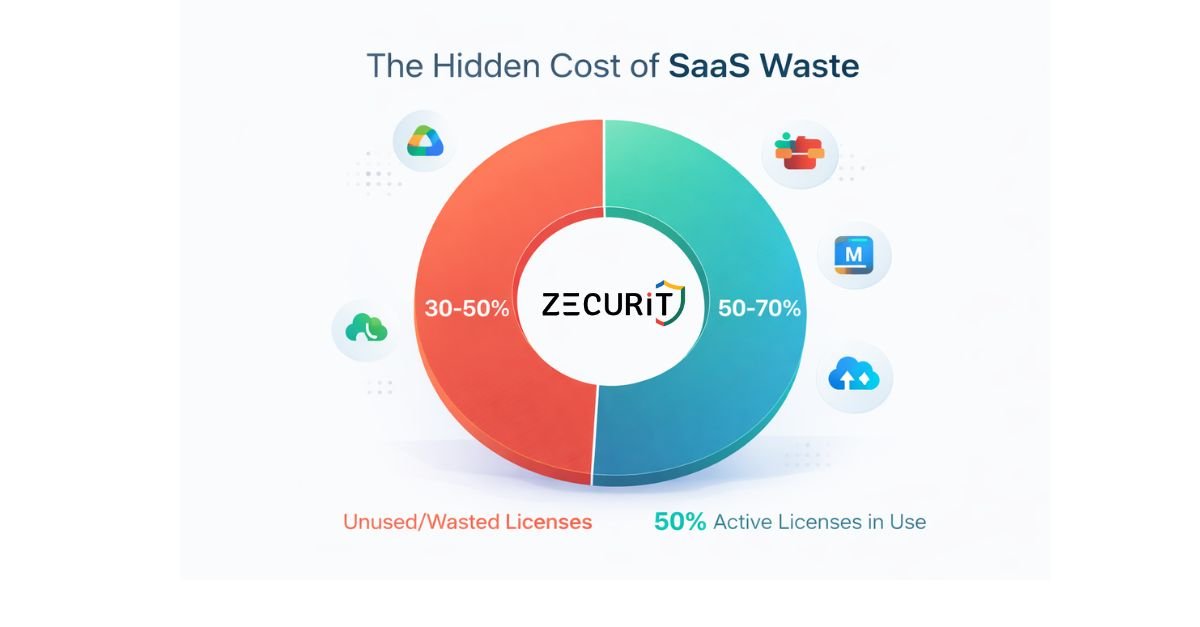
Global SaaS spending is projected to reach $299 billion in 2025, representing a 19% year-over-year increase according to recent industry forecasts. For scaling companies, this translates to an average of $4,800+ spent per employee annually on software subscriptions alone.
Here's the uncomfortable truth: 30-50% of those licenses sit unused.
CFOs and IT Directors are discovering thousands of dollars in monthly waste from employees who requested premium tools, got promoted, switched teams or left the company entirely, while their $49/month seats continue auto-renewing indefinitely. One mid-market company recently uncovered 247 active Zoom licenses for a team of 180 people. Another found they were paying for Adobe Creative Cloud subscriptions two years after their design team migrated to Figma.
This isn't just a budget problem. It's a security vulnerability. Every forgotten login represents an unmonitored access point to your company's data.
The solution isn't cutting innovation or restricting employee access. It's implementing systematic SaaS license management that gives you complete visibility, control and the ability to reclaim 30% or more of your software budget without impacting productivity.
SaaS sprawl occurs when software subscriptions multiply across an organization without centralized oversight. Unlike traditional enterprise software that required IT approval and lengthy procurement cycles, modern SaaS apps can be purchased instantly with a credit card, and that's precisely the problem.
The average company now uses 130+ SaaS applications, up from just 8 a decade ago. But IT teams typically know about only 60-70% of them.
Shadow IT refers to applications purchased and deployed without IT department knowledge or approval. This happens when:
Marketing buys a social media management tool
Sales adds a prospecting database subscription
Individual contributors expense productivity apps
Department heads use personal cards to avoid procurement delays
Decentralized line-of-business (LOB) spending is the #1 driver of SaaS waste. When purchasing decisions happen in silos, organizations lose negotiating leverage, create redundant toolsets and eliminate any possibility of tracking utilization.
Understanding these terms is critical for your audit:
Ghost Assets are licenses assigned to users who never log in. The seat exists, it's paid for, but it generates zero value. Common examples include analysts with Salesforce licenses who only view reports through dashboards, or developers with Slack Premium who already use Microsoft Teams.
Orphaned Apps are entire software subscriptions that continue after the original champion leaves. These often fly under the radar for years because the credit card auto-renews and no one questions a $200/month line item on departmental budgets.
Vendors love multi-year commitments because they lock in revenue. Finance teams love them because they secure discounts (typically 15-20% off annual rates). But here's what both overlook: your needs change faster than your contracts.
Multi-year deals eliminate flexibility right when scaling companies need it most. When you acquire a competitor, their tool becomes redundant but you're stuck paying. When you pivot strategy, that specialized app loses relevance. The "savings" from a three-year contract often disappear when calculated against seats you can't shed and features you'll never use.
You cannot optimize what you cannot see. Comprehensive discovery requires multiple data sources:
SSO Integration Logs: If you use Okta, OneLogin, Azure AD, or Google Workspace, start here. Your single sign-on system tracks every application authentication. Export a 90-day activity report to see actual usage patterns, not just provisioned access.
Finance System Audit: Pull every transaction containing keywords like "subscription," "SaaS," "monthly," or "annual license." Don't forget:
Corporate credit cards
Departmental budgets
Reimbursed employee expenses
Purchase orders under $1,000 (often bypass procurement)
Browser Extension Analysis: Tools installed as Chrome or Edge extensions often escape detection. Consider deploying browser management software to inventory what employees have added to their work profiles.
Invoice Mining: Many SaaS vendors still send renewal notices via email. Create a filter to route all emails containing "renewal," "subscription," or "invoice" to a central inbox for 60 days. You'll be shocked by what surfaces.
Employee Self-Reporting: Incentivize transparency. Some companies offer "SaaS amnesty" where teams can declare shadow IT without consequences in exchange for helping consolidate or negotiate better terms.
Discovery tells you what you're buying. Utilization reveals what you're actually using.
The 90-Day Rule: Any license with zero logins in 90 days should be reclaimed immediately. No exceptions for "we might need it someday." That thinking costs companies an average of $18,000 annually per 100 employees.
Login Frequency vs. License Tier: Someone logging in once a month doesn't need a Power User subscription. Track these metrics:
Days since last login
Logins per month (median and average)
Feature utilization percentage
Data created/modified (for content platforms)
Most SaaS platforms provide usage analytics. For those that don't, examine:
Admin dashboard activity logs
API calls (if you have technical resources)
User-generated content (documents, records, tickets created)
License Utilization Rate Formula:
(Active Users ÷ Paid Licenses) × 100 = Utilization %
Industry benchmark: 72% average utilization. If you're below 65%, you have significant harvesting opportunities.
Not every user needs every feature. This is where the real savings hide.
Tier-Appropriate Licensing: Examine your premium seat assignments:
Does your HR coordinator need Salesforce Lightning over Essential?
Should the entire marketing team have Adobe Creative Cloud when only 3 people design?
Are you paying for Zoom Webinar licenses for people who only attend meetings?
The 80/20 Rule Applied: Typically 20% of users consume 80% of advanced features. Downgrade the other 80% and you can recover 15-25% of per-seat costs without impacting productivity.
Shelfware Identification Red Flags:
Licenses purchased "just in case" for future hires
Enterprise tiers bought for features used by <10% of the team
Premium add-ons that duplicate functionality in other tools
Redundant apps (project management in Asana, Monday and Jira simultaneously)
Real-World Example: A 300-person company discovered they had 85 Zoom licenses at $20/month when only 12 people hosted meetings regularly. Moving 73 users to free Basic accounts saved $17,520 annually.
Most companies operate reactively: the renewal notice arrives and they scramble to decide whether to continue. By then, it's too late to negotiate or transition smoothly to alternatives.
The 90-Day Early Warning System:
Create a renewal calendar that flags upcoming contract expirations 90 days in advance. This window gives you time to:
Complete utilization analysis (Week 1-2)
Identify alternatives or consolidation opportunities (Week 3-4)
Gather competitive quotes (Week 5-6)
Negotiate with incumbent vendor (Week 7-10)
Execute transition or renewal (Week 11-12)
Buffer for delays (Week 13)
Negotiation Leverage Points:
Multi-year commitments (but request quarterly true-ups)
Payment terms (annual prepay often yields 10-15% discounts)
Case studies and referrals (vendors pay for marketing assets)
User group participation
Early adopter programs for new features
Pro Tip: Price Protection and Right-to-Shed Clauses
When negotiating multi-year deals, always include:
Price Protection: Caps annual increases at 5% or CPI, whichever is lower. Without this, vendors routinely implement 15-20% increases at renewal.
Right-to-Shed: Allows you to reduce licensed seats quarterly or semi-annually without penalty. Example language: "Customer may reduce licensed seat count by up to 25% at each 6-month anniversary with 30 days written notice."
These clauses eliminate vendor lock-in and preserve flexibility as your business evolves.
Manual processes don't scale. When your company grows from 200 to 500 employees, you cannot triple your IT admin time proportionally.
HRIS Integration: Your HR system (Workday, BambooHR, Rippling) is your source of truth for employee lifecycle events. Modern SaaS management platforms can trigger:
Onboarding: New hire in HRIS → Auto-provision baseline apps → Request specialized tools via workflow
Role Change: Promotion/transfer in HRIS → Adjust license tiers → Notify managers of access changes
Offboarding: Termination in HRIS → Instant deactivation across all systems → License automatically enters reallocation pool
Why Automated Deprovisioning is Critical:
The average employee has access to 30+ applications. When someone leaves, IT must locate and revoke every single access point. Miss one and you've created a security vulnerability, 48% of data breaches involve former employee credentials.
Beyond security, there's cost: Organizations take an average of 42 days to fully deprovision departed employees. At $400/month in aggregate software costs per employee, that's $560 in waste per termination. For companies with 15% annual turnover, that's substantial.
License Harvesting for New Hires: Instead of purchasing new seats, automated systems can:
Detect termination
Add license to available pool
Match to new hire requirements
Provision within minutes of start date
This "harvest and redeploy" model has helped companies avoid 20-30% of new license purchases.
As SaaS adoption exploded, a new software category emerged: SaaS Management Platforms (SMPs). These tools automate discovery, track utilization, manage renewals and increasingly handle vendor negotiations.
Leading platforms include specialized vendors like Zylo, Torii and Productiv, as well as capabilities within broader IT asset management systems.
| Criteria | Manual Tracking (Spreadsheets) | SaaS Management Platform |
|---|---|---|
| Visibility | 50-60% of applications (known purchases only) | 90-95%+ (automated discovery via SSO, finance, browser data) |
| Security Risk | High (orphaned apps, delayed offboarding) | Low (zero-touch deprovisioning, real-time alerts) |
| Time Required | 20-40 hours/month for 500 employees | 5-10 hours/month (mostly strategic decisions) |
| Cost Savings | 8-12% of SaaS budget (limited to obvious waste) | 25-35% of SaaS budget (systematic optimization) |
| Scalability | Breaks down beyond 200 employees | Scales linearly with minimal incremental effort |
| Renewal Management | Reactive (notices arrive, scramble begins) | Proactive (90-180 day warnings, automated workflows) |
For companies under 50 employees with fewer than 25 applications, a well-maintained spreadsheet can suffice. Key requirements:
Discipline in monthly updates
Centralized purchasing enforcement
Quarterly utilization reviews
Beyond that threshold, manual tracking becomes untenable.
Typical SMP pricing: $3-8 per employee per month
Example for 300-person company:
SMP cost: $1,500/month ($18,000/year)
Average SaaS spend: $1.4M annually ($4,667 per employee)
Cost savings: 30% recovery = $420,000
Net savings: $402,000
ROI: 2,133%
Even conservative 15% savings yield 10X return on platform investment.
Day 1-2: Pull SSO logs and export 90-day authentication data
Action: Identify apps with <20% utilization rates
Day 3-4: Finance system audit
Action: Flag all recurring SaaS charges over $100/month
Action: Identify subscriptions charged to personal cards (expense reports)
Day 5: Employee survey
Action: Send department heads a template asking: "What tools does your team use daily?"
Day 6-8: Cancel obvious waste
Action: Licenses with zero logins in 90+ days
Action: Duplicate tools (do you need both Zoom and Google Meet licenses?)
Action: Former employee accounts still active
Day 9-10: Downgrade premium waste
Action: Move infrequent users from premium to basic tiers
Action: Request vendor quotes for usage-based pricing models
Typical Week 2 Savings: $2,000-8,000/month
Day 11-13: Create renewal calendar
Action: Input every known renewal date + 90-day alert
Action: Assign ownership (who reviews each application?)
Day 14-15: Establish offboarding protocol
Action: Create checklist of all apps requiring access revocation
Action: Notify HR to trigger checklist on termination
Day 16-18: Vendor consolidation analysis
Action: Identify 3-5 overlapping tools
Action: Calculate savings from standardizing on one
Day 19-21: Long-term optimization roadmap
Action: Evaluate SMP platforms (if over 100 employees)
Action: Schedule quarterly utilization reviews
Anticipated 30-Day Impact: $5,000-15,000 in monthly recurring savings for mid-market companies. Annualized: $60,000-180,000.
Watch for these warning signs:
Renewal notices for apps no one recognizes
Multiple tools serving identical functions
Premium licenses for users logging in <5 times per month
Contracts auto-renewing without utilization review
Departmental budgets with "miscellaneous software" line items over $500/month
Former employees still appearing in application admin dashboards
Apps purchased more than 24 months ago with no recent usage assessment
Start by reviewing expense reports for the past 12 months. Filter for categories like "Software," "Subscriptions," or "Office Supplies" (where employees sometimes miscategorize digital tools). Also search transaction descriptions for terms like "monthly," "annual," or common SaaS vendor names (Airtable, Notion, Canva).
Consider implementing a "SaaS amnesty program" where employees can voluntarily report shadow IT tools without consequence. Explain that the goal is optimization, not punishment. Many will reveal tools they've been expensing that IT doesn't know about.
Finally, install browser management software that inventories installed extensions. Many SaaS tools offer browser-based versions that escape traditional IT monitoring.
The answer depends on feature utilization patterns. Run this simple analysis:
Option A (More users, lower tier): List the features in your current premium tier. Survey users: "Which of these do you use monthly?" If fewer than 40% regularly use premium features, downgrade them.
Option B (Fewer users, higher tier): If your team frequently shares accounts or requests temporary premium access, consolidating to power users with a shared license pool often works better.
The 40/60 Rule: If 40% or fewer of premium license holders use premium features 60% of the time, you're overspending. Downgrade aggressively.
Treating it as a one-time project instead of an ongoing discipline. Companies conduct an audit, save $50,000, then return to old habits. Within 12 months, waste creeps back to previous levels.
The fix: Establish quarterly utilization reviews. Put renewal dates on your finance calendar with 90-day warnings. Create an offboarding checklist that IT, HR and managers must complete within 48 hours of termination.
SaaS management is like expense management, it requires continuous oversight, not annual spring cleaning.
Immediate wins (Week 1-4): Canceling unused licenses and downgrading over-provisioned users yields savings in your next billing cycle. Expect to recover 8-15% of monthly SaaS spend.
Short-term gains (Month 2-6): Renegotiating renewals with 90-day lead time, vendor consolidation and implementing license harvesting for new hires typically adds another 10-15% savings.
Long-term optimization (Month 6+): Automated provisioning/deprovisioning, usage-based pricing transitions and strategic vendor relationships can push total savings to 30-35%+.
For a company spending $100,000/month on SaaS, that's $8,000-15,000 in the first month and $30,000-35,000 monthly by month six.
For contracts under $50,000 annually, negotiate directly. You'll learn vendor dynamics and build relationships. For enterprise agreements exceeding $100,000 annually, consider specialist consultants who:
Possess benchmark pricing data across industries
Understand vendor sales compensation structures (when they're motivated to discount)
Can leverage buying groups for additional 5-15% savings
Negotiate price protection and right-to-shed clauses you might miss
Consultants typically charge 20-30% of first-year savings, which often pays for itself through better terms and clauses that protect you for years.
SaaS license management isn't about restricting innovation or making employees work with inadequate tools. It's about ensuring every dollar spent on software delivers measurable value.
The companies winning this battle share three characteristics:
Visibility: They know every application in use, who's using it and how frequently.
Discipline: They've established procurement guardrails, renewal processes and regular utilization reviews.
Automation: They've eliminated manual tracking through HRIS integration and zero-touch provisioning/deprovisioning.
Start with the 30-day quick wins checklist. You'll immediately reclaim thousands in monthly waste. Then build the systematic approach that prevents waste from accumulating again.
Your 30% cost reduction isn't aspirational, it's achievable within six months for most scaling companies. The only question is whether you'll capture those savings or continue funding ghost assets and orphaned apps.
Stop funding ghost assets. Start optimizing today.