




Hardware inventory management is the systematic process of discovering, tracking and maintaining detailed records of all physical IT assets throughout their entire lifecycle from procurement to retirement. This includes computers, servers, laptops, mobile devices, networking equipment, peripherals and all other technology hardware within an organization.
A comprehensive hardware inventory system captures critical information such as:
Device specifications (CPU, memory, storage)
Serial numbers and asset tags
Manufacturer and model details
Physical location and assigned users
Purchase dates and warranty status
Operating systems and configurations
Network connectivity details
Usage metrics and performance data
Modern hardware inventory management goes beyond simple spreadsheet tracking. It provides real-time visibility, automated discovery, proactive alerts and actionable insights that empower IT teams to optimize resources, reduce costs and maintain security compliance.
Quick Stats:
Organizations with automated hardware tracking reduce IT costs by 23% on average
Manual inventory processes lead to 18-25% inventory discrepancies
Companies waste approximately $30 billion annually on unused or underutilized IT hardware
67% of IT leaders cite lack of hardware visibility as a major operational challenge
Effective hardware inventory management is no longer optional, it's essential for modern IT operations. Here's why organizations prioritize it:
Without accurate hardware tracking, IT teams operate blind. You can't manage what you can't see. Hardware inventory management provides a single source of truth for all physical IT assets, eliminating shadow IT and ensuring nothing falls through the cracks.
Hardware represents one of the largest IT expenditures. Poor inventory management leads to:
Duplicate purchases of equipment you already own
Paying maintenance on decommissioned devices
Missing warranty coverage opportunities
Inefficient allocation of resources across departments
Organizations that implement automated hardware inventory typically identify 15-30% cost savings within the first year.
Every untracked device is a potential security vulnerability. Hardware inventory management helps you:
Identify unauthorized or rogue devices on your network
Ensure all hardware meets security standards
Maintain audit trails for compliance requirements (HIPAA, SOX, PCI-DSS, GDPR)
Track device locations and prevent asset theft
Manage end-of-life devices containing sensitive data
Data-driven decisions require accurate data. Hardware inventory provides insights for:
Forecasting hardware refresh cycles
Budgeting for upcoming replacements
Standardizing on preferred vendors and models
Capacity planning for growth
Identifying performance bottlenecks
Manual hardware tracking consumes valuable IT time. Automation allows your team to:
Eliminate hours spent on manual asset audits
Respond quickly to hardware-related incidents
Streamline procurement and provisioning processes
Reduce mean time to resolution (MTTR) for hardware issues

Zecurit transforms hardware inventory from a tedious administrative task into a strategic advantage. Our solution doesn't just collect data, it delivers actionable intelligence that empowers IT teams to work smarter.
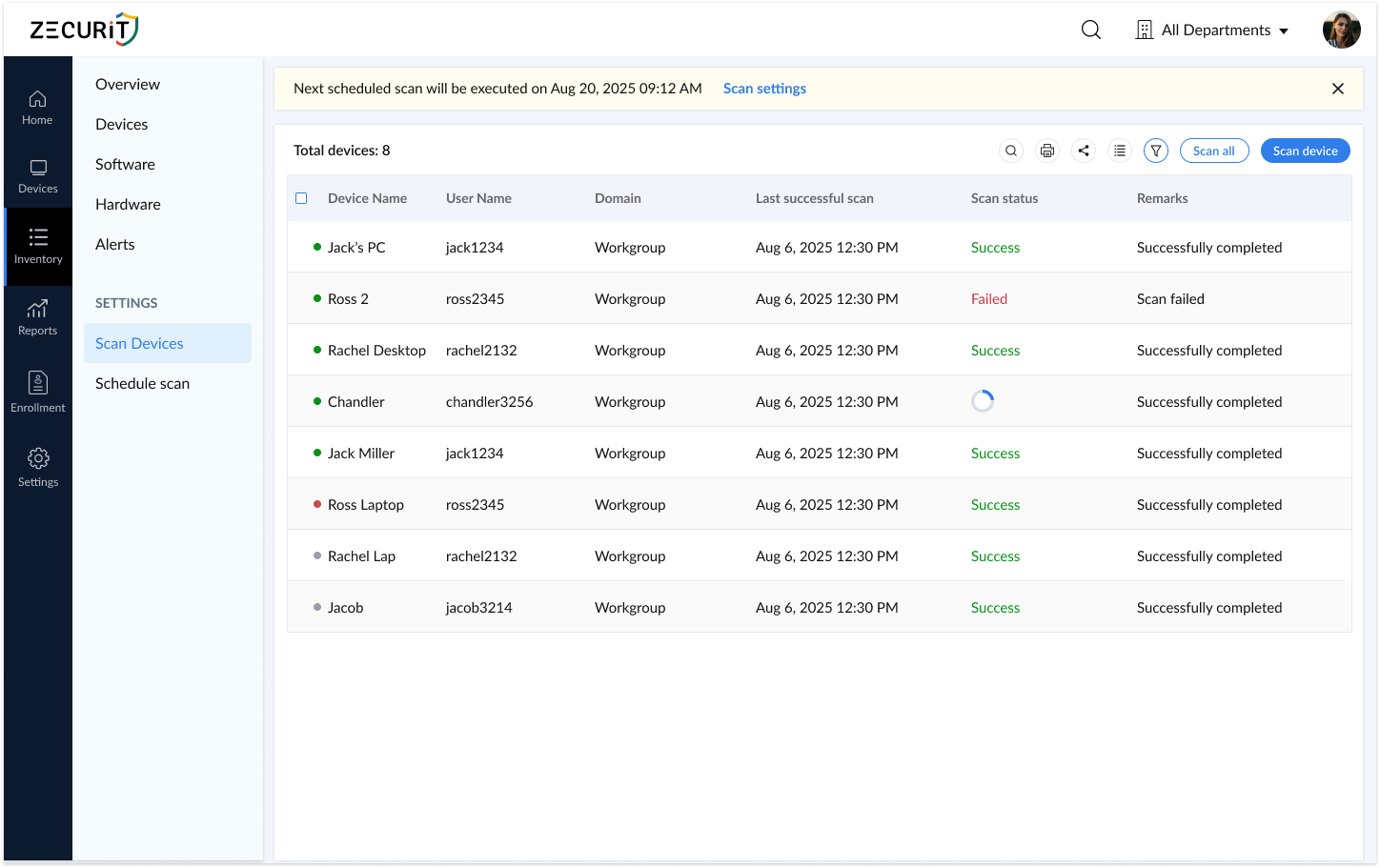
Say goodbye to manual asset tracking. Zecurit automatically discovers and catalogs every device connected to your network, including:
Workstations and laptops
Servers (physical and virtual)
Mobile devices and tablets
Network equipment (routers, switches, access points)
Printers and peripherals
IoT devices
Our agent-based and connector (active directory connector) discovery methods ensure comprehensive coverage across your entire IT environment whether devices are on-premises, remote or cloud-based.

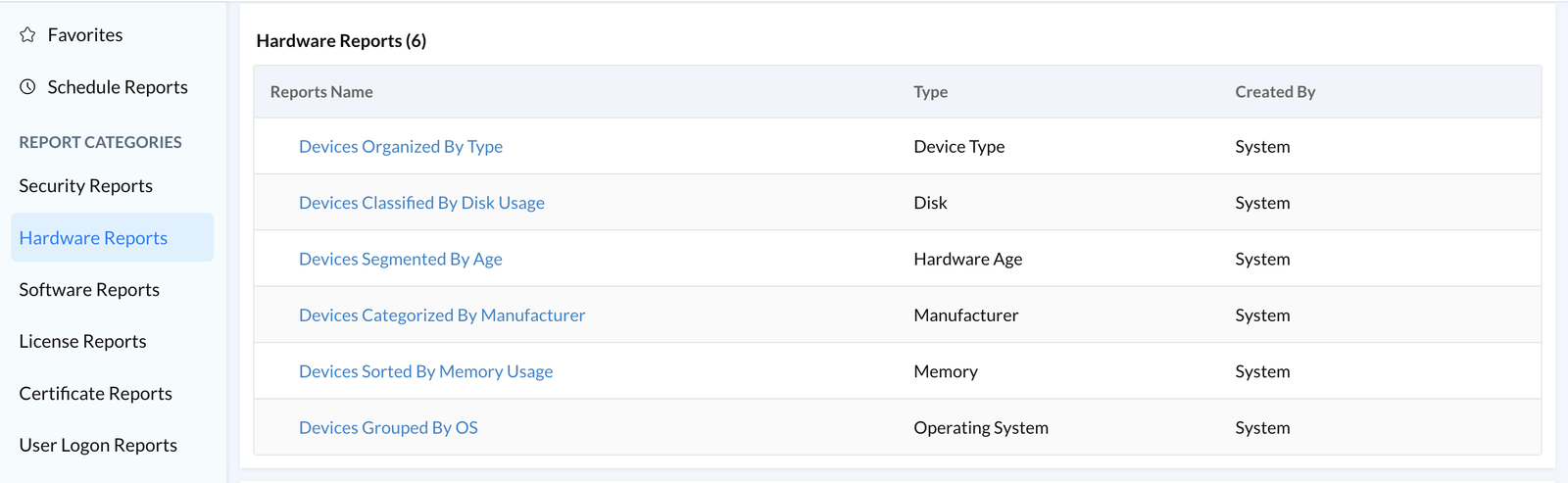
Transform raw data into strategic insights with Zecurit's intelligent reporting capabilities:
Devices Organized By Type: Instantly visualize your entire hardware landscape categorized by device type. See at a glance how many laptops, desktops, servers, tablets and mobile devices you're managing.
Devices Classified By Disk Usage: Identify storage consumption trends before they become problems. Proactively address storage bottlenecks and plan capacity upgrades based on real usage patterns.
Devices Segmented By Age: Understand your hardware lifecycle distribution. Identify aging equipment that may require replacement, plan budget for refresh cycles and ensure your technology stays current.
Devices Categorized By Manufacturer: Streamline vendor management and procurement decisions. See which manufacturers dominate your environment, negotiate better volume discounts and standardize on preferred brands.
Devices Sorted By Memory Usage: Pinpoint performance issues before users complain. Identify systems with insufficient RAM, optimize resource allocation and make informed upgrade decisions.
Devices Grouped By OS: Gain clarity on your operating system deployments. Manage patch cycles more effectively, identify unsupported OS versions and ensure compliance with security policies.

Zecurit provides crystal-clear visibility from 30,000 feet down to individual device specifications:
Device OS Summary Understand your operating system distribution at a glance. Quickly assess Windows, macOS, Linux, iOS, and Android deployments for streamlined patch management and security updates.
Device Type Summary See exactly what hardware you own, categorized for instant insights. Track laptops, servers, desktops, mobile devices, tablets, and specialized equipment from a unified view.
Device Compliance Summary Monitor asset health and compliance status in real-time. Ensure all devices meet your organizational standards for security, configuration, and software installations.
Granular Device Profiles Drill down into any asset to view comprehensive details:
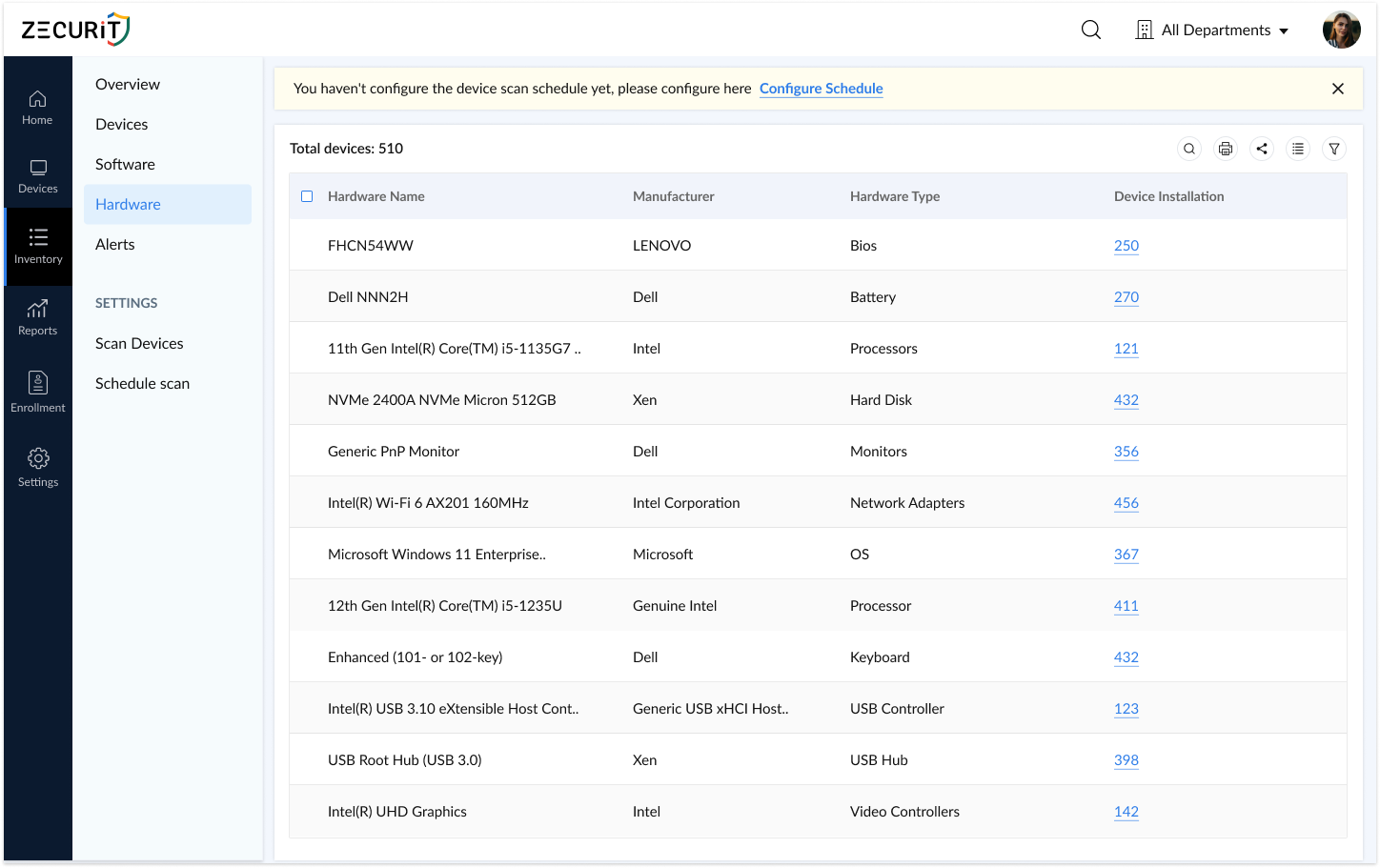
Complete hardware specifications
Installed software inventory
Network configuration
Warranty and support status

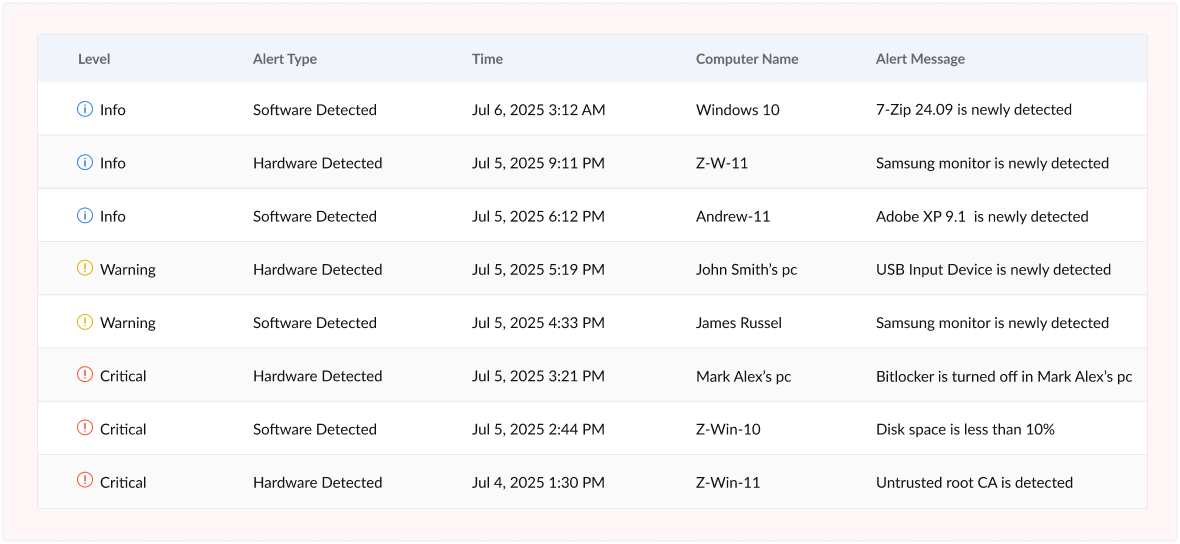
Stay ahead of hardware changes with Zecurit's intelligent alert system. Set custom policies that automatically trigger email notifications when:
New hardware is added to your network
Devices are removed or disconnected
Hardware configurations change
Warranty coverage is expiring
Storage capacity reaches critical thresholds
Memory usage exceeds defined limits
Devices go offline or become unresponsive
This proactive monitoring empowers you to quickly identify unexpected changes, enforce compliance policies, and maintain tight security control over your IT environment.

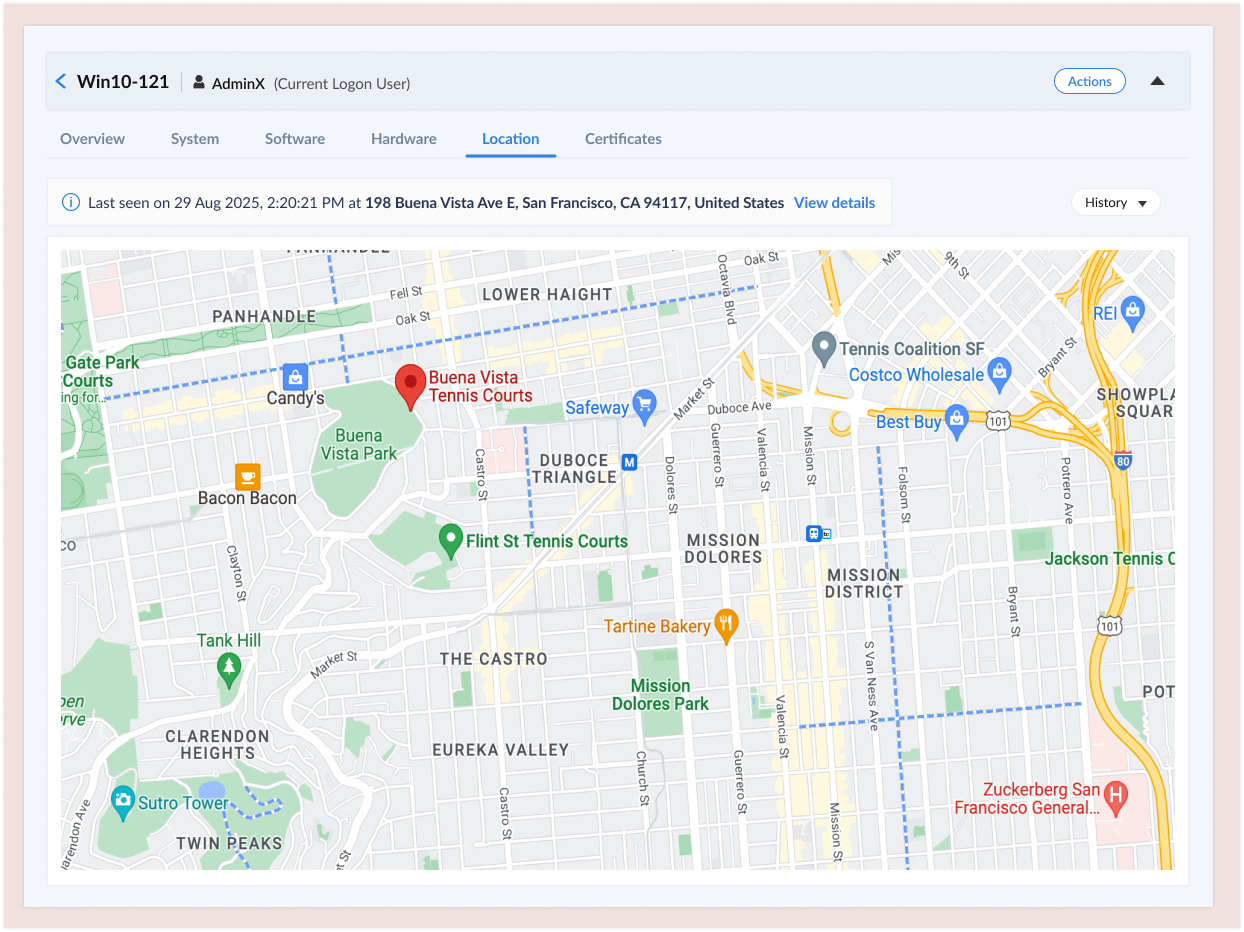
Never lose track of valuable IT assets. Zecurit's geo-location tracking provides real-time visibility into the physical location of managed devices, invaluable for:
Asset Recovery: Quickly locate lost or stolen equipment. The detailed location history provides crucial information for recovery efforts and insurance claims.
Remote Workforce Management: Track distributed assets across remote employees, ensuring equipment remains secure and accountable regardless of location.
Multi-Site Coordination: Manage hardware across multiple offices, warehouses, and geographic regions. Optimize asset distribution based on actual location data.
Compliance & Audit Support: Maintain detailed location records for regulatory requirements. Demonstrate chain of custody and physical security controls.
Geofencing Alerts: Set location-based alerts to notify you when devices move outside designated areas, perfect for detecting unauthorized equipment movement.
Zecurit securely stores geo-location history based on your configurable retention policies, providing a complete audit trail for security investigations and operational oversight.
Understanding the hardware inventory process helps you implement and optimize your system effectively.
The foundation of hardware inventory is comprehensive asset discovery. Modern solutions use multiple methods:
Network Scanning: Automated scans identify all IP-connected devices on your network, including computers, servers, printers, and network equipment.
Agent-Based Discovery: Lightweight software agents installed on endpoints provide deep visibility into hardware specifications, configurations, and real-time status.
Active Directory Integration: Leverage existing directory services to automatically discover and track domain-joined devices.
Mobile Device Management (MDM) Integration: Sync with MDM platforms to incorporate smartphones and tablets into your hardware inventory.
Once discovered, the system automatically collects detailed information:
Hardware specifications (CPU, RAM, storage, peripherals)
Serial numbers, model numbers, and asset tags
BIOS/firmware versions
Network configurations (IP addresses, MAC addresses)
Operating system details
Installed drivers and hardware components
Warranty information (when available through vendor APIs)
Raw data is processed and organized into a structured, searchable database:
Duplicate entries are identified and merged
Assets are categorized by type, location and department
Relationships between devices are mapped (e.g., docking stations with laptops)
Custom tags and attributes are applied based on your organizational needs
Hardware inventory isn't a one-time event, it's an ongoing process:
Regular automated scans detect changes
Real-time monitoring tracks device status
Configuration changes are logged
New devices are automatically added
Removed devices are flagged for investigation
Transform data into actionable insights:
Generate reports on hardware distribution, age and utilization
Identify trends in hardware lifecycle and failure rates
Calculate total cost of ownership (TCO) for different device types
Forecast future hardware needs based on historical data
Track compliance with hardware standards and policies
Modern hardware inventory systems don't operate in isolation:
Integrate with ITSM platforms for automated ticket creation
Connect to procurement systems for seamless purchasing workflows
Sync with financial systems for accurate asset depreciation
Feed data to security tools for vulnerability management
Trigger automation workflows based on inventory conditions
Transitioning from manual spreadsheets to automated hardware inventory delivers measurable business value:
Time Savings Eliminate hours of manual data entry and asset audits. IT teams report saving 10-20 hours per month on inventory-related tasks.
Accuracy & Reliability Automated discovery and tracking eliminate human error. Maintain 99%+ inventory accuracy compared to 75-85% with manual methods.
Real-Time Visibility Access up-to-the-minute asset information instead of outdated spreadsheets. Make decisions based on current data, not last quarter's snapshot.
Faster Incident Response Quickly identify affected hardware during outages or security incidents. Locate specific devices by serial number, user, or location in seconds.
Streamlined Audits Generate comprehensive audit reports instantly. Reduce audit preparation time from weeks to hours.
Reduced Capital Expenditure: Identify underutilized hardware that can be redistributed instead of purchasing new equipment. Organizations typically reduce unnecessary purchases by 20-30%.
Optimized Maintenance Contracts: Stop paying for maintenance on retired equipment. Ensure warranty coverage is maximized for equipment still under contract.
Improved Asset Utilization: Track usage patterns to ensure expensive equipment delivers value. Redistribute idle assets to where they're needed most.
Accurate Depreciation: Maintain precise records for financial reporting. Ensure asset values are correctly reflected on balance sheets.
Better Vendor Negotiations: Leverage detailed usage data to negotiate volume discounts and favorable contract terms with hardware vendors.
Complete Device Visibility: Identify every device on your network, including shadow IT and unauthorized equipment.
Rapid Security Response: Quickly identify and isolate compromised hardware during security incidents. Track affected systems across your environment.
Compliance Assurance: Maintain detailed records required for regulatory compliance (HIPAA, PCI-DSS, SOX, GDPR). Demonstrate security controls to auditors.
End-of-Life Management: Track devices nearing end-of-support dates. Ensure timely replacement before security vulnerabilities emerge.
Data Loss Prevention: Monitor hardware removals to ensure proper data sanitization procedures are followed before disposal or redeployment.
Informed Technology Planning Make data-driven decisions about hardware refresh cycles, standardization initiatives, and technology investments.
Capacity Planning Understand current resource utilization to accurately forecast future hardware needs as your organization grows.
Performance Optimization Identify hardware bottlenecks preventing optimal application performance. Prioritize upgrades where they'll deliver maximum impact.
Environmental Sustainability Extend hardware lifecycles through better management. Track energy consumption and support green IT initiatives.
Business Continuity Maintain accurate disaster recovery inventories. Ensure backup hardware is available when needed.
Even with the best intentions, organizations face numerous obstacles in maintaining accurate hardware inventories. Here's how to overcome them:
The Problem: Employees bring personal devices to work or purchase equipment without IT approval, creating security gaps and inventory blind spots.
The Solution:
Implement automated network discovery that detects all connected devices
Deploy network access control (NAC) to block unauthorized hardware
Create clear BYOD policies with automated enrollment processes
Use passive network monitoring to identify rogue devices
The Problem: Spreadsheets become outdated the moment they're created. Manual updates are time-consuming, error-prone, and unsustainable at scale.
The Solution:
Adopt automated discovery and inventory tools that update in real-time
Eliminate manual data entry through integration with existing systems
Implement agent-based monitoring for continuous asset tracking
Set up automated alerts for inventory discrepancies
The Problem: Tracking hardware across home offices, coffee shops, and global locations is exponentially more complex than managing on-premises assets.
The Solution:
Deploy cloud-based inventory management accessible from anywhere
Use VPN-connected agents that check in regardless of location
Implement geo-location tracking for valuable mobile assets
Create remote-friendly check-in/check-out processes
The Problem: Missing serial numbers, incomplete specifications, and inconsistent naming conventions make inventory data unreliable.
The Solution:
Standardize asset naming conventions and enforce them systematically
Leverage automated discovery to populate accurate technical specifications
Implement data validation rules to prevent incomplete entries
Conduct regular data quality audits and cleanup campaigns
The Problem: Managing Windows PCs, Macs, Linux servers, iOS devices, and Android tablets requires different tools and approaches.
The Solution:
Choose cross-platform inventory solutions that support all major operating systems
Implement unified agent technology that works across device types
Standardize data collection regardless of platform
Create platform-specific discovery methods when necessary
The Problem: Hardware inventory data locked in standalone systems doesn't deliver value to other IT processes like help desk, procurement, or security.
The Solution:
Select inventory solutions with robust APIs and pre-built integrations
Connect inventory to ITSM platforms for automated asset tagging
Sync with procurement systems to auto-populate new device records
Feed inventory data to security tools for vulnerability correlation
The Problem: IT leaders recognize the need for hardware inventory tools but face budget limitations.
The Solution:
Calculate ROI by quantifying current costs of manual tracking and inventory errors
Start with a pilot program covering the most critical assets
Choose scalable solutions that grow with your organization
Highlight cost savings from reduced duplicate purchases and optimized maintenance contracts
The Problem: New processes fail when IT staff and end-users resist changes to established workflows.
The Solution:
Involve key stakeholders early in tool selection and implementation
Provide comprehensive training and documentation
Demonstrate quick wins to build momentum and support
Create clear processes that make compliance easier than workarounds
Follow this proven roadmap to successfully deploy hardware inventory management:
Define Objectives
Document specific goals (compliance, cost reduction, security improvement)
Identify key stakeholders and secure executive sponsorship
Establish success metrics and KPIs
Assess Current State
Inventory existing hardware tracking methods
Identify inventory data gaps and pain points
Map current IT processes that depend on asset data
Document integration requirements
Select Your Solution
Evaluate tools against your requirements
Consider scalability, platform support, and integration capabilities
Review vendor reputation, support quality, and pricing
Request product demonstrations and trial periods
Prepare Your Environment
Ensure network infrastructure supports discovery methods
Review firewall rules and access requirements
Plan agent deployment strategy
Prepare Active Directory or MDM integrations
Start Small
Select a representative subset of devices (50-100 assets)
Include diverse device types and locations
Choose a department with IT-savvy users
Configure & Deploy
Install and configure inventory management platform
Deploy agents to pilot devices
Run initial discovery scans
Verify data accuracy and completeness
Test & Refine
Validate automated discovery is capturing all expected information
Test alert policies and notification workflows
Verify reporting meets requirements
Gather feedback from pilot users
Document Findings
Identify configuration adjustments needed
Document lessons learned and best practices
Calculate initial ROI from pilot group
Refine rollout plan based on pilot experience
Phased Rollout
Expand coverage department by department or location by location
Deploy agents using your software distribution tools
Monitor discovery progress and resolve issues
Verify each group before moving to the next
Data Quality Focus
Review discovered assets for accuracy
Correct any misclassifications or missing data
Add custom attributes and tags as needed
Establish data maintenance procedures
Integration Implementation
Connect to ITSM, procurement, and security tools
Configure automated workflows and data synchronization
Test integrations thoroughly before going live
Train staff on new integrated processes
Communication & Training
Announce deployment to all affected users
Provide role-based training for IT staff
Create self-service resources and documentation
Establish support channels for questions and issues
Fine-Tune Configurations
Optimize discovery schedules for performance
Refine alert policies to reduce noise
Adjust reporting to focus on most valuable insights
Expand integrations to additional systems
Establish Governance
Define roles and responsibilities for inventory management
Create standard operating procedures for common tasks
Implement change management for inventory processes
Schedule regular data quality reviews
Expand Capabilities
Add advanced features like geo-location tracking
Implement custom dashboards for different audiences
Deploy additional reporting and analytics
Extend coverage to previously excluded device types
Measure Success
Compare current metrics to baseline from planning phase
Calculate realized ROI and cost savings
Gather stakeholder feedback on improvements
Identify opportunities for further optimization
Conduct quarterly inventory audits
Review and update alert policies as needs evolve
Expand reporting to address new business questions
Stay current with platform updates and new features
Regularly assess coverage to identify gaps
Success Metrics to Track:
Inventory accuracy percentage
Time spent on manual inventory tasks
Cost savings from avoided duplicate purchases
Audit preparation time reduction
User satisfaction scores
Compliance audit findings
Asset utilization rates
Mean time to locate specific devices
Hardware inventory management delivers value across every industry, but specific use cases vary:
Challenges:
Strict HIPAA compliance requirements
Medical device tracking and calibration
Mobile equipment across departments and facilities
Infection control and device sanitization tracking
Solutions:
Track all devices accessing electronic health records (EHR)
Maintain calibration schedules for diagnostic equipment
Monitor location of critical devices (infusion pumps, mobile workstations)
Document device sanitization between patient uses
Generate compliance reports for HIPAA audits
Impact: Reduced compliance risk, improved patient safety, optimized expensive medical equipment utilization
Challenges:
SOX and PCI-DSS compliance
High-security device requirements
Rapid hardware refresh cycles
Branch and ATM hardware management
Solutions:
Maintain audit trails for all hardware changes
Track encryption-enabled devices and secure configurations
Monitor hardware accessing financial systems
Manage ATM hardware across distributed branch networks
Document disposal of devices containing financial data
Impact: Simplified compliance audits, reduced security risk, better control of capital expenditures
Challenges:
Large device fleets across multiple buildings
Student-issued devices and BYOD
Limited IT staff relative to device count
Budget constraints and extended refresh cycles
Solutions:
Track student-issued laptops and tablets
Monitor device check-in/check-out for labs and libraries
Identify aging equipment for targeted refresh
Optimize device distribution across classrooms
Manage BYOD registration and access
Impact: Maximized education technology investments, improved device availability, simplified 1:1 device programs
Challenges:
Harsh industrial environments
Specialized equipment and IoT devices
Multiple facilities and warehouses
24/7 operations requiring high availability
Solutions:
Track specialized hardware in production environments
Monitor industrial PCs, HMIs, and control systems
Manage mobile devices used by warehouse staff
Coordinate hardware maintenance with production schedules
Track ruggedized devices and their lifecycles
Impact: Minimized production downtime, improved equipment ROI, better maintenance planning
Challenges:
Point-of-sale system management
Distributed store locations
Seasonal equipment needs
Mobile devices for sales associates
Solutions:
Centrally manage POS terminals across all locations
Track mobile payment devices and tablets
Monitor inventory scanners and handheld devices
Coordinate hardware refresh during store renovations
Manage seasonal equipment deployment
Impact: Reduced POS downtime, improved customer experience, optimized hardware deployment
Challenges:
Globally distributed workforce
Home office hardware tracking
Shipping and logistics coordination
Equipment recovery from departing employees
Solutions:
Track hardware shipped to remote employees worldwide
Monitor device status regardless of location
Geo-locate valuable equipment
Automate equipment provisioning for new hires
Streamline equipment returns during offboarding
Impact: Maintained accountability for remote assets, reduced equipment loss, simplified remote workforce management
These terms are often used interchangeably, but they serve distinct purposes:
Focus: Physical IT equipment and devices
Tracks:
Computers, servers, mobile devices
Network equipment and peripherals
Hardware specifications and configurations
Physical location and condition
Warranty and maintenance status
Primary Benefits:
Asset visibility and accountability
Lifecycle management
Cost optimization
Security and compliance
Best For: Organizations needing detailed tracking of physical IT assets
Focus: Installed applications and software licenses
Tracks:
Installed applications and versions
Software licenses and entitlements
License compliance and usage
Software costs and renewals
Unauthorized or prohibited software
Primary Benefits:
License optimization and cost savings
Software compliance assurance
Security vulnerability identification
Software standardization
Best For: Organizations managing complex software licensing and compliance requirements
Focus: Comprehensive lifecycle management of all IT assets
Tracks:
Both hardware and software assets
Financial information (purchase price, depreciation)
Contracts and vendor relationships
Asset lifecycle from procurement to disposal
Total cost of ownership (TCO)
Primary Benefits:
Complete asset lifecycle visibility
Financial optimization across all IT assets
Strategic planning and forecasting
Comprehensive compliance management
Best For: Mature IT organizations requiring enterprise-wide asset governance
The most effective approach combines all three:
Hardware inventory provides the foundation, you need to know what physical devices you have
Software inventory adds intelligence, understanding what's installed on those devices
IT asset management ties it together, connecting hardware, software, financial data and business processes
Integrated Example: A complete view of a laptop includes:
Hardware specs and location (hardware inventory)
Installed software and licenses (software inventory)
Purchase price, depreciation and assigned user (asset management)
This integrated approach delivers maximum value and ROI from your investment in asset management tools.
Selecting the right hardware inventory tool is critical to your success. Consider these factors:
Discovery & Monitoring:
✓ Automated device discovery (network scanning and agent-based)
✓ Cross-platform support (Windows, Mac, Linux, iOS, Android)
✓ Real-time monitoring and updates
✓ Agentless and agent-based options
✓ Cloud and on-premises device support
Data & Reporting:
✓ Comprehensive hardware specifications capture
✓ Customizable dashboards and reports
✓ Data export capabilities
✓ Historical tracking and trending
✓ Configurable data retention policies
Alerts & Automation:
✓ Customizable alert policies
✓ Multi-channel notifications (email, SMS, webhooks)
✓ Automated workflow triggers
✓ Scheduled report generation
✓ Integration with ITSM tools
Security & Compliance:
✓ Role-based access controls
✓ Audit logging and trails
✓ Compliance reporting templates
✓ Secure data encryption
✓ Privacy controls for location tracking
Usability:
✓ Intuitive user interface
✓ Mobile access capabilities
✓ Quick implementation and onboarding
✓ Comprehensive documentation
✓ Responsive technical support
Scalability
Can it grow from 100 to 10,000+ devices?
Does pricing scale reasonably with growth?
Are there performance limitations at scale?
Integration Capabilities
Pre-built integrations with your existing tools?
Robust API for custom integrations?
Webhook support for real-time data sharing?
Total Cost of Ownership
Licensing costs (per device, per user, unlimited?)
Implementation and setup fees
Training and support costs
Maintenance and upgrade costs
Hidden fees for additional features
Vendor Considerations
Company stability and reputation
Product roadmap and innovation
Customer support quality and availability
User community and resources
Security certifications and compliance
Deployment Options
Cloud-hosted (SaaS) vs. on-premises
Hybrid deployment capabilities
Data residency and sovereignty options
Disaster recovery and backup
What discovery methods do you support, and which work best for our environment?
How quickly can we expect to see ROI after implementation?
What does your typical implementation timeline look like?
How do you handle discovery of remote and mobile devices?
What integrations are available out-of-the-box?
How is pricing structured, and what's included in the base package?
What level of support is provided, and what are response time SLAs?
How frequently is the product updated, and what's on the roadmap?
Can you provide customer references in our industry?
What security certifications does your product maintain?
No free trial or demonstration available
Unclear or complicated pricing structure
Limited or no integration capabilities
Poor user reviews regarding support quality
Outdated interface or technology stack
Vendor resistance to customer references
Lack of compliance certifications
No clear product roadmap or innovation
Zecurit delivers enterprise-grade hardware inventory management that's powerful yet simple to deploy and use:
Rapid Deployment: Get complete hardware visibility in minutes, not weeks. Our streamlined setup process means you'll see value on day one.
Intelligent Automation: Stop wasting time on manual tracking. Zecurit automatically discovers, monitors and alerts you to hardware changes across your entire environment.
Actionable Insights: Data without context is just noise. Zecurit transforms hardware information into strategic intelligence that drives better IT decisions.
Enterprise Security: Built with security-first principles, Zecurit provides the visibility and control you need to protect your organization's hardware assets.
Exceptional Value: Get enterprise features without enterprise complexity or cost. Zecurit scales with your organization from 100 to 10,000+ devices.
Unified Platform: Why juggle multiple tools? Zecurit combines hardware inventory with software inventory, license management and comprehensive IT asset management in one integrated platform.