Software License Management helps organizations track, manage, and optimize software licenses to stay compliant and reduce costs.
SLM solutions automate license tracking, usage monitoring, renewals, and compliance to remove manual effort.
A centralized repository provides complete visibility into license keys, contracts, vendors, and renewals.
License utilization insights help identify unused or underused licenses, improving ROI and reducing waste.
Automated renewal and expiry alerts prevent service disruptions and compliance risks.
Real-time compliance tracking and audit-ready reports help avoid penalties and vendor audit issues.
Financial insights enable better cost optimization and budget planning.
Dashboards and multi-level access controls make SLM easy to use, secure, and audit-friendly.
What is Software License Management?
Software License Management (SLM)is an integral part ofIT Asset Management. It is the process of tracking, managing, and optimizing an organization’s software licenses to ensure compliance, avoid overspending, and maximize usage. It helps businesses understand what software they own, how it’s used, and whether they are meeting vendor licensing terms.
What is a Software License Management Solution?
A Software License Management solution is a specialized tool or platform that automates the tracking, monitoring, and optimization of software licenses. For example, Zecurit Asset Managerallows the tracking, managing and optimizing of your software licenses without any difficulty, which not only keeps you compliant but also can save you money. With the combination of a feature-rich experience and customer-friendly interface, you get to control and monitor license utilization, renewal schedules and compliance risks easily.
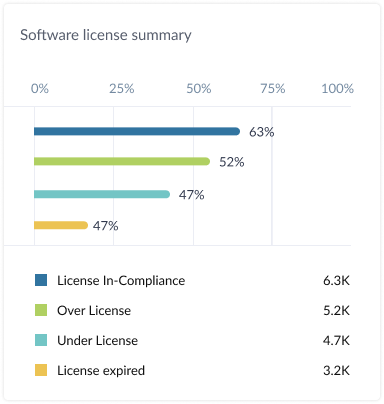
Sample software license list view page showing compliance status and usage details for various software products to help organizations effectively track and manage software licenses
Key features of a Software License Management Solution
1. Centralized license repository
An efficiently maintained and centralized license repository is the backbone of a software license management system that succeeds in real-life situations. By congregating all the license-related information in one place, you can effortlessly track, access, and update the software data.
Core components of a centralized repository:
License names and keys: Basic information about software licenses, including serial numbers or activation keys.
Vendor and contract information: Information about software vendors, licensing agreements and contract terms.
Purchase and renewal history: The history of the dates on which licenses were bought and the dates of their renewals, thus enabling smoother planning for future needs.
Assigned and unassigned licenses: Providing more accurate data of licenses in use and the ones available, reducing the likelihood of both over‑ and under‑provisioning
The one-stop location for all this information not just helps in the accuracy of the data but also saves time and provides a short snapshot of company software assets.
2. License utilization insights
Optimizing cost and compliance requires knowing how your software licenses are being used. Our tool provides information about your organization's license usage, which can assist you in making informed decisions.
To assure that money will be well spent and to stay compliant, an organization needs data regarding how software licenses will be used. Our tool provides the state of license usage in an organization, which can assist you in making informed decisions about the usage of resources.
Some of the key features enable the user to:
Track assigned and unassigned licenses: Identify the licenses that are being used and the ones that are unused at a glance.
Monitor license utilization rates: Monitor how many users are sharing each license to avoid buying more than needed.
Idenify underutilized licenses: Proving the software which is hardly used allows you to look again at your requirements and reassign or remove the excess licenses which thus lower your costs.
By gaining a clear understanding of how licenses are being utilized, organizations can eradicate the possibility of wastage and optimize the return on their investment (ROI).
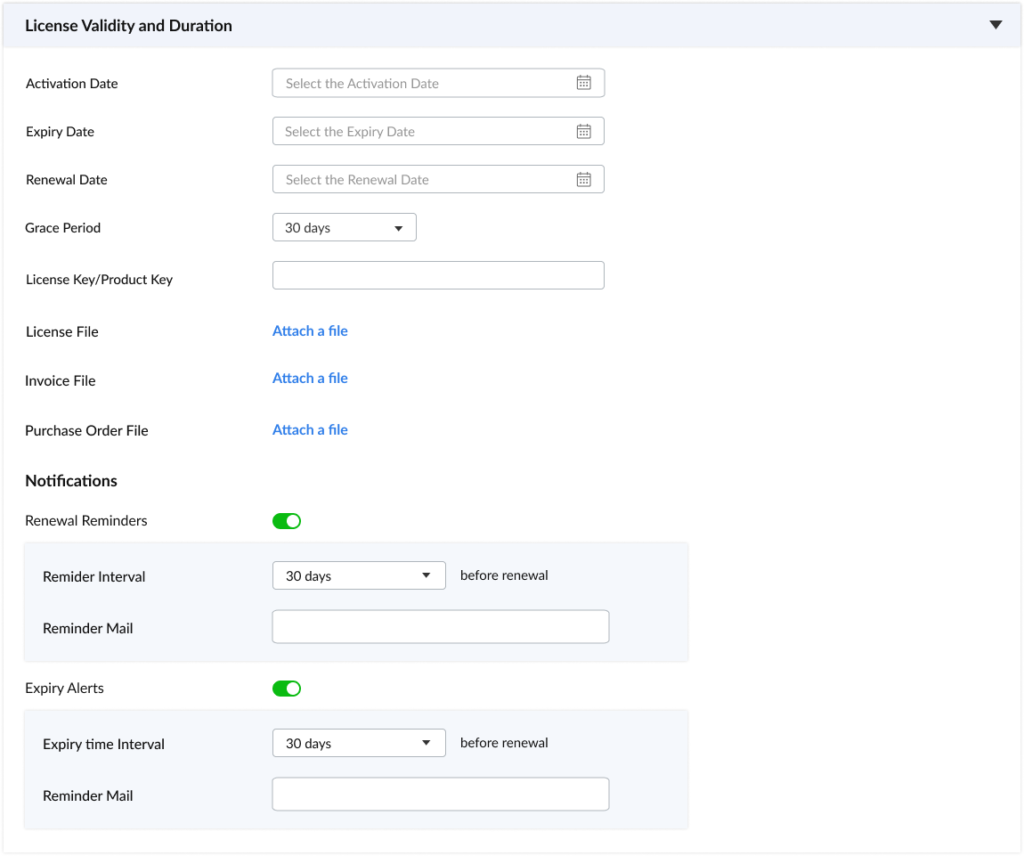
Add software license details form with integrated license validity tracking, renewal and expiry alert workflow to ensure proactive license management and timely notifications for compliance.
3.Renewal and expiry alerts
Monitoring license renewals is one of the hardest parts of licensing. Service interruptions, compliance issues and even penalties can arise from missing a renewal. To make sure you don’t miss a renewal, you can set up proactive email alerts for both renewal and expiry.
Key features:
Upcoming renewal notifications: You can configure renewal alerts to get reminders well in advance of license expiry dates so you have time to decide to renew or reassess.
Days-to-expiry tracking: You can configure the expiry alerts of each software license to monitor the exact number of days left before a license expires.
With software metering feature, you can track software usage and determine if renewing a license is necessary or not. This will help you stay on top of renewals and prevent compliance and service gaps.
One of the top worries among companies when it comes to the use of software is compliance.Infringements of software licensing agreements, whether through overconsumption, unlicensed distribution, or geographical limitations, may lead to hefty penalties or a lawsuit. Our tool helps you stay on the right side of all these compliance.
Key features include:
Real-time compliance tracking: Monitor software usage to ensure compliance with licensing terms and conditions.
Non-compliance alerts: Get informed if a license is going to be overused or if some software will be installed without a valid license.
Audit-ready reports: Create detailed reports of compliance to help in internal audit or to be handed over during official vendor audits.
By assuring compliance, you have the possibility of lowering the risks related to software piracy, overuse and breach of contract.
5. Financial analysis and cost optimization
Part of the money spent on IT in most companies often goes for software licenses. One has to be very careful with this budget item and therefore some thorough financial analysis will be required. Our all-in-one license management tool helps you to easily identify all your software expenses.
Key features include:
Total license cost tracking: Monitor the total cost of all the licenses in the organization, which includes not only the initial purchasing costs but also the continuous maintenance fees.
Cost of underutilized licenses: Uncover software licenses that are not used fully or are even redundant and determine their financial impact on the company.
ROI calculation: Generate the return of investment (ROI) for every software license by comparing expenditures with business advantages and software usage.
6. Robust reporting capabilities
Efficient reporting is vital for making data-driven decision and keeping the transparency.Out tool is loaded with the strong reporting functions that ease the monitoring and evaluating of the key metrics.
Our license reports include:
License utilization report: It summarizes the number of licenses that are assigned vs available and also shows the usage trend.
Renewal and expiry report: This report lists renewals and expiration dates, making the planning of future renewals more effortless.
Compliance report: It monitors the conformity of the licensing agreements, thus enabling the business to be ready for any audits.
Financial analysis report: It gives the company the opportunity to know the license costs and the returns on investment, stressing the areas where money can be saved.
The fact that you can access these reports at any time is what enables you to make the right decisions regarding software purchases, use, and renewals.
7. Intuitive user dashboard
An easy-to-use dashboard is one of the main feature of a software license management system, which is the modern way of dealing with licenses.It is the place where one can keep track of the main license metrics and get the necessary information in a matter of seconds.
Features of a user-friendly dashboard include:
High-level overview: A summary of your entire software license portfolio, including status updates on compliance, renewals, and utilization.
Quick access to critical metrics: Easily view important information such as upcoming renewals, compliance status, and license usage.
Customizable widgets: Allow users to personalize the dashboard with widgets that display the most relevant data for their role or needs.
A well-designed dashboard enhances the user experience and simplifies the monitoring of software license data.
8. Multi-level access control
For license data to be secure and keep their integrity, companies need to manage the access and authorizations of the people who deal with sensitive information.Multi-level access control is the main instrument for achieving both the data confidentiality and the data accountability.
Key features include:
Role-based permissions: Define the areas of access and calculate the specific rights on the basis of a position (e.g., administrators, managers, employees) so as to guarantee that users are able to view or change only that information, which is relevant to them.
Audit logs: Keep a complete record of every single change made to the license data for the purpose of ensuringf ull transparency and traceability.
Companies can use access control to prevent their license data from unauthorized modifications and keep records of any changes to be held accountable.
Types of software licenses
Below are the various types of software licenses, along with their key features and examples.
License Type
Description
Key Features & Examples
Proprietary Licenses
Software is sold with limited rights of use. Users don't own the software, but they can use it under specific terms.
Perpetual: One-time payment for indefinite use. Example: Legacy Adobe Photoshop.
Subscription: Recurring payments for ongoing access. Example: Salesforce, Microsoft 365.
Named User: Tied to specific individuals. Example: Enterprise versions of SAP.
Concurrent User: A fixed number of simultaneous users. Example: AutoCAD, Microsoft SQL Server.
Device: Tied to a specific device. Example: Software on dedicated servers.
Open-Source Licenses
Provides users the freedom to use, modify, and distribute the software.
GPL: Requires derivative works to also be open-source.
MIT: Highly permissive, allows commercial use with minimal restrictions.
BSD: Permissive, used in academic and commercial projects.
Freeware Licenses
Available at no cost, but often has limitations on features, use, or redistribution.
Free to use, but not to modify or redistribute.
May have limited functionality or display ads.
Example: Avast Antivirus (free version).
Shareware Licenses
A "try before you buy" model that offers a trial period or limited features.
Requires purchase for full functionality.
Encourages users to test the software before committing.
Example: WinRAR, trial versions of many commercial applications.
Benefits of using Software License Management tool
Effective software license management is a must in today's digital world.By managing software licenses properly, organizations can save a lot of money, lower their risks and increase their efficiency overall.
1. Enhanced software license compliance and reduced legal risks
Minimizing Audit Risk: The software vendors are always on the lookout for audit occasions to verify that the users abide by the standards stipulated in licensing agreements. Software license management tools present up-to-the-minute transparency in software utilization, thus organizations could recognize and issue dealing with the compliance problems way before they get worsened. This lowers the chances of having to pay huge fines or violating the law due to non-compliance to a great extent. In this way license compliancewill also be more proactive as organizations can cope with possible software vendor audits.
Preventing Legal Disputes: Adhering to licensing agreements make it easier to sustain the good relations with the software vendors. By ensuring compliance, organizations can avoid legal disputes, potentially leading to better pricing, improved support, and access to exclusive benefits.
2. Cost Optimization & Resource Efficiency
Identifying and Reclaiming Unused Licenses: Software license management tools allow organizations to locate the software licenses that are underutilized or not in use completely so they can cut back on their expenses and free up resources for more productive use.
Optimizing Software Investments: Organizations can practice the principle of purchasing software in a practical manner by using data on software usage patterns to make smart software buying decisions, hence they will be equipped with the necessary tools, and they will get the maximum return on their investments (ROI).
Streamlining IT Operations: Automating software license management processes such as license discovery, tracking, and renewal will put the free IT resources for more strategic works.
Improving IT Productivity: IT departments will spend less time doing manual tasks that concern licenses if there is a time reduction in which IT teams can focus on other important aspects such as making the IT infrastructure better, upgrading the security systems and giving users better service.
4. Proactive Renewal Management & Business Continuity
Preventing Service Disruptions: Automated renewal reminders and alerts are the source of timely renewals of software licenses, thus the risk of service interruptions is low practically ensuring business continuity.
Negotiating Better Terms: By leveraging data on software usage and renewal history, organizations can negotiate more favorable terms with software vendors, potentially securing discounts, extended support, or additional benefits.
Generating Comprehensive Audit Reports: Software license management solutions generate detailed reports on software inventory, usage, and compliance, providing the necessary documentation for successful audits.
Improving IT Governance: The use of software acquisition and software usage policy coupled with the software license management system assists in better governance of IT department and openly shows commitment toward responsible software practices.
Employing a robust software license management strategy is very important for any organization that relies on software to function effectively. Businesses that take up these major benefits can have software investments under tighter controls, save costs, improve their security and even raise the overall operational effectiveness.
What is Software License Compliance?
Software License Compliance means ensuring an organization is using software in accordance with the terms and conditions of the software license agreements.
This includes:
Using the correct number of licenses: This means that the numbers of the software installations and users are equal to licenses purchased.
Adhering to usage restrictions: Complying with any usage limitations such as number of concurrent users, geographic restrictions or permitted use cases.
Maintaining proper documentation: Proper documentation of software licenses including purchase orders, invoices and license keys.
Why is Software Compliance Important for Organization?
Avoiding Legal and Financial Penalties: Non-compliance with software licenses can result in:
License audits: Software vendors may carry out audits to confirm license compliance, which might be both expensive and disruptive.
Fines and penalties: A state of non-compliance can cause software vendors to levy you with large fines and penalties.
Legal action: Sometimes the imbalances of software licenses might result in filing a lawsuit or legal proceedings cases.
Maintaining a Positive Vendor Relationship: Compliance is indicative of one respecting the intellectual property rights and consequently creating a good relationship with the software vendors, potentially leading to better prices, easier support, and access to exclusive benefits.
Protecting Brand Reputation: Non-compliance can compromise the organization's reputation and the trust the customers have with the brand.
Ensuring Business Continuity: Companies who use illegal software become vulnerable to security risks, and this can contribute to data hacks and virus attacks. These may lead to the business being unstable or even stoppage of business operations.
Improving Operational Efficiency: Organizations can pave the way for the implementation of efficient and effective software usage if they commit to software compliance, thus resulting in optimized software investments and savings of costs.
Key Steps to Ensure Software Compliance:
Conduct a Software Inventory: An organization should find out what software it has installed.
Review Software Licenses: It needs to get hold of all software licenses and check them out.
Track Software Usage: Through monitoring of software usage patterns, it is possible to unveil potential issues that concern compliance.
Implement a Software License Management System: Employ certain software and procedures to make the license tracking, renewal, and monitoring run without any hitches.
Conduct Regular Audits: Carry out regular inspections of the software usage and compliance to discover and fix potential problems.
Train Employees: Letting employees know the importance of software licensing and compliance will create awareness among them about the rules.
By using a comprehensive software license management solution, organization can mitigate risks, reduce costs and maximize the value of their software investments.
Streamline Your Software License Management
Automate license tracking, ensure compliance and reduce costs. Simplify renewals and optimize software use, all in one place.
Software License Management is the process of tracking, controlling, and optimizing the use of software licenses within an organization. It involves activities like:
Software Discovery: Identifying all software installed across the organization.
License Inventory: Maintaining an accurate record of all software licenses (type, quantity, expiration dates).
Usage Monitoring: Tracking how software is being used across the organization.
Compliance Enforcement: Ensuring adherence to software license agreements.
Cost Optimization: Identifying and eliminating wasteful spending on software.