
Stop spending 20 minutes per device on manual software installations. Zecurit deploys applications silently to 1000+ endpoints automatically, with zero user disruption and full audit visibility from one console.
Reduced IT Workload
First-Attempt Success
Setup Time per Package
Zero User Disruption
System administrators face the same three frustrations every single day. Zecurit eliminates all three simultaneously with one automated platform.
Administrators spend 20-30 minutes per device for each software installation. Multiply this across 500 endpoints and you're looking at 125-250 hours of repetitive work per deployment cycle.
Different teams running different software versions creates compatibility nightmares, security vulnerabilities and support complexity that cascades through your infrastructure.
Traditional deployments require user cooperation, system restarts during work hours and frequent interruptions that reduce productivity and increase help desk tickets.
Every feature in Zecurit is designed to eliminate manual effort, prevent deployment failures, and give your IT team complete control over every endpoint.
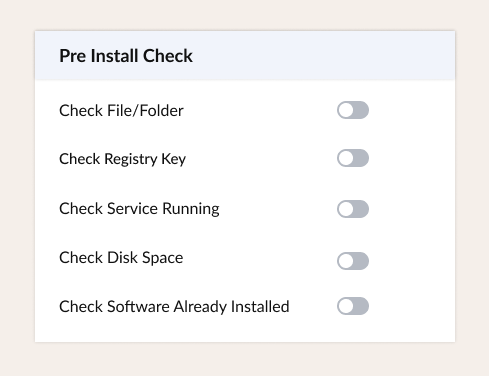
Prevent deployment failures before they happen with comprehensive validation checks:
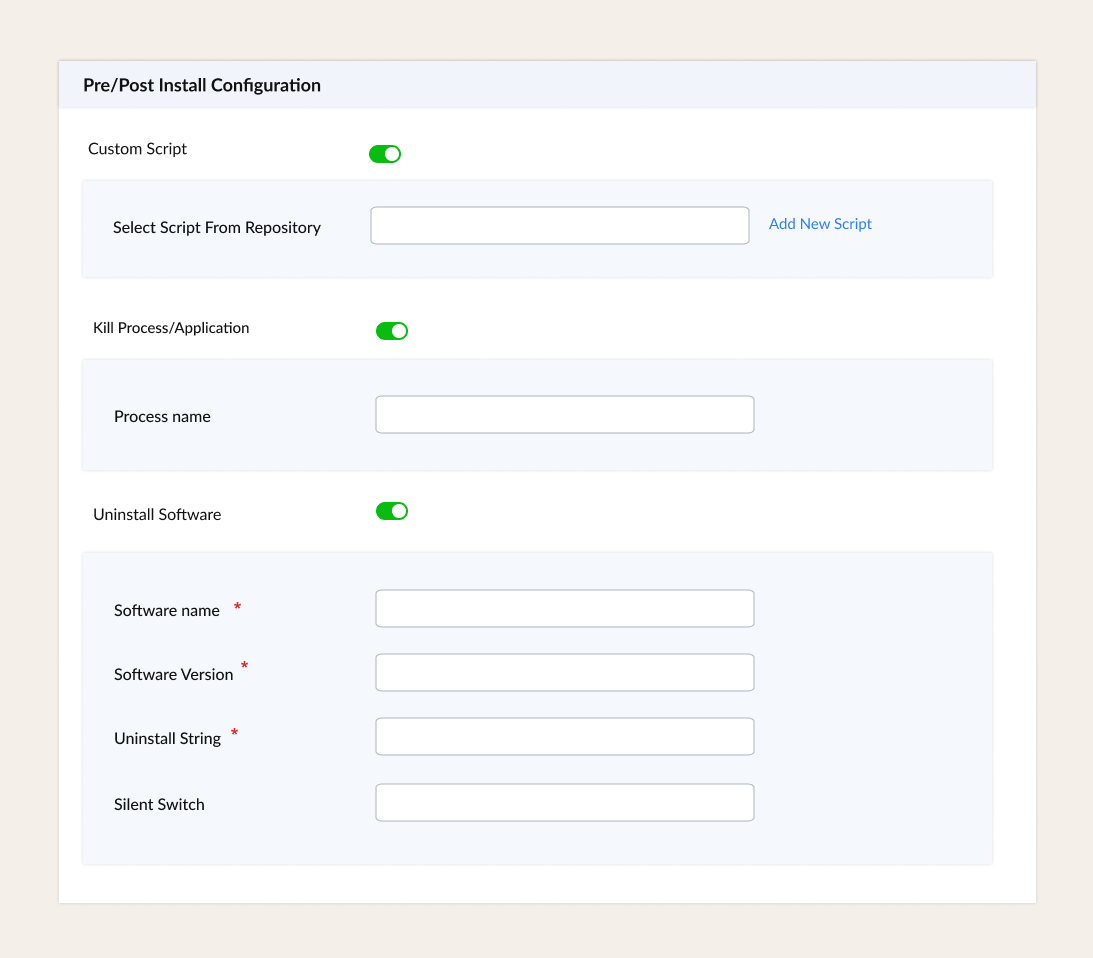
Handle complex deployment scenarios with custom automation:
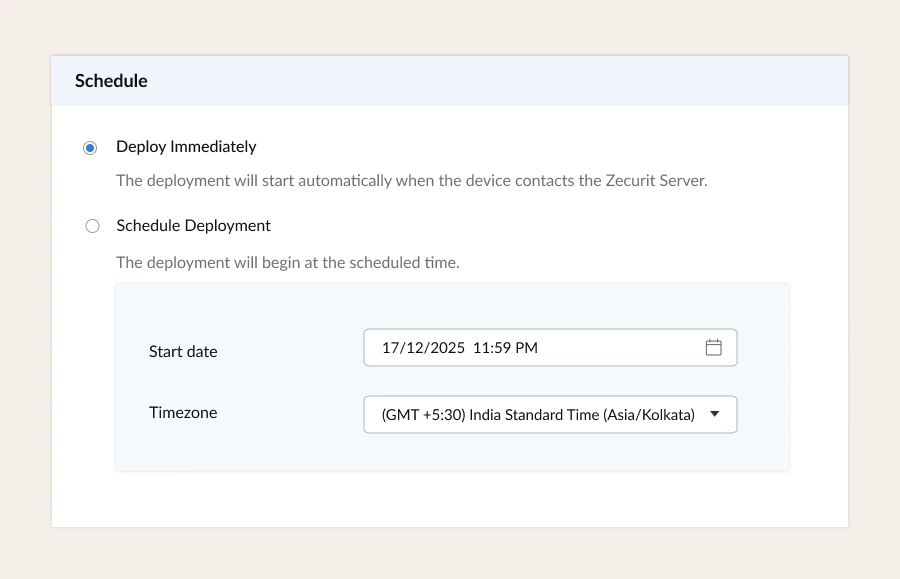
Deploy to the right devices at the right time:
Deployments that work invisibly in the background:
Get your first automated deployment running in under 10 minutes. No complex infrastructure to configure, no agents to set up separately.
Upload your installer to the Software Repository. Configure installer type, file paths, silent install arguments, pre-install validation checks, and pre/post configuration scripts. Packages are reused across multiple deployment policies without reconfiguration.
Create a Deployment Policy defining the operation type, execution context, network conditions, retry logic, schedule, and notifications. Save as a draft for internal review or publish immediately to activate the deployment across your fleet.
Associate the published policy to device groups or individual endpoints from the Groups and Devices section. New devices added to a group automatically inherit all associated deployment policies with no additional configuration required.
Track deployment status in real time from the console. View success, in-progress, pending, and failed states for every assigned device. Retry logic handles transient failures automatically based on your configured handling rules.
Zecurit empowers your IT operations with seamless control, real-time insights and enhanced security for all your assets.
Choose the right execution context for every deployment. Getting this correct is the single most important factor in ensuring installations succeed consistently across every device type in your fleet.
Runs the installer within the active user session. Use for applications that install to user profiles rather than system directories, and that require the user's environment during setup.
Executes using securely stored credentials from the Zecurit vault. Use when deployments require authenticated network access or when security policy mandates a specific service account.
From day-one employee onboarding to emergency security patches, Zecurit handles every software deployment scenario automatically.
New employees arrive to fully configured workstations on day one. Assign the device to the department group and every required application installs automatically before the employee logs in for the first time. No IT queue, no manual session.
Deploy software to home offices, co-working spaces, and branch locations over any internet connection without VPN dependency. Zecurit finds the device wherever it is connected and delivers installations silently with automatic offline catch-up.
When a vulnerability is disclosed, every minute of delay increases exposure. Zecurit deploys patched versions to your entire fleet immediately the moment devices contact the server, with real-time status showing exactly which endpoints are protected.
Handle complete application migrations in a single policy. Remove the old application, install the replacement, and apply post-install configuration — all silently and automatically across every assigned device with no manual steps required.
Branch offices without dedicated IT staff receive software automatically. Configure once from the central console. Network Share configuration serves packages from local file servers at LAN speeds, protecting WAN bandwidth during business hours.
Ensure every endpoint runs approved, compliant software versions. Deploy standardized application stacks fleet-wide and use deployment reports for audit trails, version compliance checks, and regulatory reporting requirements.
Go deeper on every aspect of software deployment with our comprehensive IT team guides.
Complete explanation of zero-touch deployment, how it works in Zecurit, and why it is essential for modern IT teams managing remote and hybrid workforces at scale.
A complete step-by-step walkthrough of bulk software deployment from package setup and pre-install checks through to fleet-wide rollout, retry handling, and deployment monitoring.
How to deploy software to distributed remote teams over any network without VPN dependency, including offline device handling, time zone-aware scheduling, and cross-platform support.
Everything IT teams need to know about evaluating and implementing a remote deployment platform — features, MSI vs EXE, lifecycle management, best practices, and FAQs.
Everything IT teams ask before getting started with Zecurit software deployment.
Zecurit runs every installation under system-level privileges entirely in the background. No installation wizards appear on screen, no user permission is requested, and no dialog boxes interrupt the user's work. The installation completes silently and reports its status back to the Zecurit console in real time.
Zecurit queues the deployment automatically. The installation begins the next time the device connects to the Zecurit server, with no manual re-triggering or administrator follow-up required. No device is permanently missed due to being offline during the scheduled window.
Yes. Assign the deployment policy to a pilot group such as your IT department first. Monitor results for 24 to 48 hours, review the deployment logs, and validate the installed application on pilot devices before expanding the policy to broader organizational groups.
Yes. Zecurit's Any Network delivery condition reaches devices over any internet connection including home broadband, Wi-Fi, and mobile data. VPN connectivity is not required. Deployments reach remote devices wherever they are connected and queue automatically for devices that are temporarily offline.
Yes. Create separate packages for each version and associate them to specific device groups organized by department, location, or any custom criteria. The Marketing group can receive one version while the Engineering team receives a different version, all managed from the same console without conflict.
Yes. Zecurit manages software deployment across Windows, macOS, and Linux endpoints from a single console using the same policy framework, retry logic, scheduling options, and reporting dashboard for all three platforms. No separate tools or workflows are needed for different operating systems.
"Zecurit reduced our software deployment time from 6 hours per application to 15 minutes. The pre-install checks alone have saved us countless failed deployment attempts. It's been transformational for our team."
"The ability to deploy to remote workers as easily as office-based employees was a game-changer during our hybrid transition. Zecurit's automatic retry for offline devices means we never lose track of deployments."
"We onboard 30+ employees monthly, and Zecurit's automated deployment has cut our provisioning time by 80%. New hires show up to fully configured workstations on Day 1."
"Zecurit reduced our software deployment time from 6 hours per application to 15 minutes. The pre-install checks alone have saved us countless failed deployment attempts. It's been transformational for our team."
"The ability to deploy to remote workers as easily as office-based employees was a game-changer during our hybrid transition. Zecurit's automatic retry for offline devices means we never lose track of deployments."
"We onboard 30+ employees monthly, and Zecurit's automated deployment has cut our provisioning time by 80%. New hires show up to fully configured workstations on Day 1."
Stop wasting IT resources on manual installations. Zecurit deploys software to 1000+ endpoints automatically, silently, and reliably, from a single console. No remote sessions needed. No devices left behind.
Discover the powerful modules that help you manage, secure, and control every endpoint from a single console.
Gain full visibility into hardware and software assets across your organization.
Remotely deploy and manage applications across devices with ease.
Automate patch scanning and deployment to keep endpoints secure and compliant.
Securely access devices, troubleshoot issues, and support users from anywhere.
Enforce IT policies and maintain standardized configurations across endpoints.
Generate endpoint reports and audit trails to monitor compliance and activity.