
Shut down, restart, lock, hibernate, or log off any endpoint from anywhere. Individual devices or entire fleets. Instantly or on a schedule. No VPN required.
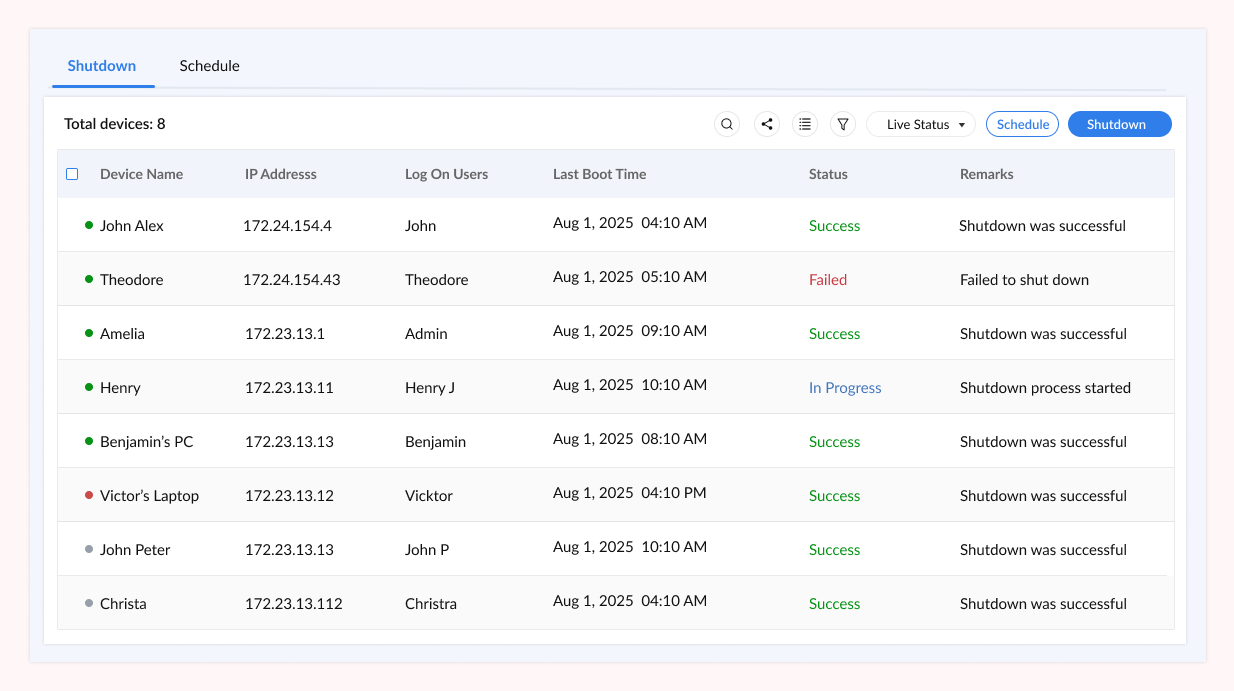
A remote shutdown tool is software that allows IT administrators to control the power state of any managed endpoint from a central console, without being physically present at the device. This includes powering devices off, restarting them, locking screens, placing machines into hibernate or sleep mode, and logging off active user sessions.
For enterprise IT teams and managed service providers, the ability to execute remote shutdown commands at scale eliminates the dependency on users to perform end-of-day routines, reduces the risk of data exposure from unattended sessions, and enables clean post-patch reboots without requiring anyone to be on-site.
Zecurit’s remote shutdown tool is built directly into the Remote Access platform. Commands are issued through the cloud console, transmitted securely via the Zecurit agent installed on each managed endpoint, and executed with full audit logging. No open firewall ports. No VPN tunnel. No physical intervention required.
The tool supports all six primary power actions: shutdown, restart, lock, hibernate, sleep, and logoff. Each can be applied to a single device, a selection of devices, or an entire device group, and each can be triggered immediately or scheduled as a recurring or one-time event. For a broader view of what the platform can do, see what is remote access software.
Every power action is built into the Zecurit console alongside monitoring, patching, and remote desktop, with no separate application required.
Power off or restart any managed endpoint instantly from the Zecurit dashboard. The agent installed on each device executes the command as soon as it is received through the encrypted cloud channel. Use restart for post-patch reboots after a patch management cycle, and use shutdown for end-of-day or off-hours power management. Both actions are confirmed and logged automatically.
Apply any power action to multiple devices or entire device groups simultaneously. Select endpoints by site, department, OS type, or any custom grouping defined in the Zecurit console, then issue a single command that reaches every device at once. This scales efficiently across large fleets, avoiding the need to action devices one by one during maintenance windows or security incidents.
Create recurring or one-time scheduled power events for devices or groups. Schedule overnight shutdowns for office endpoints, pre-patch reboots timed to maintenance windows, or morning restarts aligned with shift start times. Schedules run automatically without any technician on duty and integrate with software deployment workflows so devices are ready before deployments begin.
Lock a device's screen or end an active user session instantly from the console. This is critical for security response scenarios: when a device is reported lost or stolen, a technician can lock it remotely within seconds. Logoff is used to enforce session time limits, clear user credentials on shared machines, or terminate sessions that have been left open unintentionally. Both actions are recorded in the audit trail. See Unattended Access
Place idle endpoints into sleep or hibernate state rather than shutting them down completely. Sleep keeps the session active in low-power memory, enabling fast resume when the device is next accessed. Hibernate writes the session state to disk before powering down, suitable for longer idle periods. Both modes reduce energy draw significantly and work alongside Wake on LAN to create complete automated power lifecycle workflows.
Every remote shutdown action is recorded with the initiating technician's identity, the action type, the target endpoint, the timestamp, and the execution outcome. Role-based access controls determine which team members can issue which power commands to which devices, preventing unauthorised shutdowns of production servers or critical infrastructure. Logs are exportable for compliance and audit requirements.
Zecurit’s remote shutdown tool uses a lightweight agent deployed on each managed device. The agent maintains a persistent, outbound-only encrypted connection to Zecurit’s cloud infrastructure. This means no inbound ports are required on the device or the network, and no VPN is needed to issue commands from outside the office.
When a power action is triggered from the console, the command is delivered to the agent over this encrypted channel within seconds. The agent executes the action at the OS level using native system APIs, ensuring compatibility with Windows shutdown mechanisms, macOS power management, and Linux systemd, without requiring third-party system tools or custom scripts.
The outcome is reported back to the console, and the action is written to the audit log. If a scheduled action fails, the system records the failure with a reason code so technicians can investigate without needing to check each device individually. Pair this workflow with Wake on LAN to build complete automated power cycles that require zero manual steps.
After a patch management cycle completes, devices often require a restart to apply updates. Zecurit lets technicians trigger bulk restarts across all patched endpoints immediately or schedule them for a time that avoids disrupting active users. The restart status is reported back to the console so incomplete reboots are visible without checking each device.
When a device is reported lost, stolen, or compromised, every second counts. According to IBM's Cost of a Data Breach Report, the faster a breach is contained, the lower the financial and reputational impact. Zecurit allows technicians to lock or shut down affected endpoints within seconds, before sensitive data can be accessed or exfiltrated.
Idle office computers left on overnight represent significant unnecessary energy cost. Automated end-of-day shutdown schedules eliminate this waste without requiring users to remember to power off. Combine with Wake on LAN to bring devices back online before business hours begin, creating a full power lifecycle with zero manual steps and supporting EPA Energy Star efficiency goals.
On shared machines in labs, reception areas, or retail environments, sessions are often left open between users. Scheduled logoff or lock events enforce session hygiene automatically. For kiosk or public-facing devices, nightly restarts clear accumulated processes and return the machine to a clean state without needing a technician on-site. See how this fits into Windows endpoint management workflows.
Helpdesk teams supporting remote employees can restart a device during a troubleshooting session without asking the user to do it themselves, removing a common point of friction in remote support calls. The restart command is sent instantly, and the technician can reconnect via remote support software once the device comes back online.
Regulatory frameworks including HIPAA and PCI-DSS require automatic session termination after periods of inactivity. Zecurit's scheduled logoff and lock capabilities provide a consistent, auditable mechanism for enforcing these policies across all managed endpoints, with every action logged for compliance review. Works alongside Unified Endpoint Management policies.
Remote shutdown commands carry significant operational weight. Issuing a shutdown to the wrong server or at the wrong time can cause service disruption. Zecurit addresses this with role-based access controls that define precisely which technicians can send which power commands to which device groups. A junior helpdesk agent can be granted permission to lock user workstations but not restart production servers.
Every action is logged with a complete record: the identity of the user who issued the command, the action type, the target device or group, the timestamp of issuance, and the confirmed outcome. These logs are retained, searchable, and exportable in formats suitable for HIPAA audit controls, GDPR data access transparency requirements, and SOC 2 Type II availability and confidentiality reviews. For a full view of Zecurit’s compliance posture, visit the Unified Endpoint Management overview.
A remote shutdown tool is software that allows IT administrators to control the power state of any managed endpoint from a central console, without being physically present at the machine. Actions typically include shutdown, restart, lock, hibernate, sleep, and logoff. Zecurit's remote shutdown tool is cloud-based and executes commands through an encrypted agent channel, with no VPN or open firewall ports required. Every action is logged for compliance. See the full Zecurit Remote Access platform for context.
Yes. Zecurit's bulk remote shutdown lets you select any number of devices or entire device groups and apply a power action simultaneously with a single command. This is particularly useful during patch management cycles where all patched endpoints need a restart, or during end-of-day shutdown routines across an entire office floor.
Yes. Zecurit supports recurring and one-time scheduled power events for individual devices or device groups. Common uses include overnight shutdown schedules for office endpoints, pre-patch reboots timed to maintenance windows, and nightly restarts of shared workstations to return them to a clean state. Scheduled events run without any technician intervention and are logged automatically. They can be combined with Wake on LAN schedules to create complete automated power cycles.
Yes. Zecurit's remote shutdown tool supports Windows, macOS, and major Linux distributions. The Zecurit agent calls the native OS power management API on each platform, so no custom scripts or third-party tools are needed. All three platforms are managed from the same Zecurit console with the same audit logging and role-based access controls. This makes Zecurit suitable for mixed-OS environments common in development teams, design studios, and enterprise IT departments. See the full Windows endpoint management documentation for Windows-specific guidance.