
Zecurit automatically discovers, tracks, and governs every application installed on every device, giving IT teams a single source of truth for compliance, security and cost control.
Scan 1000+ devices in minutes
Inventory accuracy
Reduce software costs
License audit surprises – Discover non-compliance violations during vendor audits, risking $50K+ in penalties
Wasted software spend – Pay for unused licenses while teams request new tools you already own
Security blind spots – Unauthorized or outdated software creates vulnerabilities you don't even know exist
Audit panic mode – Spend 8+ hours manually collecting software data across spreadsheets and tickets
Outdated data – Your "inventory" is obsolete the moment someone installs or removes software
If your software inventory lives in a spreadsheet, you're not managing assets, you're guessing.
Stop reacting to software issues. Start preventing them with complete, real-time visibility.
Zecurit continuously scans Windows, Mac, and Linux endpoints, no manual updates, no data drift, no surprises during audits.
98%+ inventory accuracy maintained automatically.
IT, finance, security, and compliance teams access the same normalized, searchable repository, no conflicting spreadsheets or outdated exports.
Respond to "what's installed?" in 30 seconds, not 3 hours.
Identify unused licenses, reclaim wasted spend, and make data-driven renewal decisions based on actual usage, not guesswork.
Average customer saves $47K annually on software costs.
Generate compliance reports instantly with complete version history, install dates, and license reconciliation—no scrambling to collect data.
Pass software audits without last-minute panic
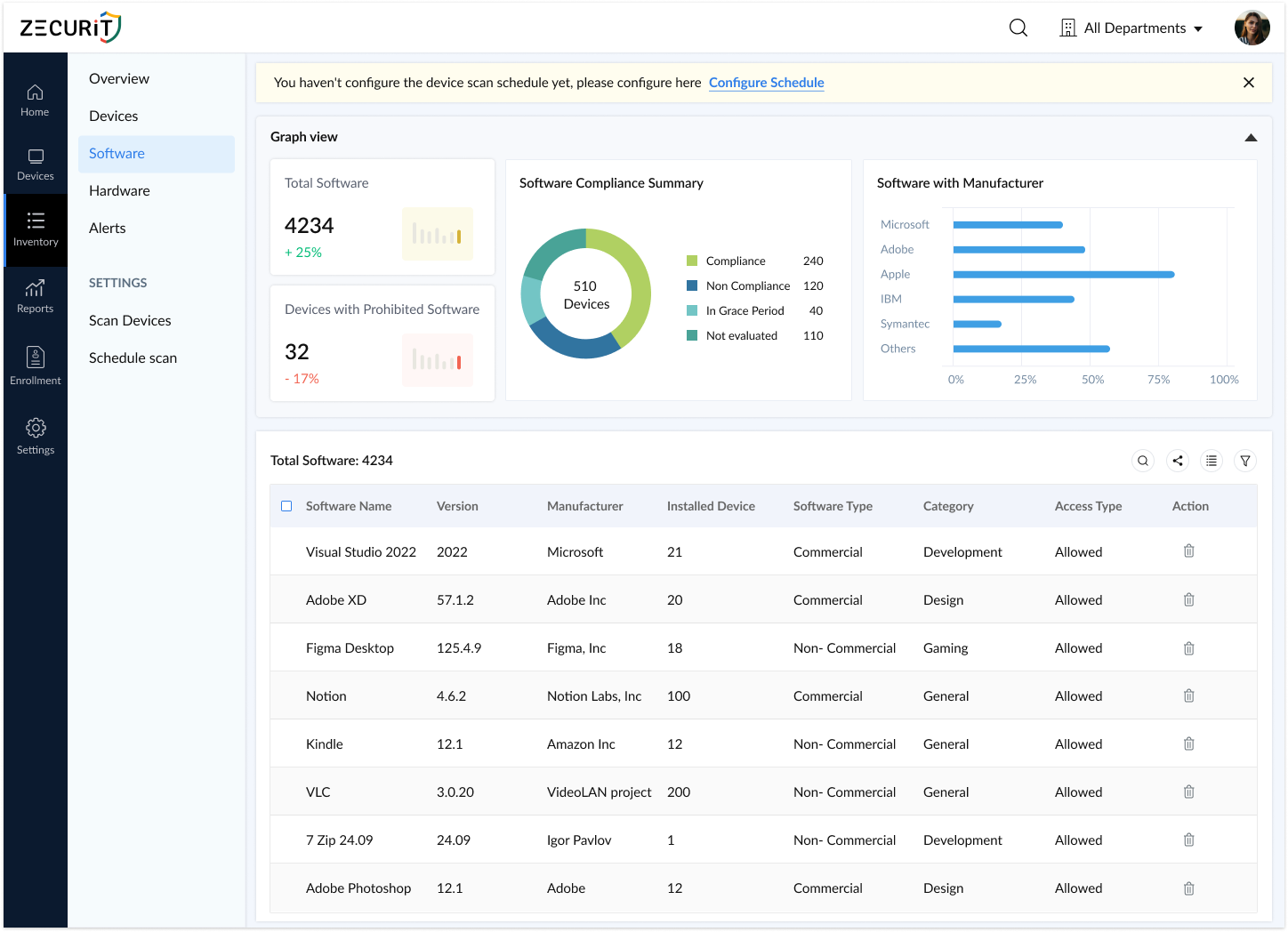
Zecurit agents discover all installed software across desktops, laptops, and servers the moment they're deployed. No blind spots, no manual tracking.
Every discovered application includes granular details IT and audit teams need, no guesswork, no incomplete records.
Captured for every app:
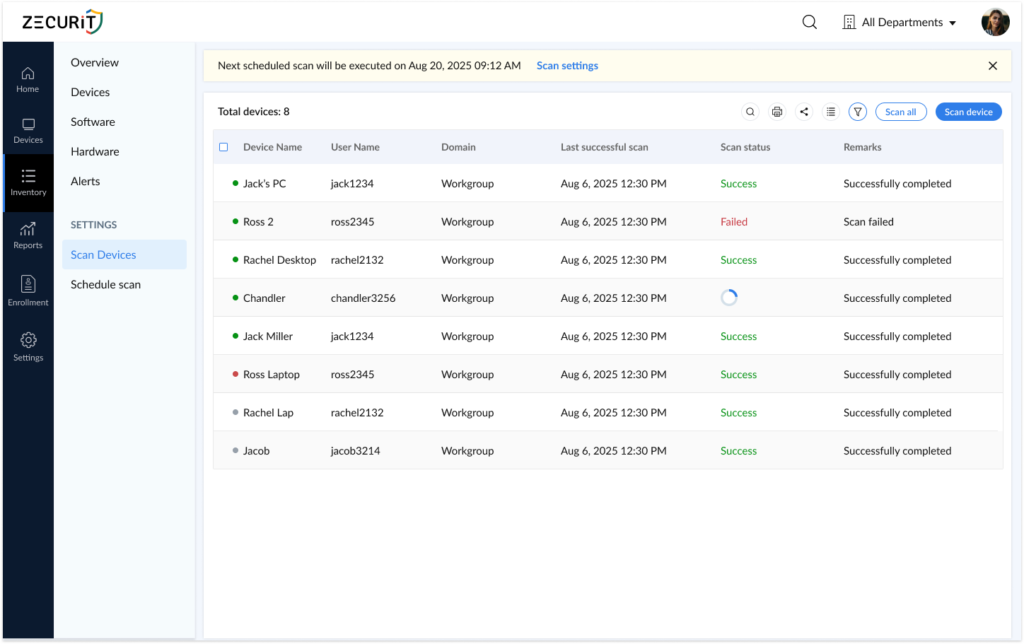
Scheduled scans run automatically, daily, hourly, or on-demand, ensuring your software records reflect reality, not history.
How it works:
Result: Inventory accuracy stays above 98% without manual intervention
During audits, security investigations, or troubleshooting, run targeted scans to capture current software state in real-time.
Use cases:

All software data consolidates into a single repository that becomes your system of record for compliance, procurement, and security.
How it works:
Export options: Excel, PDF, CSV, HTML
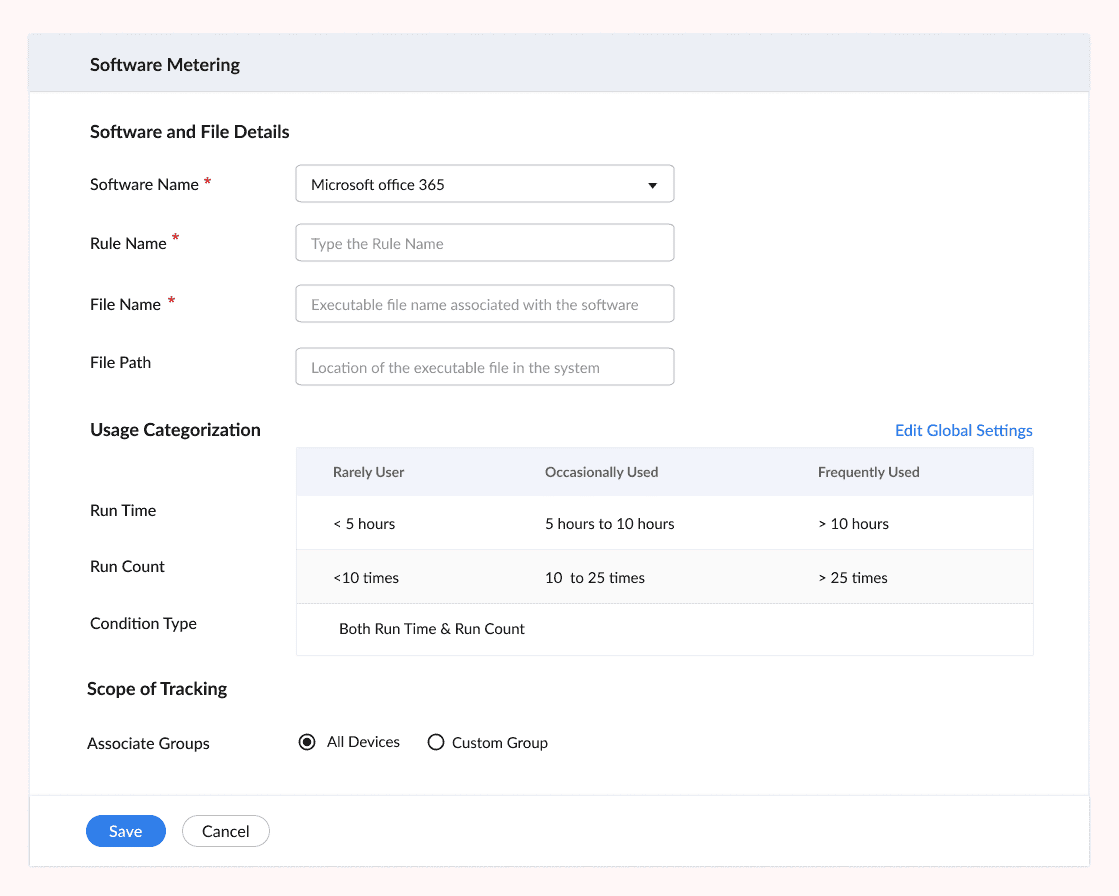
Track application launches, session duration, and active users to identify unused software and optimize license spend.
Usage analytics include:
ROI Example: "Discovered 47 unused Adobe licenses worth $18K annually, reassigned 12, cancelled 35"
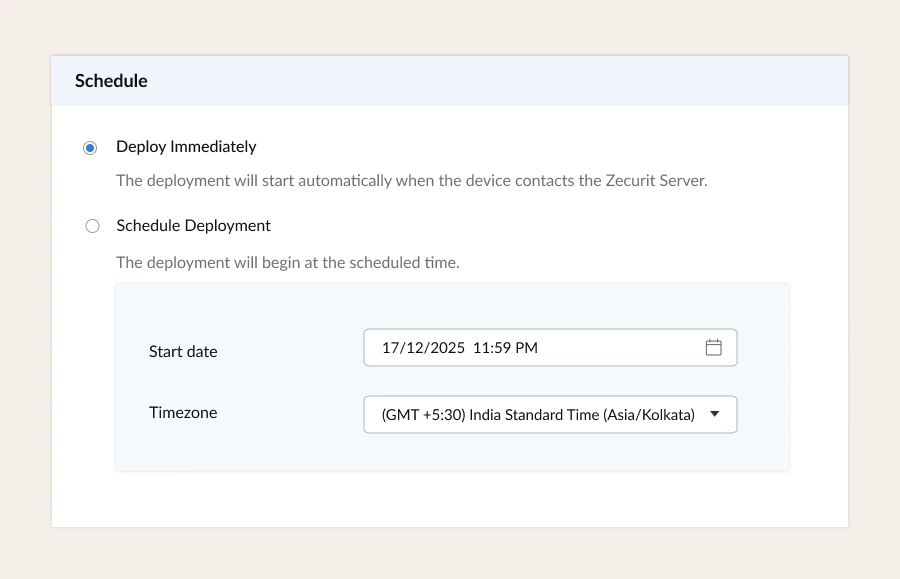
Define prohibited software lists and receive instant alerts when unauthorized applications are detected. Remove them remotely without touching the device.
Security controls:
Compliance boost: Enforce software policies across 100% of managed devices
Generate detailed reports in seconds for audits, compliance reviews, budgeting, and executive dashboards.
Available reports:
Export formats: PDF, Excel, CSV, HTML
Group applications into meaningful categories—Productivity, Development, Security, Finance, or custom categories that match your business needs.
Benefits:
IT Operations Team
"Where is Adobe Acrobat installed?" - asked 10 times a week
Audit season = panic mode scrambling for spreadsheets
Users install software IT doesn't know about
Answer "what's installed?" queries in 30 seconds
Generate audit-ready reports in minutes
Detect unauthorized software within 24 hours
Finance Team
Paying for unused licenses with no usage data
Can't justify software budget without proof
Renewals approved blindly without utilization insights
Identify $50K+ in unused licenses before renewal deadlines
Track software spend by department or cost center
Support budget planning with actual usage data
CISO / Security Team
Shadow IT creates security blind spots
Compliance frameworks require software asset tracking
Vulnerability management needs accurate software versions
Detect prohibited software within hours of installation
Maintain audit trails for compliance (ISO 27001, SOC 2)
Identify outdated/vulnerable software versions instantly
C-Suite / Leadership
No clear view of software asset value or risk
IT spend growing without visibility into ROI
Can't make data-driven decisions about technology
Dashboard view of software footprint and cost exposure
Optimization opportunities backed by usage data
Risk insights on unauthorized or non-compliant software
Install lightweight agents on Windows, Mac, and Linux devices via your existing deployment tools or Zecurit's Connector.
Zecurit immediately scans all endpoints and builds your software inventory with complete application metadata.
View dashboards, set up alerts, generate reports, and optimize software spend, all from a single console.
Join thousands of organizations that trust Zecurit to manage and secure their endpoints
Software inventory is a comprehensive, up-to-date record of all applications installed across an organization's devices, including operating systems, business applications, development tools, and utilities.
A complete software inventory captures critical metadata such as application name, version, publisher, installation date, device location, license type, and usage frequency, transforming chaotic software sprawl into a structured, actionable asset list.
Organizations without reliable software inventory face serious operational, financial, and security risks:
Software vendors conduct audits with little warning. Without accurate inventory data, IT teams can't answer fundamental questions:
How many licenses are deployed vs. owned?
Which devices run unlicensed or outdated software?
Are compliance terms being violated unknowingly?
License audit penalties range from tens of thousands to millions of dollars. Accurate software inventory provides the proof needed to avoid these fines.
IT and finance teams often renew expensive software subscriptions without knowing actual usage. Software inventory with usage analytics reveals:
Applications installed but never launched
Licenses assigned to inactive users
Duplicate tools purchased across departments
Industry stat: Organizations waste 30-40% of software budget on unused or underutilized licenses. Inventory visibility reclaims this spend.
Unauthorized or outdated software creates attack vectors security teams can't see. Software inventory helps:
Detect malware, risky utilities, or prohibited applications
Identify vulnerable software versions needing patches
Enforce compliance with frameworks like ISO 27001, SOC 2, and HIPAA
When you know what's installed, you can protect what's at risk.
Internal IT audits, vendor audits, and financial reviews all demand accurate software records. A centralized software inventory:
Eliminates hours of manual data collection
Provides verifiable proof of license compliance
Delivers audit-ready reports in minutes, not days
Many organizations start with manual software tracking using spreadsheets, periodic exports, or point-in-time reports. But manual approaches fail at scale:
Data becomes outdated within days of collection
Devices are missed or duplicated
Version numbers and publisher names are inconsistent
Unsustainable as device count grows
Continuously scans all endpoints (Windows, Mac, Linux)
Automatically captures name, version, publisher, and install date
Updates inventory in real-time as software changes
Provides a single source of truth, not scattered guesswork
Organizations building or improving software inventory should follow these steps:
Map every device type that needs coverage:
End-user devices (Windows, macOS, Linux workstations)
Servers (physical, virtual, cloud)
Managed tablets or thin clients
Comprehensive device coverage ensures inventory completeness.
Select scanning approach based on your environment:
Agent-based scans: Software installed on each device for deep visibility
Agentless scans: Network-based discovery for devices that can't run agents
Integration: Sync with Active Directory, MDM, or RMM tools
Most organizations use agent-based scanning for accuracy and real-time updates.
Raw scans often show variations like:
"Microsoft Office 2019" vs. "Office Professional Plus 2019"
Multiple versions of Chrome across devices
Standardize application names and versions so:
All instances group under one product name
Old versions are flagged for upgrade
Reporting and license reconciliation become accurate
Connect each software entry to:
License type (perpetual, subscription, volume)
Number of licenses owned
Purchase and renewal dates
Responsible team or department
This transforms inventory into a complete license management system.
Go beyond "it's installed" to understand:
How often applications are launched
Session duration (active vs. idle time)
When software should be retired or replaced
Usage data drives optimization, not just compliance.
If your organization experiences any of these symptoms, it's time to invest in an automated software inventory platform:
Spreadsheets updated quarterly (or less)
Audits require days of manual data collection
Frequent discovery of unlicensed software
Finance can't see software usage to optimize spend
Security finds unauthorized apps after incidents occur
Dedicated software inventory tools automate discovery, centralize data, and provide usage insights—eliminating reactive firefighting.
When evaluating software inventory solutions, prioritize:
Automatic discovery across Windows, Mac, Linux
Detailed metadata: name, version, publisher, install date, device
Continuous updates: scheduled scans + real-time detection
Centralized repository: single searchable view
Usage analytics: who's using what, how often
Prohibited software detection: enforce policies
Reporting and export: audit-ready reports in multiple formats
These features turn basic inventory into strategic asset management.
Software inventory is no longer optional—it's essential for modern IT operations, security, and financial management.
Instead of reacting to audits, license issues, and security incidents, accurate software inventory enables teams to:
Stay compliant and avoid vendor penalties
Reduce software waste by 30%+ through usage insights
Strengthen security by detecting unauthorized applications
Make data-driven decisions about renewals and upgrades
If your software inventory still lives in spreadsheets, calculate the cost: wasted time, financial risk, and missed optimization opportunities.
The ROI of automated software inventory is immediate and measurabl
14-Day Free Trial No credit card required. Full access to all features.
Software inventory management is the systematic process of identifying, tracking, and managing all software applications and licenses within an organization. It provides real-time visibility into what's installed, where it's deployed, how it's being used, and whether it complies with licensing agreements, enabling better cost control, security, and compliance.
Software inventory prevents costly license non-compliance fines, identifies unused software to reduce budget waste, strengthens cybersecurity by highlighting outdated or unauthorized applications, and provides data for strategic IT decision-making. Organizations without accurate software inventory face financial penalties, security vulnerabilities, and operational inefficiency.
Software inventory reduces costs by identifying unused licenses (shelfware) for reallocation instead of new purchases, optimizing license agreements based on actual usage data, preventing over-licensing, and enabling better vendor negotiations. Average organizations save 30-40% on software spend through inventory-driven optimization.
Yes, software inventory is fundamental for license compliance. It provides accurate, audit-ready records of all software installations and licenses, ensuring adherence to vendor agreements and regulatory requirements, thereby avoiding penalties and legal issues during audits.
Software inventory is a foundational component of Software Asset Management (SAM). Inventory focuses on discovering and tracking what's installed, while SAM encompasses the entire lifecycle, procurement, deployment, optimization, compliance, and retirement. You can't manage what you can't see, inventory comes first.
Implement software inventory using automated discovery tools like Zecurit Asset Manager. Deploy agents on Windows, Mac, and Linux devices to automatically scan and catalog all installed software with complete metadata. Continuous scans keep inventory current as applications are installed, updated, or removed.
Software inventory should be updated continuously through automated scanning—not quarterly or annually. Daily or hourly scans ensure your records reflect the current state of your environment, not outdated snapshots. On-demand scans provide instant visibility during audits or security investigations.
Disover the essential features and functionalities of Zecurit Asset Manager.
Automatically discover all IT assets across your network for complete inventory visibility.
Track all software installations and ensure accurate license utilization to avoid costly audits.
Track all hardware assets, from desktops to servers, for effective monitoring and proactive maintenance.
Manage software licenses effectively, reduce costs, and ensure compliance with vendor agreements.
Monitor software usage in real-time to optimize license utilization and maximize your software investments.
Generate insightful reports on asset utilization, software usage and other key metrics to make informed decisions.