
Wake single devices, entire fleets, or schedule automatic WoL events from anywhere in the world. No port forwarding. No VPN. No physical access required.
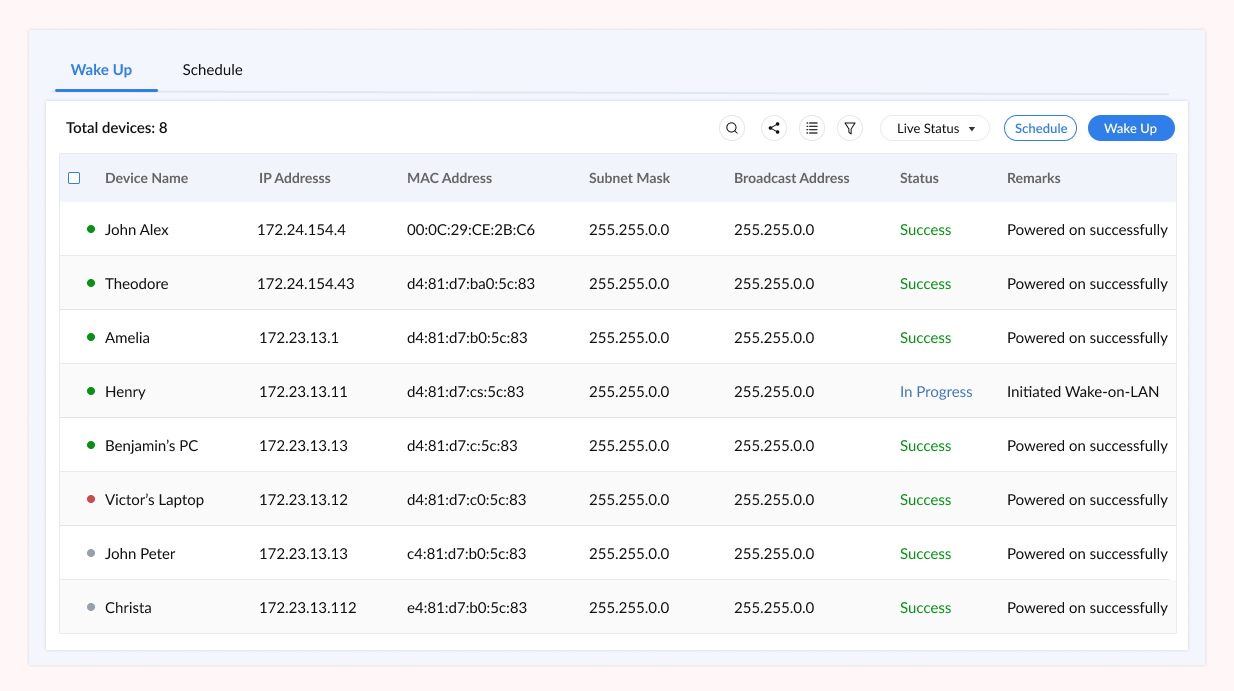
Wake on LAN (WoL) is a networking standard that lets IT administrators remotely power on a computer that is shut down, sleeping, or in hibernation. It works by sending a magic packet, a broadcast frame containing the target device’s MAC address repeated sixteen times, over the local network or the internet. The device’s network card stays in a low-power listening state and triggers a full boot sequence when it detects this packet.
A Wake on LAN tool is the software layer that manages this process at scale: storing MAC addresses, routing magic packets across subnets and remote sites, scheduling wake events, and logging every action for compliance. Without a dedicated tool, WoL over the internet requires manual port forwarding, a static IP or Dynamic DNS configuration, and direct access to router settings, which is impractical across distributed IT environments.
Zecurit’s Wake on LAN tool eliminates these requirements entirely using a relay agent architecture. The Zecurit agent installed on the same subnet as the target device handles magic packet delivery locally, while IT administrators send WoL commands from the cloud console. No router changes. No firewall rules. No site visits. Learn more about the full Zecurit Remote Access platform and how WoL fits into the Unified Endpoint Management ecosystem.
All WoL capabilities are built into the Zecurit console. No separate app, no extra license tier.
Power on any individual workstation, server, or laptop with a single click from the Zecurit dashboard. The console stores each device's MAC address automatically when the agent is installed, so there is nothing to configure manually. Useful for urgent support calls when the target machine is offline.
Select any number of offline endpoints and wake them all simultaneously with a single action. Ideal for bringing an entire office floor online before a patch maintenance window, powering up lab environments before a training session, or restoring a fleet after a planned shutdown. Scales to hundreds of endpoints without additional configuration.
Create recurring WoL schedules for devices or groups. Set endpoints to wake 15 minutes before a patch cycle begins so updates apply immediately without waiting for manual power-on. Schedule morning wake routines to align with remote employee start times across time zones. Schedules run automatically with no technician intervention required.
Standard WoL is limited to the local subnet. Zecurit's relay agent architecture extends WoL to remote offices, branch locations, and distributed sites without requiring VPN access or router-level port forwarding. As long as one online device on the subnet has the Zecurit agent installed, all offline devices on that subnet can be woken from anywhere. This is the same zero-trust network principle that eliminates attack surface from public-facing services.
See Unattended Access
Every Wake on LAN action is logged with the initiating user identity, timestamp, target device, and delivery status. These records are retained and exportable for IT compliance reviews. Wake commands are transmitted through Zecurit's encrypted relay channel, and the magic packet itself is delivered locally by the relay agent, never exposed on the public internet.
Combine WoL with Remote Support to build complete power management workflows. Shut devices down after off-hours tasks complete, then wake them again before the next scheduled job. This reduces idle power consumption across large device fleets and supports green IT policies without sacrificing IT access.
Every standalone Wake on LAN tool faces the same internet problem. Magic packets are broadcast frames that do not naturally cross routers. To wake a device over the internet, traditional tools require you to configure port forwarding on the router, know the device’s external IP address, and maintain a Dynamic DNS record if the IP changes. This setup is fragile, security-sensitive, and completely impractical across multiple branch sites.
Zecurit eliminates this entirely. The Zecurit agent installed on any online device within the target subnet acts as a relay. When you issue a WoL command from the console, the command travels through Zecurit’s encrypted cloud channel to the relay agent, which then broadcasts the magic packet locally. From the network’s perspective, the packet originated on the subnet, because it did.
This means Zecurit works across VLANs, remote offices, and geographically distributed sites with zero network reconfiguration. Combine WoL with Patch Management to create automated wake, patch, and shutdown workflows that run entirely unattended. You can also pair it with Software Deployment to push updates the moment a device powers on.
WoL requires a small number of hardware and OS settings to be enabled before the feature will work. Zecurit handles the network delivery; these are the prerequisites on the device side.
To enable the Wake-on-LAN hardware configuration, follow these steps in your system's firmware:
Enter BIOS/UEFI: Restart your computer and press the Del, F2, or F10 key immediately during the boot sequence.
Locate Power Settings: Navigate to the Power Management, ACPI, or Advanced settings tab.
Enable Hardware Wake: Look for and Enable options such as "Wake on LAN," "Power on by PCI-E," or "Resume by LAN" (names vary by motherboard vendor).
Save and Exit: Press F10 to save your changes and exit. This step is mandatory for WoL to function correctly after a full system shutdown.
To enable Wake-on-LAN on your Windows machine, follow these steps:
Open Device Manager and expand the Network Adapters section.
Right-click your Ethernet adapter and select Properties.
Under the Power Management tab, check the box for "Allow this device to wake the computer."
Switch to the Advanced tab and ensure "Wake on Magic Packet" is set to Enabled.
Finally, disable Fast Startup in your Power Options, as this feature can often block WoL signals after a full shutdown.
Network Connectivity: A Wired Ethernet connection is strongly recommended for consistent performance.
Wireless Limitations: Note that Wi-Fi WoL (WoWLAN) has significantly more limited hardware and driver support across various NICs.
Power State: The target device must remain plugged into mains power; battery-only mode often disables the network card's power to save energy.
Relay Agent: To trigger the wake signal, a Relay Agent must be active on at least one online device within the same local subnet.
WoL not working at all: Double-check that your BIOS settings were saved correctly. A system power cycle can sometimes revert these if the CMOS battery is weak.
Wakes from Sleep but not Shutdown: This is a classic symptom of Fast Startup being enabled. Ensure this feature is disabled in Windows Power Options to allow the NIC to remain "listening" after a full shutdown.
Remote sites not waking: Confirm that your Relay Agent is currently online and active on the specific target subnet. The "Magic Packet" cannot typically cross router boundaries without a local relay.
Schedule devices to wake 20 minutes before a patch maintenance window. Updates begin the moment the window opens, with no manual power-on required. Combine with Remote Support to verify endpoint health once devices are back online.
Employees working remotely can request their office workstation be powered on before they connect. IT can schedule morning wake events aligned with each employee's time zone so workstations are ready when their shift begins, with no reliance on a colleague to press the power button.
Bring critical infrastructure back online remotely during an outage without dispatching staff to a data centre or remote office. Wake servers, then connect via Unattended Remote Access to assess and remediate. Pair with Windows Server Management for full post-recovery control.
Keep endpoints powered off during non-working hours and wake them only when needed. According to the US Energy Star programme, idle office PCs account for significant unnecessary energy draw. Pairing WoL with Remote Support creates a complete power lifecycle that cuts consumption without impacting IT operations.
Wake on LAN (WoL) is a networking standard that allows a powered-off or sleeping computer to be started remotely. It works by sending a magic packet containing the target device's MAC address repeated 16 times as a broadcast frame over the network. The device's NIC remains in a low-power listening state and triggers a full boot when it detects this packet. WoL must be enabled in BIOS/UEFI and configured in the OS network adapter settings to function. The original specification was standardised under IEEE 802.3 and is supported by most modern motherboards and network interface cards.
Yes. Zecurit uses a relay agent installed on the target subnet. WoL commands from the cloud console are delivered to the relay agent over an encrypted channel, and the relay agent broadcasts the magic packet locally. This means no port forwarding, no static IP, and no VPN is required. It works across remote offices, branch sites, and any network where at least one Zecurit agent is online. For a full overview of how the platform handles remote connectivity, see what is remote access software.
Yes. Zecurit supports recurring scheduled WoL events for individual devices or device groups. Schedules can be set to align with patch maintenance windows, backup jobs, compliance scans, or employee shift start times. Scheduled events run automatically with no manual intervention and are logged in the audit trail for compliance purposes.
Yes. Zecurit's bulk Wake on LAN lets you select any number of offline endpoints and wake them all with a single action. Devices can be selected individually or by group, making it straightforward to bring an entire office floor, server rack, or lab environment online before a scheduled task. This is particularly useful when combined with software deployment jobs that require all targets to be online before they begin.
Wake on Wireless LAN (WoWLAN) is supported by a limited set of wireless adapters and requires specific driver and firmware support. Most desktop and laptop NICs do not support WoL over Wi-Fi, and devices must remain plugged into mains power for WoWLAN to function. According to Microsoft's hardware documentation, WoWLAN support depends entirely on the adapter and its driver implementation. For reliable Wake on LAN, a wired Ethernet connection is strongly recommended. Zecurit's relay agent works with wired connections and any NIC that supports standard WoL.
Magic packets are typically sent over UDP port 7 or 9, as registered with IANA. On a local network, the port usually does not require any configuration. When attempting WoL over the internet via traditional port forwarding rather than using Zecurit's relay method, the chosen port must be forwarded on the router to the local subnet's broadcast address. Zecurit's relay architecture bypasses this requirement entirely, so no port configuration is needed on your network hardware.
Single wake, bulk wake, or fully automated schedules. Zecurit's Wake on LAN tool requires no port forwarding, no VPN, and no site visits.