
Scheduled software deployment is the most reliable way to install software across enterprise endpoints without disrupting your team. When IT administrators push software during business hours, it triggers unexpected reboots, freezes active work sessions, and floods the helpdesk with complaints. By shifting to a scheduled software deployment strategy during off-hours maintenance windows, organizations using a platform like Zecurit Endpoint Manager can deliver software silently, consistently, and at exactly the right time, whether that is 2 AM on a Tuesday or a Sunday maintenance window.
Scheduled software deployment is the practice of configuring software installations, updates, or removals to run automatically at a predefined date and time. This is a core feature of modern Unified Endpoint Management (UEM) platforms and replaces the older approach of manually pushing software during working hours.
In Zecurit Endpoint Manager, administrators choose between Deploy Immediately and Schedule Deployment. With Schedule Deployment, you set a precise start date, time, and time zone (for example, GMT +05:30 Asia/Kolkata) for any geographic region. If a device is offline at the scheduled time, the deployment starts automatically the next time the device contacts the Zecurit server, ensuring no endpoint is left behind.
In 2026, two major shifts have made scheduled software deployment a business necessity rather than a convenience. First, the decline of on-premise distribution points means software is now delivered via cloud-native channels, giving IT teams the flexibility to reach any device at any time, globally. Second, the rise of Platform SSO has increased the complexity of software environments, making silent, unattended deployments during off-hours far safer than interactive installs.
Beyond operations, scheduled software deployment is now tied directly to cybersecurity insurance eligibility. Insurers increasingly require Continuous Asset Valuation as a condition of coverage, meaning every endpoint must run known, approved, and patched software at all times. A disciplined off-hours deployment schedule creates the audit trail that satisfies this requirement.
Before you can run a scheduled software deployment, the package must exist in the Zecurit Software Repository. Navigate to Deployment > Software Repository and click Add Package. For a full walkthrough of deployment scripts, visit the Zecurit knowledge hub.
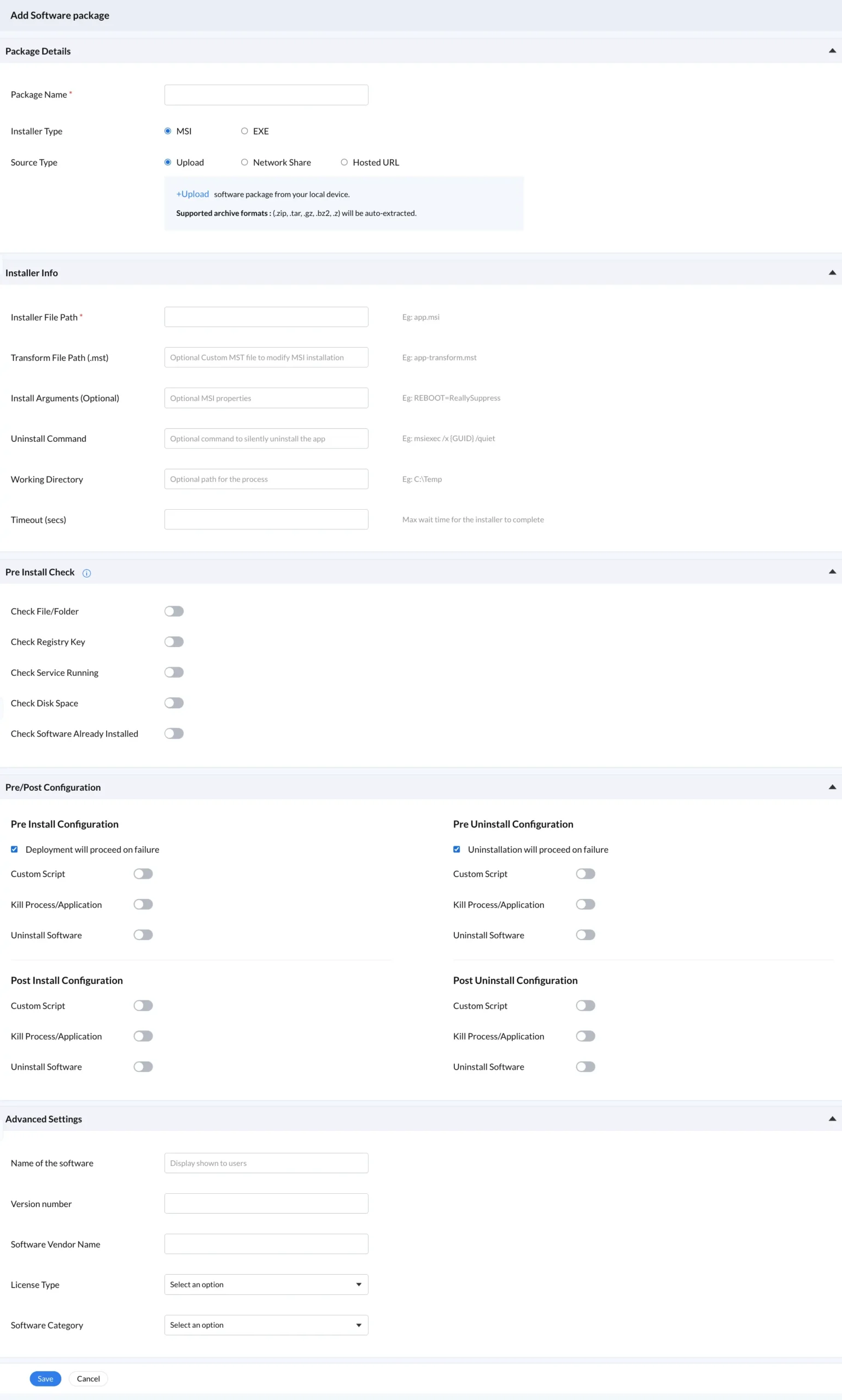
The Add Package form collects:
Package Name and installer type (MSI or EXE)
Source Type: Upload, Network Share, or Hosted URL
Installer Info: file path, transform files, install arguments, uninstall command, working directory, and timeout
Pre-Install Checks: file or folder existence, registry keys, running services, disk space, and duplicate install detection
Pre/Post Configuration: custom scripts, kill processes, and uninstall conflicting software
Advanced Settings: software name, version, vendor, license type, and category
These settings ensure that when your scheduled software deployment runs unattended at limited time, every condition is verified in advance and no manual intervention is needed.
Once your package is ready, the deployment policy controls how and when the scheduled software deployment runs. In Zecurit, go to Deployment > Deployment Policy and click Create Policy.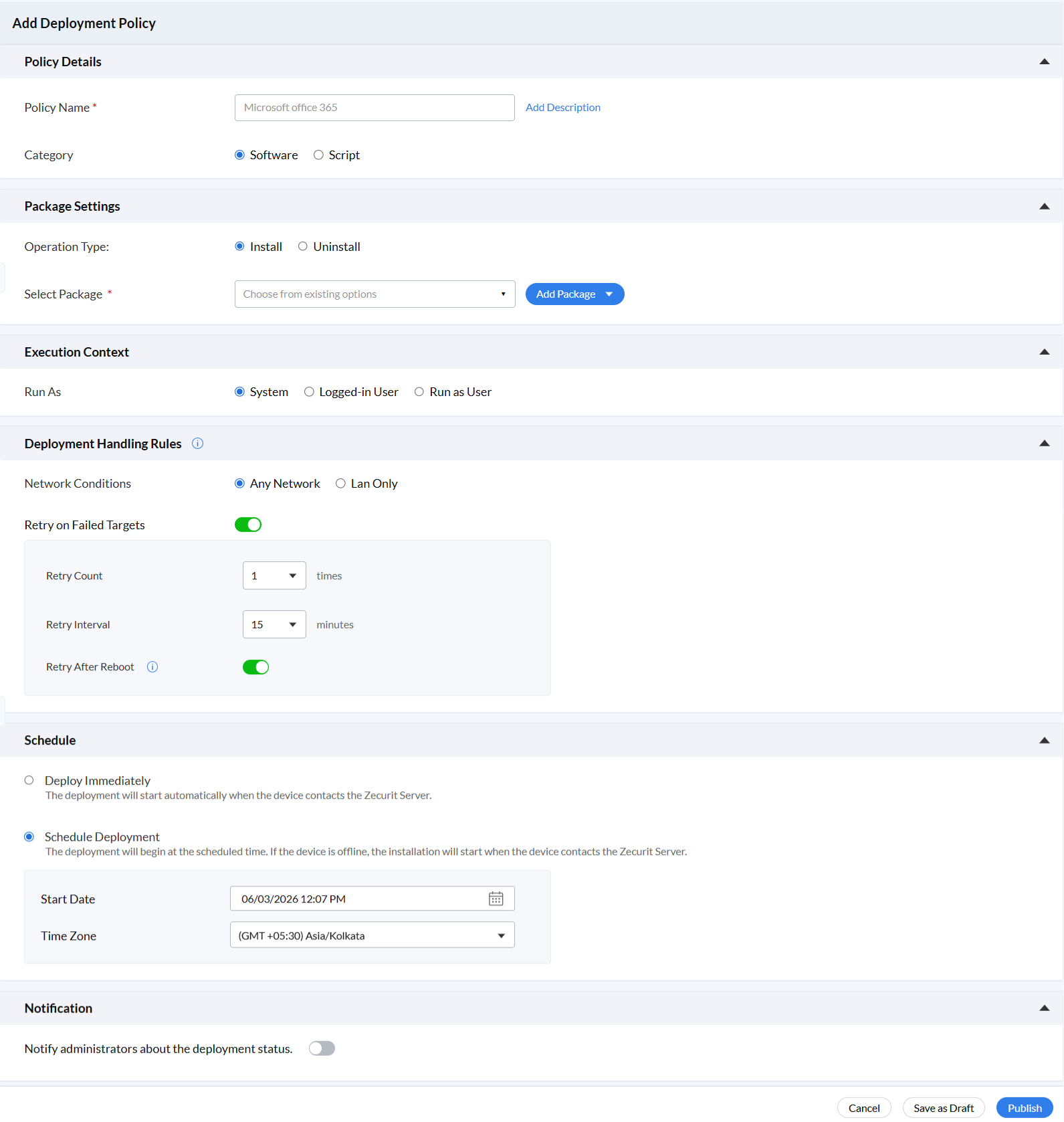
Policy Details Name the policy clearly, for example "Microsoft Office 365 Scheduled Deployment," and set the category as Software or Script.
Package Settings Choose Install or Uninstall and select the package from your Software Repository.
Execution Context For off-hours scheduled software deployment where no user is logged in, select System context. This ensures the installation runs with full privileges without requiring a user session.
Deployment Handling Rules Set the network condition to Any Network or LAN Only. Configure retry logic including Retry Count, Retry Interval in minutes, and the Retry After Reboot toggle.
Schedule Select Schedule Deployment, enter the Start Date and time, and choose the correct Time Zone. The scheduled software deployment will begin at that exact time. If the device is offline, it triggers automatically on the next server contact.
Notification Enable the administrator notification toggle so you receive a deployment status summary before the workday begins, without having to log in manually.
A key challenge in scheduled software deployment is that not every device is online during the maintenance window. Devices may be asleep, powered off, or mid-reboot. Zecurit addresses this with built-in retry logic.
When Retry on Failed Targets is enabled, the platform retries the installation automatically after the configured interval. The Retry After Reboot toggle ensures that if a device rebooted during the deployment window, the scheduled software deployment resumes cleanly once the device is back online. IT teams receive a consolidated morning report showing success, failure, and pending counts per policy, with no manual follow-up required.
Enterprise scheduled software deployment rarely runs in a vacuum. Zecurit's pre-install and post-install configuration panels automate all the safety checks that would otherwise require manual attention. Learn how bulk script deployment and script execution security extend these controls further.
| Pre-install Check | Purpose |
|---|---|
| Check File or Folder Presence | Verifies whether a required file or folder exists before installation. |
| Check Registry Key | Checks whether a specific registry key or value is present on the target system. |
| Check Service Running Status | Confirms whether a required service is running before continuing. |
| Check Disk Space Availability | Ensures enough free disk space is available for installation. |
| Check if Software is Already Installed | Prevents duplicate installation by verifying whether the software already exists. |
Post-install actions include running a Custom Script, killing a process or application, and uninstalling a replaced application. Together, these controls make scheduled software deployment safe to run fully unattended every night.
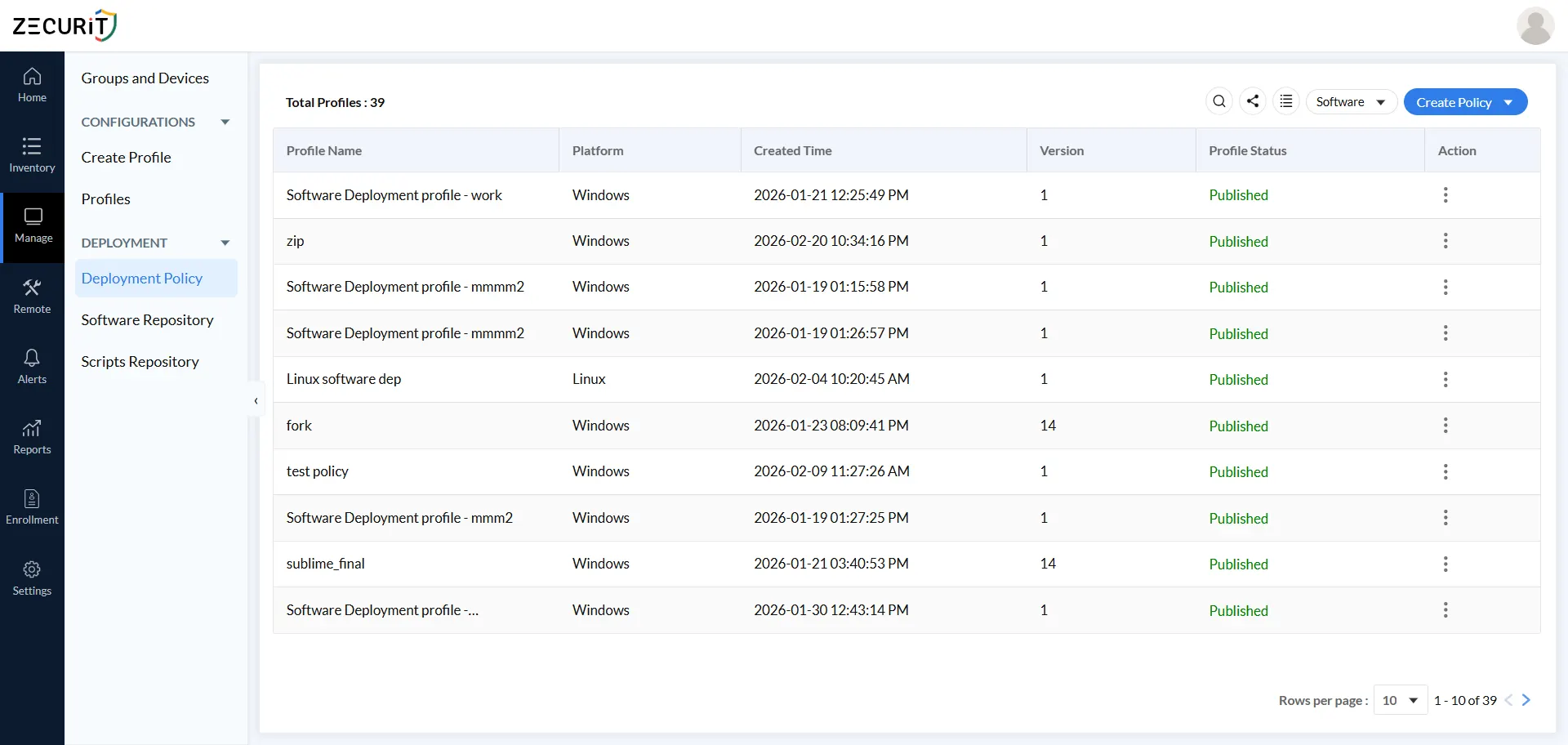
Large enterprises running scheduled software deployment across thousands of endpoints need a well-organized Software Repository. Zecurit's repository supports Windows, Mac, and Linux packages and provides a list view showing the package name, software name, platform, creator, and creation timestamp.
Best practices for repository management:
Use a consistent naming convention such as "AppName - Version - Platform"
Tag packages by software category and vendor for quick filtering
Audit the repository regularly to archive outdated versions
Use the Hosted URL source type to reduce on-premise storage dependency in 2026's cloud-first environmen
For guidance on managing software assets alongside scheduled software deployment, see ITAM vs Endpoint Management and the SaaS license management guide.
Scheduled software deployment is increasingly a formal compliance requirement, not just an operational best practice. Cybersecurity insurers now require Continuous Asset Valuation, meaning organizations must demonstrate that every endpoint runs approved, up-to-date software at all times.
Each scheduled software deployment policy in Zecurit records its version, device count, group associations, and published status. This creates a complete, auditable deployment trail that satisfies insurer and auditor requirements without extra reporting effort. Organizations migrating away from SCCM-based distribution should read the SCCM vs Modern UEM migration guide to understand the compliance advantages of switching to a cloud-native deployment model.
Scheduled software deployment during off-hours is a foundational IT practice for any organization managing more than a handful of endpoints. The right tool depends on your scale and technical maturity.
For teams new to endpoint management, Zecurit offers a guided workflow from package creation to policy publishing that needs no scripting expertise. For technically mature IT teams, the platform's pre/post configuration hooks, custom scripts, retry logic, and group-based targeting deliver enterprise-grade control over every scheduled software deployment.
The shift toward cloud-native delivery, the end of on-premise distribution points, and tightening cybersecurity insurance requirements all confirm the same direction: automated, policy-driven scheduled software deployment is the 2026 standard, and Zecurit is purpose-built for it.