
Zecurit's IT Asset Tracking software is designed to be both powerful and intuitive, giving you the tools you need to manage your remote workforce and secure your assets effectively.
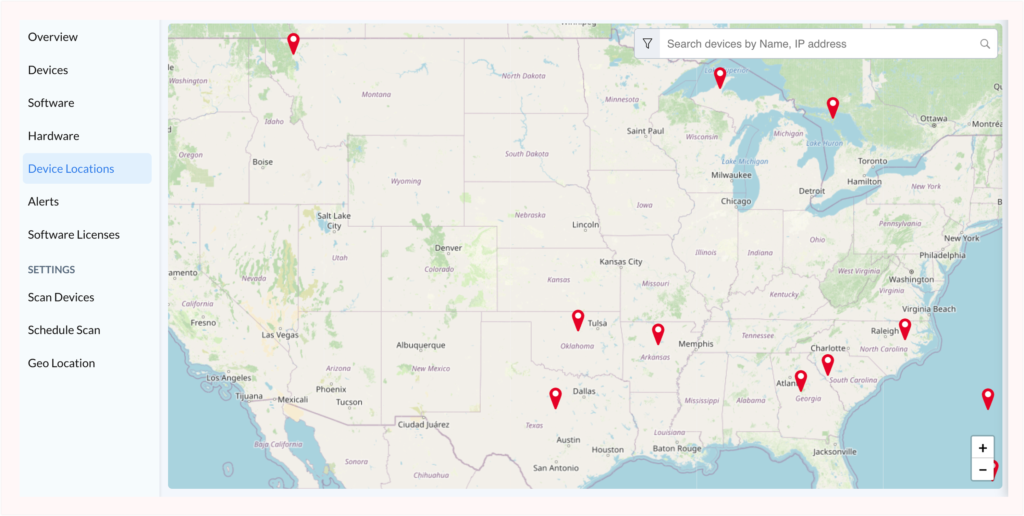
The main feature is a real-time global map accessible via Inventory → Device Locations. This map gives you an overview of all your managed endpoints.
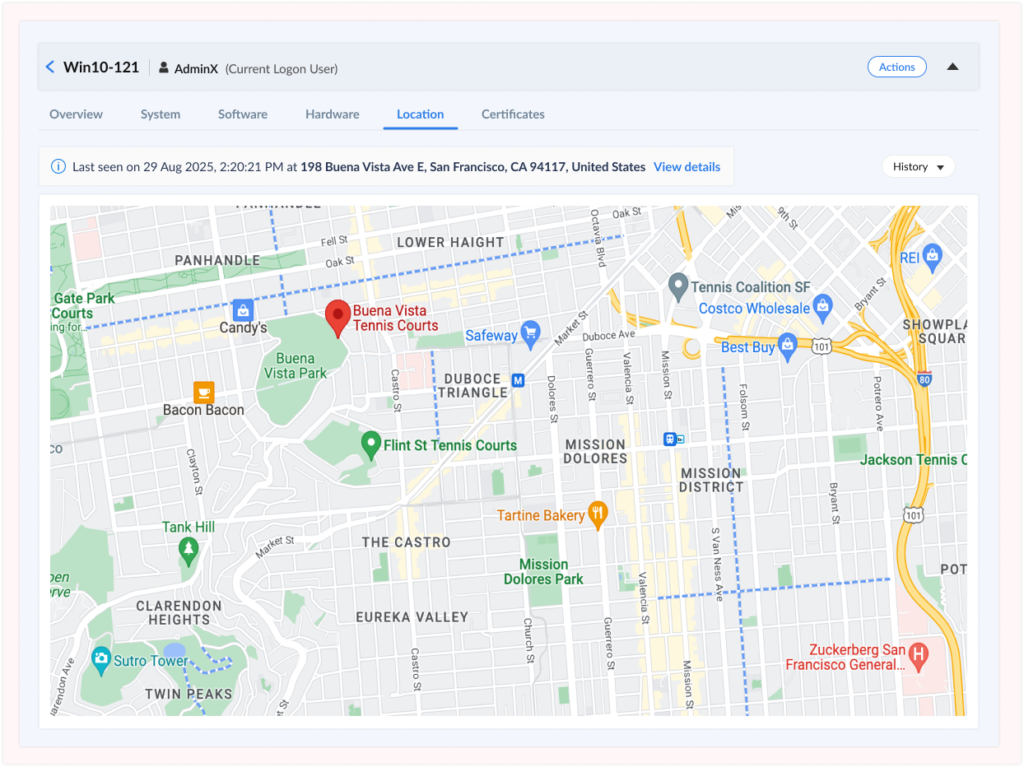
For more detail visit the Location tab under a device’s details. This view shows the address and coordinates which are important for endpoint security monitoring and recovery.
You can customize Geo Tracking to fit your organization's needs by going to Inventory → Settings → Geo Location.
IT asset location tracking is an enterprise device management capability that monitors the physical location of company-owned laptops, desktops, mobile devices, and other endpoints in real time. Unlike consumer GPS apps designed for personal device recovery, enterprise asset location tracking provides centralized management, compliance audit trails, security investigation support, and integration with IT service management platforms.
Modern IT asset location tracking uses native operating system location services, built into Windows, macOS, and Linux to capture GPS coordinates, WiFi-based positioning, or IP geolocation data. This information is displayed on interactive maps within asset management platforms, allowing IT teams to:
Locate lost or stolen devices with precise GPS coordinates and movement history
Monitor remote workforce distribution across offices, home offices, and field locations
Detect unauthorized movement when devices travel to unexpected or prohibited regions
Support security investigations with verifiable location records and audit trails
Maintain compliance with regulatory requirements for physical asset tracking
Optimize asset distribution based on actual geographic usage patterns
Consumer tools like "Find My Device" or "Find My iPhone" are designed for individual device owners. Enterprise IT asset location tracking provides:
Centralized dashboard for managing thousands of devices
Group-based targeting and privacy controls
Historical location data with configurable retention policies
Integration with ITSM, security, and compliance platforms
Automated alerts for policy violations or suspicious movement
Audit-ready reporting for regulatory compliance
Organizations lose an average of $49,000 worth of laptops annually due to theft or misplacement
67% of IT leaders cite lack of visibility into remote device locations as a security concern
Companies with location tracking recover 78% of stolen devices vs. 12% without tracking
Remote workforce management costs are 23% lower with automated device location monitoring
The Problem: Laptops, tablets, and mobile devices go missing during travel, in airports, coffee shops, and at customer sites. Without location tracking, recovery is nearly impossible.
The Solution: Real-time location tracking enables IT teams to pinpoint the last known location, provide coordinates to law enforcement, and remotely wipe devices if recovery isn't possible. Location history shows movement patterns to identify where devices were lost.
Impact: Organizations with location tracking recover 78% of stolen devices vs. just 12% without tracking. Average recovery time decreases from 30+ days to 3-5 days.
The Problem: With distributed teams working from home offices, co-working spaces, and coffee shops, IT has no visibility into where company assets actually are or whether they're being used in secure locations.
The Solution: Automated location tracking provides real-time visibility into device distribution across regions, countries, and work locations. IT can verify remote employees have equipment, detect if devices move to unauthorized countries, and optimize support based on geographic distribution.
Impact: 23% reduction in remote workforce management costs through improved asset accountability and faster incident response.
The Problem: Insider threats, unauthorized access, and data breaches often involve physical device movement that goes undetected until after damage occurs.
The Solution: Location-based alerts trigger when devices move to unexpected locations, enter prohibited countries, or exhibit suspicious travel patterns. During security incidents, historical location data provides forensic evidence for investigations.
Impact: 41% faster security incident response with location-based threat detection and investigation support.
The Problem: Regulations like SOX, GDPR, and HIPAA require organizations to maintain physical safeguards and audit trails for IT assets containing sensitive data.
The Solution: Automated location tracking maintains verifiable records of device locations with timestamps, GPS coordinates, and user attribution. Exportable reports demonstrate compliance with physical security requirements during audits.
Impact: 60% reduction in audit preparation time for physical asset compliance requirements.
The Problem: Organizations often purchase new equipment without knowing existing assets are sitting unused in storage rooms, former employee homes, or forgotten offices.
The Solution: Location tracking identifies idle devices, verifies equipment returns during offboarding, and ensures assets are actively deployed before new purchases are approved.
Impact: 15-20% reduction in unnecessary hardware purchases through improved asset accountability and utilization tracking.
Understanding the differences helps you choose the right solution for enterprise device management:
| Feature | Zecurit IT Asset Tracking | Consumer GPS Apps (Find My Device) | Basic MDM Location |
|---|---|---|---|
| Enterprise device management | ✅ Full ITAM integration | ❌ Consumer-focused | ⚠️ Limited |
| Centralized multi-device dashboard | ✅ Thousands of devices | ❌ Individual devices only | ✅ Yes |
| Integration with ITSM/security tools | ✅ Automated workflows | ❌ No integration | ⚠️ Basic API |
| Compliance audit trails | ✅ SOX, GDPR, HIPAA reports | ❌ No audit support | ⚠️ Limited reporting |
| Privacy controls & opt-in history | ✅ Granular controls | ❌ Always-on tracking | ⚠️ Basic controls |
| Windows/macOS/Linux support | ✅ Full cross-platform | ⚠️ Mobile-only or limited | ⚠️ Varies by vendor |
| Group-based targeting & exclusions | ✅ Flexible policies | ❌ All or nothing | ✅ Yes |
| Security investigation support | ✅ Forensic-ready data | ❌ Limited history | ⚠️ Basic logs |
| Historical movement tracking | ✅ 7-90 day configurable | ❌ Limited history | ⚠️ 30 days typical |
| Automated movement alerts | ✅ Policy-based alerts | ❌ Manual checking | ⚠️ Basic alerts |
| Cost | $$$ Part of ITAM & Endpoint Mgmt | Free (consumer) | $$$ Part of MDM suite |
| Best for | Enterprise IT asset management | Personal device recovery | Mobile device management |
When to use Zecurit IT Asset Location Tracking:
Managing 50+ company-owned devices
Need compliance audit trails and reporting
Require integration with ITSM/security platforms
Must support Windows, macOS, and Linux endpoints
Want granular privacy controls and targeting policies
When consumer tools might suffice:
Tracking personal devices only
No compliance requirements
Individual users managing their own equipment
Mobile devices only (smartphones/tablets)
Windows 10/11:
Navigate to Settings → Privacy & Security → Location
Toggle on "Location services"
Toggle on "Allow apps to access your location"
Ensure the Zecurit Agent has location access enabled
macOS (Monterey, Ventura, Sonoma):
Open System Settings → Privacy & Security → Location Services
Enable "Location Services" (master toggle)
Scroll to Zecurit Agent and ensure it's checked
Select "While Using the App" or "Always" as appropriate
Navigate to: Inventory → Settings → Geo Location
Choose which devices to track:
Option A: All Managed Devices
Track every enrolled endpoint across the organization. Best for comprehensive visibility and maximum security.
Option B: Selected Groups Only
Target specific departments, locations, or device types:
Remote workers only
High-value equipment (executive laptops, specialized devices)
Field technicians and mobile workforce
Specific geographic regions
Option C: All Except Selected Groups
Track all devices but exclude:
Executive leadership (privacy considerations)
Legal/HR departments (sensitive roles)
Contractors or temporary devices
Specific office locations
No History (Default): Real-time location only, no historical data stored. Maximum privacy, sufficient for basic device finding.
7 Days: Short-term tracking for routine security monitoring and recent theft recovery.
15-30 Days: Balanced retention for security investigations and monthly compliance reporting.
60 Days: Extended tracking for quarterly audits and complex security investigations.
90 Days: Maximum retention for regulatory compliance (SOX, GDPR, HIPAA) and forensic investigations.
Privacy Consideration: Zecurit does not store any historical location data unless explicitly enabled by administrators. This privacy-first design ensures compliance with employee privacy regulations.
Daily Operations:
View all devices on interactive Device Locations Map
Filter by department, location, or device type
Verify remote employee device check-ins
Identify devices that haven't checked in recently
Lost/Stolen Device Response:
Search for device by name or user in location dashboard
View last known location and timestamp
Check location history (if enabled) to see movement pattern
Coordinate with employee to verify if genuinely lost
Provide coordinates to law enforcement for recovery
Initiate remote wipe if recovery unlikely and data is sensitive
Security Investigation:
Review location history for suspicious devices
Correlate location data with security logs and user activity
Identify unauthorized access patterns or insider threats
Export location records for forensic analysis
Generate audit reports with timestamps and GPS coordinates