
Managing IT environments has never been more complex. Devices connect from home offices, coffee shops, and client sites. Employees install new software without approval, and hardware often disappears before anyone notices.
Every unknown device introduces a potential security risk. Every untracked application could drain your budget or break compliance. When auditors request your asset inventory, you shouldn’t have to dig through outdated spreadsheets.
Asset discovery tools solve these challenges by automatically identifying and cataloging everything connected to your IT environment. They run continuously, detecting the laptop a developer brought from home, the SaaS app marketing just added, and the printer that’s been idle for months.
Common Asset Discovery Challenges in 2026:
This guide reviews the eight best IT asset discovery tools in 2026, what makes each one unique, who they’re best suited for, and how to choose the right fit for your IT environment.
IT asset discovery is the process of identifying every piece of technology connected to your organization’s environment. This includes physical hardware such as servers and laptops, installed software, cloud resources, and network devices like routers and switches.
In the past, IT teams tracked assets manually using spreadsheets or physical audits. That approach no longer works with today’s mix of remote work, cloud systems, and constantly changing endpoints.
Modern asset discovery tools automate this process. They continuously scan your environment, detect new devices as soon as they connect, identify installed software, and flag anything suspicious or unauthorized.
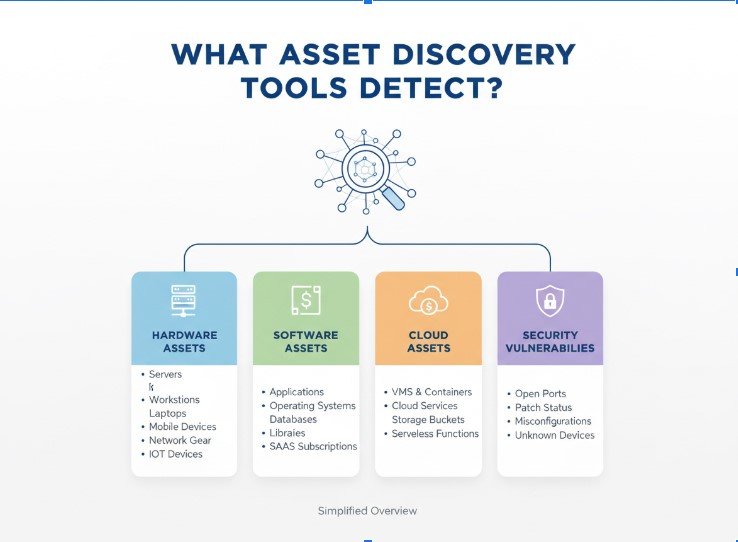
Hardware Assets: Physical servers, workstations, laptops, and mobile devices. Tools capture details like make, model, serial number, warranty, and specifications.
Endpoints: Any device connecting to your network, including remote laptops, contractor systems, and IoT devices such as printers or sensors.
Software and Applications: Installed software, browser extensions, and SaaS tools. Tools track versions, publishers, and usage patterns to spot unauthorized or redundant apps.
Network Devices: Routers, switches, firewalls, and access points. Discovery tools map network topology and monitor configuration changes.
Organizations typically discover that 15–30% of their software licenses are unused or duplicated once discovery tools are implemented.
The best asset discovery tools do more than scan your network. They keep your inventory accurate, protect against shadow IT, and make compliance easier.
Here are the features that matter most when choosing a tool.
Manual asset tracking quickly becomes outdated. The right tool runs automatically and continuously, detecting new devices or software the moment they appear.
Remote work means many assets connect from outside your corporate network. Look for tools that discover and track endpoints no matter where they are.
A complete picture of your environment includes software visibility. Choose tools that identify installed applications, usage patterns, and unauthorized programs.
Your IT environment changes every day. Discovery tools should detect and log these changes immediately to keep your records accurate.
When an unapproved device or risky software appears, your team should know instantly. Tools with real-time alerts help prevent compliance and security issues before they spread.
| Tool | Discovery Type | Endpoint Coverage | Software Discovery | Real-Time Updates | Best For |
|---|---|---|---|---|---|
| Zecurit | Agent-based, continuous | On/off network, remote | Application-level visibility | Yes | Remote/hybrid environments |
| Lansweeper | Network scanning | On-network primarily | Install detection | Scheduled scans | Large on-prem networks |
| InvGate Assets | Agent-based | Managed endpoints | Install tracking + usage | Agent reporting | Clean UI and reporting |
| ManageEngine AssetExplorer | Hybrid (network + agent) | Mixed environments | License management focus | Scheduled + agent | Full lifecycle ITAM |
| Qualys Asset Inventory | Continuous scanning | Cloud + on-prem | Security-focused | Yes | Security and compliance |
| ServiceNow Discovery | Multiple methods | Enterprise scale | Service mapping | Configurable | Large enterprises |
| SolarWinds Service Desk | Network scanning | Standard network | Basic install detection | Scheduled | ITSM integration |
| Snipe-IT | Manual entry + API | Depends on integration | Manual tracking | Manual updates | Budget-conscious teams |
Zecurit gives IT teams complete visibility into their environment by tracking every asset in real time. Instead of waiting for scheduled scans, the platform updates your inventory the moment a new device or software appears.
This is especially useful for remote teams, frequent software rollouts, or organizations that need to stay compliant at all times.
The platform combines automated asset discovery and real-time monitoring to track hardware, software, and endpoints across office and remote networks. It identifies every device, flags anything unauthorized, and alerts your team before small issues turn into bigger problems. Zecurit also includes software metering to monitor application usage, helping you find unused licenses and reduce costs.
With an easy-to-use dashboard and continuous updates, Zecurit gives you accurate, real-time visibility without complex setup or constant manual work.
Small and mid-sized IT teams managing remote or hybrid work environments that need accurate visibility without heavy configuration.
Lansweeper is known for its strength in discovering everything connected to your network. It uses agentless discovery, scanning your infrastructure to identify devices without installing software on each endpoint. This makes deployment quick and easy, especially for large on-premises environments.
The platform collects detailed information for each asset, including serial numbers, hardware specifications, firmware versions, and warranty details.
It also maps your network topology and tracks configuration changes, helping IT teams plan capacity and manage infrastructure more effectively.
IT teams managing large on-premises networks that need detailed hardware data and clear visibility into connected infrastructure.
InvGate Assets combines reliable asset discovery with a simple, user-friendly interface. It uses agent-based discovery to track hardware, software, and usage information across all devices, including those outside the corporate network. This ensures your asset data stays current even for remote employees.
The platform is easy to navigate, and its dashboard presents data clearly with built-in reports that are useful for both daily operations and compliance audits.
InvGate also integrates with IT service management systems, allowing discovery data to flow directly into service desk workflows.
Mid-sized IT teams that need reliable asset tracking, clear reporting, and smooth ITSM integration without a complex setup.
ManageEngine AssetExplorer combines asset discovery with complete lifecycle management in a single tool. It uses both network scanning and agent-based discovery, giving IT teams flexibility for different types of devices and environments.
Discovered assets automatically link to procurement records, license management, and compliance tracking. This unified approach reduces manual work and ensures that all data stays synchronized across asset, purchase, and contract records.
IT teams that want asset discovery and full lifecycle management in one connected platform.
Qualys takes a security-first approach to asset discovery. The platform continuously scans your environment to identify every connected device and links each one to known vulnerabilities. This helps IT and security teams maintain a clear view of potential risks across both on-premises and cloud environments.
Because it is cloud-based, Qualys requires no on-premise infrastructure. It delivers real-time visibility, compliance mapping, and continuous monitoring, making it ideal for organizations that prioritize security and regulatory compliance.
Organizations that need continuous asset visibility with strong security and compliance integration.
ServiceNow Discovery is built for large enterprises that need a detailed view of their entire IT infrastructure. The platform integrates directly with the ServiceNow Configuration Management Database (CMDB), giving teams full visibility into all assets and how they connect across systems and services.
It supports multiple discovery methods, including network scans and cloud API connections, to detect devices and applications across on-premises and cloud environments.
The platform’s automated workflows and service mapping features make it especially useful for organizations managing complex, global infrastructure.
Enterprises with complex infrastructures that require advanced discovery, service mapping, and integration with broader ITSM operations.
SolarWinds Service Desk integrates asset discovery directly into IT service management workflows. When a technician handles a support ticket, the platform automatically pulls related asset information, helping resolve issues faster and with better context.
The system discovers hardware and software across networks and links that data to tickets, knowledge base articles, and user profiles. This creates a unified view of IT assets within daily service operations, making it a good fit for teams already using SolarWinds ITSM tools.
IT teams that want integrated asset discovery within an existing SolarWinds ITSM environment.
Snipe-IT is an open-source platform that offers complete control over IT asset management without licensing costs. It’s ideal for organizations that want flexibility and have the technical skills to handle setup and maintenance on their own.
The platform supports manual asset entry, CSV imports, and API integrations for connecting with other discovery tools. While automated discovery is limited out of the box.
Snipe-IT provides strong asset tracking, lifecycle management, and customization through its open-source framework.
Small IT teams or budget-conscious organizations that want a customizable, self-hosted asset tracking solution.
Zecurit is built for today’s hybrid workplaces, where devices connect from offices, homes, and public networks. Instead of relying on scheduled scans, it continuously discovers and updates every asset in your environment, giving IT teams real-time visibility and control.
Key Highlights:
With Zecurit, IT teams gain accurate, continuous visibility across distributed environments. Every asset, whether in the office or off-network, stays tracked, compliant, and secure all from a single platform.
Network scanning alone misses remote workers, cloud infrastructure, and mobile devices. This can leave your inventory showing only what’s connected to your office network. A better approach is to use discovery methods that work regardless of network location.
Laptops that rarely VPN in, contractor devices, and traveling equipment create blind spots. These devices still access company data and pose security risks. Choose discovery tools that track endpoints no matter where they connect from.
IT environments change constantly. Periodic discovery leaves you working with outdated data. Continuous discovery that updates your inventory automatically ensures you always have an accurate view.
Finding unauthorized devices or risky software is only helpful if action follows. Connect discovery data to workflows that create tickets, send alerts, and escalate issues based on severity.
Asset discovery is no longer optional. As IT environments grow and spread across offices, homes, and cloud systems, real-time visibility has become essential.
The right tool depends on your setup. Enterprises may prefer ServiceNow or Qualys, while teams managing hybrid or remote environments benefit most from continuous discovery.
Zecurit is built for this reality. It helps you track every device and application in real time, reduce risk, and stay compliant without manual effort. The only question now is which discovery tool fits your organization best.