
Windows Endpoint Management Software

Manage, secure, and automate every Windows endpoint in your fleet – desktops, laptops, servers, and virtual machines – from one lightweight agent and one console.

Monitor Every Windows Endpoint in Real Time

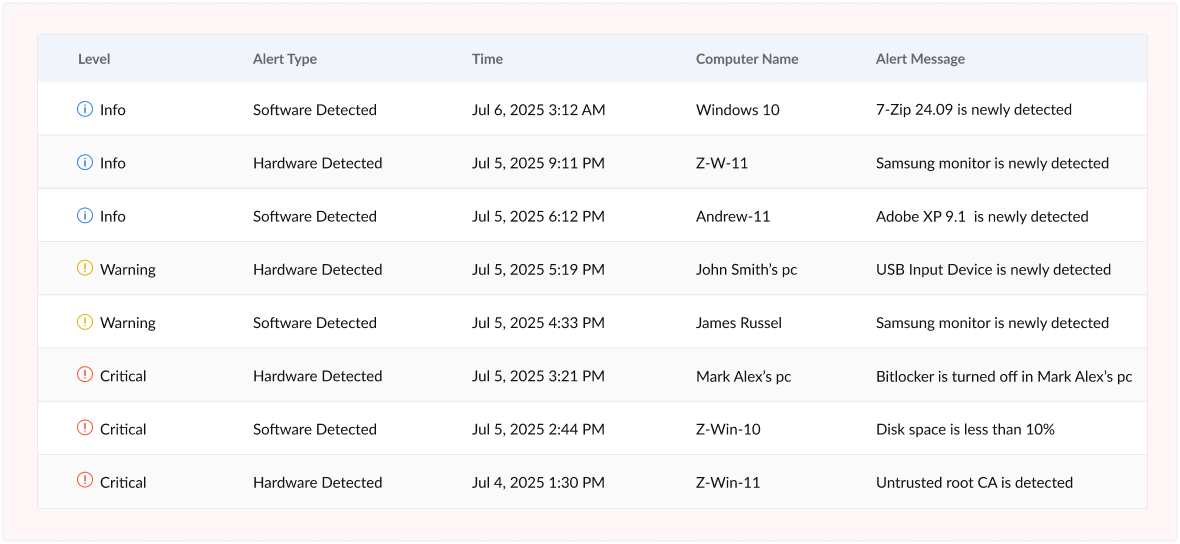
Know the exact state of every device the moment something changes. Zecurit's lightweight agent collects live hardware, software, and security data from every managed Windows endpoint, including:
  • CPU, memory, disk, and volume usage
  • Installed software and version details
  • Network adapters and connectivity status
  • Security posture: BitLocker status, firewall state, antivirus health
  • Running services and active processes
  • User logon activity and event logs

Dashboard showing a variety of IT asset alerts

Automate Windows Patch Management

Stop chasing patches manually. Zecurit gives you full visibility and control over Windows OS and third-party patch management - with automation that keeps every endpoint protected without IT lifting a finger.
  • Automatically scan all devices for missing security, critical, and optional patches ranked by severity
  • Approve, defer, or block patches by category and severity level
  • Define separate patch scan and deployment schedules per device group
  • Manage Windows feature updates, driver updates, and maintenance windows
  • Receive instant alerts when critical patches remain uninstalled
  • Generate real-time compliance reports for auditors and security stakeholders

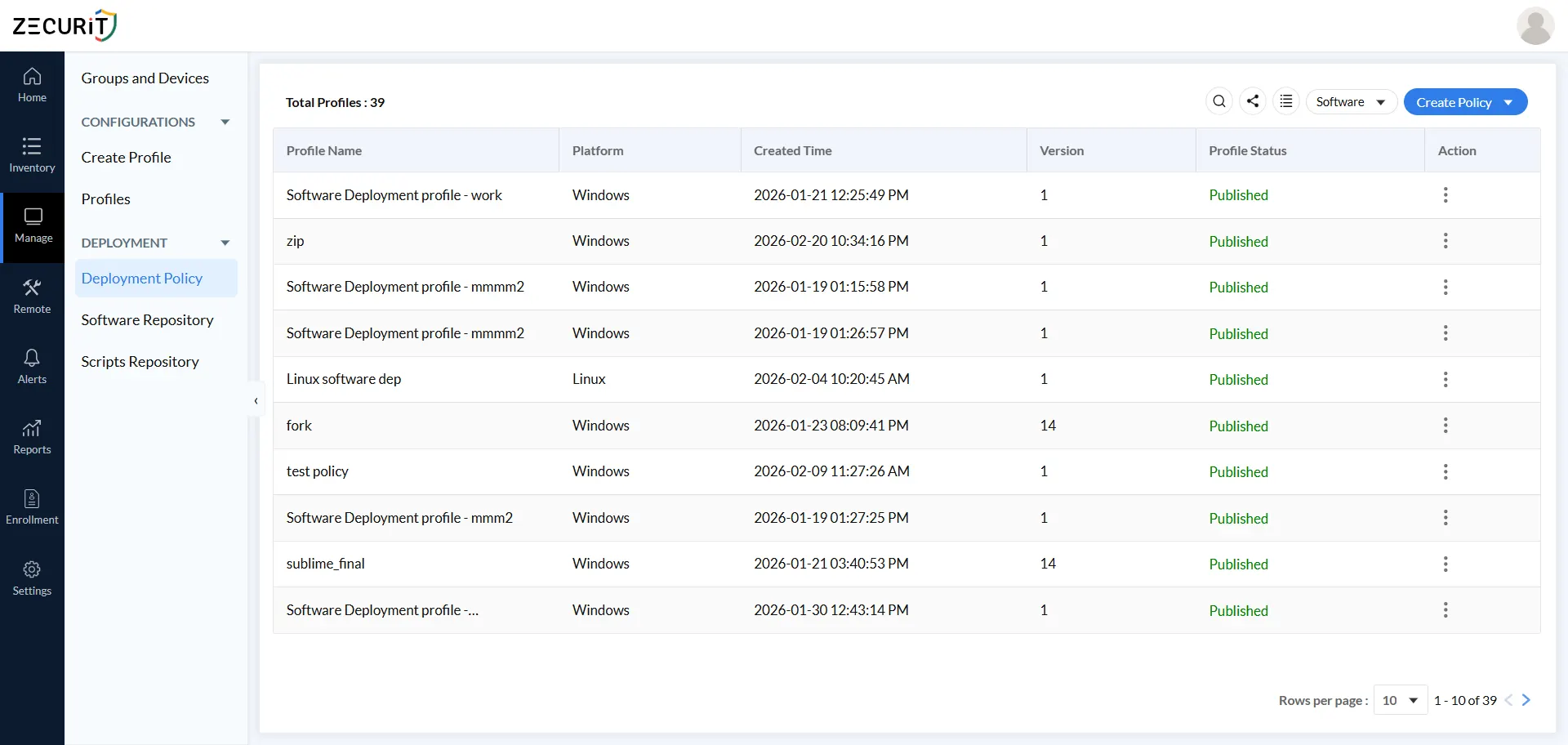
Scheduled software deployment dashboard showing off-hours maintenance window configuration in Zecurit

Deploy Software to Thousands of Windows Devices in Minutes

Push any application - MSI, EXE, or packaged installer - silently and automatically. Users never feel a thing.
  • Silent background installation with no user prompts or interruptions
  • Pre-install validation checks: disk space, registry keys, running services
  • Target specific device groups or individual endpoints
  • Schedule deployments during off-hours or maintenance windows
  • Run custom PowerShell or batch scripts before or after installation
  • Track real-time deployment progress with success and failure reports

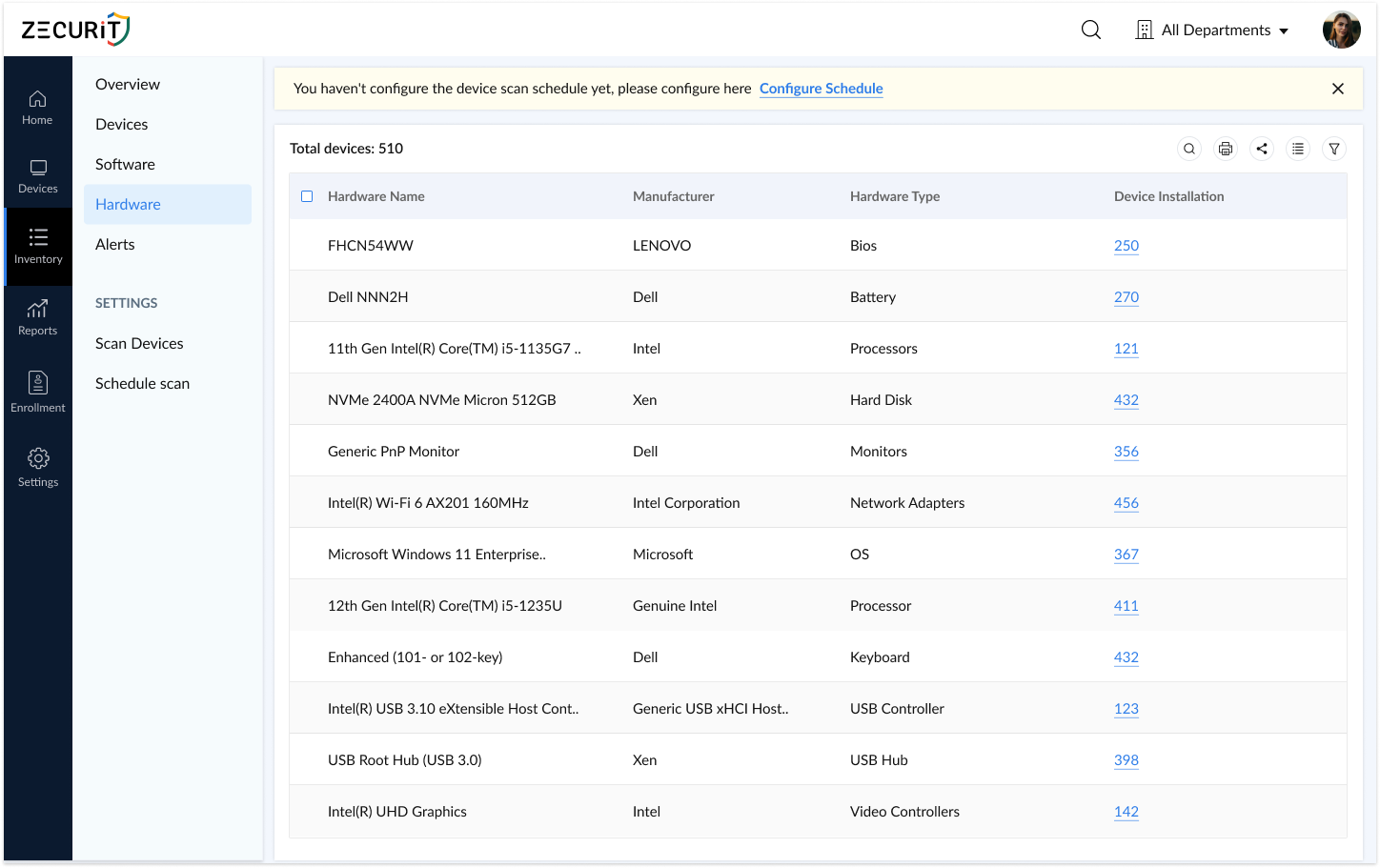
Zecurit Hardware Inventory Management Page.

Enforce Security Policies Across Your Entire Windows Fleet

Define once, enforce everywhere. Centralise Windows firewall rules, user account settings, update policies, and device controls - without touching each machine individually.

  • Build unlimited configuration profiles for different teams, roles, or security tiers
  • Deploy firewall rules, Windows Update policies, and password settings centrally
  • Create, modify, and disable local user accounts and groups remotely
  • Assign any policy to specific device groups or individual endpoints
  • Deploy custom PowerShell, Python, and batch scripts for advanced configuration

Scheduled software deployment dashboard showing off-hours maintenance window configuration in Zecurit

Centralise BitLocker Encryption Management

Enforce full-disk encryption across every Windows device with automated key backups, TPM policy control, and audit-ready reporting - all from one console.

  • Enable and enforce BitLocker encryption across your entire Windows fleet
  • Configure TPM-only, TPM+PIN, or passphrase authentication per device type
  • Automatically back up recovery keys to Active Directory with configurable rotation
  • Create BitLocker profiles per department or security requirement
  • Generate compliance reports showing encryption status and unprotected endpoints

Get a Complete Windows Hardware and Software Inventory

Instantly know what devices you have, what software is installed, which licences are at risk, and which hardware is approaching end of life.
  • Auto-discover and onboard new Windows devices as they join the network
  • Collect full hardware data: CPU, RAM, storage, peripherals, and system specs
  • Track every installed application across your fleet with real-time version updates
  • Monitor software licence entitlements vs. actual installations to avoid audit risk
  • Identify unused licences and over-deployed software with usage metering
  • Track warranty expiry dates and plan hardware refresh cycles proactively

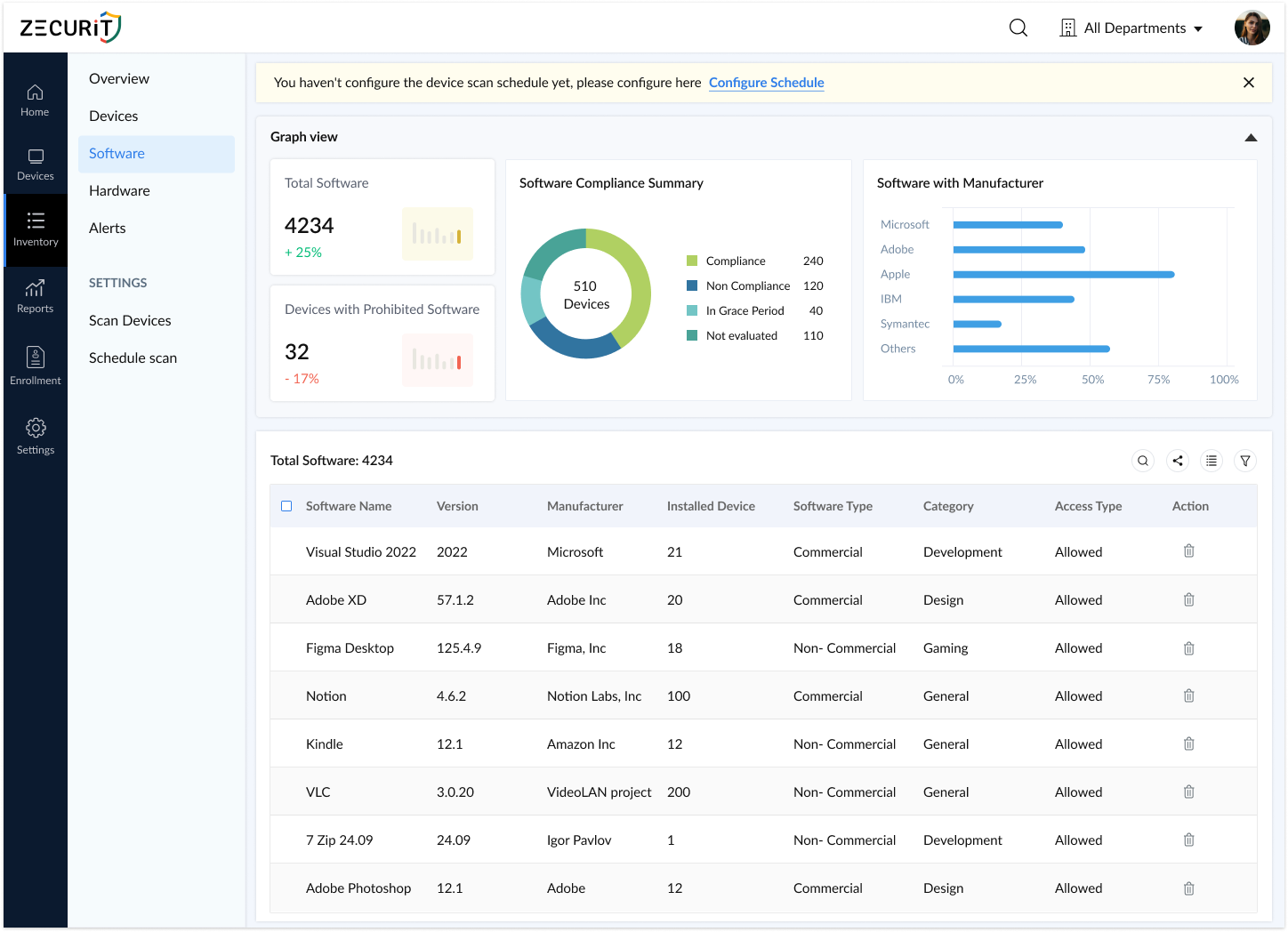
Zecurit Software Inventory

Remotely Access and Fix Any Windows Endpoint

Resolve issues on any Windows device without interrupting the end user - or travelling to the desk.
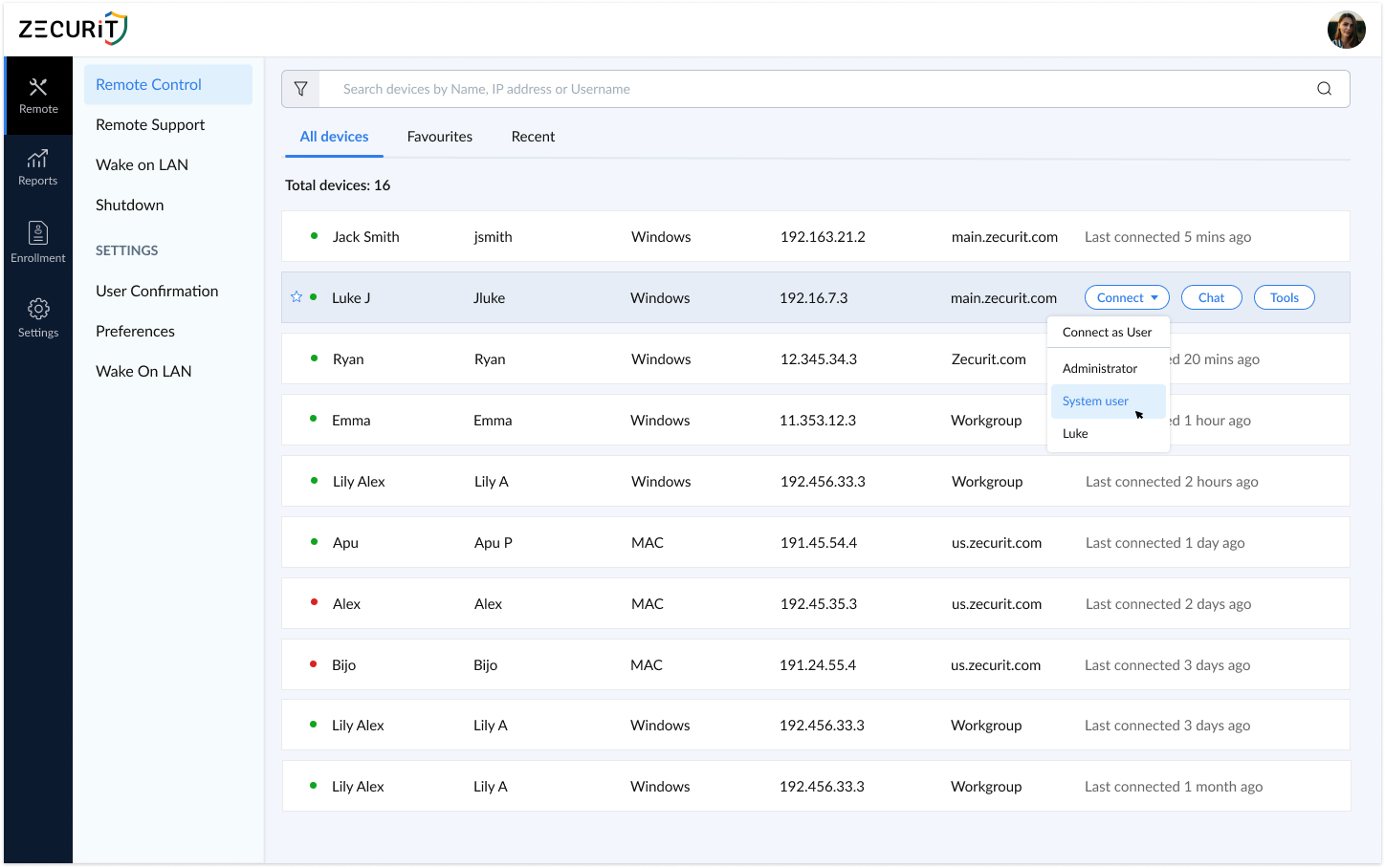
  • Full unattended remote access for after-hours maintenance and troubleshooting
  • Built-in diagnostic tools: process manager, network diagnostics, system information
  • Secure file transfer with end-to-end encryption between local and remote devices
  • Remote shutdown, restart, and Wake on LAN for offline devices
  • Multi-monitor support for complex user setups
  • Two-way chat during live support sessions
  • Full session logging and role-based access controls for compliance

Screenshot of Zecurit Remote Access web console dashboard displaying a table of online devices with columns for Wake on LAN, device name, user, OS, IP address, connection time, and actions like Connect and Upload; shows Windows and Mac endpoints connected via Zecurit server.

Automate Repetitive IT Tasks with Remote Script Execution

Turn hours of manual IT work into single-click automation. Run PowerShell, Bash, Python, VBScript, and batch scripts across thousands of Windows endpoints simultaneously.
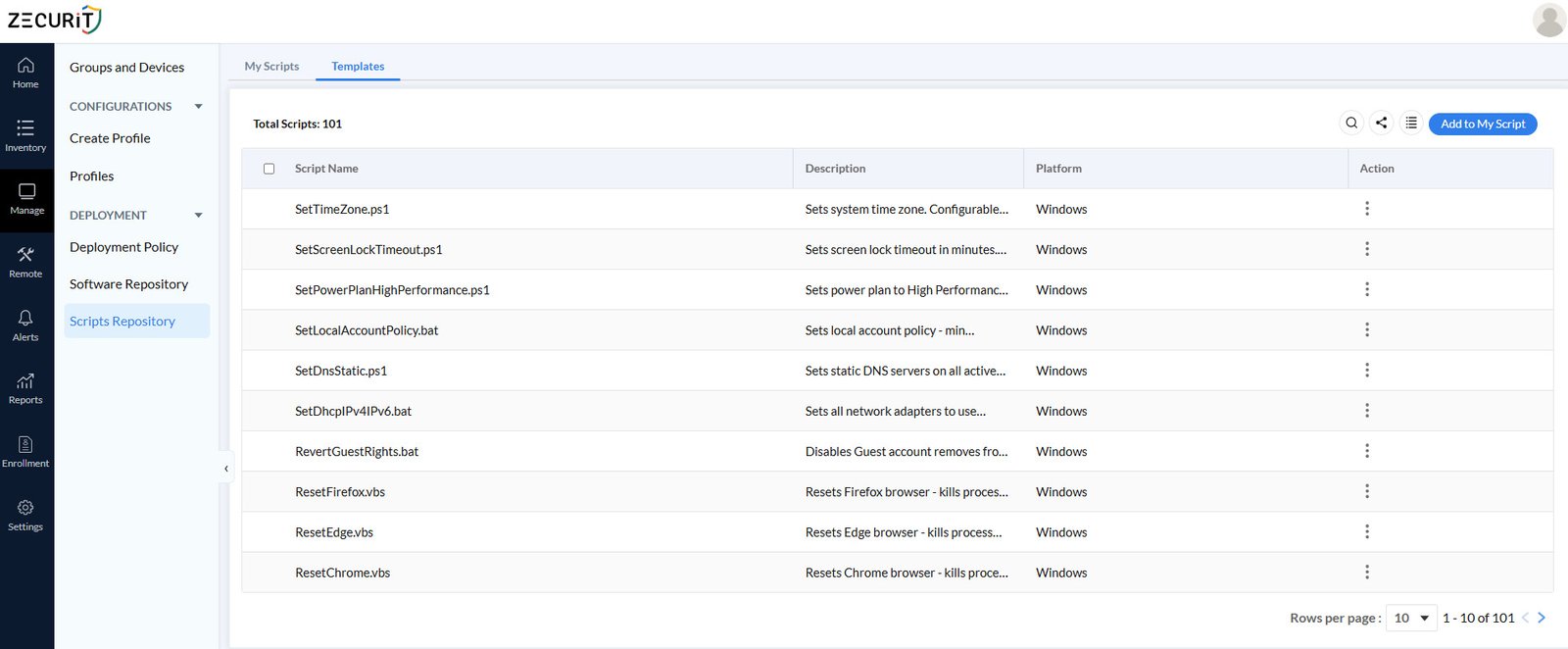
  • Execute scripts on demand, on schedule, or triggered by an alert condition
  • Centralised script repository with tags, search, and version management
  • Deploy scripts to specific device groups or individual endpoints
  • Pass custom runtime parameters without modifying script code
  • Track execution status live with output logs and failure alerts
  • Access 100+ pre-tested script templates for common IT and security tasks

Zecurit script templates library with pre-built Windows automation scripts for IT management

Stay Audit-Ready with 100+ Built-In Compliance Reports

Pull any compliance report in one click - or schedule it to land in stakeholders' inboxes automatically.
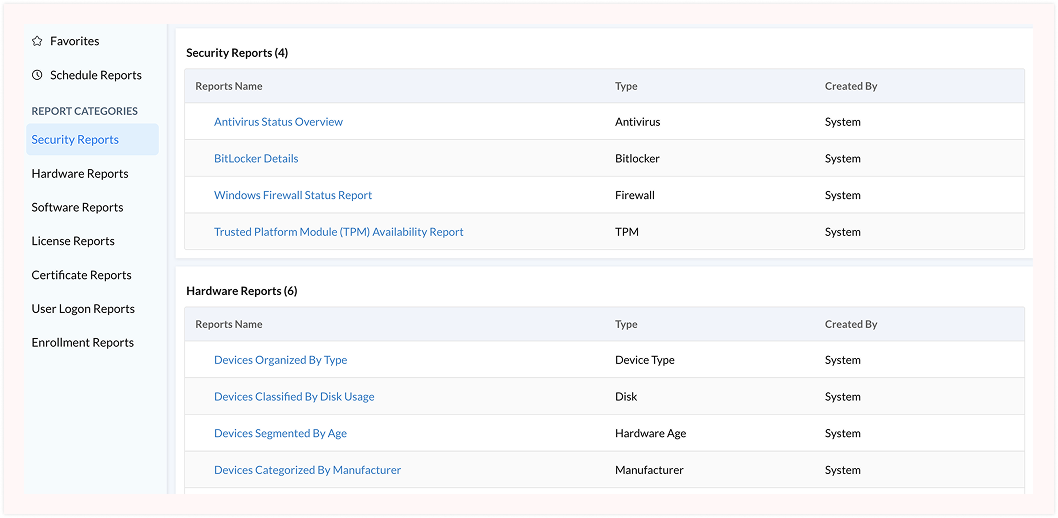
  • Pre-built report templates mapped to HIPAA, ISO 27001, PCI-DSS, GDPR, CIS, and NIST
  • Security reports: BitLocker status, firewall health, antivirus coverage, TPM availability
  • Software and licence compliance reports to detect prohibited or unlicensed applications
  • User logon audit reports for anomalous access detection and investigation
  • Schedule automated delivery daily, weekly, or monthly in PDF, CSV, or XLS format

"We replaced four separate tools with Zecurit, patch management, asset tracking, remote access, and BitLocker and cut our IT management overhead by half. One agent, one console, everything we need."

Sarah L
Director of IT

How Zecurit Works for Windows Endpoint Management

1. Deploy the agent Install the Zecurit lightweight agent via Group Policy, silent deployment package, or manual installer. Takes minutes. No server infrastructure required.

2. Enrol devices Windows endpoints appear in your console automatically. Hardware inventory, software data, and security posture populate in real time.

3. Set your policies Build configuration profiles, patch schedules, BitLocker rules, and firewall policies. Assign them to device groups or individual endpoints in a few clicks.

4. Let automation run Patch scans execute on schedule, software deploys silently, scripts handle maintenance, and alerts fire the moment something changes on any device.

5. Report with confidence Pull audit-ready compliance reports mapped to your regulatory framework, or set them to deliver to stakeholders automatically.

Please take a look at our article explaining Windows endpoint management.

Built for Every Windows IT Team

IT Administrators

One console for patching, software, config, remote access, and asset tracking

Security Teams

Real-time alerts, BitLocker enforcement, firewall policy, and security reports

IT Managers

Fleet-wide visibility, licence dashboards, and scheduled stakeholder reports

MSPs

Multi-client Windows management with role-based access and grouped policies

Finance and Procurement

Licence optimisation, warranty tracking, and software spend data

CISOs

Audit-ready templates mapped to HIPAA, ISO 27001, PCI-DSS, NIST, and GDPR

Supported Windows Versions

Zecurit manages all actively maintained Windows versions across desktop and server environments:

  • Windows 11 (Pro, Enterprise, Education)

  • Windows 10 (all editions, builds 1903+)

  • Windows Server 2022

  • Windows Server 2019

  • Windows Server 2016

Start Managing Your Windows Endpoints Today

Join hundreds of IT teams who trust Zecurit to automate their windows endpoint management.

Windows Endpoint Management FAQs

  • What is Windows endpoint management software?

    Windows endpoint management software is a centralised platform that lets IT teams deploy, configure, patch, monitor, and secure Windows devices across the organisation from one console - replacing manual, device-by-device management.

  • How is Zecurit different from Microsoft Intune?

    Zecurit is built for IT operations depth - automated patch management, BitLocker management, software metering, power management, remote script execution, and 100+ compliance reports in one lightweight agent. Intune is tightly coupled with the Microsoft 365 identity stack. Zecurit works across on-premise, cloud, and hybrid environments without requiring Azure AD or an M365 subscription.

  • Does Zecurit support on-premise Windows environments?

    Yes. The Zecurit agent works across on-premise, cloud, and hybrid environments. It communicates securely with the Zecurit cloud console regardless of where the device is located.

  • Can Zecurit manage Windows servers as well as desktops?

    Yes. Zecurit manages desktops, laptops, and Windows Server 2016, 2019, and 2022 from the same console with the same agent and the same policy framework.

  • Is Zecurit suitable for small IT teams?

    es. Zecurit gives small and mid-sized IT teams enterprise-grade endpoint control without requiring dedicated headcount per tool. One agent handles patch management, asset tracking, remote access, BitLocker, scripting, and reporting.

Explore Zecurit Endpoint Management Capabilities

Discover the powerful modules that help you manage, secure, and control every endpoint from a single console.

IT Asset Management

Gain full visibility into hardware and software assets across your organization.

Explore
Software Deployment

Remotely deploy and manage applications across devices with ease.

Explore
Patch Management

Automate patch scanning and deployment to keep endpoints secure and compliant.

Explore
Remote Access & Tools

Securely access devices, troubleshoot issues, and support users from anywhere.

Explore
Configuration Management

Enforce IT policies and maintain standardized configurations across endpoints.

Explore
Reports & Auditing

Generate endpoint reports and audit trails to monitor compliance and activity.

Explore