Every IT manager knows the story. You start with 20 laptops, a handful of software licenses and a simple Excel sheet. It's free, familiar and "good enough." Fast forward two years: you're managing 200 assets across three locations, your spreadsheet has 47 tabs and you just failed an audit because nobody updated the "Master_Inventory_FINAL_v3_ACTUAL_FINAL.xlsx" file.
The hidden cost of "free" isn't the software, it's the chaos, the compliance failures and the countless hours your team spends hunting for data that should be at their fingertips. This comprehensive guide examines when spreadsheets stop being a solution and start being a liability and how dedicated ITAM software transforms asset management from a time sink into a strategic advantage.
Spreadsheets aren't inherently bad for IT inventory management. They're accessible, flexible and cost nothing upfront. For startups or very small teams managing fewer than 30 assets, Excel for IT inventory can work reasonably well.
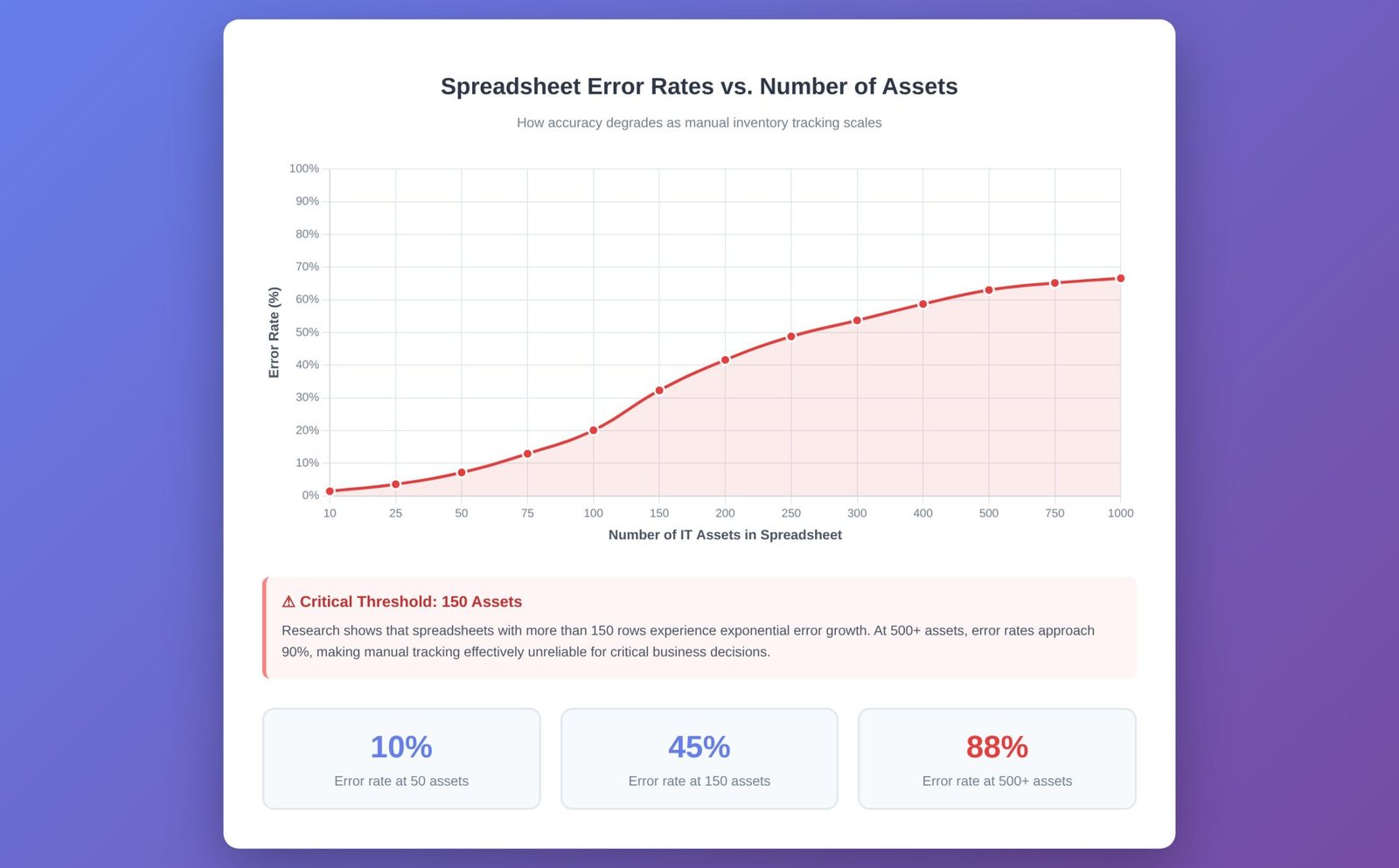
The problem emerges at scale. Research from Raymond Panko at the University of Hawaii found that spreadsheets with more than 150 rows have an error rate approaching 90%. When your asset inventory grows beyond a single person's ability to maintain it, manual asset tracking risks multiply exponentially.
Most organizations hit their breaking point when:
Multiple people need access to the same data, creating version control nightmares
Asset counts exceed 50-100 items, making manual updates unsustainable
Compliance requirements increase, demanding audit trails that spreadsheets can't provide
Turnover occurs and the person who "knew the system" takes their tribal knowledge with them
The moment you realize you can't answer "How many Windows 10 licenses do we actually own?" without spending three hours cross-referencing files, you've crossed from efficiency to liability.
The dangers of spreadsheet-based IT asset management extend far beyond inconvenience. Let's examine the specific, measurable risks that cost organizations time, money and compliance standing.
Studies consistently show that nearly 90% of large spreadsheets contain errors. These aren't just typos, they're miscalculations, broken formulas and outdated information that cascade into expensive mistakes.
Common errors include:
Duplicate entries that inflate license counts and waste budget
Deleted rows that make assets "disappear" from inventory
Copy-paste mistakes that assign the wrong serial numbers to users
Formula breaks that corrupt calculations across entire sheets
A single transposed digit in a serial number can mean the difference between recovering a stolen laptop and writing it off as a total loss. When you're managing hundreds or thousands of assets, these errors become statistically inevitable.
Ghost assets and zombie assets represent one of the most expensive failures of manual tracking. These are devices or licenses that exist in your records but have been lost, stolen, retired or simply misplaced in the physical world.
Industry estimates suggest that 30-40% of assets in spreadsheet-managed inventories are ghosts. That means nearly half your recorded inventory might not actually exist or be usable. When audit time comes, you're either buying replacement licenses in a panic or explaining to auditors why your records don't match reality.
Spreadsheets can't help you identify ghost assets because they have no connection to the physical world. They'll happily store information about a laptop that was recycled two years ago, continuing to count it toward your totals until someone manually removes it, if they ever do.
Excel files containing sensitive IT inventory data often have minimal security controls. Consider what's typically in your asset spreadsheet:
Serial numbers that identify specific hardware
Software license keys worth thousands of dollars
User assignments linking people to devices
Purchase dates and warranty information
Location data showing where valuable equipment is stored
These files frequently live on shared drives, get emailed as attachments or exist on personal laptops. Every copy is a potential security breach. Spreadsheet version control is nearly impossible at scale, meaning you often can't track who accessed or modified sensitive data.
One deleted employee with an old copy of your master inventory file on their personal laptop represents an unquantified security risk that most IT managers don't even know exists.
Spreadsheets are snapshots, not live documents. The moment you save the file, the data begins aging. In dynamic IT environments where assets are deployed, moved, upgraded and retired daily, this creates a fundamental disconnect between your records and reality.
Your spreadsheet might show that Jennifer in Accounting has a Dell Latitude 5520. But Jennifer got promoted to Finance last month, inherited her predecessor's newer MacBook and her old laptop is sitting in a storage closet. The spreadsheet doesn't know this, can't know this and won't know this until someone manually updates it, which might be never.
This lack of real-time visibility means every decision based on your spreadsheet data is potentially based on outdated information. You might reorder laptops you already have or retire licenses you're still using.
Dedicated IT Asset Management software fundamentally changes the relationship between your records and your actual inventory. Rather than manually entering data and hoping it stays accurate, ITAM systems actively discover, track and update asset information.
Modern ITAM tools use agent-based or agentless scanning to automatically discover assets on your network. When a new device connects, the system immediately logs its presence, hardware specifications, installed software and network configuration.
This automated inventory management means your records update themselves. When Jennifer moves from Accounting to Finance and logs into her new MacBook, the system notes the change. When that old Dell sits unused for 90 days, the system flags it as a potential ghost asset for review.
The time savings alone justify the investment. Organizations report reducing manual data entry time by 80-90% after implementing automated discovery, freeing IT staff for strategic work rather than spreadsheet maintenance.
ITAM software tracks assets from procurement through disposal, creating an unbroken chain of custody and status changes. You can see:
When an asset was purchased and from which vendor
Who has possessed it throughout its lifecycle
Every maintenance event, upgrade or repair
Warranty status and renewal dates
Depreciation schedules for accounting purposes
Disposal methods that meet compliance requirements
This complete lifecycle view is nearly impossible to maintain in spreadsheets because it requires discipline, consistency and time that manual processes can't sustain. Please check this IT Asset Lifecycle Management article to learn best practices for procurement, deployment, maintenance and disposal, helping you optimize asset utilization and reduce costs.
When auditors come calling whether for software licenses, financial accounting or regulatory compliance, audit-ready reports can mean the difference between a smooth review and a costly remediation process.
ITAM systems generate compliance reports instantly, showing exactly what you own, where it is, who's using it and whether you're properly licensed. These reports include timestamps, change logs and verification data that spreadsheets simply cannot provide.
The audit trail alone provides substantial value. You can demonstrate who made changes to asset records, when they made them and why, critical for both internal accountability and external compliance requirements.
Because ITAM software pulls data directly from assets themselves rather than relying on manual entry, data accuracy in ITAM approaches 95-98% compared to the 10-50% accuracy typical of large spreadsheets.
This accuracy compounds over time. With spreadsheets, errors accumulate and multiply. With ITAM software, automated verification catches and corrects discrepancies before they cascade into major problems.
| Factor | Spreadsheets | ITAM Software |
|---|---|---|
| Data Accuracy | 10-50% for large inventories; errors compound over time | 95-98% through automated discovery and verification |
| Scalability | Breaks down beyond 50-100 assets; multiple versions create chaos | Designed for thousands of assets across multiple locations |
| Initial Cost | Free to minimal | $500-$5,000+ annually depending on features and scale |
| Long-term Cost | High hidden costs: labor hours, compliance failures, ghost assets | Lower total cost through efficiency and error prevention |
| Automation | None; every update requires manual entry | Automated discovery, updates and alerting |
| Security | Minimal; files easily copied and shared | Role-based access, encryption, complete audit trails |
| Real-time Visibility | None; data ages from moment of entry | Live dashboards showing current asset status |
| Compliance Support | Manual reporting; no audit trail | Automated compliance reports with complete documentation |
| Learning Curve | Familiar but requires system documentation | 1-2 weeks for most teams; vendor training included |
| Version Control | Nearly impossible; leads to conflicting copies | Single source of truth; automatic change tracking |
Not every organization needs enterprise ITAM software immediately. But certain warning signs indicate that your spreadsheet system is costing more than it's saving. Here's when to make the switch:
1. You Can't Answer Basic Questions Quickly
If someone asks "How many laptops are due for replacement next quarter?" and you need hours or days to provide an accurate answer, your system has failed its primary purpose. ITAM software ROI begins with the time you reclaim from data archaeology.
2. You've Failed or Narrowly Passed a Software Audit
Software vendors are increasingly aggressive about compliance audits. If you've been caught under-licensed, paid compliance penalties or spent weeks preparing documentation, you need better systems. The cost of a single failed audit often exceeds five years of ITAM software subscriptions.
3. Multiple Versions of the "Master" File Exist
When people start creating local copies because they can't access the shared file or because they don't trust its accuracy, you've lost control of your asset data. This fragmentation makes every subsequent decision based on uncertain information.
4. Onboarding New IT Staff Takes Days
If new team members need extensive training to understand your spreadsheet system and productivity suffers for weeks while they learn its quirks, you're perpetuating inefficiency. Good ITAM systems are intuitive enough that new users become productive within days.
5. You're Making Purchasing Decisions Without Confidence
When you're not certain whether to order new equipment because you can't verify what you already own, you're either wasting money on unnecessary purchases or creating shortages that impact productivity. Both scenarios are expensive and avoidable.
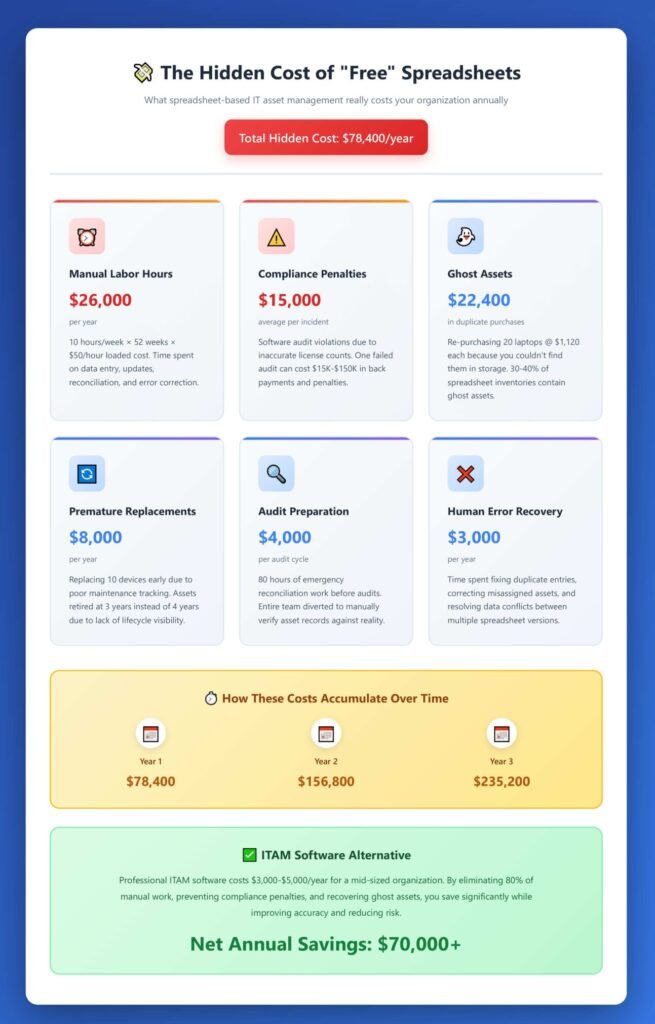
The return on investment from ITAM software comes from multiple sources:
Time Savings: If your IT team currently spends 10 hours weekly on manual inventory management at an average loaded cost of $50/hour, that's $26,000 annually just in labor. ITAM software typically reduces this by 80%, saving $20,800 per year.
Avoided Compliance Penalties: Software audit penalties range from thousands to millions of dollars. Even one avoided penalty justifies years of ITAM investment.
Ghost Asset Recovery: Finding and redeploying just 10% of ghost assets in a 500-device inventory can recover $50,000-$100,000 in value that would otherwise be repurchased.
Extended Asset Life: Better tracking means better maintenance scheduling, reducing premature replacements by 15-20%.
For most organizations with 50+ assets, ITAM software pays for itself within 6-12 months through efficiency gains and error prevention alone.
Moving from Excel to dedicated ITAM software isn't as disruptive as many fear. Modern tools offer import capabilities that let you upload your existing spreadsheet data as a starting point. From there:
Initial Discovery (Week 1): Deploy scanning agents or configure network discovery
Data Reconciliation (Week 2-3): Compare imported data against discovered assets, identify discrepancies
Process Definition (Week 3-4): Establish workflows for procurement, deployment and retirement
Training (Ongoing): Most teams become proficient within 2 weeks of daily use
The key is accepting that your spreadsheet data likely has errors and letting the ITAM system's automated discovery serve as the source of truth moving forward.
The spreadsheet versus ITAM software decision isn't really about cost, it's about recognizing when a general-purpose tool becomes a specialized liability. Spreadsheets served you well when your needs were simple. As your organization grew, those needs evolved beyond what manual tracking can reliably support.
Real-time visibility, automated discovery and audit-ready reports aren't luxuries, they're requirements for modern IT management. The time your team spends maintaining spreadsheets, correcting errors and hunting for missing information represents pure waste that specialized ITAM software eliminates.
The hidden cost of "free" spreadsheets is the opportunity cost: the strategic initiatives delayed because your team is buried in manual data entry, the compliance penalties paid because your records didn't match reality and the ghost assets purchased twice because you couldn't find them the first time.
Dedicated ITAM software transforms asset management from a necessary burden into a strategic capability. The question isn't whether to make the switch, but whether you can afford to wait another quarter while the problems compound.
Evaluate your current system honestly using the checklist above. If you recognize three or more warning signs, it's time to explore ITAM solutions. The investment pays for itself faster than most IT tools and the operational improvements begin immediately.
Your future self, the one who answers audit questions with confidence rather than panic, will thank you for making the switch today.