
Centralized control for enterprise drive encryption. Configure policies, enforce TPM authentication, automate recovery key backups, and generate comprehensive compliance reports.
Microsoft BitLocker Administration and Monitoring (MBAM) support ended in April 2026 – migrate to the cloud‑native Zecurit now.
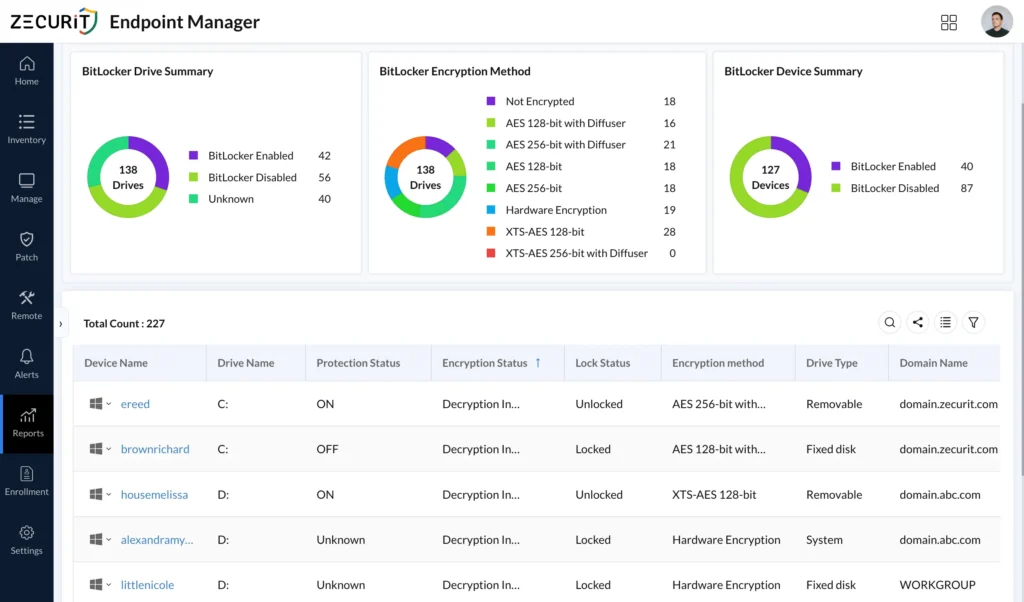







Simplify enterprise encryption with centralized BitLocker policy management, automated compliance, and detailed reporting capabilities.
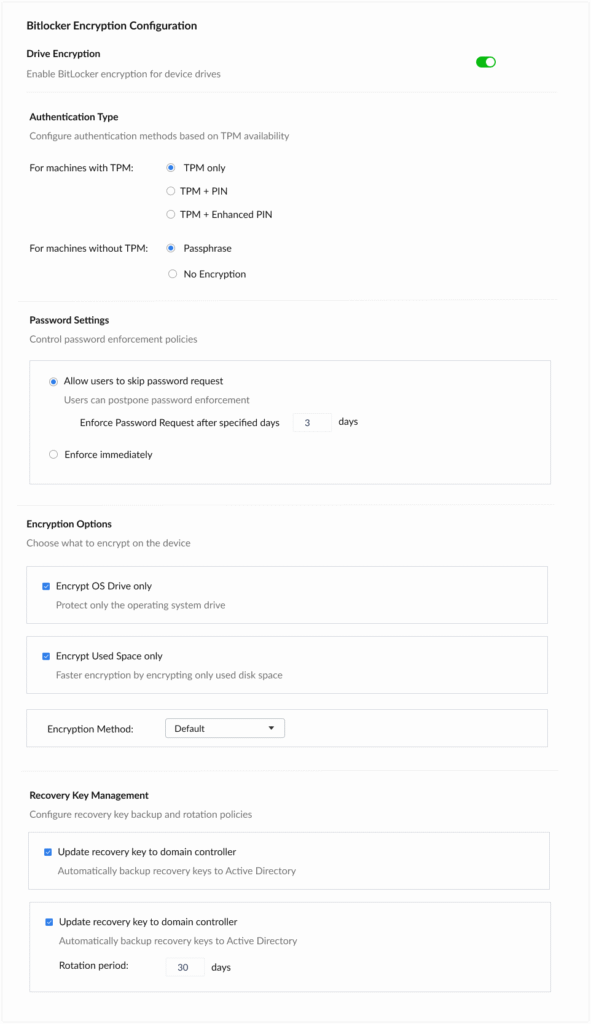
Enable BitLocker encryption across all endpoints from a single console. Configure OS drive and used space encryption options with granular control over encryption methods and algorithms.
Configure authentication types based on TPM availability. Support for TPM-only, TPM+PIN, TPM+Enhanced PIN configurations, or Passphrase fallback for devices without TPM modules.
Automatically backup BitLocker recovery keys to Active Directory with configurable rotation periods. Set Password enforcement policies with flexible or mandatory compliance timelines.
Generate comprehensive reports on encryption status across your organization. Monitor policy compliance, track encryption deployment progress, and identify unprotected endpoints.
View detailed TPM availability and version information across all managed devices. Identify devices requiring firmware updates or hardware upgrades for enhanced security.
Create multiple BitLocker profiles for different departments or security requirements. Deploy appropriate policies based on device groups, user roles, or organizational units.
Push BitLocker policies to endpoints automatically
Choose between full disk or used space encryption
TPM, PIN, Enhanced PIN, or passphrase support
Automatic backup to domain controllers
Flexible or mandatory password requests
Configurable rotation periods (30 days default)
Configure drive encryption, TPM authentication, password policies, and recovery key management from a unified interface.
Ensure all endpoints have encrypted drives, protecting sensitive data from physical theft and unauthorized access.
Reduce manual encryption configuration time with automated policy deployment and centralized management.
Standardize BitLocker policies across all devices and generate audit-friendly reports to prove encryption coverage and key escrow.
Eliminate lost recovery keys with automatic Active Directory backup and configurable rotation policies.
Gain complete visibility into encryption status and hardware readiness with comprehensive BitLocker and TPM reports for audit-ready compliance.
Track encryption status across all managed endpoints. View which devices are encrypted, encryption methods in use, and policy compliance rates. Export detailed reports for auditing and compliance documentation.
Identify devices with TPM capabilities and their versions. Plan hardware upgrades for devices lacking TPM support. Monitor TPM activation status and readiness for enhanced security policies.
Complete audit trail of recovery key access and usage. Track when keys are retrieved, by whom, and for which devices. Maintain compliance with data protection regulations requiring access logs.
Microsoft is discontinuing MBAM 2.5 SP1 support in just months. Discover how Zecurit eliminates the infrastructure tax while providing superior BitLocker management for hybrid workforces. Migrate risk-free with our proven 3-step process.
ZECURIT supports passphrase-based encryption for devices without TPM. You can configure separate policies for non-TPM devices or choose "No Encryption" if hardware limitations prevent secure encryption deployment.
Recovery keys are automatically backed up to your Active Directory domain controllers with configurable rotation periods. This ensures keys are available for recovery while maintaining security through AD access controls.
Yes, ZECURIT allows you to create multiple BitLocker configuration profiles and assign them to specific device groups/devices.
ZECURIT supports all standard BitLocker encryption methods including AES-128, AES-256, XTS-AES 128, and XTS-AES 256. The default method can be selected per policy profile.
Reports provide complete visibility into encryption coverage, showing which devices are compliant, pending encryption, or non-compliant. Export these reports for compliance audits related to GDPR, HIPAA, PCI-DSS, and other data protection regulations.
No. BitLocker encrypts the entire drive (volume), not just individual files or folders.
When BitLocker is enabled:
This provides much stronger protection than file-level encryption because the entire drive remains protected even if removed from the device.
If a BitLocker-encrypted drive is removed and connected to another computer:
The normal Windows login password is not sufficient unless the drive is unlocked using the required BitLocker authentication method.
Without the recovery key or authorized credentials, the data remains inaccessible.A BitLocker Recovery Key is typically required when BitLocker detects a significant security-related change, such as:
The Recovery Key acts as a backup method to regain access to encrypted data when normal authentication cannot be completed.
BitLocker significantly reduces the risk of data theft.
If a stolen laptop is:
The drive remains fully encrypted. The thief cannot access the data without the correct credentials or recovery key.
Even if the drive is physically removed and connected to another computer, the data remains encrypted and inaccessible without authorization.
If the laptop was already logged in and unlocked at the time of theft, the thief may be able to access data until the device is locked, shut down, or remotely managed.
BitLocker does not prevent data recovery after an operating system failure.
If Windows becomes corrupted:
Alternatively, Windows recovery tools or recovery environments can be used to access the encrypted drive using the Recovery Key.
Important: Organizations should securely store BitLocker Recovery Keys. Without the Recovery Key, recovering data from a damaged system may not be possible.
BitLocker helps protect sensitive business and personal data from unauthorized access.
In today's environment, full disk encryption is considered a security best practice and is often a baseline requirement for protecting endpoint data.
Discover the powerful modules that help you manage, secure, and control every endpoint from a single console.
Gain full visibility into hardware and software assets across your organization.
Remotely deploy and manage applications across devices with ease.
Automate patch scanning and deployment to keep endpoints secure and compliant.
Securely access devices, troubleshoot issues, and support users from anywhere.
Enforce IT policies and maintain standardized configurations across endpoints.
Generate endpoint reports and audit trails to monitor compliance and activity.