
The 2026 standard for remote access is not just a connection. It is a secure, high-speed gateway that feels like sitting in the same room as the device you are managing.
Remote desktop software has evolved far beyond the original concept of screen mirroring. In 2026, it is defined as a secure, cloud-brokered access layer that allows IT professionals to connect to any endpoint worldwide without configuring VPNs, opening firewall ports, or exposing machines to the public internet.
The best platforms today bypass the traditional Network Address Translation (NAT) and firewall hurdles that plagued earlier tools. Instead, they use outbound-only relay connections to establish sessions that deliver same-room performance: fluid 4K visuals, near-zero input lag, and full control over remote resources as if you were physically present.
For IT Support Leads, MSPs, and Infrastructure Managers, this means one thing: faster resolution times and a smaller attack surface. Legacy approaches that relied on open RDP ports or complex VPN tunnels are no longer acceptable. They are a liability.
A slow remote session is not just frustrating. It is expensive.
When technicians wrestle with lag, they make mistakes. They misread dialogs. They click past warnings. They abandon complex tasks mid-session and return later, increasing dwell time for any active threat.
Modern remote support software has solved this with adaptive video codecs. The H.265/HEVC standard, now widely adopted in enterprise-grade tools, compresses screen data with dramatically higher efficiency than older protocols. The result is a stream that maintains crisp visuals even on constrained bandwidth connections, including public Wi-Fi or cellular networks.
The arrival of 5G and Wi-Fi 7 has further closed the latency gap. Wi-Fi 7 delivers theoretical throughputs above 40 Gbps with sub-millisecond latency in enterprise environments. 5G standalone networks, with average round-trip latencies below 10ms, have made cellular-connected remote sessions nearly indistinguishable from wired LAN access. For field technicians supporting remote sites or retail branches, this is transformative.
Zecurit Remote Access is built on an optimized proprietary protocol that dynamically adjusts stream quality based on available bandwidth, ensuring the session remains responsive whether the technician is on fiber at headquarters or tethered to a phone in a server closet.
Microsoft’s Remote Desktop Protocol (RDP) was not designed for internet exposure. It was built for internal LAN use. Yet for years, organizations opened RDP on port 3389 and pointed it directly at the internet, creating one of the most exploited attack surfaces in enterprise IT history.
The FBI and CISA have repeatedly identified exposed RDP as a leading ransomware entry vector. Credential-stuffing attacks, brute-force tools, and exploit kits targeting unpatched RDP vulnerabilities are openly traded. The moment an RDP port is exposed, automated scanners find it within minutes.
VNC carries similar risks. Its security model depends heavily on the strength of the surrounding network, and many deployments transmit data over unencrypted or weakly encrypted channels.
Zecurit solves this at the architecture level, not as a feature add-on.
Zecurit operates on a Zero-Trust model. No inbound firewall ports are required. Connections are always initiated outbound from the managed endpoint to Zecurit’s relay infrastructure. There is no publicly reachable service. There is nothing for a scanner to find.
Every session requires:
Multi-Factor Authentication (MFA): Mandatory for every connection attempt, with no administrative bypass.
Network Level Authentication (NLA): Credentials are verified before the session is established, preventing unauthenticated access to the login screen.
End-to-End Encryption (E2EE): Session data is encrypted in transit using AES-256 and cannot be intercepted at the relay layer.
Role-Based Access Control (RBAC): Technicians can only access the endpoints they are authorized to manage.
This architecture means Zecurit is safe to use without a VPN. The VPN is not an added layer of security; it is an unnecessary complexity that Zecurit’s relay model replaces entirely.
The verdict is clear. RDP and VNC were built for a different era. Zecurit's protocol was designed for the hybrid workforce reality of 2026.
Everything you need for secure remote desktop sharing, remote support, and IT management in one powerful platform.
Unattended remote access lets technicians connect to any server, workstation, or endpoint around the clock without a user present. A lightweight Zecurit agent keeps every managed device available from the console, with full authentication and audit logging on every session.
Zecurit's remote desktop client renders all connected displays simultaneously, letting technicians view each screen individually or as a combined extended desktop without disrupting the remote user's layout.
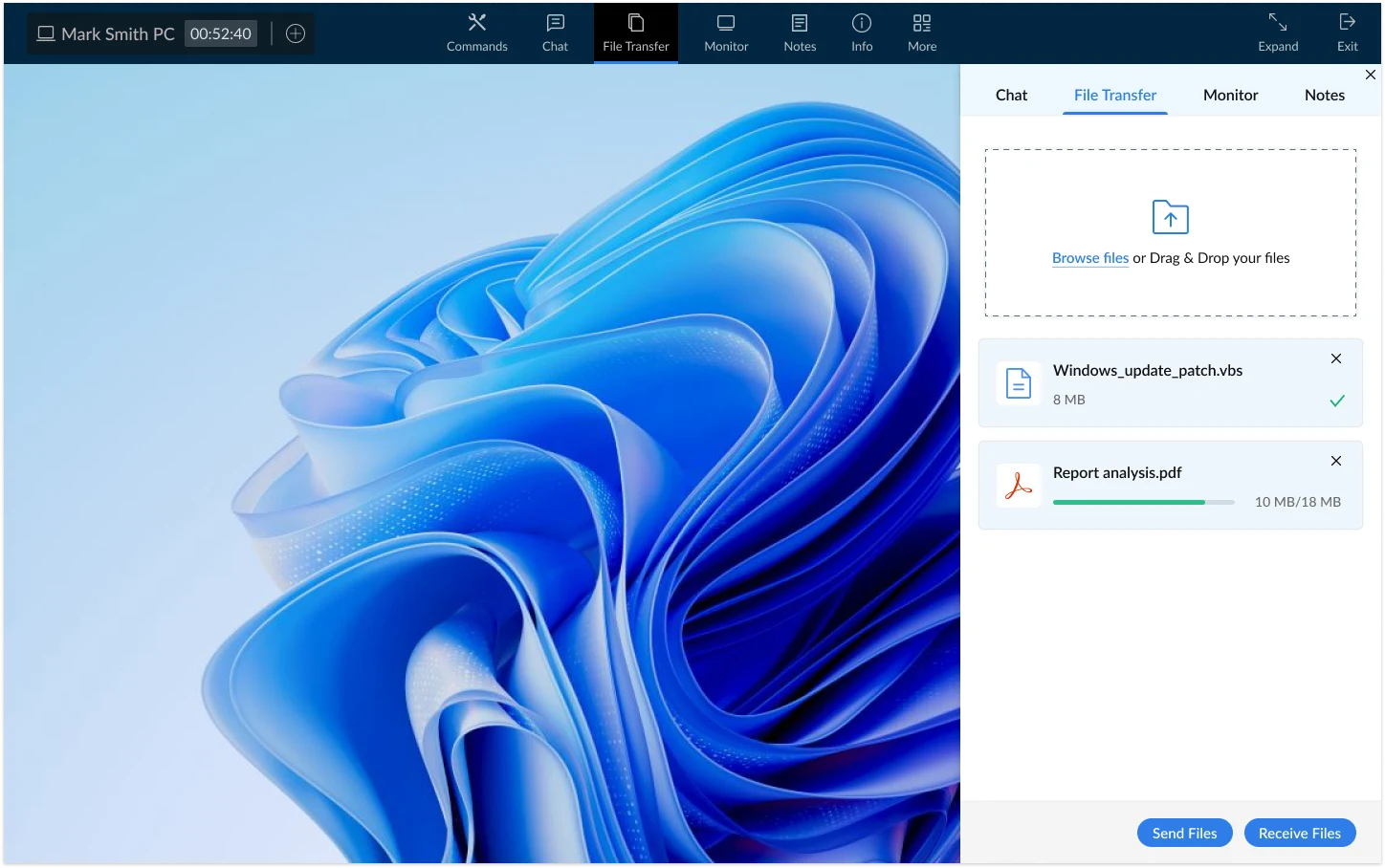
Encrypted drag-and-drop file transfer is built directly into every session. Optional clipboard sync lets technicians move commands, error codes, and configuration values between local and remote machines without manual re-entry.
Zecurit's built-in toolkit covers the full diagnostic workflow without switching applications: Registry Editor, Task Manager, Command Prompt, Event Viewer, and Service Manager.
Black Screen Mode blanks the physical display at the remote end during sensitive maintenance, keeping session activity invisible to anyone in the room. Essential for compliance-driven and shared-workspace environments.
Reboot unresponsive endpoints remotely and wake powered-off machines via Wake on LAN before a session begins, with no physical access required.
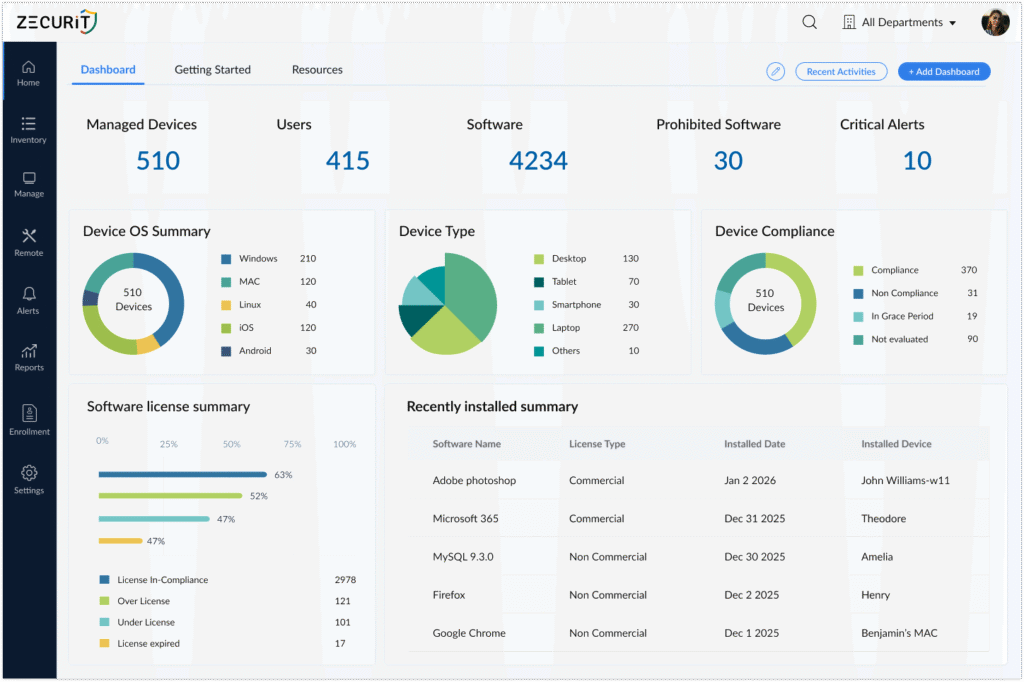
Zecurit Remote Access is not a standalone tool bolted onto a management platform. It is a native module inside the Zecurit Endpoint Manager, giving IT teams a single pane of glass for monitoring, alerting, patching, and now remote control.
The operational advantage is measurable. When a monitoring alert fires, for example, a device reporting sustained CPU spikes above 95%, the technician does not need to switch applications, look up the device IP, configure a connection, or authenticate separately. They click Launch Remote Session directly from the alert card. The session opens in under 30 seconds.
This closed-loop workflow from detection to resolution reduces mean time to repair (MTTR) for common endpoint issues by eliminating the manual steps between identifying a problem and acting on it.
Zecurit Remote Access also pairs with Windows Endpoint Management workflows, Software Deployment pipelines, and Windows Server Management operations, creating a unified remediation environment.
Every Zecurit remote session generates a complete audit log including:
Technician identity and authentication method used
Session start and end timestamps
Devices accessed
Files transferred
Commands executed via terminal
These logs are retained and exportable for compliance with HIPAA (healthcare endpoint access), GDPR (data access transparency), and SOC 2 Type II (security and availability controls). For MSPs operating under client SLAs and enterprise IT teams subject to regulatory audit, this removes the need for a separate session recording tool.
A well-designed remote desktop agent has a minimal footprint. Zecurit's agent consumes negligible CPU and memory while idle. During an active session, the agent encodes and transmits screen data using hardware acceleration where available, which offloads processing from the CPU. For most workloads, the user logged into the machine locally will not notice a performance difference during a remote session.
With legacy tools like RDP, no. Exposing an RDP endpoint without a VPN or additional hardening is a well-documented security risk. With Zecurit, the answer is yes, by design. Zecurit's Zero-Trust relay model means no inbound connection is ever accepted by the endpoint. The device reaches out to Zecurit's encrypted relay infrastructure. There is nothing to expose, and no VPN is needed to achieve a higher security posture than most VPN-plus-RDP configurations provide.
Most legacy remote support tools are standalone applications that require separate purchase, separate authentication, and separate management consoles. Zecurit Remote Access is natively embedded in the Zecurit Endpoint Manager ecosystem. Monitoring, alerting, patching, and remote control all operate within one platform. The result is faster incident response, simpler licensing, and a unified audit trail across all IT operations
Zecurit is designed for real-world connectivity. The adaptive codec adjusts stream quality dynamically based on available bandwidth. Sessions remain usable on connections as low as 1 Mbps and scale to deliver 4K-quality rendering on high-bandwidth links. The combination of 5G and Wi-Fi 7 infrastructure now available in enterprise environments makes this ceiling increasingly accessible for field technicians.