
Unified Endpoint Management (UEM) is a framework and technology platform that gives IT and security teams a single console to manage, secure, monitor, and remediate every endpoint in their organization, regardless of operating system, form factor, ownership model, or physical location.
In 2026, the endpoint universe has expanded well beyond the corporate laptop. A modern UEM platform must handle Windows PCs and servers, macOS devices, Linux workstations, iOS and Android smartphones, tablets, IoT sensors, point-of-sale terminals, industrial controllers, and emerging wearable devices, all through one unified management layer.
The strategic value of UEM goes beyond operational convenience. It is the primary control plane through which organizations enforce their security posture. Every device that touches corporate data is either managed and verified, or it is a risk. UEM is what makes the difference between those two states.
The definition has also shifted in 2026 in one important way: UEM is no longer just a management discipline. It has become a convergence point where IT operations, cybersecurity, and Digital Employee Experience (DEX) intersect. The best UEM platforms in 2026 do not just manage devices; they monitor device health to proactively resolve performance issues before users experience them, integrate with EDR and XDR signals to adjust security posture dynamically, and use AI-assisted automation to reduce the human intervention required for routine remediation tasks.
Strategic framing for leadership: UEM is the central nervous system of the modern digital workplace. It connects identity, device posture, application access, and security policy into a single coherent operational layer. Organizations without a unified management plane are operating with fragmented visibility and fragmented control, which translates directly into elevated risk and elevated cost.
Understanding where UEM came from explains why it is designed the way it is, and why the next evolution matters for your 2026 planning.
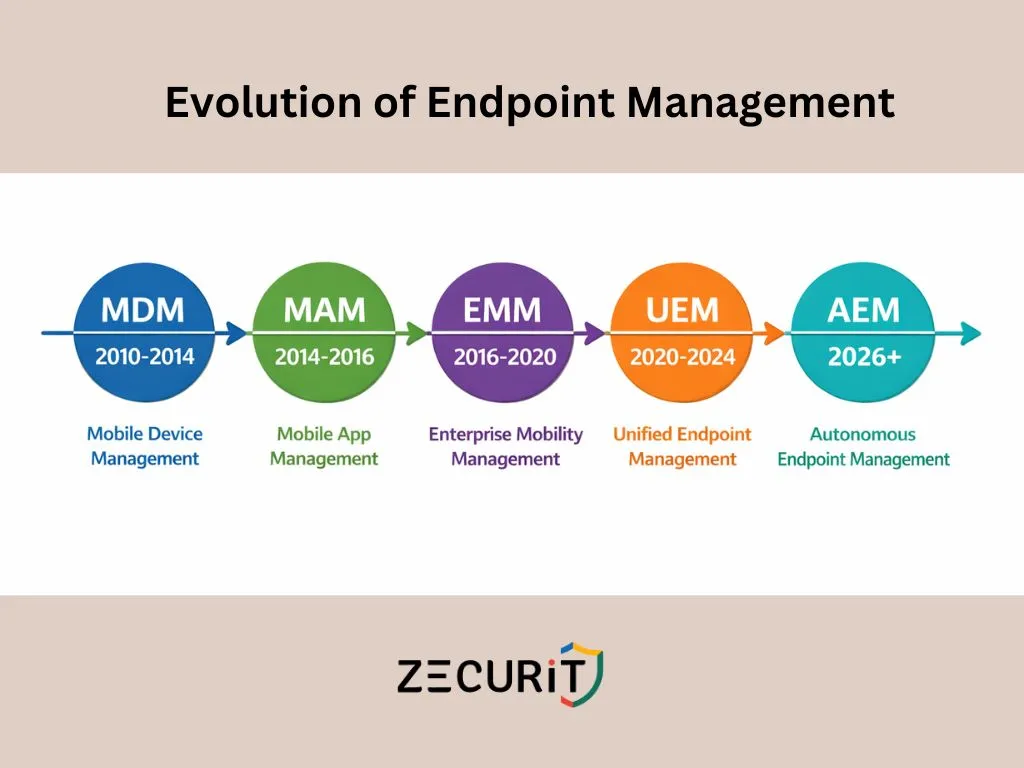
Mobile Device Management emerged to solve a specific problem: iPhones and Android devices were entering the workplace, and IT had no way to configure, control, or wipe them. MDM focused on full device enrollment, pushing Wi-Fi profiles, enforcing passcodes, and enabling remote wipe. It was purpose-built for mobile and treated every other device category as out of scope.
As BYOD (Bring Your Own Device) policies became mainstream, organizations needed a way to protect corporate data on personal devices without enrolling and controlling the entire phone. Mobile Application Management emerged to manage and protect specific applications and their data containers without requiring full device control. This introduced the MDM vs. MAM distinction that remains relevant in enterprise BYOD strategy today.
Enterprise Mobility Management expanded the scope of MDM by bundling device management (MDM), application management (MAM), and content management (MCM) into a single platform. EMM was a meaningful step forward but remained fundamentally mobile-centric. Managing Windows PCs through an EMM platform was an afterthought, typically bolted on rather than natively supported.
Unified Endpoint Management redefined the scope entirely. Rather than treating mobile as the primary device class and everything else as secondary, UEM treats all endpoint types as equal management targets. Windows, macOS, Linux, iOS, Android, and increasingly IoT and wearables all fall under the same management framework. The Gartner Magic Quadrant for Unified Endpoint Management Tools formalized this category and has tracked its evolution since 2019, with Microsoft, VMware, and a growing field of cloud-native challengers competing for leadership.
The 2026 Gartner trajectory points toward Autonomous Endpoint Management as the next evolutionary stage. AEM uses AI and machine learning to move beyond policy-driven automation (where humans define rules that execute automatically) toward predictive and self-healing management (where the platform identifies emerging issues, recommends or executes remediation without waiting for human approval, and continuously optimizes device configuration based on observed behavior patterns). This shift is already underway in leading UEM platforms, with AI-assisted patch prioritization, anomaly-based compliance alerting, and predictive hardware failure detection becoming standard capabilities.
NIST SP 800-207, the authoritative standard for Zero Trust Architecture, establishes a core principle: no user, device, or network connection should be trusted implicitly. Every access request must be verified continuously based on identity, context, and device posture.
Device posture is where UEM becomes indispensable to a Zero Trust strategy. You cannot enforce Zero Trust without real-time device compliance data, and that data comes from your UEM platform.
The Zero Trust access decision for any device involves answering several questions in real time:
Is this device enrolled and actively managed?
Is the operating system patched to within the required deferral window?
Is encryption enabled and verified on the device?
Is the EDR agent healthy and reporting clean telemetry?
Has the device risk score from security tooling exceeded the defined threshold?
Does the device comply with the organization's configuration baseline?
A UEM platform answers all of these questions continuously, not just at enrollment time. When a device falls out of compliance (a patch is missed, encryption is disabled, or an EDR alert fires), the UEM platform updates the device's compliance state in real time, and that state change flows into Conditional Access policies that dynamically block or restrict the device's access to corporate resources until remediation is complete.
This is the critical distinction between legacy device management and modern UEM in a Zero Trust context. Legacy management audits compliance periodically, typically weekly or monthly. Zero Trust requires continuous compliance verification. UEM is the mechanism that makes continuous verification operationally feasible at scale.
According to the Microsoft Digital Defense Report, organizations with automated compliance enforcement (a core UEM capability) experience significantly fewer successful breach attempts, with device-based Conditional Access blocking a substantial proportion of credential-based attack attempts that would otherwise succeed against unmanaged or non-compliant devices.
The most significant evolution in UEM between 2022 and 2026 has been the elevation of macOS and Linux from second-class management targets to fully supported, feature-equivalent platforms. Organizations that adopted UEM primarily for Windows management and used separate, weaker tooling for their Mac fleet have consolidated onto platforms that treat all operating systems with equal depth.
Cross-platform parity in 2026 means:
For organizations running mixed OS environments, the operational efficiency gain from consolidating onto a cross-platform UEM is substantial. Separate tools for Windows, Mac, and mobile mean separate policy management, separate patching workflows, separate compliance reporting, and separate vendor relationships. A unified platform eliminates all of that overhead.
Traditional patch management is reactive and human-dependent. A CVE is published, an administrator reviews it, approval is given, a deployment is scheduled, and the patch rolls out days or weeks later. In 2026, that timeline is no longer acceptable. Active exploits for critical CVEs appear within hours of publication; an approval workflow that takes days is a security gap, not a security control.
Autonomous patching addresses this by removing the human bottleneck from routine patch decisions. AI-driven patch prioritization analyzes CVE severity, exploit availability, device exposure, and organizational risk context to automatically approve and deploy critical patches without waiting for manual review. Non-critical patches continue through staged approval workflows, but the patches that matter most are handled immediately.
Key characteristics of autonomous patching in 2026:
Risk-based prioritization: patches ranked not just by CVSS score but by actual exploit activity in the wild, device exposure, and asset criticality
Automatic approval for critical CVEs: predefined risk thresholds trigger deployment without human intervention
Staged ring deployment: even autonomous patches roll out through test, staging, and production rings to protect against regressions
Third-party application coverage: OS patches and application patches managed through the same autonomous pipeline, closing the gap that WSUS-only environments leave open
Rollback capability: failed patches detected automatically with rollback triggered without administrator action
NIST SP 800-40 Rev. 4 sets the benchmark: critical vulnerabilities should be remediated within 72 hours to 7 days. Autonomous patching is the only mechanism that makes this standard achievable at scale for most IT teams.
Digital Employee Experience has shifted from a nice-to-have metric to a core UEM capability in 2026. The premise is straightforward: a managed device that is performing poorly is a productivity problem, a potential security risk (degraded devices are more likely to skip updates or have stalled agents), and a source of avoidable helpdesk volume.
DEX monitoring in a UEM context means continuously collecting performance telemetry from every managed device: CPU and memory utilization patterns, application crash rates, boot time trends, disk read/write latency, and network connectivity quality. This telemetry feeds two operational outcomes.
The first is proactive remediation. When a device's boot time degrades significantly over a baseline period, or an application starts crashing with increasing frequency, the UEM platform identifies the pattern before the user notices, and can trigger automated remediation (script execution, application reinstall, driver update) or create a helpdesk ticket with full diagnostic context already attached.
The second is fleet-wide insight. DEX data aggregated across the fleet reveals patterns that individual incident management misses. If 15% of devices running a specific driver version are experiencing elevated crash rates, that is a fleet-wide issue that needs a fleet-wide fix, not 15% of your helpdesk capacity handling the same problem repeatedly as individual tickets.
Organizations that implement DEX monitoring typically see helpdesk ticket deflection of 20 to 40%, with the most significant gains coming from proactive resolution of performance degradation and application stability issues.
Windows Autopilot demonstrated that zero-touch provisioning was operationally viable at scale: ship a device directly to an end user, and have it fully configured, enrolled, and business-ready on first boot without IT intervention. In 2026, this model has extended beyond Windows to every major platform.
Modern zero-touch provisioning across platforms:
Windows: Autopilot with Intune or cloud-native UEM agent enrollment, Azure AD join, policy and app deployment on first boot
macOS: Apple Business Manager with Automated Device Enrollment (ADE), profile delivery via MDM on first boot, app deployment through managed distribution
iOS and Android: Zero-touch enrollment through Apple Business Manager and Android Enterprise respectively, with app and policy deployment without user action
Linux: Automated agent deployment through infrastructure-as-code tooling (Ansible, cloud-init), with UEM agent enrollment scripted into the provisioning pipeline
The operational impact is significant. Traditional imaging-based provisioning for a single device takes 4 to 8 hours of IT time. Zero-touch provisioning reduces that to 30 to 45 minutes of unattended configuration time, with no IT hands required. For a 500-device fleet refresh, that difference represents hundreds of hours of recovered IT capacity.
One of the most compelling business cases for UEM consolidation is the cost of tool sprawl. Organizations that evolved their management stack organically over the past decade frequently find themselves running five to eight separate tools that partially overlap, poorly integrate, and each carry their own licensing, maintenance, and training costs.
| Cost Dimension | Legacy (Multiple Tools) | Unified UEM (Zecurit) |
|---|---|---|
| Licensing | 4 to 8 separate vendor contracts, each with annual renewals and independent pricing | Single per-device or per-seat contract covering all capabilities |
| Windows management | Dedicated RMM or SCCM license | Included |
| Mac management | Separate MDM tool (Jamf, Mosyle, etc.) | Included in same console |
| Patch management | WSUS (free but high-maintenance) or separate patch tool | Included, covering OS and third-party apps |
| Remote access | Separate remote support tool (TeamViewer, AnyDesk) | Included |
| Asset inventory | Separate ITAM tool or spreadsheets | Included, real-time with software metering |
| Compliance reporting | Manual evidence collection or separate GRC tool | 100+ pre-built templates, automated scheduling |
| Security integration | Separate EDR console, manual correlation | Integrated compliance signals, dynamic posture |
| Integration overhead | Custom API work to connect tools, ongoing maintenance | Native, single-platform data model |
| Training overhead | 4 to 8 tool-specific training programs per admin | Single platform, one learning curve |
| Vendor management | Multiple renewal dates, multiple support relationships | Single vendor, single renewal |
| Helpdesk efficiency | Context fragmented across tools when diagnosing issues | Full device context in one view |
| Total labor cost | High: tool-switching overhead on every workflow | Low: consolidated workflows, automation at scale |
The Forrester Total Economic Impact methodology applied to UEM consolidation projects consistently finds that the labor savings from reduced tool-switching and consolidated workflows alone justify the platform cost, before any security incident reduction or compliance efficiency gains are factored in.
The emergence of AI-assisted IT operations (AIOps) in 2025 and 2026 has created a new dependency that most organizations have not fully mapped. AI-assisted IT tools, whether for predictive helpdesk, automated incident response, or intelligent capacity planning, all require clean, unified, real-time data about device state. They cannot function on fragmented data spread across five separate management consoles.
UEM is the data foundation that makes AI-assisted IT operations possible. A UEM platform with full-fleet telemetry (hardware state, software inventory, patch compliance, performance metrics, security posture, and user experience signals) provides the unified data layer that AIOps tools need to generate accurate insights and reliable automation.
Organizations that invest in UEM consolidation in 2026 are not just solving today's tool sprawl problem. They are building the data infrastructure that their 2027 AI-assisted IT operations strategy will depend on. The Gartner trajectory toward Autonomous Endpoint Management is a direct extension of this: the UEM platform that has the most comprehensive, highest-quality telemetry will be the one best positioned to add autonomous remediation capabilities as AI tooling matures.
Organizations that are still operating primarily in an EMM mindset (mobile-first, Windows as an afterthought, separate tools for each platform) have a clear consolidation path available. This roadmap applies regardless of which specific platform you are moving to.
Before planning a consolidation, map every tool currently handling any aspect of endpoint management: MDM, RMM, patch management, remote access, asset inventory, compliance reporting, and any mobile-specific tools. Document the cost, the capabilities, the overlaps, and the gaps for each tool. This audit is the baseline against which your UEM consolidation ROI will be measured.
UEM consolidation is not just a tool change; it is a policy consolidation exercise. Define what a compliant device looks like across every platform and use case in your environment: corporate-owned Windows, corporate-owned Mac, corporate-owned mobile, BYOD mobile, and servers. Write these as platform-agnostic requirements first (encrypted, patched within 7 days, EDR agent healthy) and then map them to platform-specific enforcement mechanisms.
Begin with a pilot covering 50 to 100 devices across all platform types in your environment. The goal is not just to validate technical enrollment; it is to validate that your unified policy framework produces consistent compliance outcomes across platforms and that the operational workflows (patch approval, remote access, compliance reporting) work as expected for your team.
Migrate management workloads to the UEM platform methodically, starting with the tools that have the lowest migration risk and highest consolidation value. Patch management and asset inventory are typically the first to consolidate cleanly. Remote access and compliance reporting follow. Keep legacy tools running in parallel during migration rather than cutting them off prematurely.
Once the fleet is enrolled and compliant data is flowing reliably, connect UEM compliance signals to your Conditional Access policy engine. This is the step that transforms UEM from a management tool into a Zero Trust enforcement point. Devices that fall out of compliance lose access to corporate resources automatically, creating a continuous enforcement loop rather than periodic audit-based compliance.
Zecurit's endpoint management platform brings Windows endpoints, Windows Servers, and macOS devices into a single management console with a consistent policy engine, unified compliance reporting, and one asset inventory view. IT teams that previously ran separate tools for Windows RMM and Mac MDM consolidate both into Zecurit without sacrificing depth of management capability on either platform.
For teams managing Windows-specific environments in depth, the Windows endpoint management guide covers the full feature set. For server fleet management, the platform applies the same agent and policy framework across Windows Server 2016, 2019, 2022, and 2025.
Zecurit integrates management and security into a single operational layer rather than treating them as separate disciplines connected by API. Device compliance state reflects real-time security signals: patch status, BitLocker enforcement, firewall configuration, antivirus agent health, and EDR telemetry all feed a unified compliance posture that can gate Conditional Access decisions dynamically.
When a device's compliance state changes, that change is reflected immediately in the console and in any downstream access control integration. This is the architecture that makes continuous Zero Trust enforcement operationally feasible rather than theoretically aspirational.
UEM is not an enterprise-only technology, and the assumption that it requires a dedicated team of specialists to operate is outdated. Zecurit is specifically designed for IT teams managing hundreds to thousands of devices without the headcount that enterprise-scale management platforms assume. Automated patch deployment, policy-driven configuration, pre-built compliance report templates, and a unified console reduce the per-device management overhead significantly.
A two-person IT team can manage a 500-device mixed-OS fleet through Zecurit with operational rigor that would have required five or six people using fragmented legacy tooling. The efficiency gain comes from automation replacing manual workflows, not from headcount expansion.