
Script execution security is a critical component of modern IT automation platforms. In centralized script repositories like the Scripts Repository in Zecurit Endpoint Manager, administrators can store, manage, and deploy scripts across hundreds or thousands of endpoints. While this capability dramatically improves operational efficiency, it also introduces potential security risks if scripts are executed without proper controls, validation, and monitoring.
Without strong governance, attackers or unauthorized users could modify scripts, escalate privileges, or deploy malicious commands across the entire device fleet. This is why organizations must implement strict security measures such as controlled script access, version management, logging, and execution policies. By securing every stage of the script lifecycle, from creation and storage to deployment and execution, IT teams can safely leverage automation without exposing their infrastructure to misuse or attacks. For a broader understanding of how scripting fits within the wider endpoint management discipline, it helps to consider script governance as one layer within a mature endpoint security posture.
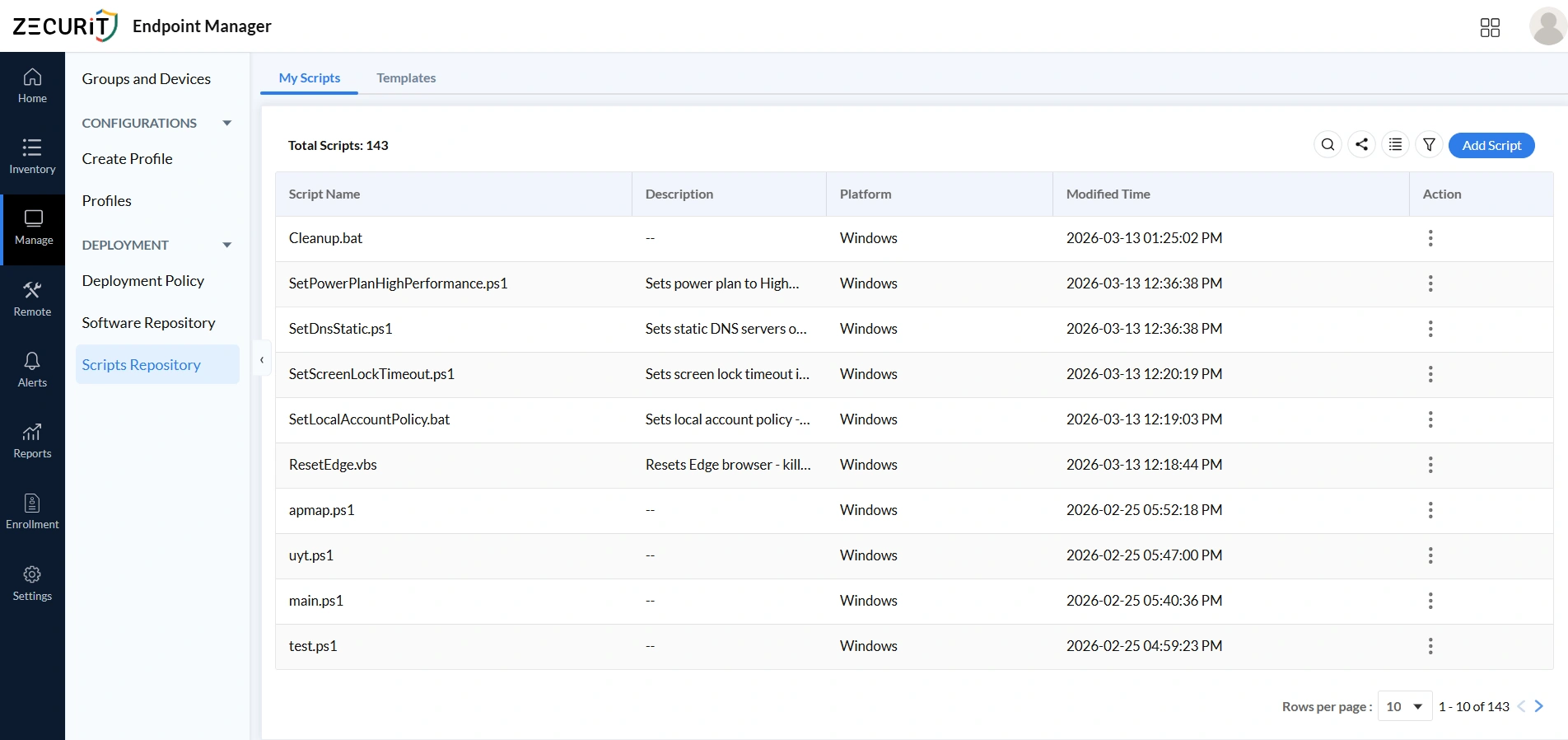
The My Scripts section is the central library where administrators store and manage all custom automation scripts, with each entry displaying its name, platform compatibility, arguments, modification history, and tags. This structured visibility allows administrators to verify scripts before execution, maintain version control, track modifications, and prevent unauthorized changes. Proper naming conventions, clear descriptions, and controlled editing permissions reduce the risk of accidental misuse or malicious code insertion. Organizations that want a complete deployment walkthrough can refer to the remote script deployment guide for step-by-step instructions.
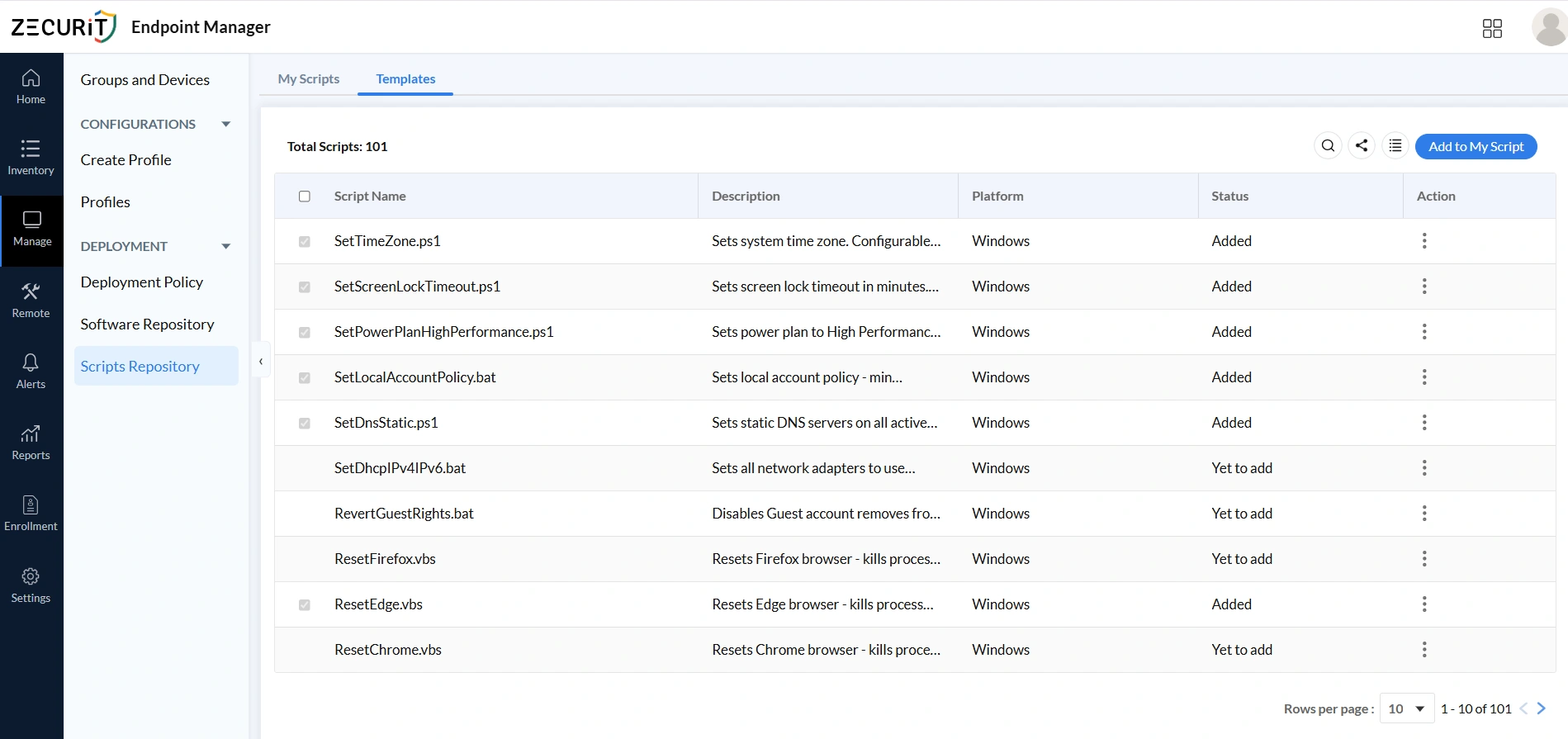
The Templates section provides pre-built, validated scripts for common administrative tasks including time zone configuration, screen lock policies, power plans, DNS settings, and browser resets. Since templates are pre-tested and reviewed, they reduce the risk of errors or insecure code reaching production systems. Administrators can review descriptions, check exit codes, and add templates directly to their script library, enforcing consistent configuration standards across all managed devices without writing scripts from scratch. Template-based deployments naturally complement configuration management workflows where consistent baseline enforcement across device groups is a primary goal.
A centralized script repository ensures every script has a defined owner, a clear purpose, and a traceable modification history. Without governance, scripts become vulnerable to tampering, unauthorized access, and malicious injection. Click Add Script in the My Scripts toolbar to open the New Script form, where every field carries both operational and security significance.
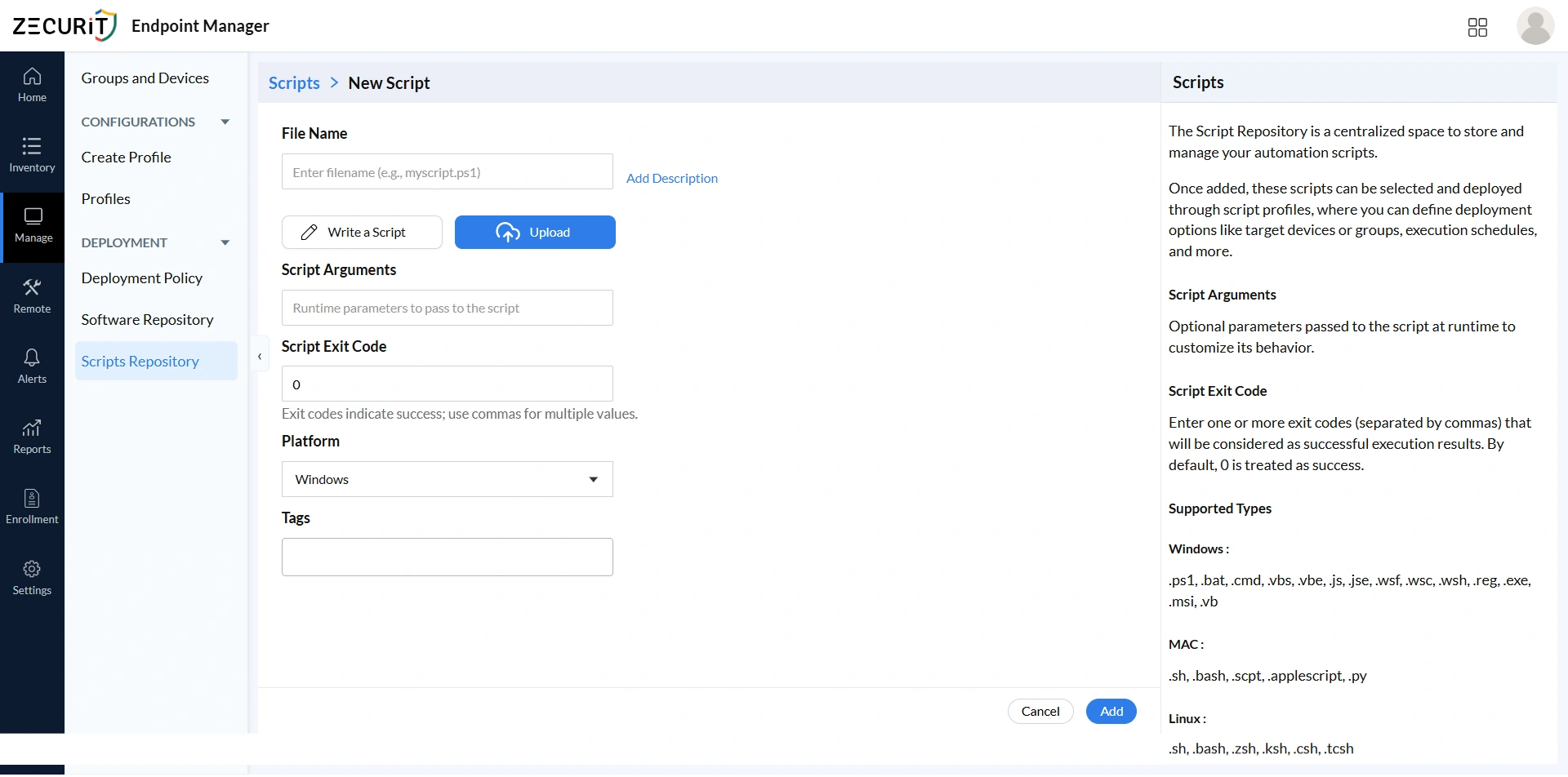
The filename and extension determine the execution engine that processes the script on target devices, making it a security decision, not a cosmetic one. PowerShell (.ps1) is preferred for complex Windows automation due to its auditing and execution policy controls. Batch files (.bat, .cmd) suit simple tasks with less granular logging. VBScript (.vbs) should be used sparingly. Registry files (.reg) carry the highest risk and require the strictest review. Cross-platform scripts (.sh, .bash, .py) require careful review of their import scope before repository admission.
Scripts can be written directly in the built-in editor or uploaded from an external source. Either way, all scripts must pass through a formal code review before being saved to the repository. Uploaded scripts require additional verification of origin and integrity. The platform editor is convenient but does not substitute for pre-admission review.
A complete description is mandatory for every script in the repository. It must state what the script does, what system state it modifies, what arguments it requires, which platforms it targets, and what exit codes it returns. This documentation supports pre-deployment security review, accelerates incident response by providing immediate context, and enforces accountability by giving every script a traceable owner.
The Platform dropdown restricts which device types a script can target within deployment policies. This prevents scripts designed for one operating system from being mistakenly deployed to incompatible endpoints, avoiding execution errors and unintended system behavior across your managed fleet.
Tags such as "security-critical", "cis-benchmark", "compliance", or "privileged" allow security teams to filter the repository and identify scripts requiring periodic review or change approval. Consistent tagging transforms the script library from an operational tool into a governed security asset that supports structured audit and compliance workflows.
Navigate to Manage, then Deployment, then Deployment Policy to access the dashboard showing all active, completed, and pending policies across your managed environment. From a security perspective, this view is your automation attack surface inventory: the complete list of authorized automated operations that a compromised deployment system could potentially expose. For broader context, see how software deployment and script deployment operate as related but distinct disciplines governed through the same policy framework.
The policy history showing which policies ran, when, and with what outcome is a critical element of your security audit trail. Compliance frameworks require evidence that automated changes occurred within approved windows and produced expected outcomes, and this dashboard provides exactly that. Review it regularly for unexpected policy activations, as unauthorized execution by a compromised account or malicious insider may only be visible here. Organizations subject to HIPAA or GDPR should treat the deployment policy audit trail as a required evidence artifact for demonstrating controlled automation.
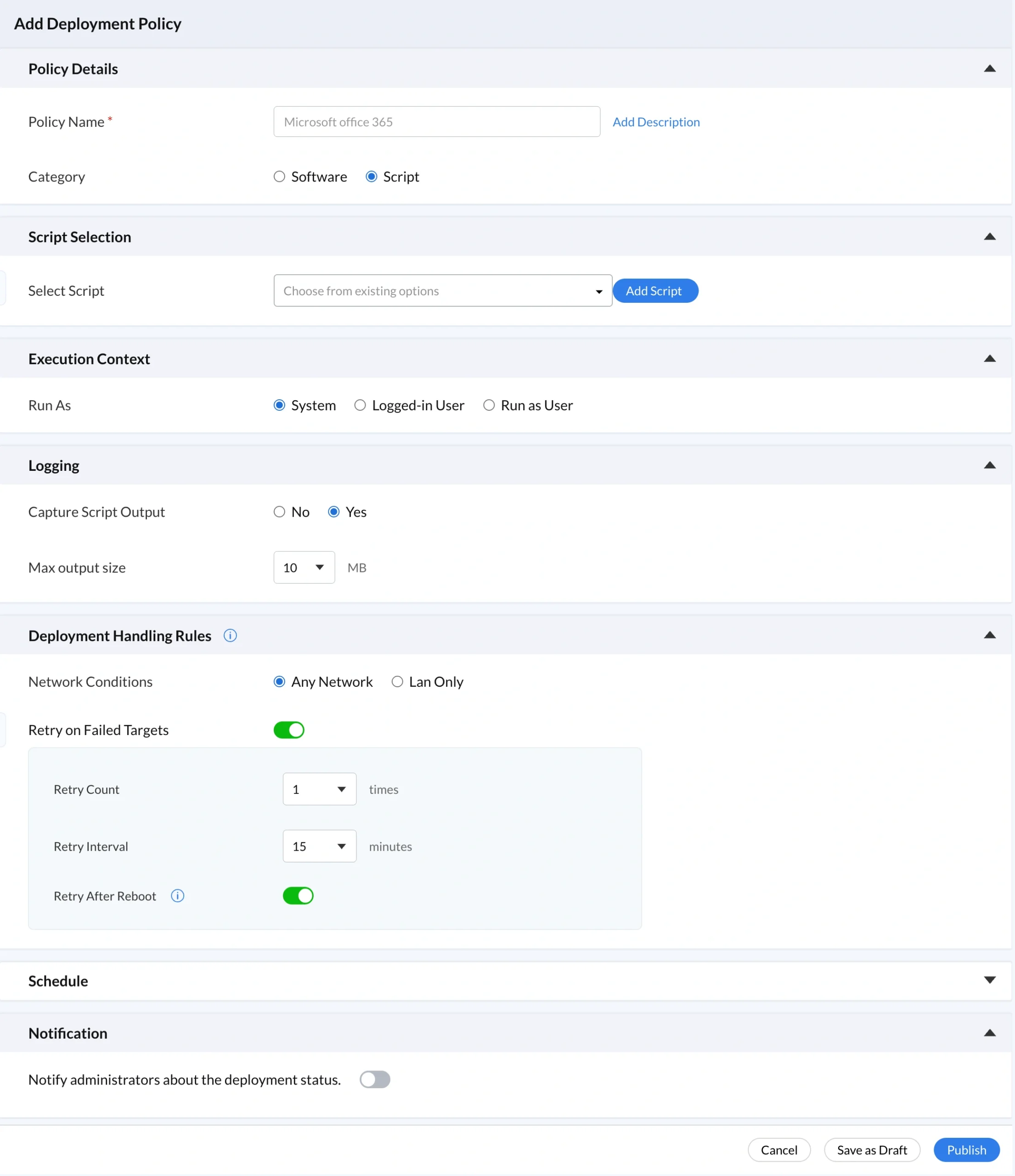
Deployment governance begins here, in the configuration that defines what executes, why it executes, and how it is classified in the audit record. The top sections of this form establish the foundational identity of the deployment policy before any execution settings are configured.
The Policy Details section makes every deployment auditable. Use a descriptive Policy Name such as "Security Hardening, Windows Fleet, CIS L1, Q1 2026" that communicates purpose, scope, and compliance alignment at a glance, as vague names like "Script1" are impossible to evaluate during an audit. Document the authorization basis in the Add Description field and set Category to Script so every automated action remains separately traceable from software deployments in your reports and auditing workflows.
The Select Script dropdown restricts deployment to approved, reviewed, versioned scripts from the My Scripts repository, preventing arbitrary command injection entirely. Every script that reaches your endpoints carries a known modification history, a documented purpose, and a complete repository audit trail that forensic investigators can retrieve when needed. This single control directly mitigates privilege escalation risks by ensuring no ad-hoc, unreviewed command can ever reach production endpoints.
Execution context determines the level of system access a script receives at runtime. Selecting the wrong context is one of the most common causes of silent deployment failures and unnecessary security exposure. Every script should run with only the minimum privileges its function requires.
System context grants full administrative privileges on each target device, making it the correct choice for time zone configuration, DNS settings, firewall rules, registry modifications, and software installation. However, a compromised System-level script can disable security tools, exfiltrate data, or create backdoors across every device in the deployment group. Reserve System context only for tasks that genuinely require it and apply the strictest review and monitoring controls to those scripts.
Logged-in User runs with the privileges of the currently active user session, making it appropriate for browser profile resets, user preference configuration, and any script that interacts with user-specific resources. A compromised Logged-in User script cannot access system-level resources or persist beyond the current session, dramatically reducing the blast radius of any security incident.
Run as User executes the script under a named service or domain account. Use this when scripts require domain credentials, network resource access, or when your security policy requires explicit service account attribution rather than the anonymous SYSTEM context. Audit all execution contexts regularly to ensure no script runs with more privilege than its function requires.
Without comprehensive logging, script execution becomes a blind spot across your entire managed fleet. Enabling Capture Script Output instructs the agent on each device to collect all stdout and stderr output and transmit it to the central platform for per-device execution logs. Increase the default 10 MB Max Output Size for diagnostic scripts to prevent truncation that could hide anomalous behavior. Output capture goes beyond basic exit code monitoring by preserving exactly what the script did at runtime, giving teams managing endpoint monitoring and alerts a complementary anomaly detection data source alongside platform-level alert policies.
Deployment handling rules control the conditions under which scripts are allowed to execute, adding a security layer beyond policy configuration. Network restrictions and retry logic must both be governed carefully to avoid creating unnecessary attack surface or unintended persistence.
Any Network permits execution regardless of connection type and is correct for most organizations with remote or hybrid workforces. LAN Only restricts execution to devices on the corporate network, ensuring sensitive or privileged scripts only run within a trusted perimeter where infrastructure security can be reasonably assumed. Document the reasoning explicitly whenever Any Network is chosen for high-privilege scripts.
Retry on Failed Targets automatically reattempts delivery to devices that missed the initial execution. Configure retry logic conservatively because each additional retry is a re-execution opportunity for a potentially compromised script. Favor manual review for scripts that continue to fail after three attempts, as persistent failures can signal environmental issues or active interference.
Set Retry Count to three for critical security deployments requiring complete coverage. Scripts failing beyond three attempts should trigger manual review rather than unlimited automatic retries. Persistent failure is often a security signal, not just a connectivity issue.
Keep the default 15-minute interval between retry attempts. This creates a detection window that gives monitoring systems and administrators time to identify anomalous behavior before the next execution fires. Shorter intervals compress this window and reduce response time when something goes wrong.
Retry After Reboot reattempts execution after a device restarts, handling failures caused by locked resources that only release after a reboot. When combined with high retry counts, this setting approaches startup-based persistence behavior. Scrutinize all deployments using this setting carefully and document the operational justification clearly.
Scheduling controls when and how frequently scripts execute. The chosen mode should reflect the urgency of the deployment, the sensitivity of the script, and the organization's change management requirements.
Deploy Immediately begins execution on each target device as soon as it checks in after the policy is activated. Use this for active incident response, critical vulnerability remediation, and emergency configuration corrections. Even for urgent deployments, maintain the same documentation and approval standards as scheduled deployments. An immediate deployment without a documented owner and justification is a governance gap regardless of urgency.
Schedule Deployment lets administrators define an exact start date, time, and time zone aligned with approved maintenance windows. Predictable execution patterns are a prerequisite for anomaly detection; a script activating outside its scheduled window becomes an immediately detectable signal. Use scheduled deployment for all planned configuration changes, off-hours maintenance, and compliance-driven baseline rollouts.
Execute at Every Startup runs the script on every device boot, making it powerful for enforcing persistent security baselines, DNS settings, and power plans. It is also the scheduling mode most similar to the startup persistence mechanism used by malware. Every startup-scheduled script must have complete description documentation, verified exit codes, output logging enabled, and a quarterly governance review. Monitor for unexpected new startup-scheduled policies, as unauthorized additions may indicate a security compromise.
Notifications make administrative oversight scalable across large fleets by proactively alerting designated administrators to deployment outcomes without requiring manual dashboard checks. Enable notifications for all security-critical and compliance-relevant deployments so failures are discovered within minutes rather than during a weekly review cycle. Configure notifications selectively alongside Zecurit's endpoint monitoring and alerts to maintain meaningful signal coverage without creating alert fatigue.
Centralized repository control prevents script sprawl and unauthorized modification. See how Zecurit handles this through its remote script execution and remote script deployment guide
Structured policy definitions ensure every deployment has a documented purpose and scope, supported by reports and auditing workflows
Controlled script selection eliminates arbitrary command execution, a core principle of zero trust security implementation
Least privilege enforcement limits the damage any compromised script can cause. Learn more about endpoint privilege management and privilege escalation risks
Detailed logging provides visibility to detect anomalies and support investigations, complementing endpoint monitoring and alerts
Network-based restrictions reduce exposure when devices operate outside trusted environments. See what is remote code execution for context on the threats these restrictions mitigate
Retry governance prevents automatic re-execution from becoming an exploitation mechanism, referenced in the automated system reboot script guidance
Scheduling oversight aligns automation with change management and makes deviations detectable, consistent with patch management and Patch Tuesday governance practices
Administrative notifications ensure human oversight remains proactive and scalable alongside IT asset monitoring and alerts
When consistently maintained, these safeguards deliver both the operational efficiency of large-scale automation and the security integrity of a carefully governed environment. Organizations that invest in structured governance, visibility, and access control transform their automation from a liability into a competitive advantage. Explore the full endpoint management features and cybersecurity best practices to prioritize which safeguards to implement first in your environment. Strengthening endpoint script security is not a one-time project; it is an ongoing commitment to governed, accountable, and actively monitored automation.
The Select Script dropdown restricts deployment to approved, reviewed scripts only, preventing arbitrary command injection from reaching production endpoints.
Implement peer review for every script before repository admission. Map code reviews to CIS benchmark controls where applicable.
Enforce complete documentation for every script and policy. Undocumented automation cannot be evaluated during audits and becomes a governance liability.
Apply least privilege execution context without exception. Audit periodically using group policy settings reviews as a reference baseline.
Script execution security builds from layered governance across every stage of the script lifecycle, from a governed repository and controlled script selection through auditable deployment policies, execution context enforcement, and proactive notifications. When consistently maintained, these safeguards deliver both the operational efficiency of large-scale automation and the security integrity of a carefully governed environment. Explore the full endpoint management features to see how script execution governance integrates with the complete Zecurit platform.