
Not every patch improves security. When a Windows update breaks applications, crashes systems, or introduces compatibility issues, Zecurit Endpoint Manager gives IT teams the power to uninstall patches and rollback problematic updates across one device or thousands, directly from the console.






Enterprise IT teams live by the rule: patch fast, patch often. But seasoned administrators know the hard truth: not every update ships cleanly. Microsoft and third-party vendors occasionally release patches that cause:
• Blue Screen (BSOD) loops after cumulative Windows updates
• Application crashes when security patches conflict with legacy software
• Network or driver failures post firmware updates
• Authentication issues breaking VPN or domain connectivity
• Performance degradation that halts productivity across departments
Without a reliable patch rollback strategy, a single bad update can trigger helpdesk floods, downtime, and emergency recovery workflows. The difference between a minor incident and a major outage often comes down to one question: Can you uninstall that patch in minutes, or in hours?
Zecurit Endpoint Manager treats patch uninstall as a first-class feature, not an afterthought. Whether you need to target a specific endpoint or execute a fleet-wide rollback, the action is always two clicks away. Our platform provides dedicated uninstall pathways from both the centralized patch inventory and individual device records, designed for the way real IT teams respond to incidents.
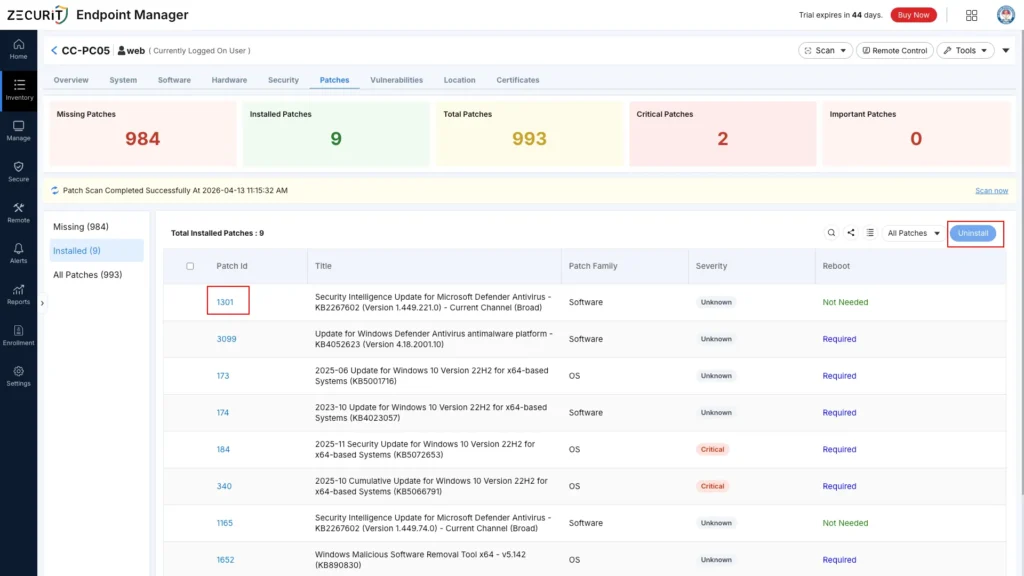
From the Installed Patches console, administrators see every update deployed across the estate, complete with Patch ID, title, affected system count, patch family (OS vs. Software), severity rating, and reboot requirement. When a problematic update is identified, simply select the patch, choose target devices from the intelligent device grid, and trigger uninstall in bulk. Zecurit handles the rest: agent communication, execution verification, and real-time status reporting back to the dashboard.
This view is ideal for fleet-wide rollbacks when a vendor confirms a patch is defective and must be removed from all endpoints immediately.
Sometimes only one machine is affected. Navigate to any endpoint's Device Details > Patches tab to see a complete patch history: missing patches, installed patches, total patch count, and severity breakdown (Critical, Important, Moderate). From this granular view, admins can cherry-pick specific updates to uninstall from that device alone. This is perfect for troubleshooting compatibility issues on high-value workstations or executive machines without impacting the broader fleet.
This view is ideal for targeted troubleshooting and surgical patch removal where bulk action is unnecessary.
Speed matters during a patch incident. Zecurit's patch rollback workflow is engineered to minimize mean-time-to-recovery (MTTR) while maintaining complete audit visibility:
Admins detect the problematic update through helpdesk tickets, user reports, or Zecurit's own patch health monitoring. The Installed Patches view or Device Details tab reveals exactly which systems received the update.
Choose the patch from the console. Select affected endpoints individually, by group, or by dynamic filter (for example, all Windows 10 22H2 devices with Patch ID 184 installed). Zecurit validates uninstall eligibility before execution.
Zecurit dispatches the uninstall command through the endpoint agent using native OS APIs. The platform monitors execution in real time, capturing exit codes and verifying that the patch is successfully removed from the system's update history.
Post-rollback, Zecurit updates the compliance dashboard and can automatically add the patch to an exclusion list, preventing the same problematic update from being reinstalled during the next automated scan or deployment cycle.
Beyond basic removal, Zecurit Endpoint Manager delivers enterprise-grade controls for safe, auditable patch uninstall operations:
Uninstall from the global Installed Patches grid for bulk action, or from Device Details > Patches for single-endpoint precision.
Rollback Windows OS cumulative updates, security rollups, and third-party software patches from a single interface.
The console clearly flags whether an uninstall requires a system restart, so admins can schedule removals within maintenance windows and avoid surprise downtime.
Every patch uninstall is logged with admin identity, timestamp, target devices, and result status. This is essential for compliance frameworks like SOC 2 and ISO 27001.
After removal, Zecurit can automatically rescan the endpoint to confirm patch state and refresh the vulnerability posture in real time.
Convert a bad patch into a global deployment block with one click, ensuring your auto-deployment policies never reintroduce the same problem.
Our customers rely on Zecurit's patch uninstall capabilities across a wide range of operational scenarios:
A vendor withdraws or recalls an update after release. Use the Installed Patches view to identify every affected endpoint across the organization and execute a fleet-wide rollback within minutes, not days.
A new OS patch crashes a critical line-of-business application. Navigate to the affected device's Device Details > Patches tab, locate the conflicting update, and remove it surgically while leaving other security patches intact.
Firmware or driver updates cause network adapter failures or peripheral malfunctions. Rollback the specific driver patch from the console and restore stable hardware operation without reimaging the machine.
A pilot group reports instability after a staged rollout. Halt the broader deployment and uninstall patches from the pilot devices directly through Zecurit, preserving the production fleet while you investigate root cause.
Based on our experience managing millions of endpoint updates, we recommend the following approach to reverting problematic updates safely:
Confirm the patch is truly the root cause. Use Zecurit's device-level patch history to correlate the install timestamp with the first reported issue. Uninstalling the wrong patch can leave systems exposed.
When a bad patch is suspected, begin with a single-device uninstall via Device Details > Patches. If the rollback resolves the issue, escalate to bulk removal through the Installed Patches view.
After uninstalling, immediately add the patch to your exclusion policy. Zecurit's auto-deployment engine will otherwise reinstall the same update during the next maintenance window, recreating the problem.
Enable Zecurit's post-uninstall rescan to verify system stability. Check that the endpoint correctly reports the patch as missing and that no dependent services have been disrupted.
Many uninstalls require a restart to complete. Use Zecurit's reboot flag visibility to schedule removals during approved maintenance windows and notify end users proactively.
Do not let one bad update derail your security posture. Zecurit gives you the control to remove, recover, and resume, without leaving the console.
| Capability | Native OS Tools | Zecurit Endpoint Manager |
|---|---|---|
| Bulk Patch Uninstall | Manual, script-based only | One-click from Installed Patches grid |
| Per-Device Rollback | Requires physical access or RDP | Remote from Device Details > Patches |
| Target Selection | No centralized device filtering | Dynamic filters by OS, group, or patch status |
| Uninstall Verification | Manual log review | Real-time execution status & audit logs |
| Re-Installation Prevention | Manual WSUS/SCCM exclusions | Instant policy-based patch blocking |
| Audit & Compliance | Fragmented event logs | Centralized rollback history with admin attribution |
Zecurit supports uninstall for most Windows OS updates, security rollups, and third-party software patches that the operating system natively allows to be removed. Some cumulative updates or core system components may be marked as non-removable by Microsoft itself. Zecurit will flag these as ineligible before you attempt the action.
Zecurit clearly displays the reboot requirement in both the Installed Patches view and the Device Details > Patches tab before you confirm the uninstall. You can schedule the uninstall to execute immediately or defer until the endpoint's next maintenance window
Yes. The Installed Patches view is designed for bulk operations. Select the patch, choose your target devices from the device grid (with checkbox selection and Clear all controls), and trigger the uninstall across all selected endpoints simultaneously.
Yes. Zecurit's agent communicates uninstall progress back to the console as it happens. You can monitor which devices have completed the removal, which are pending reboot, and which encountered errors, all from a single dashboard.
When updates go wrong, every minute of delay costs productivity and trust. Zecurit Endpoint Manager puts patch uninstall and rollback capabilities exactly where admins need them: in the Installed Patches view for fleet-wide action, and in Device Details > Patches for surgical precision. Stop scripting workarounds. Start controlling your patch estate with confidence.
Discover the powerful modules that help you manage, secure, and control every endpoint from a single console.
Gain full visibility into hardware and software assets across your organization.
Remotely deploy and manage applications across devices with ease.
Automate patch scanning and deployment to keep endpoints secure and compliant.
Securely access devices, troubleshoot issues, and support users from anywhere.
Enforce IT policies and maintain standardized configurations across endpoints.
Generate endpoint reports and audit trails to monitor compliance and activity.