
Application Control stops unauthorized applications, prohibited tools, and shadow IT before they execute. Build allowlists or blocklists, enforce least privilege, and give every endpoint a Zero Trust default: nothing runs unless it is explicitly trusted.
No credit cards required - 14 days free trial.
Application Control is the discipline of deciding, at the endpoint, which software is permitted to launch and which is not. It sits below antivirus and EDR in the security stack: instead of detecting malicious behavior after execution, it prevents unauthorized code from ever starting. For the full definition and how it compares to antivirus and EDR, see What Is Application Control?
Traditional antivirus works on a default allow model. Everything is permitted to run except what a signature or heuristic flags as malicious. Endpoint Application Control flips that logic. With an allowlist, or "default deny," policy, only explicitly approved products, vendors, executables, file hashes, or folder paths are permitted to run, and everything else is stopped automatically. With a blocklist policy, named applications, such as unauthorized browsers, unmanaged remote access tools, or unlicensed utilities, are refused while everything else continues to run normally. For a practical walkthrough of setting up block-list enforcement against a specific category of unauthorized software, see How to Block Unauthorized Software Before It Runs.
That distinction matters for shadow IT mitigation. Employees routinely install browser extensions, file-sharing clients, or remote support tools without IT approval. Application privilege management closes that gap by tying execution rights to policy rather than to whatever a user happens to download.
Application Control also underpins a practical Zero Trust endpoint security model. Zero Trust assumes no user, device, or process is trusted by default, and application execution is one of the clearest places to apply that principle. Rather than trusting a binary because it exists on disk, the endpoint checks it against policy first, every time.
For CISOs and IT security administrators, this converts application security from a reactive, alert-driven process into a proactive, policy-driven one. For MSPs managing many client environments, it standardizes prohibited software management across tenants without hand-tuning every device.
Every endpoint enforces explicit trust; unapproved software cannot execute once Allow List policy is active.
Typical drop in unauthorized app installs after moving from ad hoc restrictions to full policy enforcement.
Default-deny stops unrecognized executables before they run, cutting incidents tied to unsigned binaries.
Bulk CSV import and rule templates roll the same policy across every device without per-endpoint tuning.
Every policy starts with an Application Group. You name the group, choose Block List or Allow List as the access type, assign a risk level, and then associate rules that define exactly what the group matches.
Groups such as "Prohibited App, US Branch" carry a risk level (Low, Medium, High) so security teams can prioritize which violations need immediate review versus routine logging.
Block List refuses named software while allowing everything else. Allow List permits only what is listed and denies everything else, the stricter, default-deny posture recommended for high-risk endpoints.
Add rules manually, select from an existing library, or import a CSV in bulk, which is especially useful for MSPs rolling the same policy out across many client tenants.
Matches by product name and version, ideal for controlling entire software families such as unsanctioned browsers or P2P clients.
Blocks or allows every application published by a given vendor, useful for enforcing approved-vendor lists.
Targets a specific .exe or binary by name, giving granular executable control over individual tools.
Matches a cryptographic hash of the binary itself, the most precise form of hash blocking and resistant to renaming tricks.
Restricts execution based on where a file lives, commonly used to lock down Downloads or Temp directories.
Once an Application Group is defined, a Deployment Policy decides how enforcement actually behaves on the endpoint. This lets teams roll out prohibited software management gradually instead of flipping a switch that breaks user workflows on day one.
Prevents the application from launching entirely, with no user interaction. Reserved for confirmed high-risk or prohibited software.
Blocks the app and shows the user a message explaining why, which cuts down on help desk tickets from confused employees.
The app still runs, but the user receives a warning. Useful for testing a new policy before enforcing it.
Silent logging with zero disruption to the user, the recommended starting point for any new Application Control rollout.
Running new policies in Audit Only first is standard practice: it surfaces every application that would have been blocked, so administrators can correct false positives before enforcement affects real users. Our phased deployment guide walks through each stage of this rollout in detail.
Application Control fails in production for predictable reasons: brittle rules, untested baselines, and hardware differences that admins did not account for. A few habits prevent most of that pain, see the full Application Control Best Practices guide for the complete phased approach.
Build your allowlist baseline from a standardized gold image, a hardened reference build with only approved applications, drivers, and agents installed. Capturing rules from a clean image, rather than from a live, drifted production machine, keeps unnecessary software out of the trust list from day one and makes the resulting policy far easier to audit later.
File hash rules are precise but brittle across hardware refreshes, because drivers tied to the hardware abstraction layer, such as chipset, graphics, or storage controller drivers, differ by device model even when the OS image is identical. For driver and vendor components, publisher or certificate-based rules generally survive hardware churn far better than hash-based rules alone.
NIST's guide to application whitelisting recommends treating deployment as a lifecycle rather than a one-time project: plan and test in a limited environment, implement in phases, and continuously monitor and update the policy as approved software changes.
Source: NIST Special Publication 800-167, Guide to Application Whitelisting, National Institute of Standards and Technology.
On Windows endpoints specifically, Microsoft draws a similar distinction between its two native application control technologies. Microsoft's WDAC and AppLocker overview notes that Windows Defender Application Control enforces a system-wide, kernel-level default-deny policy, while AppLocker offers more flexible, per-user rules layered on top. Zecurit's rule types, product, vendor, executable, hash, and folder path, mirror that same layered logic so teams already familiar with WDAC or AppLocker concepts can apply the same thinking here. If you're currently running AppLocker or evaluating a dedicated allowlisting platform, see how Zecurit compares as an AppLocker Alternative or a ThreatLocker Alternative.
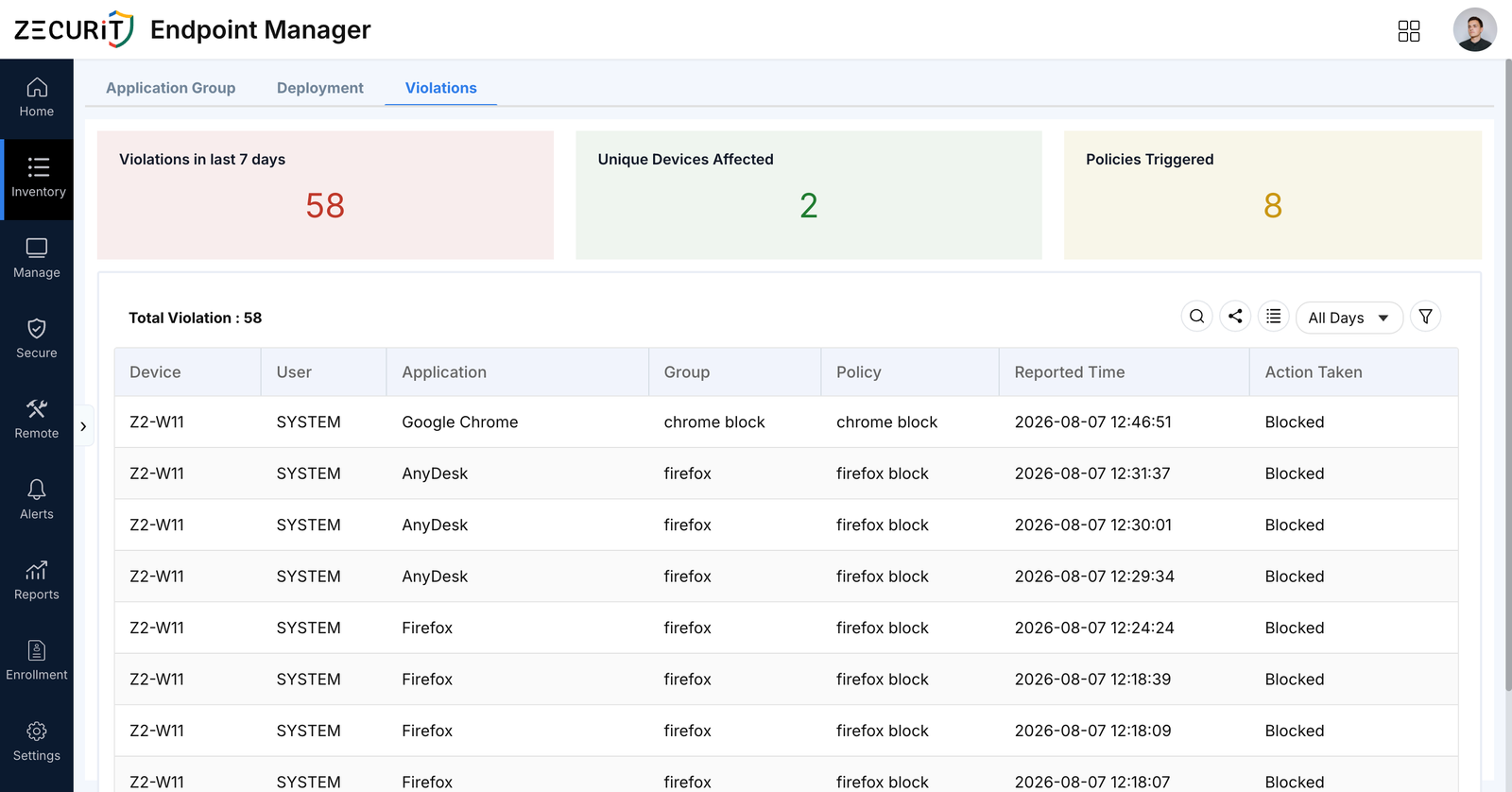
Every blocked launch, whether it is a prohibited browser, an unmanaged remote access client, or a random installer picked up from email, lands in the Violations view with the device, user, application, version, matched policy, and timestamp. That detail is what turns a static blocklist into a living policy.
Reviewing violations regularly answers two questions: which unauthorized applications are employees actually trying to run, and which policies are generating noise that needs a rule adjustment. Both are essential for keeping least privilege enforcement realistic instead of purely theoretical.
Application Control works alongside software inventory and metering, since an accurate inventory of installed software is what makes allowlist rules trustworthy in the first place. Pairing the two also supports license compliance, because metering shows which approved applications are actually being used versus sitting idle on a device. See Application Control for Software License Compliance for how to build a block-list policy around unlicensed and non-compliant software specifically.
According to G2's Endpoint Management category research, buyers evaluating this category consistently prioritize centralized visibility and compliance enforcement over point features, which is why a violations feed tied directly to policy, rather than a separate reporting tool, tends to get used day to day.
Antivirus generally works on a default allow model and looks for known bad signatures or suspicious behavior after a program has already started. Application Control works on execution itself: it checks whether a program is explicitly allowed or explicitly blocked before it ever runs, which stops unknown and unsigned threats that signature-based tools have not seen yet.
Blocklists are easier to start with because you only need to name the software you already know is unwanted, such as unmanaged remote access tools or unauthorized browsers. Allowlists take more upfront work to build but give a much stronger, default-deny security posture, which is why high-risk endpoints and regulated environments typically move toward allowlisting over time.
Yes, in an allowlist configuration. Because unrecognized executables are denied by default, a brand-new piece of malware with no known signature still fails to launch simply because it was never added to the trusted list. This is one of the main reasons application control is treated as a core control rather than an optional add-on, and it’s specifically why it’s effective against ransomware. See How Application Control Prevents Ransomware for the full mechanism.
Not if it is rolled out correctly. Starting a new policy in Audit Only mode surfaces what would be blocked without disrupting anyone, then moving to Notify Only and finally Block & Notify or Block Execution lets IT teams fix false positives before enforcement is strict. The check itself adds no noticeable performance impact. Our best practices guide covers this rollout sequence in full.
Yes. Application Groups and Deployment Policies can be scoped to specific device groups, geographic locations, or organizational units, so a finance team can run a stricter allowlist than a general staff group, and an MSP can maintain separate policies per client without them interfering with each other.
Go deeper on specific scenarios, comparisons, and rollout strategies:
A clear, prioritised view of every software vulnerability across your endpoints, with the tools to remediate or upgrade directly from the same console.
Discover the powerful modules that help you manage, secure, and control every endpoint from a single console.
Gain full visibility into hardware and software assets across your organization.
Remotely deploy and manage applications across devices with ease.
Automate patch scanning and deployment to keep endpoints secure and compliant.
Securely access devices, troubleshoot issues, and support users from anywhere.
Enforce IT policies and maintain standardized configurations across endpoints.
Generate endpoint reports and audit trails to monitor compliance and activity.