27% of paid workdays are now performed remotely in the US, making traditional office-centric ITAM obsolete
Zero-touch deployment enables 2-3 day provisioning versus 1-2 weeks with traditional methods
Agent-based discovery is essential for tracking assets that never connect to corporate networks
Remote wipe capabilities and geo-location tracking provide security when physical control is impossible
Corporate-owned devices typically prove more cost-effective and secure than BYOD for remote teams
Nexus tax implications arise when company equipment exists across multiple states or countries
90%+ recovery rates are achievable with automated offboarding workflows and prepaid return shipping
The laptop you provisioned three months ago could be anywhere right now. A coffee shop in Portland. A co-working space in Barcelona. Someone's kitchen table in suburban Ohio. And if you're an IT manager still clinging to office-centric asset management playbooks, that reality probably keeps you up at night.
The shift to remote and hybrid work didn't just change where people work. It fundamentally dismantled the physical perimeter that IT teams relied on for decades. Walk-up help desks are gone. Equipment closets sit empty. That server room you could physically secure? Now your "perimeter" is scattered across thousands of home Wi-Fi networks, each one a potential security gap.
According to WFH Research data from 2024, approximately 27% of paid full-time workdays in the United States are now performed remotely, a dramatic increase from pre-2020 levels. This isn't a temporary adjustment anymore. This is the new operational reality.
Traditional ITAM systems were built for a world where assets entered through receiving docks, lived on corporate networks and retired through structured decommissioning processes. That world no longer exists for most organizations. The old playbook assumed visibility, physical access and network dependency. Today's reality demands something entirely different: location-agnostic infrastructure that treats the human, not the office, as the center of your IT universe.
This guide addresses the hard questions facing IT managers, HR operations leads and security officers managing distributed teams. How do you maintain control when you can't physically touch your assets? How do you secure devices that never connect to your VPN? How do you recover a $2,000 laptop from a terminated employee halfway across the country?
The answers require rethinking everything from procurement to offboarding. Let's break down what truly works.
Traditional asset discovery relied on network scanning tools that could see every device the moment it connected to corporate infrastructure. Plug in a laptop and within minutes, your ITAM system would catalog its make, model, serial number, installed software and security posture. This passive discovery created a comprehensive, always-current inventory with minimal effort.
Remote work shattered that model. Now you're shipping laptops directly to home addresses. Employees connect through personal internet providers. Many workers never use the corporate VPN for daily tasks, especially if they're primarily using cloud applications. Your traditional discovery tools are essentially blind.
The consequences of this visibility gap are immediate and expensive. Without real-time asset tracking, you face several critical challenges:
Ghost assets multiply rapidly. Equipment gets shipped, employees onboard, but nothing appears in your CMDB because the device hasn't hit your detection parameters. Six months later, you're reconciling invoices and realize you have 47 laptops in the wild that your system doesn't know exist.
Software compliance risk escalates dramatically. When you can't see what's installed on remote machines, you can't verify license compliance. Are employees installing unauthorized software? Are they using outdated versions with known vulnerabilities? Traditional scanning won't tell you unless they're on the network.
Security posture degradation happens silently. You might have perfect patching processes for on-network devices, but that laptop in a remote employee's home office hasn't updated its operating system in four months because the user keeps postponing restarts. You won't know until there's an incident.
Forward-thinking organizations are shifting to agent-based discovery rather than relying on network positioning. Lightweight agents installed during provisioning maintain constant communication with your ITAM platform through secure cloud connections. These agents report home regardless of network location, providing consistent visibility whether the employee is on a beach in Thailand or their basement in Detroit.
Cloud-native ITAM platforms designed for distributed workforces offer real-time dashboards showing device location, last check-in time, security compliance status and software inventory. These systems treat internet connectivity, not corporate network presence, as the baseline assumption.
The key shift: Remote asset tracking software must work independently of your network infrastructure. The device needs to self-report, not wait to be discovered.
In the office era, logistics were simple. Equipment arrived at headquarters, IT techs imaged and configured machines and employees picked up their devices from a central location. Broken hardware got swapped at a help desk. Departing employees returned equipment to a designated person before their badge stopped working.
Distributed teams require a completely different operational model. You're now running a complex supply chain operation where the warehouse might be in Tennessee, the employee is in California and your IT team is in New York. Every stage demands new thinking.
Zero-touch deployment represents the most significant operational shift in IT provisioning. Rather than manually configuring each device, you leverage vendor programs like Apple Business Manager, Windows Autopilot and Google Workspace device management to automate the entire setup process.
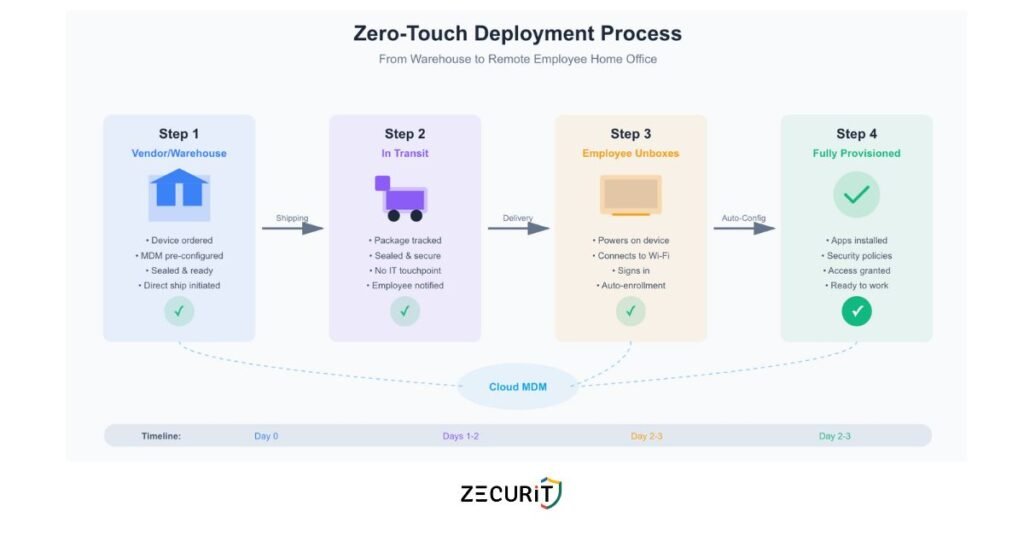
Here's how it transforms the workflow: You purchase devices directly from an authorized vendor who's integrated with your UEM/MDM platform. The vendor ships the sealed device directly to the employee's home address. When the employee unboxes and powers on the device for the first time, it automatically connects to your management infrastructure, downloads your security policies, installs required applications and configures appropriate access controls. All without an IT technician ever touching the hardware.
This approach delivers multiple advantages beyond just convenience. Deployment speed accelerates dramatically. New employees can be fully provisioned within days instead of weeks. There's no waiting for equipment to arrive at headquarters, no queue for IT configuration, no shipping delays to forward the device to a remote location.
Security actually improves through zero-touch methods. Devices enter service with current security baselines automatically applied. There's no risk of an IT technician forgetting a critical configuration step or using outdated images. The process is standardized and repeatable.
If deployment is complex, recovery is even harder. When a remote employee leaves your organization, you face a logistical puzzle: how do you get a laptop back from someone who might be bitter about their departure, who has no reason to help you and who lives 1,500 miles from your nearest office?
Organizations that handle this well build remote employee offboarding IT checklists that execute automatically alongside HR processes. The moment a separation is triggered in your HRIS, your ITAM system should initiate a recovery workflow.
Smart recovery processes include several components:
Immediate asset lockdown protects your data even before physical recovery. Remote wipe capabilities ensure that sensitive information is removed from the device within hours of termination. Access to corporate systems gets revoked instantly through automated identity management integration.
Pre-paid return shipping removes friction from the recovery process. Your system automatically generates a prepaid shipping label and emails it to the departing employee with clear instructions. Include the packaging materials directly in the initial deployment shipment so employees always have appropriate boxes and padding ready.
Economic incentives dramatically improve recovery rates. Many organizations hold the final paycheck or offer gift card incentives contingent upon equipment return. Frame this clearly in employment agreements and reiterate during offboarding.
Escalation pathways handle non-compliance professionally. If equipment isn't returned within a reasonable timeframe, your process should include automated reminders, involvement of legal teams for high-value assets and clear documentation for potential cost recovery.
Some organizations are experimenting with third-party recovery services that specialize in remote equipment retrieval. These companies send couriers to retrieve devices from uncooperative former employees, handle refurbishment and return assets to your available inventory. The cost per recovery typically ranges from $50-150, which often proves more economical than writing off the asset entirely.
The traditional security model assumed a fortress. You built strong walls around your network, installed robust firewalls and monitored everything that crossed the boundary. Inside the perimeter was safe. Outside was hostile. Assets that lived inside inherited that protection.
Endpoint security for remote teams requires assuming breach and zero trust from the start. Every device is potentially compromised. Every network connection is potentially hostile. You can't trust the coffee shop Wi-Fi, the home router and even the employee's personal judgment about what links to click.
Geo-location tracking has become a critical component of modern ITAM security. By monitoring where devices physically exist, you can detect anomalous patterns that signal potential theft or policy violations.
If a laptop assigned to an employee in Boston suddenly appears in Moscow, that's not a vacation that's a security incident requiring immediate investigation. Geofencing capabilities let you define approved regions and trigger automatic alerts when devices cross boundaries.
However, location tracking introduces legitimate privacy concerns. Employees rightfully worry about surveillance and the implications of their employer knowing their physical whereabouts 24/7. The legal landscape varies significantly by jurisdiction, with European regulations through GDPR being particularly strict about tracking employee activities.
Responsible implementation requires transparent policies. Communicate clearly what you're tracking, why it matters for security and how you'll use the data. Many organizations configure tracking to only activate after a device is reported lost or stolen and to track device location without associating it with individual employee identity except during security investigations.
Remote wipe capabilities represent your last line of defense when physical control is impossible. Modern MDM platforms can trigger full data erasure within seconds of receiving the command, rendering the device useless for data extraction even if stolen.
Effective remote wipe strategies distinguish between different scenarios. For theft or loss, full device erasure makes sense. For employee offboarding where equipment return is expected, selective corporate data removal preserves the device's functionality while eliminating sensitive information.
The key is ensuring your remote wipe infrastructure doesn't depend on employees cooperating. Devices should check in regularly with your management system, receiving wipe commands even if the employee isn't actively using the machine. This requires persistent background agents that survive reboots and can't be easily disabled by users.
Perhaps the most underrated security challenge with distributed teams is maintaining consistent patching and security posture across devices that rarely connect to managed networks. A laptop that skips security updates for six months becomes an attractive target for attackers exploiting known vulnerabilities.
Automated patching for off-network devices requires cloud-managed update infrastructure. Instead of relying on employees to manually install updates or connect to VPN for patching windows, modern systems push updates through encrypted cloud channels whenever devices have internet connectivity.
Configure your systems to require security updates as a condition of accessing corporate resources. Employees can delay optional feature updates, but critical security patches should become mandatory within defined timeframes, with access automatically suspended for non-compliant devices.
The Bring Your Own Device movement promised cost savings and employee satisfaction. Why buy expensive hardware when employees already own capable computers and smartphones? The reality proved far messier than the promise.
BYOD policy for remote workers introduces complex security, privacy and legal considerations that escalate in remote environments. When an employee uses their personal laptop for work, where does your right to manage that device end and their personal privacy begin?
Organizations with stringent security or compliance requirements increasingly mandate corporate-owned devices for remote workers. Full device control eliminates ambiguity about management rights. You own the hardware, you control the software, you define the security policies.
Corporate-owned models also simplify offboarding dramatically. When someone leaves, you initiate asset recovery procedures without navigating questions about personal data intermixed with corporate information. The device belongs to you, period.
The hybrid work IT infrastructure works most smoothly when your ITAM system tracks devices you fully control. Inventory management, security compliance and lifecycle planning all become more straightforward when you're managing a homogeneous fleet rather than accommodating hundreds of different personal device configurations.
Despite the challenges, BYOD remains appropriate in certain contexts. Organizations with tight budgets, highly technical workforces comfortable with security practices and specific roles requiring specialized personal equipment might benefit from the model.
Modern BYOD policy for remote workers requires clear containerization. Corporate data and applications must operate in isolated, managed environments separate from personal use. Solutions like mobile application management and virtual desktop infrastructure create clear boundaries, letting you enforce security policies on corporate resources without invading personal device privacy.
The legal framework matters significantly. Your BYOD policy must explicitly define what happens during offboarding. Can you remotely wipe an employee's personal device? What happens to corporate data stored locally? What are the employee's obligations regarding uninstalling company software? Document everything clearly and require explicit consent.
Pure cost analysis often reveals BYOD saves less than anticipated. Employee stipends, support complexity for diverse device types, increased security tools for unmanaged endpoints and compliance risk often offset hardware cost savings. Many organizations find corporate-owned models actually prove more economical at scale.
Distributed workforce management becomes significantly easier when you standardize on corporate-owned devices. Support teams develop deep expertise with specific models rather than troubleshooting infinite device variations. Bulk purchasing delivers better pricing than individual stipends. Lifecycle planning and refresh cycles become predictable.
Few IT teams realize that where your employees work can trigger tax obligations for your organization. The concept of "nexus" means that having employees or property in a jurisdiction can require your company to collect sales tax, pay corporate income tax and comply with local employment regulations in that location.
When you ship laptops to remote employees, you're creating physical property presence in those states or countries. For organizations with distributed teams across multiple states, this creates complex compliance obligations that finance teams must navigate.
Your ITAM system becomes a critical data source for tax compliance. Finance teams need accurate, real-time information about where company property exists, how long it's been in each jurisdiction and what the hardware value represents. This data feeds into nexus calculations and helps determine where tax obligations exist.
Cross-border remote work introduces even more complexity. Shipping laptops internationally triggers customs declarations, import duties and equipment registration requirements in many countries. Some jurisdictions require special licenses to import encryption technology, which includes most modern computing devices.
Geo-fencing for corporate laptops helps track international movement and flag compliance risks. If an employee takes company equipment to a country where your organization lacks proper legal structure or where data sovereignty laws restrict data access, that creates potential legal exposure.
Data residency regulations like GDPR also create technical requirements for where corporate data can be processed and stored. Your ITAM platform needs to help you understand where devices are processing sensitive data and whether that complies with applicable regulations.
Comprehensive asset tracking creates the documentation trail required for compliance verification. If a tax authority questions your nexus footprint, you need clear records showing where equipment was located during specific time periods. If a security incident occurs, you need audit logs demonstrating you took reasonable protective measures.
Modern ITAM systems should timestamp and log every significant event: when devices were provisioned, where they were shipped, when they checked in, when security policies were applied and when assets were recovered. This audit trail protects your organization during investigations and demonstrates due diligence in asset management.
Creating an ITAM strategy that thrives in distributed environments requires embracing several core principles:
Assume devices will never touch your corporate network. Design every process to work through internet connectivity alone. VPN dependency becomes a single point of failure that will frustrate users and create security gaps.
Automate everything possible. Manual processes don't scale across distributed teams in multiple time zones. Provisioning, security updates, compliance checks and recovery workflows must execute automatically based on predefined triggers.
Instrument for visibility. If you can't measure it, you can't manage it. Deploy agents and tools that provide real-time insights into device health, location, security posture and compliance status regardless of network position.
Plan for the worst case. Employees will be uncooperative during offboarding. Devices will be stolen. Remote workers will travel internationally without notifying IT. Build processes that handle these scenarios automatically rather than requiring heroic intervention.
Your ITAM strategy directly impacts Digital Employee Experience (DEX). When remote employees receive equipment quickly, when their devices work reliably, when security measures operate transparently without frustrating workflows, you're enabling productive work rather than creating obstacles.
Poor ITAM practices create friction that damages remote employee satisfaction. Delays in provisioning new equipment mean new hires spend their first week unproductive. Overly aggressive security policies that lock out employees for minor compliance issues create helpdesk tickets and frustration. Cumbersome VPN requirements slow access to cloud applications.
Modern ITAM platforms incorporate DEX metrics that measure endpoint performance, application responsiveness and user experience scores. This data helps IT teams optimize for both security and usability, finding the balance point that protects assets without degrading the employee experience.
Track meaningful metrics that reveal your ITAM program's health:
Time-to-provision: How quickly can you deliver a fully configured device to a new remote hire?
Asset recovery rate: What percentage of equipment do you successfully retrieve during offboarding?
Security compliance percentage: How many devices meet current security baselines at any given moment?
Ghost asset ratio: What proportion of purchased equipment lacks corresponding ITAM records?
Mean time to remediation: How quickly can you respond to security incidents on remote devices?
Review these metrics quarterly and identify process improvements. The goal isn't perfection but continuous progress toward better visibility, security and operational efficiency.
| Dimension | Traditional ITAM | Remote-First ITAM |
|---|---|---|
| Discovery Method | Network scanning, physical audits | Agent-based reporting, cloud-native |
| Deployment Speed | 1-2 weeks (shipping + IT config) | 2-3 days (zero-touch deployment) |
| Security Perimeter | Network firewall, physical access controls | Endpoint-based, zero trust architecture |
| Logistics | Centralized warehouse, help desk pickup | Direct shipping, prepaid returns |
| Visibility | Complete when on-network | Continuous regardless of location |
| Recovery Process | Badge swipe, physical return | Automated workflows, courier services |