
USB ports are one of the most underestimated security blind spots in any corporate network. While most enterprise security investment goes toward firewalls, endpoint detection, and identity management, the physical layer remains dangerously exposed. A single unattended workstation and a personal USB drive is all it takes for a privileged user to walk out with gigabytes of sensitive data, or for a contractor to silently introduce malware that bypasses every network-layer control in your stack.
USB device control software is the policy-driven discipline that closes this gap. For IT administrators and security teams evaluating their options, Zecurit Device Control provides a centralised, profile-based approach to managing every USB and peripheral device across your endpoint fleet, without the operational compromises that come with native OS tooling.
USB device control software is a security management tool that enables IT administrators to define, enforce, and audit which USB-connected devices and peripheral hardware are permitted to interact with managed endpoints. Rather than relying on OS-level defaults, dedicated software enforces granular, category-specific policies that can be applied uniformly across an entire fleet, including remote, hybrid, and non-domain machines.
USB device control is not simply about blocking USB ports. Modern solutions manage all peripheral classes including removable storage, Bluetooth adapters, wireless network interfaces, printers, biometric devices, and legacy serial ports, through a single unified policy interface.
Most Windows administrators are familiar with blocking USB mass storage through Group Policy Objects (GPO) or direct registry modifications under HKEY_LOCAL_MACHINE\SYSTEM\CurrentControlSet\Services\USBSTOR. Setting the Start value to 4 disables removable storage across domain-joined machines, and it works reliably in a stable, on-premise environment. For a broader look at how modern tools extend beyond GPO for Windows endpoint management, the operational gaps become even more apparent.
The problem surfaces the moment your environment becomes more complex, which for most enterprises, it already is.
GPO-based USB control breaks down in several predictable ways:
It is all-or-nothing. GPO offers no native mechanism to allow a specific, company-issued USB drive while blocking all others on the same machine. Every device in a class is treated identically.
It does not extend beyond domain boundaries. Remote workers on personal networks, contractor machines, and cloud-managed endpoints operating outside Active Directory are unaffected by GPO rules, creating a policy gap that grows with every remote hire.
It cannot enforce device category distinctions. A GPO rule blocking removable storage does not touch Bluetooth adapters, modems, or imaging devices. Each requires separate, manually maintained policy objects.
Audit visibility is limited. GPO has no built-in mechanism to log which devices were connected, which were blocked, or by which user, making compliance evidence collection a manual and incomplete process.
Centralised USB management for enterprise environments requires a dedicated solution that operates at the agent level, persists beyond network boundaries, and provides the granular control that GPO cannot. Device control is one layer of a broader endpoint hardening strategy that also includes vulnerability management and proactive patch enforcement.
The foundation of any serious USB device control solution is structured device categorisation. Rather than treating all USB-connected hardware as a single class, modern tools segment the peripheral landscape into distinct risk tiers, each with independent enforcement actions.
The Zecurit Device Control policy interface organises all controllable hardware into three functional groups:
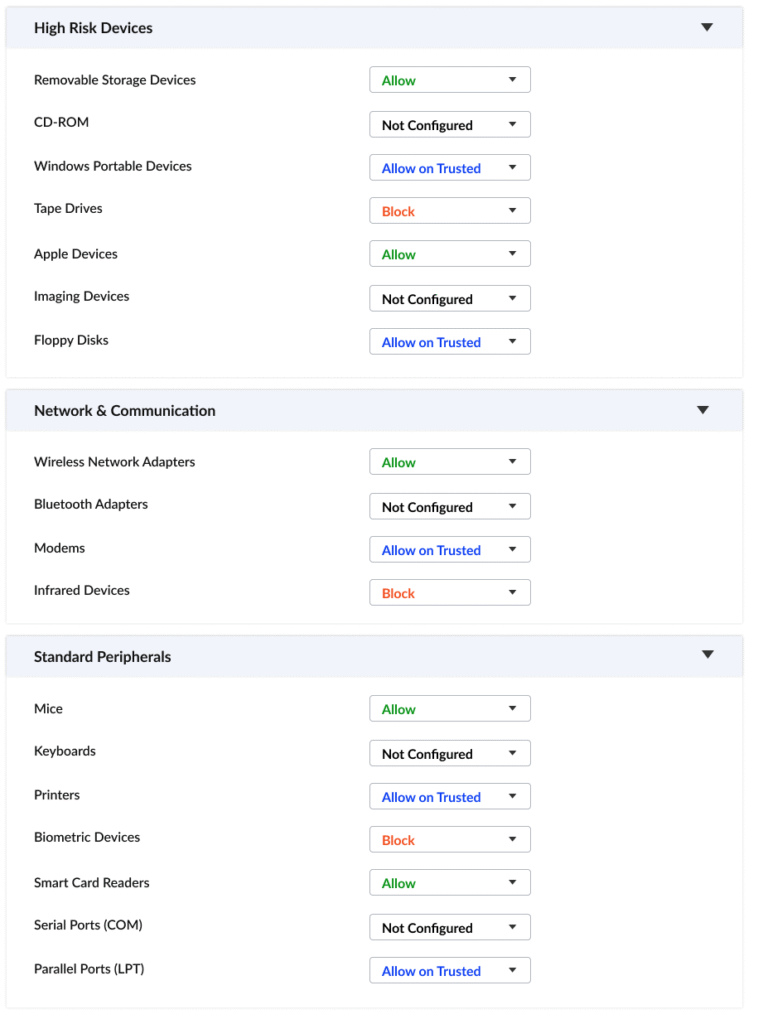
High Risk Devices
This category covers the primary data exfiltration and malware ingress vectors: removable storage devices, CD-ROM drives, Windows Portable Devices (MTP/WPD), tape drives, Apple devices, imaging devices, and floppy disks.
Each device type in this group represents a distinct threat profile. Removable storage is the most common vector for insider data theft. Windows Portable Devices, which include media players and MTP-connected smartphones, can mount and transfer file system content without appearing as a traditional drive. Imaging devices, often overlooked, can be used to extract document copies through scan-to-USB workflows. Applying individual enforcement actions per type, rather than a single blanket rule, gives administrators the control resolution that real-world environments require.
Network and Communication Devices
Wireless network adapters, Bluetooth adapters, modems, and infrared devices fall into this category. These are the hardware-layer equivalents of shadow IT: a rogue Bluetooth adapter or personal mobile broadband modem plugged into an endpoint creates a data pathway that is completely invisible to corporate network monitoring, DLP tools, and proxy controls.
Blocking or whitelisting these device classes at the endpoint agent level, before any driver negotiation occurs, is the only reliable way to eliminate these covert channels.
Standard Peripherals
Mice, keyboards, printers, biometric devices, smart card readers, serial ports (COM), and parallel ports (LPT) form the standard peripherals group. These devices are present on almost every managed workstation and are routinely left unrestricted.
The risk is real. BadUSB attacks exploit the USB Human Interface Device (HID) specification to register a malicious device as a keyboard in Windows, allowing arbitrary keystroke injection at machine speed before any endpoint protection agent can intervene. Printer controls prevent sensitive documents from being physically output on unregistered devices. Managing this category through policy eliminates the assumption that familiar hardware is safe hardware.
For each device type across all three categories, administrators assign one of four enforcement actions:
Allow: Full, unrestricted access. Applied to verified low-risk devices where productivity impact of blocking outweighs security benefit, such as approved smart card readers or registered mice.
Block: Complete OS-level restriction. No driver negotiation, no file system mounting, no data transfer. The endpoint agent enforces this state regardless of network connectivity.
Not Configured: The device type inherits the OS default or a higher-level policy rule. Used intentionally for lower-priority device classes while more critical categories are formally configured, or where a separate policy layer governs the device class.
Allow on Trusted: The most operationally powerful state. Only hardware with a registered identifier in the trusted device list is permitted to connect. Any device in the same class that does not match a registered hardware identifier or serial number is silently blocked at the OS level. This is the mechanism that enables a company-issued encrypted USB drive to function normally on any managed endpoint while blocking every personal drive in the same device class. This approach directly implements the principles outlined in a Zero Trust security model for UEM, where no hardware is trusted by default.
Apply Allow on Trusted to removable storage, Windows Portable Devices, printers, and modems as a baseline.
Reserve Block for device types with no legitimate operational use case in your environment, such as tape drives,
infrared devices, and floppy disks.
The enforcement actions configured within a Device Control policy are saved as a named security profile within Zecurit Endpoint Manager. That profile is then assigned to specific machine groups, organisational units, or individual enrolled devices through the centralised deployment console. This sits within the broader configuration management framework that governs how all security profiles, including BitLocker, Defender, and application guard settings, are distributed across the fleet.
This architecture means a finance team endpoint can have removable storage set to Block while a field operations machine in the same organisation has it set to Allow on Trusted with only approved encrypted drives registered. Policy updates push to all assigned endpoints immediately upon publication, with no requirement for endpoints to be on the corporate network. For a detailed overview of how profile-based deployment works across the platform, see the Zecurit Endpoint Management overview.
USB and removable media control maps directly to the technical controls required by the most demanding enterprise compliance frameworks:
ISO 27001 Annex A.8.3 requires documented, enforced policies for removable media handling. Zecurit Device Control policy profiles serve as the documented, auditable evidence of those controls.
PCI-DSS Requirement 9.7 mandates strict controls over removable electronic media within the cardholder data environment. Blocking or whitelisting removable storage on in-scope endpoints reduces PCI audit scope risk directly.
HIPAA Physical Safeguards require workstation and device use controls that prevent unauthorised access to systems containing protected health information. Agent-enforced device policies satisfy this requirement with a complete audit trail.
SOC 2 Common Criteria CC6.7 covers logical access controls over physical ports. Every Device Control policy change and blocked device event in Zecurit generates a timestamped log entry suitable for auditor review.
Before configuring any policy, conduct a full inventory of peripheral hardware currently in active use across the fleet. The goal is to identify which device types are present, which are necessary for business operations, and which registered hardware identifiers belong to company-issued devices. This audit forms the foundation of your trusted device list and prevents legitimate hardware from being inadvertently blocked at deployment.
Using the audit output, configure your baseline Device Control profile. Set high-risk categories to Allow on Trusted and register all identified company-issued device identifiers. Apply Block to device types with no operational use case. For device classes that require further evaluation, set Not Configured temporarily rather than leaving them at a permissive default.
Assign the baseline policy to a controlled pilot group of 10 to 20 endpoints before organisation-wide deployment. Monitor for blocked legitimate devices, unexpected operational disruptions, and any hardware identifiers missing from the trusted list. Zecurit's endpoint monitoring and alerts surface these events in real time during the pilot window, making it straightforward to catch gaps before full rollout. Refine the policy and trusted device registry based on pilot feedback before proceeding.
After full deployment, establish a regular cadence for reviewing device connection logs, blocked event records, and policy violation alerts. Zecurit's reports and auditing module centralises this data, giving security teams the forensic trail they need for both internal governance reviews and external compliance audits. Use the log data to identify hardware that needs adding to trusted groups, device classes that require policy adjustment, and any patterns of repeated blocked connection attempts that warrant a security investigation.
The physical perimeter of your endpoint environment is as important as any network boundary. USB ports, peripheral interfaces, and communication hardware represent a consistent, low-visibility attack surface that native OS tools are not equipped to manage at enterprise scale. Understanding what endpoint security requires in a modern, distributed environment makes clear why device control cannot be an afterthought.
Effective USB device control requires category-level policy management, hardware-specific whitelisting, offline enforcement, and a complete audit trail. These are the operational requirements that purpose-built solutions address and that GPO cannot.
Zecurit Endpoint Manager delivers all of this through a single, cloud-managed policy console. If your organisation is ready to close the physical security gap across your endpoint fleet, start a free trial or request a guided demo to see Device Control in action across your real environment.