
Imagine waking up to discover that BitLocker was silently disabled on a finance laptop three days ago, your antivirus service crashed on a remote sales device last week, and no one received a single notification. This is not a hypothetical scenario. It is an everyday reality for IT teams that rely on manual checks, fragmented dashboards, and reactive workflows to manage device security.
In 2026, endpoint environments have grown dramatically more complex. Hybrid work models have normalized remote and distributed device fleets. On-premise distribution points are declining as cloud-first endpoint management becomes the standard. The rise of Platform SSO and conditional access policies means that compliance gaps, even temporary ones, can cascade into access revocations, audit failures, and breach incidents.
Automated endpoint compliance monitoring alerts solve this by creating a real-time intelligence layer across your device fleet. The moment BitLocker is disabled, an antivirus service stops, or a firewall policy drifts from its expected state, the right person receives an actionable notification. No polling delays. No spreadsheets. No surprises.
This guide explains how automated alerts work, what conditions they should cover, why they have become a requirement for modern cybersecurity insurance, and how to choose the right platform based on your organization size and technical maturity.
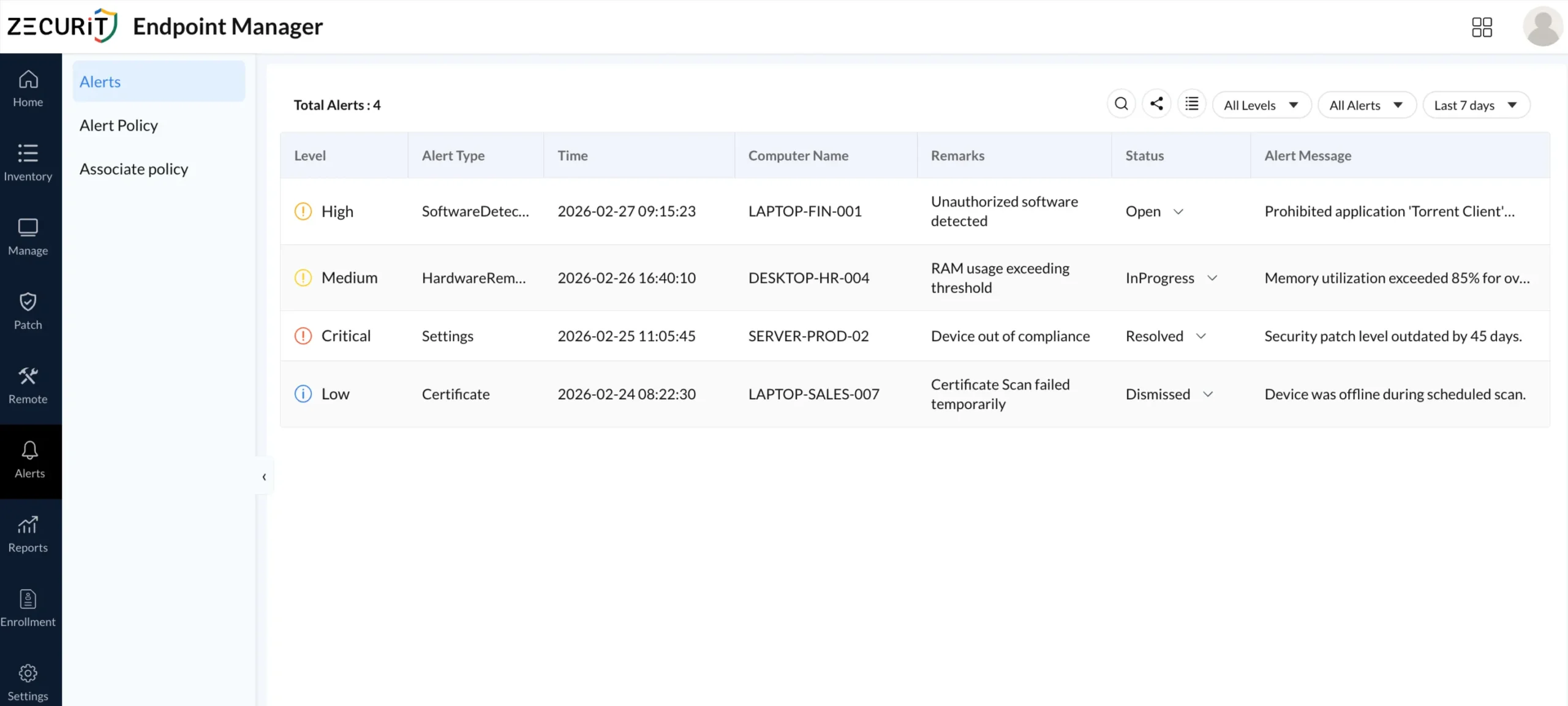
Endpoint compliance monitoring is the practice of continuously evaluating managed devices against a defined security baseline and triggering notifications when deviations occur. Unlike periodic audits, which capture a point-in-time snapshot, compliance monitoring operates persistently. It evaluates device state after inventory scans, configuration changes, software events, and certificate checks.
Modern unified endpoint management platforms embed compliance monitoring directly into the agent that runs on each endpoint. This agent reports device state back to a central console, where alert policies evaluate whether defined conditions are met. When a condition is violated, an alert is generated and routed to the appropriate IT team member.
Core Compliance Conditions Monitored
A mature endpoint compliance alerting system monitors several categories of security state:
Encryption status: Is BitLocker enabled and active on every managed Windows device? If encryption is suspended or disabled, that device is a data exposure risk regardless of other controls.
Antivirus service health: Is the antivirus service running, updated, and reporting clean status? A stopped antivirus service on a remote device creates an unprotected window that can persist for days without automated alerting.
Firewall policy enforcement: Is the Windows firewall enabled and configured in line with the published policy? Firewall drift is a common misconfiguration that often goes undetected.
Certificate validity: Are security certificates on managed devices current? Expired certificates can disrupt authentication flows and trigger user-facing errors.
Hardware and software changes: Has unauthorized software been installed? Has a hardware component been swapped or removed? Inventory-level changes can signal policy violations or unauthorized access.
Patch compliance level: Is the device running within an acceptable patch lag? Devices that fall behind on security patches represent a quantifiable vulnerability, especially in the context of patch management obligations.
An alert policy defines the conditions that must be met to generate a notification. In Zecurit Endpoint Manager, creating an alert policy is a three-step process:
Step 1: Define the policy. Administrators assign a policy name, description, priority level (Critical, High, Medium, or Low), and a notification email. The priority level determines how the alert is surfaced in the console and how urgently it is routed.
Step 2: Configure alert conditions. The policy specifies what inventory or configuration event triggers the alert. This can include detection of prohibited software, hardware changes during a scan, settings drift such as BitLocker being disabled, or certificate scan failures.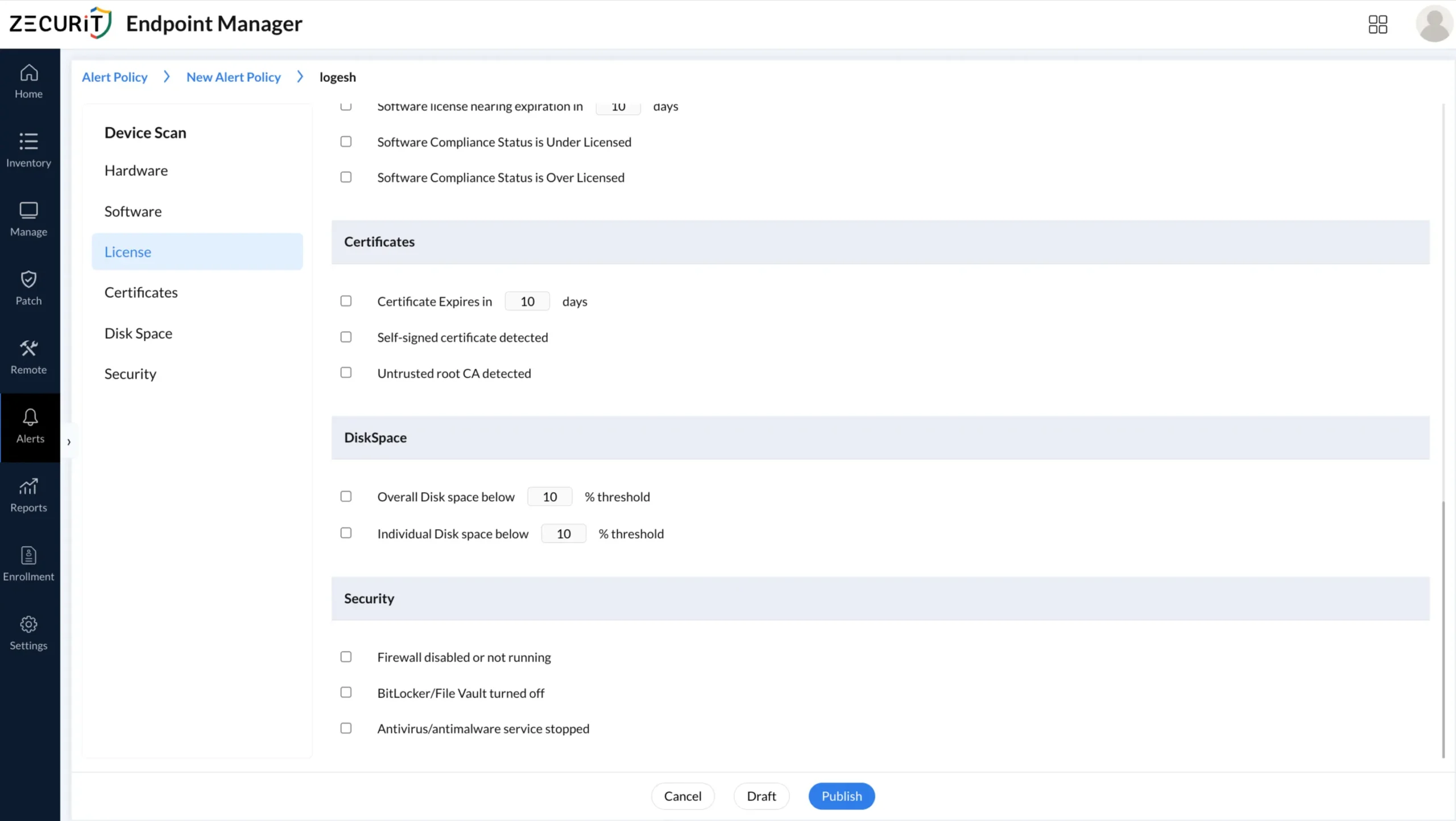
Step 3: Associate the policy with device groups. Once published, the alert policy is linked to one or more device groups. Every device in those groups is now monitored against the defined conditions. When a qualifying event occurs during an inventory scan or configuration check, the alert is automatically generated and logged.
This workflow ensures that alert policies are reusable, auditable, and tied directly to device group scope rather than requiring per-device configuration.
BitLocker encryption is a foundational requirement for data protection on Windows devices. When it is disabled, whether intentionally or through a system event, the device becomes immediately vulnerable to physical data extraction. This is particularly critical for laptops used by finance, HR, and executive teams who handle sensitive data in transit.
Automated BitLocker monitoring works by checking encryption status during inventory scans. If the agent detects that BitLocker has been suspended or turned off on a device where it should be active, an alert is generated and routed to the assigned team with the device name, timestamp, and current status.
For organizations managing BitLocker at scale, this alert capability removes the manual verification burden and creates a documented response trail. Every alert is logged with its status, whether Open, In Progress, Resolved, or Dismissed, giving auditors a clear record of how compliance deviations were handled.
Compliance insurance implication: Cyber insurers increasingly require Continuous Asset Valuation as part of policy underwriting. Being able to demonstrate that encryption state changes generate real-time alerts, and that those alerts are acknowledged and resolved, directly supports policy qualification and renewal.
Remote and hybrid workers present a unique challenge. When an antivirus service crashes or is stopped on a device that is not physically visible to IT, the gap can persist for an extended period before anyone notices. During that window, the device is running without behavioral protection.
Automated antivirus monitoring closes this gap by flagging service interruptions during the next check cycle. The alert surfaces in the console with the device name (for example, DESKTOP-HR-004) and a message indicating that memory or service state is outside the defined threshold.
This is especially relevant for distributed teams where devices may be on home networks, VPNs, or public Wi-Fi. The Windows endpoint management agent continues to report state regardless of network location, as long as the device has internet connectivity.
For organizations in healthcare, finance, or legal sectors, undetected antivirus failures can constitute a compliance breach under HIPAA, PCI-DSS, or other regulatory frameworks. Automated alerting creates the audit evidence needed to demonstrate that gaps were detected and remediated within acceptable timeframes.
Windows Firewall misconfigurations are one of the most common and overlooked compliance failures in enterprise environments. Group Policy can push firewall settings, but policy application can fail. Users on local admin accounts can disable the firewall. VPN-connected devices can inherit unexpected rules.
An alert policy configured to detect firewall state changes will trigger the moment a scan identifies that Windows Firewall is disabled or misconfigured on a managed device. The alert is categorized by the severity level defined in the policy, routed to the assigned email address, and logged in the alert console with full device context.
This connects directly to zero trust security implementation, where every device must continuously prove compliance before being granted access. A device with a disabled firewall fails this validation. Automated alerts provide the detection layer that zero trust frameworks depend on.
Not all compliance deviations carry equal risk. A well-designed alerting system distinguishes between Critical, High, Medium, and Low severity events. This prevents alert fatigue while ensuring that the most urgent conditions receive immediate attention.
A typical severity mapping in an endpoint compliance context:
Critical: Security patch level outdated beyond the acceptable threshold (for example, 45 days), device out of compliance with core settings policies, or encryption disabled on a server-class endpoint.
High: Unauthorized software detected (for example, a torrent client on a finance laptop), prohibited application running on a managed device.
Medium: RAM usage exceeding defined thresholds, antivirus service in degraded state.
Low: Certificate scan failed due to device being offline during the scheduled scan window.
Each alert carries a status field that the IT team manages through the resolution lifecycle:
Open: Newly generated, not yet acknowledged.
In Progress: Assigned team member is investigating.
Resolved: Root cause addressed and documented.
Dismissed: Acknowledged as a known exception with justification.
This status workflow creates the audit trail that compliance frameworks and cyber insurers require when evaluating an organization's security posture.
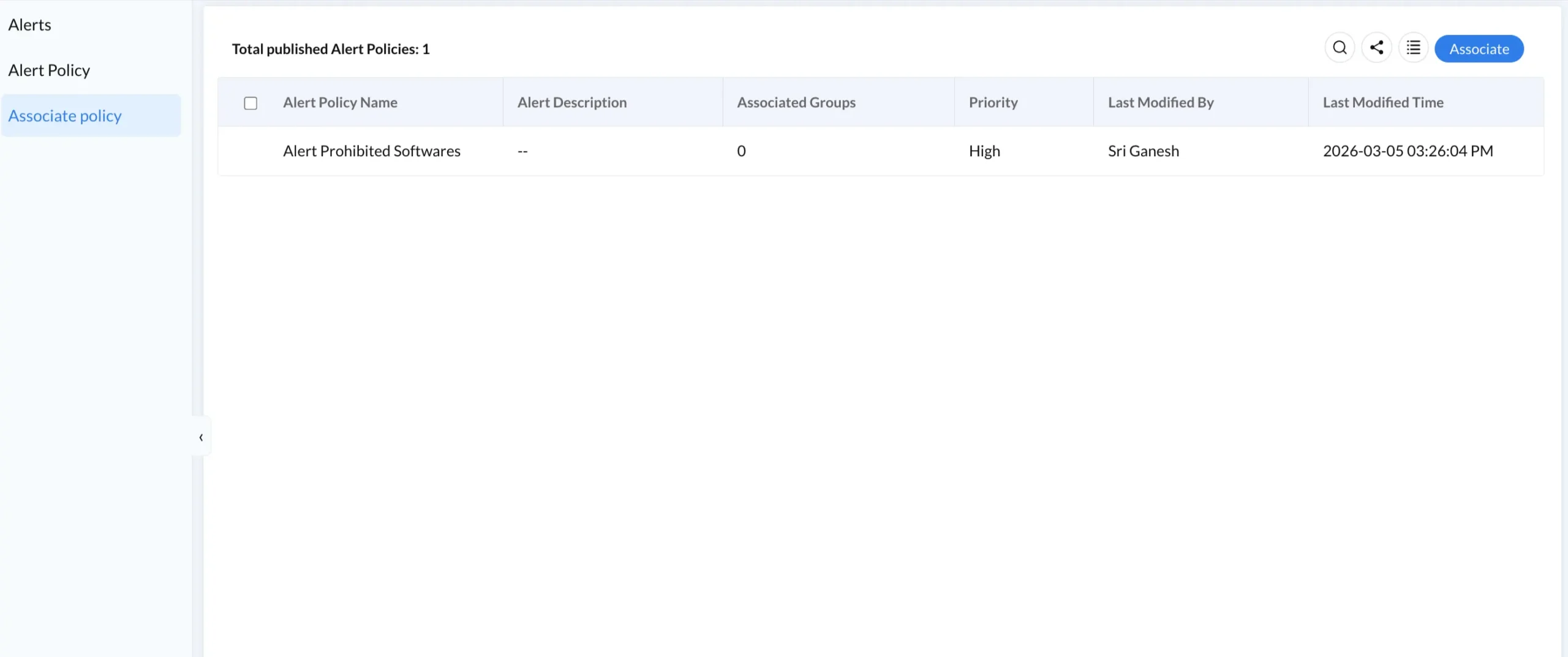
One of the most operationally important aspects of alert policy design is scope management. Creating a single policy and manually assigning it to hundreds of individual devices is not scalable. Instead, alert policies should be associated with device groups that map to organizational structure, device type, or risk classification.
For example, a Critical-priority BitLocker alert policy should be associated with the Finance Laptops and Executive Devices groups, while a Medium-priority hardware change alert can cover the broader All Windows Endpoints group.
This approach ensures that as new devices are enrolled into a group, they automatically inherit the associated alert policies. No manual intervention is required. Device enrollment workflows feed directly into group membership, making the compliance coverage self-maintaining.
The right tool depends on three factors: organization size, device fleet composition, and the technical maturity of the IT team.
Small to mid-size organizations (50 to 500 devices): Look for a platform that combines alert policy creation, device group management, and remote remediation in a single agent-based interface. Ease of onboarding and cloud-native architecture matter most. Avoid tools that require on-premise distribution points or complex infrastructure.
Mid-market organizations (500 to 5,000 devices): Prioritize policy granularity, multi-tenant support, and integration with SIEM or ticketing platforms. Alert routing to email or webhook endpoints should be configurable per policy. Autonomous endpoint management capabilities that enable self-healing responses to common alert conditions add significant operational value.
Enterprise organizations (5,000 and above): Require a platform that supports role-based access to alert policies, full audit logging, API access for integration with SOC workflows, and compliance reporting that maps to frameworks like NIST, CIS, or ISO 27001. The shift toward Platform SSO and identity-based access control should be reflected in how alert policies are managed and assigned.
Zecurit Endpoint Manager provides a purpose-built alert policy engine designed for Windows endpoint environments. The setup process follows a logical sequence that most IT teams can complete within a single working session.
Step 1: Navigate to Alerts and select Alert Policy. Review existing policies or select Create Policy to begin a new one.
Step 2: Define the policy name, priority level, and notification email. This information determines who is alerted and how urgently.
Step 3: Configure the alert conditions that reflect your compliance baseline. This includes BitLocker status, antivirus service health, firewall state, prohibited software detection, and certificate validity.
Step 4: Navigate to Associate Policy and link the published policy to the relevant device groups. All devices in those groups are now monitored.
Step 5: Monitor the Alerts dashboard for incoming events. Use the status workflow (Open, In Progress, Resolved, Dismissed) to manage and document the response lifecycle.
For teams new to endpoint management, the Zecurit knowledge hub provides implementation guides and configuration references that walk through each step in detail.
Endpoint compliance monitoring alerts are not a feature. They are an operational discipline. The goal is not to generate more notifications but to ensure that the right people know about the right deviations at the right time, with enough context to act immediately.
For small IT teams managing a hybrid device fleet, automated alerts replace hours of manual checking with a structured, policy-driven workflow. For enterprise security teams, they provide the continuous evidence layer that cyber insurers, auditors, and regulators increasingly require.
The shift away from periodic audits toward continuous compliance monitoring is not optional in 2026. It is the baseline expectation. Organizations that invest in automated alerting now reduce their mean time to detection, protect their cybersecurity insurance position, and build the foundation for a zero-trust device posture.
Start with the conditions that matter most, such as BitLocker, antivirus, and firewall, and build from there. Every alert resolved is a risk removed before it becomes a breach.