
An IT automation script library gives IT teams instant access to tested, ready-to-deploy scripts for system maintenance, security enforcement, and endpoint configuration. Zecurit Endpoint Manager includes an IT automation script library of over 100 pre-built templates, so administrators can automate repetitive tasks across Windows, Mac, and Linux devices in minutes, not days. No scripting experience is required to get started.
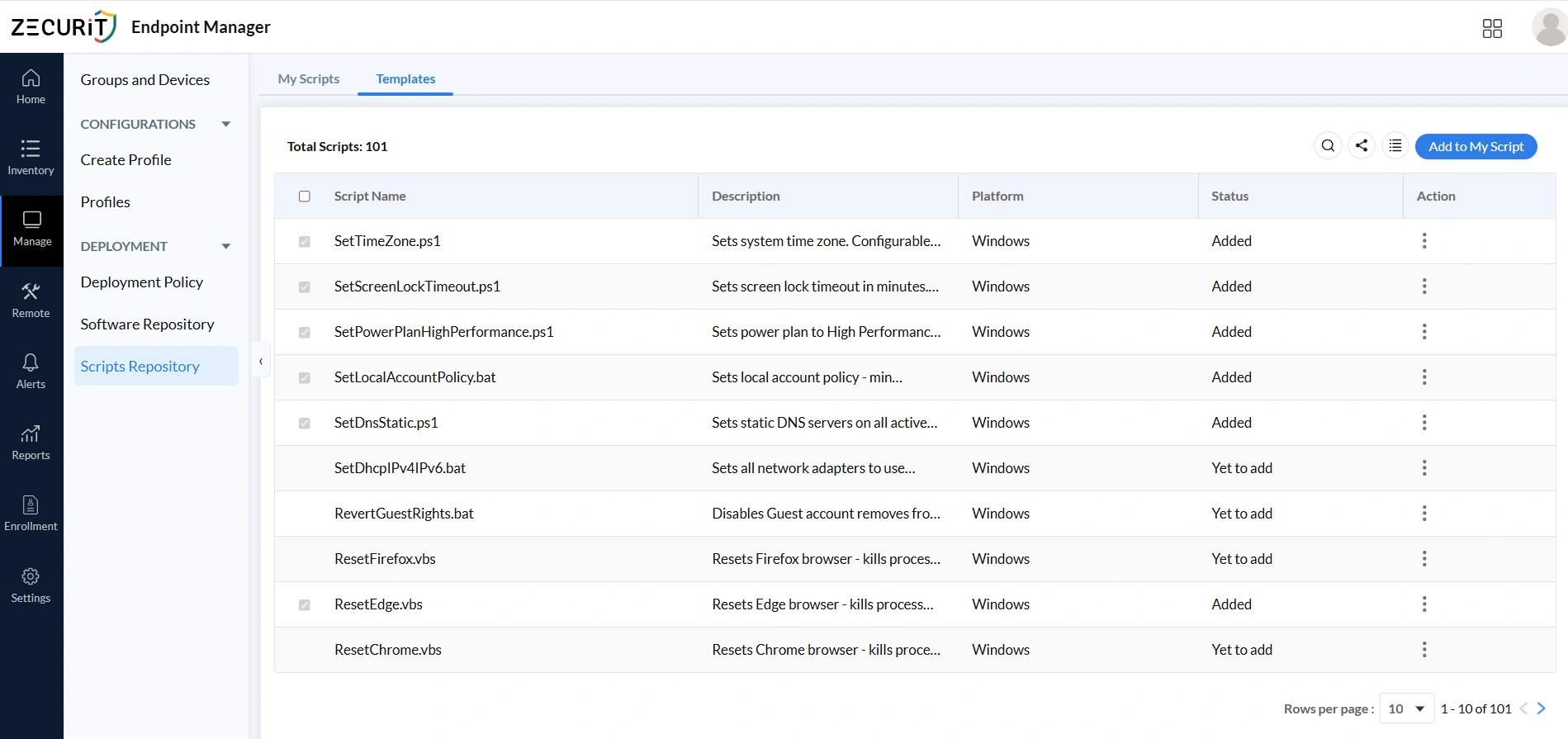
An IT automation script library is a centralized collection of pre-built scripts that IT teams can deploy to endpoints without writing code from scratch. In Zecurit Endpoint Manager, the Scripts Repository contains two sections: My Scripts for your organization's custom scripts and Templates, a curated IT automation script library of 100+ expert-built scripts.
Each entry in the library displays the script name, description, platform, arguments, tags, and last modified date. This makes it easy to browse, evaluate, and deploy the right script without reading the code. To understand how script execution works at the platform level, see What Is Remote Script Execution.
Manually configuring endpoints one device at a time creates inconsistency, compliance gaps, and wasted hours. A centralized IT automation script library solves all three problems at once.
In 2026, cybersecurity insurers require proof that endpoint configurations are continuously enforced, not just set once and forgotten. According to NIST's cybersecurity framework guidance, organizations must demonstrate consistent control implementation across their device fleet to satisfy modern compliance requirements. An IT automation script library directly supports this requirement by making enforcement repeatable, auditable, and scalable.
The decline of SCCM and on-premise tools has also accelerated the move to cloud-managed script deployment. Teams that relied on Group Policy or manual scripts now need a better system. Zecurit's IT automation scripts for sysadmins page covers how this fits into a modern endpoint management workflow.
Zecurit's IT automation script library covers three core categories of endpoint management automation. Each category targets a different layer of IT operations.
System configuration scripts standardize Windows device settings at scale. Without automation, these settings drift over time as devices are reimaged, upgraded, or reassigned.
Key templates in this category include SetTimeZone.ps1, SetPowerPlanHighPerformance.ps1, SetScreenLockTimeout.ps1, and SetDnsStatic.ps1. The DNS script configures static DNS servers across all active network adapters simultaneously. These scripts work alongside Zecurit's configuration management features to enforce a consistent baseline across the entire fleet.
Security scripts enforce the account policies and access controls required by modern compliance frameworks. They are the most commonly audited category of endpoint configuration.
SetLocalAccountPolicy.bat sets password complexity rules and account lockout thresholds. RevertGuestRights.bat disables the Guest account and removes associated permissions that are often left active after OS deployment. For organizations with encryption requirements, the Enable BitLocker Encryption script from the Script Hub handles drive encryption deployment at scale.
Browser misconfigurations are one of the most common sources of endpoint security risk. Corrupted profiles, cached credentials, and rogue extensions create vulnerabilities that standard patching does not address.
Zecurit's IT automation script library includes ResetEdge.vbs, ResetFirefox.vbs, and ResetChrome.vbs. Each script terminates the browser process, clears user settings, and resets the browser to a known-good state. These scripts are particularly useful after phishing incidents or when a device is being reassigned. For firewall-level coverage, the Windows Firewall Configuration script handles network security policy enforcement.
Zecurit's IT automation script library supports all major script formats across every platform your team manages. IT teams maintain one centralized library instead of separate repositories for each operating system.
| Operating System | File Extensions |
|---|---|
| Windows | .ps1, .bat, .cmd, .vbs, .vbe, .js, .jse, .wsf, .wsc, .wsh, .reg, .exe, .msi, .vb |
| Mac | .sh, .bash, .scpt, .applescript, .py |
| Linux | .sh, .bash, .zsh, .ksh, .csh, .tcsh |
Platform targeting is handled automatically when you create a deployment policy. This cross-platform capability is a core part of Zecurit's endpoint management features, which covers Windows, Mac, and Linux devices from a single console. For bulk deployment across mixed environments, see Bulk Script Deployment.
Adding a script from the template library to your organization's repository takes under a minute. Here is the exact process.
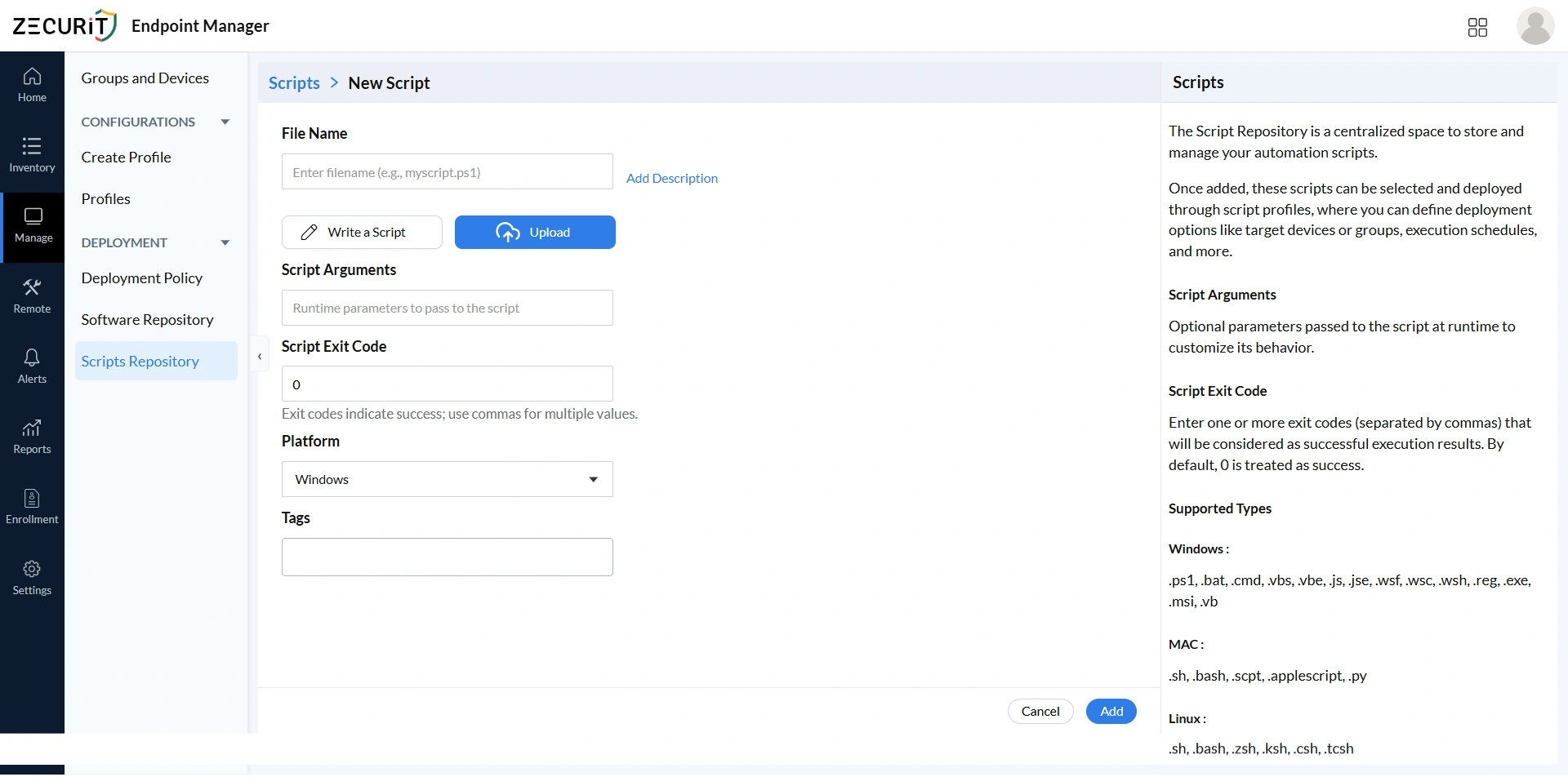
Navigate to Deployment > Scripts Repository and click the Templates tab. Browse the 101 available templates by name, platform, or tag. When you find the script you need, click Add to My Script. The template moves immediately to your My Scripts tab and is ready for deployment with no additional configuration required.
For scripts that need customization, the New Script form lets you enter a filename, add a description, set runtime arguments, configure exit codes, select the platform, and add tags. Microsoft's PowerShell scripting documentation provides guidance on argument syntax and exit code conventions if you are customizing templates for your environment.
A deployment policy controls how and when scripts from your IT automation script library run across your managed devices. Policies handle targeting, timing, retry logic, and notifications automatically.
Navigate to Deployment > Deployment Policy and click Create Policy with the category set to Script.
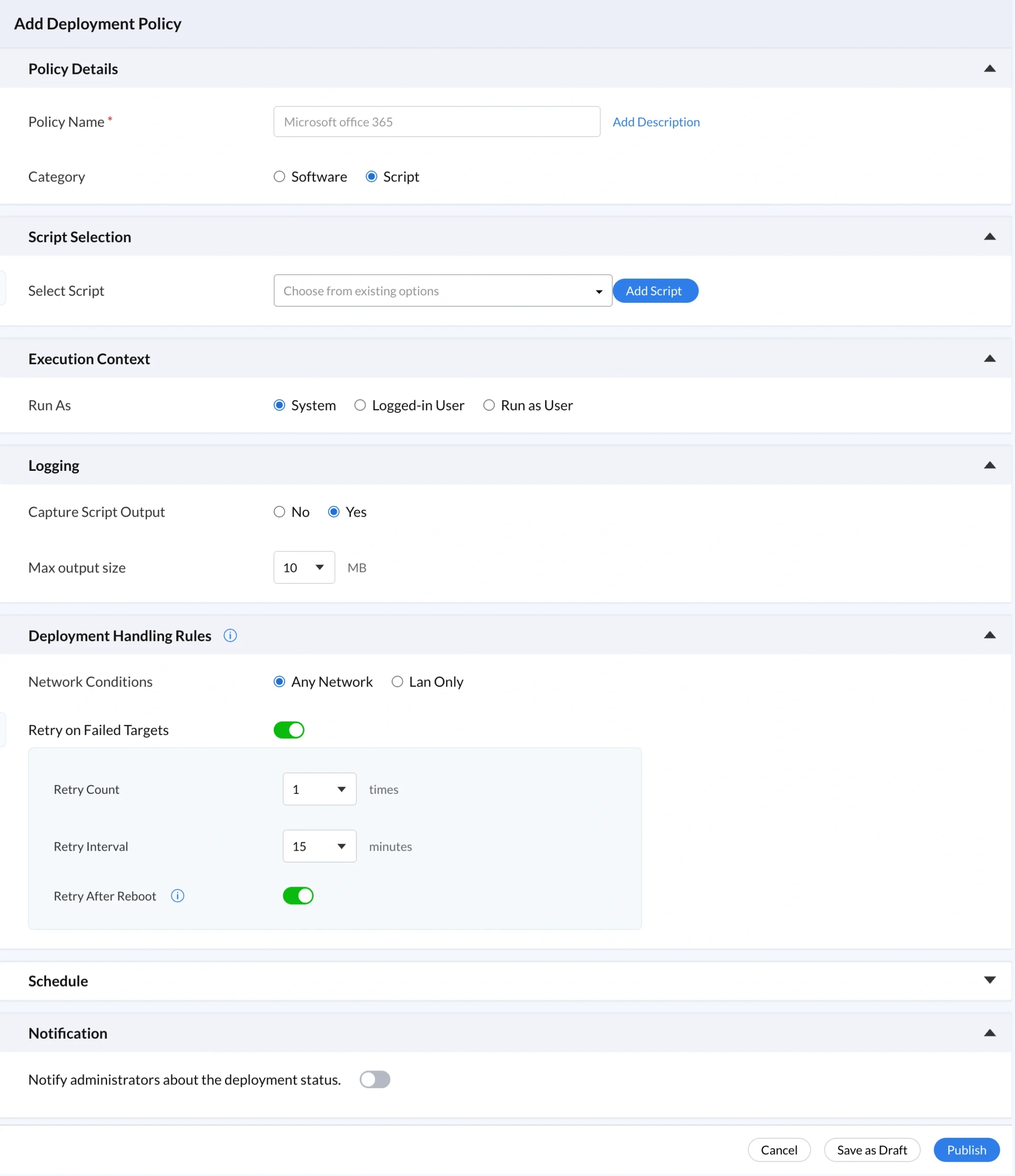
Script Selection: Choose the script from your My Scripts repository, or click Add Script to add a new one inline.
Execution Context: Select System, Logged-in User, or Run as User. System context is the correct choice for unattended maintenance scripts running overnight. For more detail on execution contexts, see the Remote Script Deployment Guide.
Logging: Enable Capture Script Output and set a maximum output size. The default is 10 MB. This creates a retrievable log of every execution, which is critical for compliance reporting and troubleshooting. See Zecurit's Reports and Auditing feature for how execution logs feed into audit reports.
Deployment Handling Rules: Set the network condition to Any Network or LAN Only. Enable Retry on Failed Targets with a Retry Count and Retry Interval. Enable Retry After Reboot to handle devices that restart during the maintenance window.
Schedule: Select Schedule Deployment, enter the Start Date and time, and choose the correct Time Zone. Alternatively, enable Execute at Every Startup to run the script each time the device boots. This is the right choice for configuration enforcement scripts that must persist across reboots.
Notification: Enable the notification toggle to receive a deployment status summary automatically.
Large IT teams accumulate significant script libraries quickly. A poorly organized IT automation script library becomes a maintenance burden rather than a time-saver. Good naming, tagging, and review habits prevent this from happening.
According to Microsoft's PowerShell scripting best practices, consistent naming conventions and inline documentation are the two most important factors in keeping a script library maintainable long-term.
Follow these practices to keep your IT automation script library organized:
SetDnsStatic-Windows.ps1Your IT automation script library is not just a productivity tool. In 2026, it is increasingly a requirement for cybersecurity insurance eligibility. Insurers now ask organizations to demonstrate that endpoint configurations are enforced continuously, not just at renewal time.
When scripts are deployed through Zecurit's policy engine with logging enabled, every execution creates a timestamped audit record. This record satisfies both internal security teams and external auditors without any additional effort.
The right starting point for your IT automation script library depends on fleet size and security maturity.
Small organizations (under 200 devices): Start with four templates: SetScreenLockTimeout.ps1, SetLocalAccountPolicy.bat, RevertGuestRights.bat, and one browser reset script. These enforce the most common security baseline requirements and satisfy the basic controls checked during a cybersecurity insurance review. See how software deployment for remote workers extends this coverage to distributed teams.
Mid-size organizations (200 to 2,000 devices): Add DNS configuration, power plan enforcement, and DHCP network adapter scripts. Schedule these weekly during off-hours maintenance windows with logging enabled for every run. Pair script deployment with endpoint monitoring and alerts to catch configuration drift between scheduled runs.
Enterprise organizations (2,000 or more devices): Build a full IT automation script library organized by category and platform. Use Zecurit's policy engine to assign different script sets to different device groups, with separate schedules for servers, workstations, and remote devices.
A centralized IT automation script library removes the biggest barrier to IT automation: time. Zecurit's library of 100 or more ready-to-use templates covers system configuration, security enforcement, browser management, and user account control. Every script is deployable to any endpoint within minutes from a single console.
For teams new to script automation, the IT automation script library provides an immediate productivity boost with no learning curve. For technically mature IT teams, the combination of custom scripts, policy-based scheduling, cross-platform support, execution logging, and retry logic delivers enterprise-grade automation that scales to thousands of endpoints.