
A BitLocker compliance report is the foundation of any audit-ready encryption program. When an auditor, cybersecurity insurer, or board member asks for proof that your Windows endpoints are encrypted, a manual PowerShell export or a week-old screenshot is not acceptable evidence. This guide explains what a complete BitLocker compliance report must contain, why point-in-time reports fail enterprise requirements, and how Zecurit Endpoint Manager delivers live, agent-verified encryption status across every enrolled device.
A BitLocker compliance report is a structured record that shows the encryption status of every managed Windows endpoint. It answers four essential questions for any compliance review: which devices are encrypted, which are not, whether recovery keys are properly backed up, and how far the encryption rollout has progressed across the fleet.
An effective report goes well beyond a simple "encrypted" or "not encrypted" flag. It captures per-device data confirmed by the endpoint agent itself, tracks the suspended state that leaves drives temporarily accessible, and documents recovery key backup status alongside encryption status. Without all of these elements, the report creates evidence gaps that experienced auditors will identify immediately. For foundational context on managing BitLocker at scale, see the centralized BitLocker management guide.
Most organizations generate BitLocker status data by running a script, querying Active Directory, or pulling an SCCM hardware inventory export. That output is accurate at the moment it runs and immediately starts going stale.
Point-in-time reports fail in four specific ways. First, they miss devices that were offline or unreachable during the scan, leaving remote endpoints invisible without any indication they were skipped. Second, they record only an "enabled" or "disabled" state, completely missing the suspended condition that occurs automatically during certain OS upgrades. Third, they do not confirm whether recovery keys are actually backed up per device, which is a separate and equally critical compliance requirement. Fourth, they require manual effort to regenerate, meaning compliance evidence is always hours or days old by the time it reaches a reviewer.
As cybersecurity insurers shift toward Continuous Asset Valuation as a coverage condition, the ability to demonstrate encryption status at any point in time is becoming the difference between satisfying the requirement and failing it. See what is endpoint security for broader context on how encryption fits within a modern security posture.
An audit-ready BitLocker compliance report must cover five data points for every enrolled device. Missing any one of them creates an evidence gap.
Per-Device Encryption Status. Confirms whether BitLocker is enabled, disabled, or suspended on each device. The suspended state is critical because it is not captured by basic binary reports and can persist after OS upgrades without IT awareness.
Encryption Method and Strength. Documents which encryption algorithm is applied on each device. Frameworks including NIST and FIPS require specific encryption standards, and confirming encryption is enabled without documenting the method does not satisfy their technical requirements.
Recovery Key Backup Status. Confirms whether the current recovery key for each device is backed up to Active Directory or Azure AD. An encrypted device with no backed-up key fails ISO 27001 control A.8.24 and NIST CSF PR.DS-1 regardless of whether the drive itself is encrypted.
Authentication Method. Documents the TPM configuration applied to each device, whether TPM only, TPM plus PIN, TPM plus Enhanced PIN, or Passphrase for non-TPM devices. This is required by frameworks that mandate device-level multi-factor authentication.
Deployment Progress Tracking. Shows what percentage of the target device population has encryption enabled, broken down by device group, location, or department. This is the data IT directors need for board presentations and what auditors use to assess the completeness of the encryption program.
Before Zecurit can generate a BitLocker compliance report for any device, that device must be enrolled and have a BitLocker configuration profile applied. The New Profile screen is accessed through Configurations under Profiles in Zecurit Endpoint Manager.
The IT administrator enters a profile name and optional description, then clicks Continue to access the full configuration editor. A profile defines a complete set of policies including BitLocker, password rules, security restrictions, and device settings to be enforced on managed endpoints. Once created, the profile must be associated with specific device groups or individual devices. After association, configured policies apply automatically at the next device check-in.
This profile-based architecture is what makes fleet-wide BitLocker compliance reporting scalable. A single profile enforces identical encryption settings across hundreds or thousands of devices, and the resulting compliance data flows back to the reporting console automatically at each check-in without manual queries or scripts. For context on how profiles fit the broader management model, see what is unified endpoint management.
The BitLocker Encryption Configuration screen is where every setting that feeds into the compliance report is defined. The breadcrumb trail confirms these settings are applied as a named, versioned profile rather than as ad hoc device settings.
Drive Encryption enables BitLocker for all devices in the profile. The compliance report records a confirmed enabled status only after the Zecurit agent on the device verifies actual encryption state, not simply after the policy is dispatched.
Authentication Type configures methods based on TPM availability. For TPM-equipped machines, options include TPM only, TPM plus PIN, and TPM plus Enhanced PIN. For machines without TPM, options are Passphrase or No Encryption. The compliance report records the authentication method applied to each device, satisfying the documentation requirements of NIST and CIS Controls.
Password Settings control enforcement policy for PIN or passphrase authentication. Options include allowing users to skip the password request temporarily or enforcing it immediately. The compliance report uses this setting to confirm whether the authentication policy is enforced or whether a grace period is active per device.
Encryption Options define the scope of encryption on each device. Configurable settings include Encrypt OS Drive only, Encrypt Used Space only, and Encryption Method. The compliance report records which option is applied per device and the encryption method, satisfying the technical documentation requirement for frameworks that specify encryption scope and algorithm.
Recovery Key Management is the component that directly connects BitLocker configuration to the most critical compliance report element: key backup status. Enabling "Update recovery key to domain controller" backs up BitLocker recovery keys to Active Directory, causing the compliance report to show a confirmed key backup status for each device. Enabling "Allow periodic rotation of recovery key" automatically regenerates keys at regular intervals, with the rotation period defined in days. The compliance report records the date of the last key rotation per device, giving auditors the rotation history needed to confirm that key management controls are operating as defined.
Zecurit generates BitLocker compliance reports from data collected continuously by the agent running on each enrolled Windows endpoint. The agent reports current encryption status, authentication configuration, encryption method, and recovery key backup status to the management console at each check-in, without requiring the device to be on the corporate network, connected to VPN, or domain-joined during the reporting event.
This agent-based model makes Zecurit BitLocker compliance reports accurate for distributed and hybrid fleets. Remote worker laptops, WORKGROUP-joined devices, Azure AD-joined endpoints, and office workstations all contribute to the compliance report on the same schedule. There are no blank rows for devices that were offline at scan time. For context on how this supports remote teams, see software deployment for remote workers.
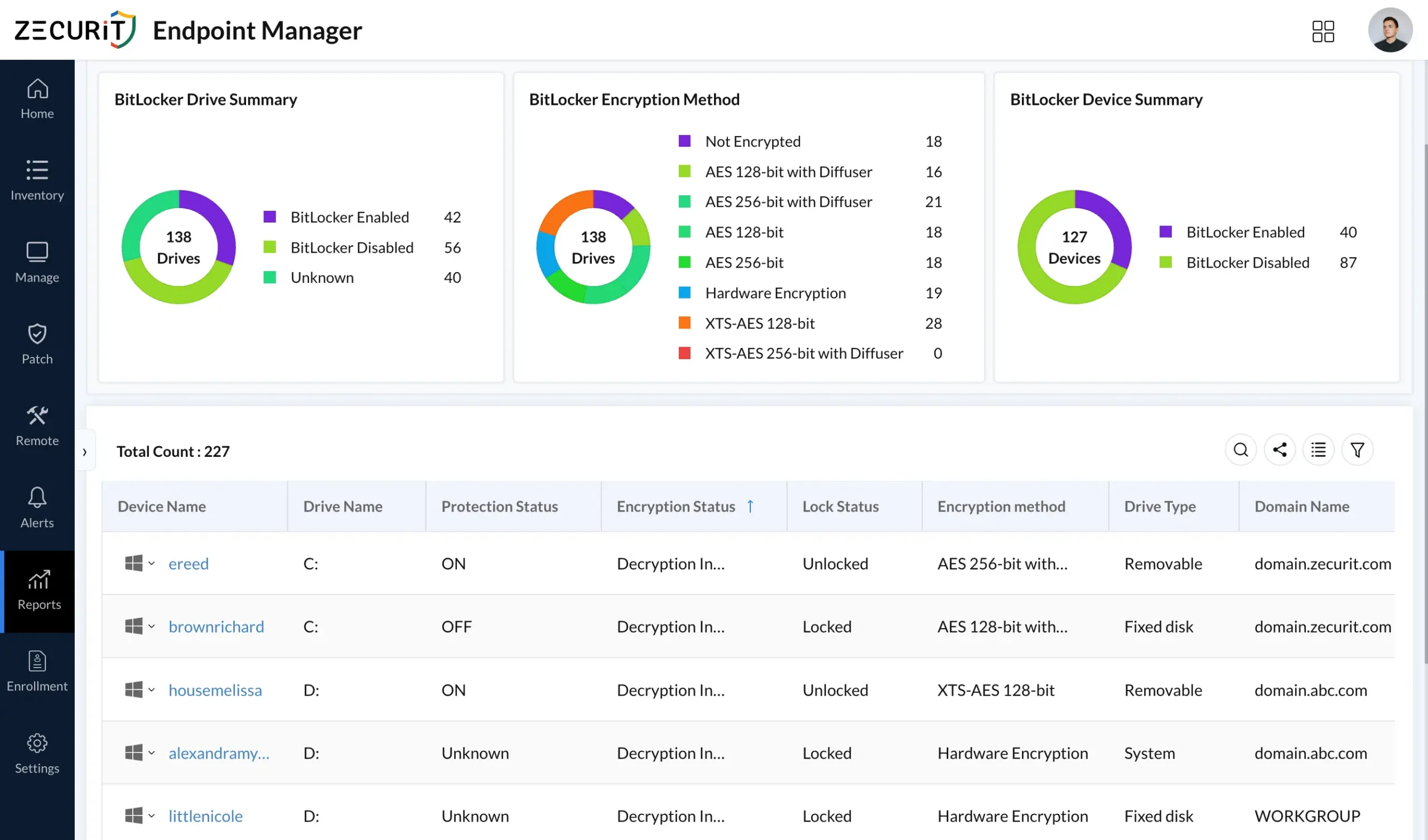
The compliance report presents all five required data points per device in a filterable, exportable format. IT administrators filter by device group, domain, encryption status, authentication method, or recovery key backup status to isolate the subset of devices relevant to a given audit question.
Identifying unencrypted endpoints is the most urgent function of a BitLocker status report. In a fleet of hundreds or thousands of devices, unencrypted exceptions are the highest-risk assets and the first things an auditor will ask about.
Zecurit surfaces unencrypted endpoints in real time, without requiring a manual scan or scheduled query. When a device is added to the fleet without encryption enabled, when BitLocker is disabled on an existing device, or when a device fails to complete encryption after a profile is applied, the non-compliant status appears in the console at the next agent check-in.
The unencrypted device identification workflow in Zecurit supports three immediate actions. IT administrators can see the specific reason a device is unencrypted: profile not yet applied, encryption failed during deployment, BitLocker suspended after an OS upgrade, or device added without an associated profile. They can initiate remediation directly from the report by pushing the BitLocker profile to the affected device. They can also configure alerts through the endpoint monitoring and alerts module to notify the IT team automatically whenever any device transitions to an unencrypted or suspended state.
BitLocker deployment progress reporting is the view IT directors use to communicate encryption rollout status to boards, executives, and auditors. It answers the question that matters most during a compliance review: what percentage of the fleet is encrypted, how is that changing over time, and when will full coverage be achieved?
Zecurit tracks encryption coverage at the device group level, allowing IT directors to present progress by department, location, device type, or any other grouping that matches the organizational structure used in board and audit communications. A healthcare organization shows progress by clinical facility. A financial institution shows progress by office location and device type. A distributed technology company shows progress by remote versus office-based device population.
The deployment progress view displays current encryption coverage as a percentage of enrolled devices per group, the list of devices pending encryption with their current status, and the last time the Zecurit agent checked in from each pending device. This last check-in data distinguishes devices that are genuinely unencrypted from devices that have not yet had the opportunity to apply the profile because they have been offline. Pair this view with hardware inventory management for full device lifecycle visibility alongside encryption compliance.
Different compliance frameworks require different evidence from a BitLocker compliance report. Zecurit reporting is configured to produce exactly the evidence each framework requires.
ISO 27001 control A.8.24 requires policies on the use and protection of cryptographic keys to be defined and implemented. The BitLocker compliance report satisfies this by documenting per-device encryption method, authentication configuration, and recovery key backup status with timestamps.
SOC 2 Type II CC6.7 requires that data protection includes encryption controls. Zecurit agent-verified, timestamped encryption status records confirm that encryption controls are continuously applied, not just configured at setup.
HIPAA requires covered entities to implement encryption for electronic protected health information and to document that encryption is maintained. Zecurit per-device encryption status and recovery key backup records satisfy the technical safeguard documentation requirement. For more on HIPAA obligations, see what is HIPAA compliance.
CIS Controls v8 control 3.6 requires that end-user devices use full-disk encryption. Zecurit BitLocker compliance reports provide per-device confirmation of full-disk encryption status that CIS Controls assessors require.
PCI DSS v4 requirement 3.5 requires that primary account data is protected wherever it is stored, including endpoint device storage. The BitLocker compliance report identifies which devices are in scope and confirms their encryption status.
NIST CSF controls PR.DS-1 and PR.DS-5 require that data at rest is protected and that data leaks are guarded against. Systematic key management including backup and rotation addresses both controls.
Financial Institution Preparing for Regulatory Examination. A regional bank needed to demonstrate that encryption controls were applied and documented for all devices handling customer data. Using Zecurit BitLocker compliance reports, the IT security team generated per-device encryption status records showing authentication method, recovery key backup confirmation, and encryption method for every managed endpoint. The examiner accepted Zecurit-generated compliance evidence without requesting additional supporting data.
Healthcare Network Tracking Encryption Rollout Across Multiple Facilities. A regional healthcare network needed to report BitLocker deployment progress to their HIPAA compliance officer quarterly. Using Zecurit deployment progress reporting by facility device group, the IT director presented encryption coverage percentages per facility, the list of specific devices pending encryption, and the reason each was not yet compliant.
Technology Company Identifying Unencrypted Remote Endpoints. A technology services company needed to demonstrate during a cybersecurity insurance renewal assessment that all endpoints were encrypted. The Zecurit BitLocker compliance report identified remote worker laptops that had never received the BitLocker profile because they were provisioned outside the standard onboarding process. All were confirmed encrypted within forty-eight hours of the next agent check-in, before the insurance assessment deadline. See software deployment for remote workers for how Zecurit handles distributed fleet provisioning at scale.
Always Current, Never Stale. Agent-verified encryption status updates at every device check-in. IT directors present compliance evidence at any point without scheduling a manual report run.
Complete Fleet Coverage Including Remote Devices. Agent-based reporting reaches every enrolled endpoint at next check-in regardless of VPN status, domain connectivity, or office location.
Immediate Identification of Unencrypted Endpoints. Non-compliant devices appear in the report in real time. IT administrators do not need to run a scan to discover unencrypted devices.
Audit-Ready Evidence on Demand. Timestamped per-device encryption records, recovery key backup status, and deployment progress metrics are available for export at any time from live data.
Deployment Progress Visibility for Boards and Executives. Deployment progress reporting by device group gives IT directors the data they need to communicate encryption rollout status: percentage complete, devices outstanding, and projected full coverage date.
BitLocker reports age the moment they're saved and by the time a snapshot reaches an auditor or board, it no longer reflects reality. The 2026 landscape raises the stakes: insurers expect continuous proof of encryption, conditional access policies enforce real-time status, and mixed Windows 10/11 fleets create gaps that point-in-time tools miss. Zecurit Endpoint Manager delivers live, agent-confirmed encryption status at every check-in wherever the device is with recovery key tracking, authentication documentation, and deployment dashboards that eliminate manual data assembly. Audit prep, insurance renewal, or closing the policy-to-reality gap: it all starts with knowing exactly which devices are encrypted.