
Every IT administrator knows the sinking feeling: a security audit is imminent, and you have no fast, reliable way to confirm which devices have BitLocker enabled, which are running an out-of-date antivirus, or whether Windows Firewall is active across your entire managed fleet. For teams responsible for hundreds or thousands of Windows endpoints, this visibility gap is not just an operational inconvenience. It is a direct compliance and security risk.
An endpoint security posture report solves this problem by aggregating critical protection signals across every managed device into a single, actionable view. When that report covers BitLocker encryption status, antivirus health, Windows Firewall configuration, and TPM availability, IT teams gain the full-spectrum visibility required for frameworks like CIS Controls, NIST 800-53, and ISO 27001.
This guide explains exactly what a mature endpoint security posture reporting dashboard looks like, what data it must surface, how to automate delivery, and how to avoid the mistakes that leave reporting gaps. Whether you manage a single-site SMB or a geographically distributed enterprise, the principles and practices here apply directly to your environment.
An endpoint security posture report is a structured output that captures the current security state of every managed device at a point in time. Unlike raw inventory data, a posture report is purpose-built for risk identification and compliance validation.
A mature report answers four foundational questions:
Are devices encrypted? BitLocker status tells you whether data-at-rest is protected on every drive.
Is protection software active and current? Antivirus health tells you whether real-time protection is enabled and whether definitions are up to date.
Is the network boundary defended? Windows Firewall status tells you whether host-based filtering is enforced on each device.
Does the hardware meet baseline security requirements? TPM availability tells you whether the device is capable of enforcing hardware-rooted trust.
When these four signals are surfaced alongside device identity, domain membership, and OS version, a security operations team can prioritize remediation instantly. Without this view, even a single unencrypted laptop with a disabled antivirus can go undetected for months.
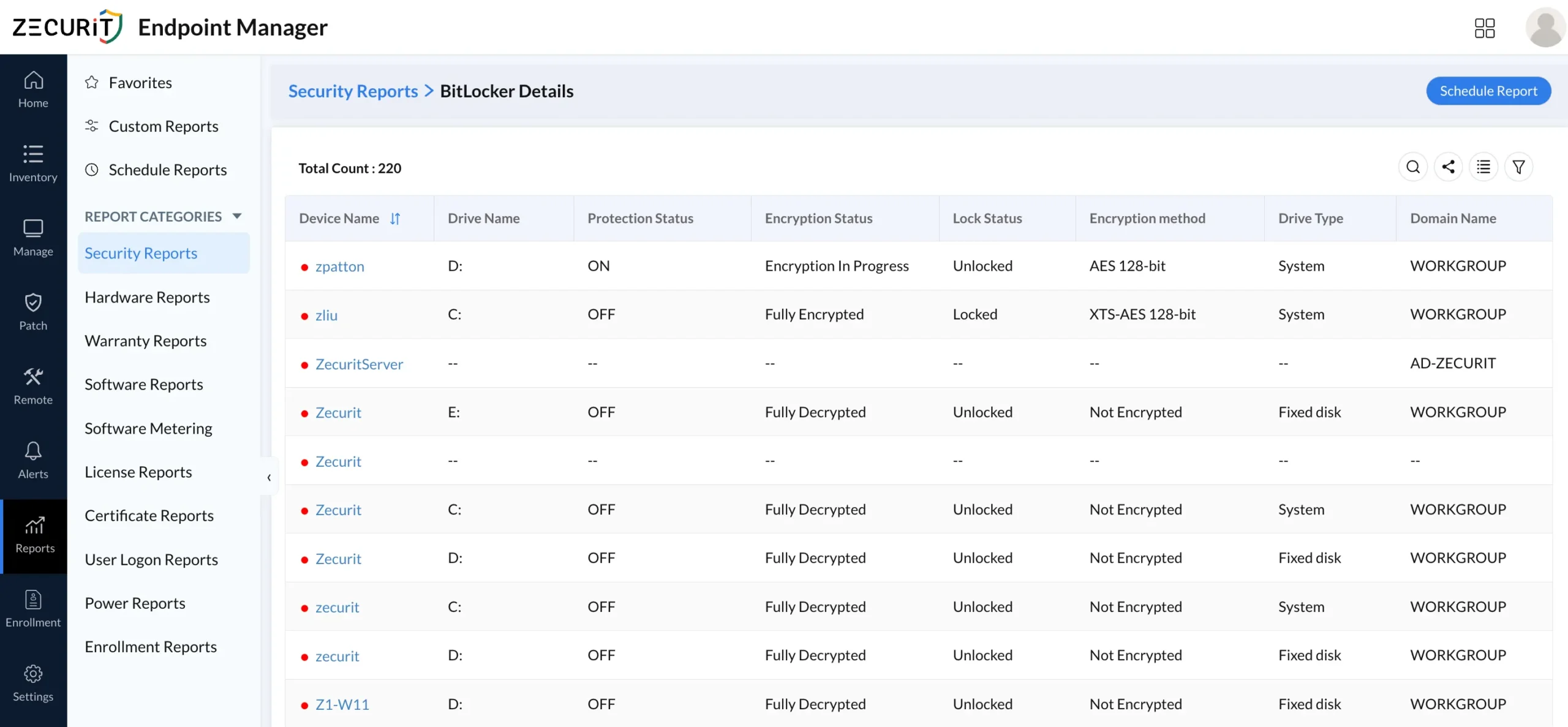
BitLocker management reporting shows, per device, whether full-disk encryption is active, suspended, or absent. A well-structured report surfaces:
Encryption status per volume (enabled, disabled, suspended)
Protection method (TPM, TPM+PIN, recovery key only)
Recovery key escrow confirmation
Drive type (OS drive, fixed data drive, removable)
For compliance audits, knowing that 94% of devices are encrypted is insufficient. You need to know exactly which six are not, on which drives, and why. A granular per-device view enables targeted remediation rather than blanket re-imaging, and teams looking to understand the full scope of BitLocker encryption and key recovery will find that escrow tracking alone justifies the reporting investment.
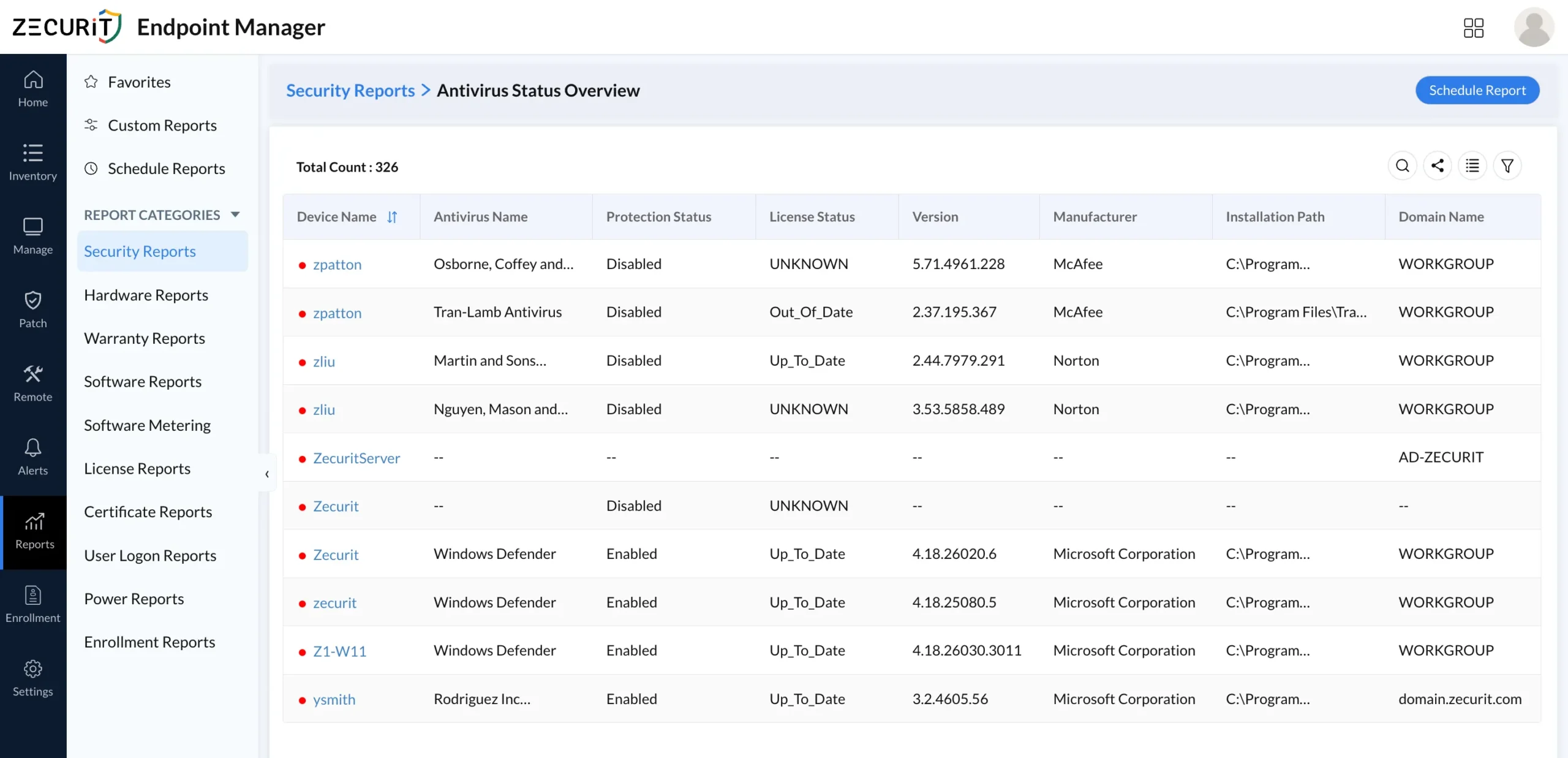
An antivirus status overview report tracks protection state at the device level across your entire managed fleet. Critical fields include:
Protection status (Enabled / Disabled)
License status (Up_To_Date / Out_Of_Date / Expired)
Product version and last definition update timestamp
Manufacturer (allows cross-vendor fleet analysis)
Installation path (confirms correct binary location)
Domain membership (segments by organizational unit or workgroup)
The most operationally valuable pattern this report exposes is devices where antivirus is present but disabled, or where the product is enabled but definitions are critically out of date. Both states leave the device effectively unprotected even though inventory shows software is installed. For MSPs managing multi-tenant environments, per-domain antivirus coverage breakdowns are essential for billing accuracy and SLA compliance reporting.
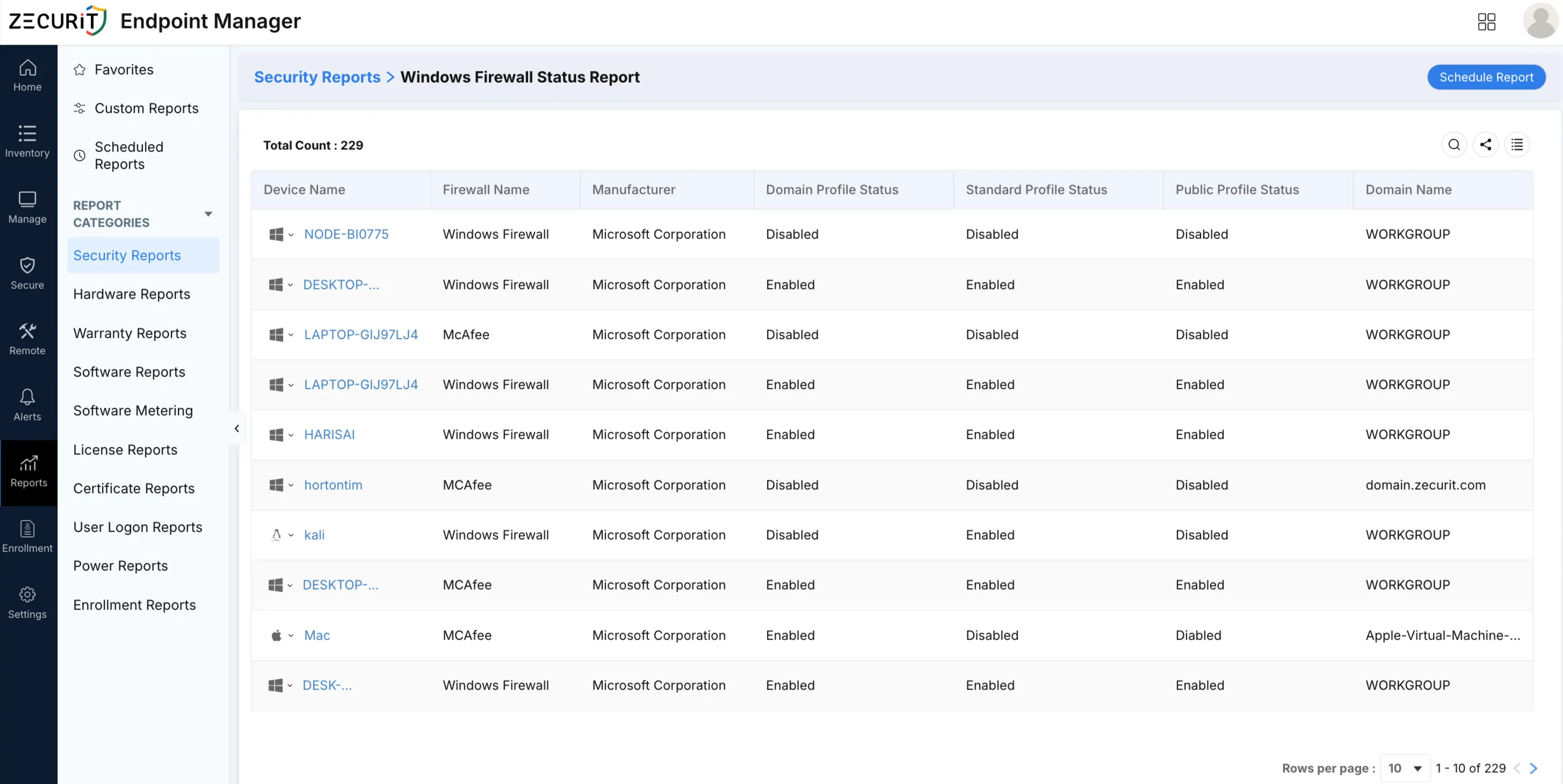
A Windows Firewall status report confirms whether host-based network filtering is active on each managed device, regardless of whether that device sits inside a corporate perimeter or connects remotely. The report should surface:
Firewall profile state per device (Domain, Private, Public)
Whether any profiles are explicitly disabled
Last policy push timestamp
Devices without any firewall policy applied
Remote and hybrid workers connecting from home networks with no perimeter firewall make host-level enforcement non-negotiable. Teams that have already implemented centralized firewall rule deployment will find that a Firewall status report is the natural audit layer that confirms rules are actually enforced on every managed machine, not just pushed from the policy server.
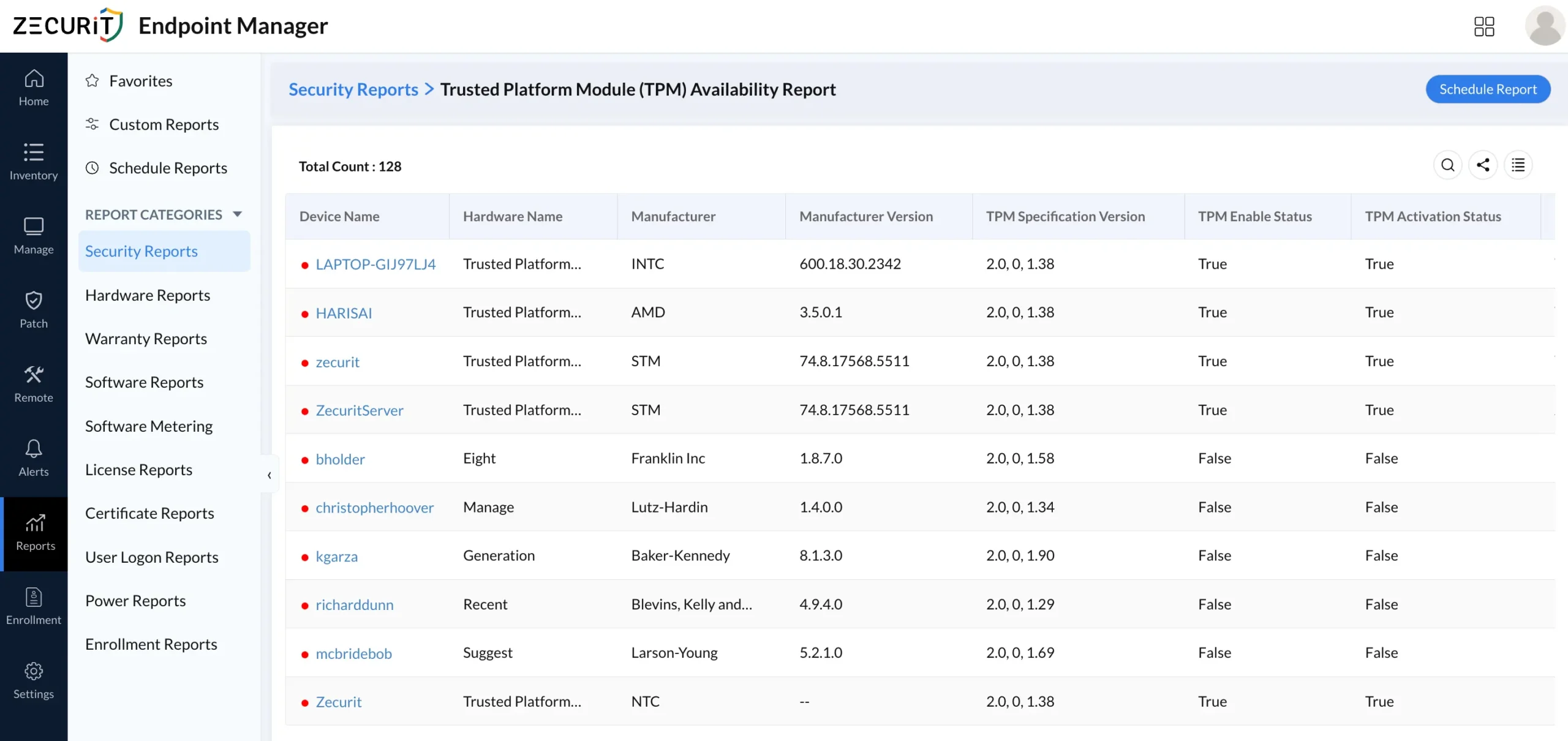
TPM (Trusted Platform Module) availability is increasingly a prerequisite for BitLocker enforcement, Windows Hello, and Secure Boot validation. A TPM health dashboard surfaces:
TPM version (1.2 vs. 2.0) per device
TPM enabled/activated/owned status
Devices without TPM hardware (ineligible for hardware-rooted encryption)
Manufacturer and firmware version (relevant for known TPM vulnerabilities)
This data is critical when planning BitLocker rollouts or Windows 11 upgrade eligibility assessments, since TPM 2.0 is a hard requirement for Windows 11. Without a TPM availability report, IT teams are forced to audit devices manually or rely on unreliable self-reported data.
A Certificate By Key Size report surfaces every certificate installed across managed endpoints, with fields for:
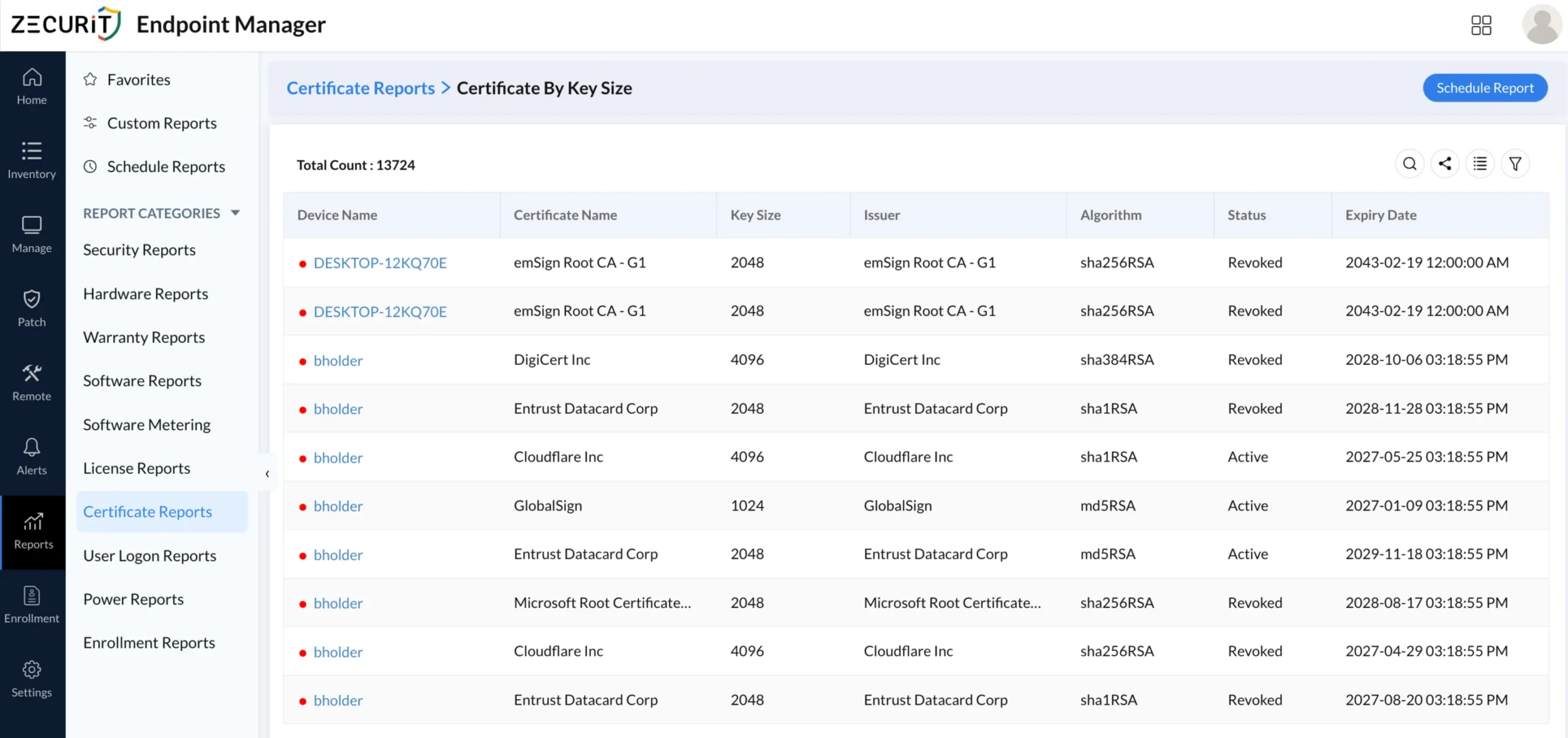
Certificate name and issuing authority
Key size (1024, 2048, 4096 bits)
Signing algorithm (SHA256RSA, SHA1RSA, MD5RSA)
Certificate status (Active, Revoked, Expired)
Expiry date
This is particularly relevant for organizations phasing out SHA-1 and MD5 certificates, or auditing for certificates issued by untrusted CAs. A report covering thousands of certificates across a managed fleet, segmented by algorithm and status, makes this otherwise unscalable task tractable.
Managing endpoint security without centralized reporting is like running a data center without monitoring. You know something is wrong only after a breach or a failed audit, not before.
Compliance drivers include:
CIS Controls v8: Control 10 (Malware Defenses) and Control 11 (Data Recovery) require documented antivirus and encryption status.
NIST SP 800-53: SC-28 (Protection of Information at Rest) requires verifiable encryption on all portable devices.
ISO 27001 Annex A: A.8.24 covers cryptography policy, requiring documented key management and encryption status.
SOC 2 Type II: Availability and confidentiality criteria require evidence that endpoint protection controls are continuously monitored.
Without automated reporting, producing evidence for any of these frameworks requires manual PowerShell queries, spreadsheet assembly, and significant engineering time before every audit cycle.
Operational drivers include:
Identifying devices where antivirus protection is disabled without triggering a full security alerting and incident response cycle
Tracking BitLocker key recovery readiness before a device is reported stolen
Confirming firewall policy propagation after a configuration management change
Validating TPM presence before beginning a Windows 11 migration project
Not all endpoint reporting solutions surface the same depth of data. When evaluating a security posture reporting dashboard, prioritize these capabilities:
Report Coverage
Security reports: antivirus status, encryption, firewall, certificate health
Hardware reports: device categorization, processor architecture, TPM data
Software reports: compliance with specific software baselines, version auditing
License reports: expired license impact, compliance gap analysis
User logon reports: devices with no recent logon activity (potential ghost assets)
Power reports: shutdown timeline and uptime for always-on compliance validation
Enrollment reports: device enrollment method, agent version, enrollment status
Delivery and Automation
Scheduled report delivery via email (daily, weekly, monthly)
Multiple export formats: PDF, XLSX, CSV
Per-report scheduling with independent frequency controls
Timezone-aware scheduling for global environments
Data Privacy Controls
Personal data handling options: Retain, Mask, or Remove personally identifiable information from report exports
Password protection for exported report files
Filtering and Segmentation
OS-level filtering (Windows, macOS)
Date range selectors for time-series analysis
Domain and workgroup segmentation
Per-device drill-down from summary views
Scale
Support for 200+ devices per report (hardware, software, enrollment reports)
Paginated table views with configurable rows per page
Total count indicators for audit evidence documentation
A healthcare IT team running a HIPAA readiness assessment needs to confirm that all 850 managed endpoints have BitLocker enabled and antivirus definitions current within the last 48 hours. A scheduled daily security posture report, exported to PDF and delivered to the compliance officer each morning, replaces a manual process that previously took two engineers three days to complete.
A managed service provider servicing 40 clients needs to produce monthly security posture summaries for each. Automated per-client antivirus status reports, certificate expiry alerts, and firewall compliance exports allow the team to generate client-ready deliverables in minutes rather than days.
An enterprise IT team planning a Windows 11 rollout across 3,000 devices needs to identify machines without TPM 2.0 and flag them for hardware refresh. A TPM availability report segmented by device model and processor architecture provides the exact data set needed to build a phased replacement plan.
After a phishing campaign is detected, security operations needs to identify every device running an out-of-date antivirus within 30 minutes. A real-time antivirus health dashboard filtered by license status "Out_Of_Date" immediately surfaces the at-risk population for emergency patching.
A one-time report is useful. A scheduled report is a control. The difference matters for compliance evidence, since auditors increasingly expect continuous monitoring, not point-in-time snapshots.
An effective report scheduler allows administrators to configure:
Scheduler name for identification in audit logs
Start date and time with timezone awareness (critical for distributed teams)
Frequency: Daily, Weekly, or Monthly
Repeat pattern: Every day, specific weekdays, or specific dates of the month
Report selection: Multiple reports bundled into a single scheduler
File format: PDF for human-readable delivery, XLSX for data analysis, CSV for SIEM ingestion
Personal data handling: Mask or remove PII in exported reports to maintain GDPR and HIPAA compliance in email delivery
Email recipients: Direct delivery to security officers, compliance teams, or client contacts
The practical workflow for a security-conscious IT team: schedule daily antivirus status and firewall reports for internal review, weekly BitLocker and certificate reports for the CISO, and monthly full-stack posture summaries for executive or client stakeholders. Teams that want a complete picture of all available reports and auditing capabilities will find that scheduling is only one layer of a full audit pipeline.
Baseline before you optimize. Run your first full antivirus, BitLocker, and firewall status report before making any configuration changes. The baseline gives you a before-state for measuring remediation effectiveness and documenting risk reduction.
Separate report frequency by risk tier. High-risk data: schedule antivirus and firewall status daily. Medium-risk data: BitLocker and TPM reports weekly. Lower-risk data: certificate and license reports monthly. This prevents alert fatigue while maintaining continuous visibility on your most critical controls.
Always export in multiple formats. PDF for audit submissions, CSV for SIEM ingestion, XLSX for trending analysis in spreadsheet tools. A single scheduled report can deliver all three simultaneously.
Use domain segmentation. Separate reports by domain to map your overall security posture to organizational units. This is essential for MSPs managing multi-tenant environments and enterprises with segmented network topologies.
Cross-reference enrollment status with security posture. Devices showing "Uninstall In Progress" or with stale last-contact timestamps in enrollment reports are the same devices most likely to have outdated antivirus or missing BitLocker keys. Correlating these two data sets surfaces your highest-risk endpoints immediately, which is a core step in any mature vulnerability management program.
Document remediation against report evidence. For every out-of-date antivirus or unencrypted drive the report surfaces, log the remediation action and timestamp. The before/after report pair becomes your compliance evidence trail and aligns directly with the continuous verification principle at the heart of Zero Trust security implementation.
Mistake 1: Treating antivirus presence as protection. A device with antivirus software installed but in a Disabled state is unprotected. Reports that only confirm software inventory without capturing protection status will miss this critical gap. Always filter for Protection Status, not just software name.
Mistake 2: Ignoring out-of-date license status. An antivirus product with an expired license often stops receiving definition updates while continuing to appear as "active." An Out_Of_Date license status is a distinct risk signal that warrants immediate action independent of protection state.
Mistake 3: Running security reports only before audits. Quarterly or annual reporting is too infrequent to catch the configuration drift that happens continuously as devices are reimaged, users change, and software updates modify firewall rules. Daily or weekly automated scheduling is the minimum for operational security.
Mistake 4: Not accounting for devices with no antivirus data. Devices returning "--" across all antivirus fields are not necessarily clean. They may be unmanaged, misconfigured, or running a product that the management agent cannot query. These gaps require investigation, not dismissal.
Mistake 5: Failing to mask PII in scheduled email reports. When reports are delivered via email to multiple recipients, device names associated with personal user accounts constitute personally identifiable information in some jurisdictions. Use the Mask or Remove personal data option in scheduled report configuration to maintain regulatory compliance.
Limitation: Historical trend data. Point-in-time reports show current state. If you need to demonstrate that antivirus definitions have been consistently current for the past 90 days, you need archived historical exports or a platform that retains report history. Build your scheduling cadence to generate the archive before you need it.
| Capability | Manual Audit | Automated Reporting Dashboard |
|---|---|---|
| Coverage | Sample-based (10-20% of fleet) | 100% of enrolled devices |
| Frequency | Quarterly or on-demand | Daily, weekly, or monthly (scheduled) |
| Time to produce | 15-40 hours per audit cycle | Minutes (automated delivery) |
| BitLocker visibility | Script output per device | Centralized, filterable, exportable |
| Antivirus health | WMI query per machine | Status, version, license per device in one view |
| Firewall status | GPO result output per OU | Per-device, per-profile reporting |
| TPM data | PowerShell per device | Fleet-wide availability dashboard |
| Compliance export | Manual spreadsheet assembly | PDF, XLSX, CSV on schedule |
| PII handling | Manual redaction | Retain, Mask, or Remove in report settings |
| Audit trail | None unless manually logged | Timestamped scheduled report history |
| MSP multi-tenancy | Custom scripts per client | Domain-segmented reports per tenant |
The productivity argument for automated reporting is unambiguous. At scale, the gap between manual and automated approaches is not a matter of convenience but of operational feasibility.
An endpoint security posture report is not a nice-to-have feature for compliance-minded IT teams. It is the operational foundation that makes proactive risk management possible at scale. Without centralized, automated visibility into BitLocker encryption status, antivirus health, Windows Firewall configuration, and TPM availability across every managed device, your security program is built on assumptions rather than evidence.
A production-grade reporting workflow covers per-device antivirus status with protection state, license currency, version, and manufacturer; hardware categorization by manufacturer, model, and architecture; warranty coverage; software compliance deviation tracking; software usage metering; expired license impact; certificate auditing by key size and algorithm; user logon activity; power and shutdown timelines; and enrollment method verification. When these reports are scheduled for automated delivery, configured with appropriate personal data handling, and exported in audit-ready formats, a small IT team can maintain continuous compliance visibility across thousands of endpoints that would otherwise require a dedicated audit team.
Ready to build your endpoint security posture reporting program? Explore the full capabilities at Zecurit Endpoint Management and see how automated reporting, centralized configuration management, and proactive security alerting work together to give your team continuous, audit-ready visibility into every managed device.