A centralized script deployment platform is where IT teams store, organize, and manage automation scripts from one location. In large IT environments, administrators often manage hundreds of devices across multiple operating systems. Performing configuration tasks manually on every system can be time consuming and error prone. By using a centralized repository, administrators can reuse scripts, standardize automation processes, and maintain consistent configurations. This improves collaboration among IT teams and helps organizations build a scalable and reliable automation environment. For teams managing Windows devices at scale, this discipline is a foundational part of broader Windows endpoint management and directly supports configuration management goals across the device fleet.
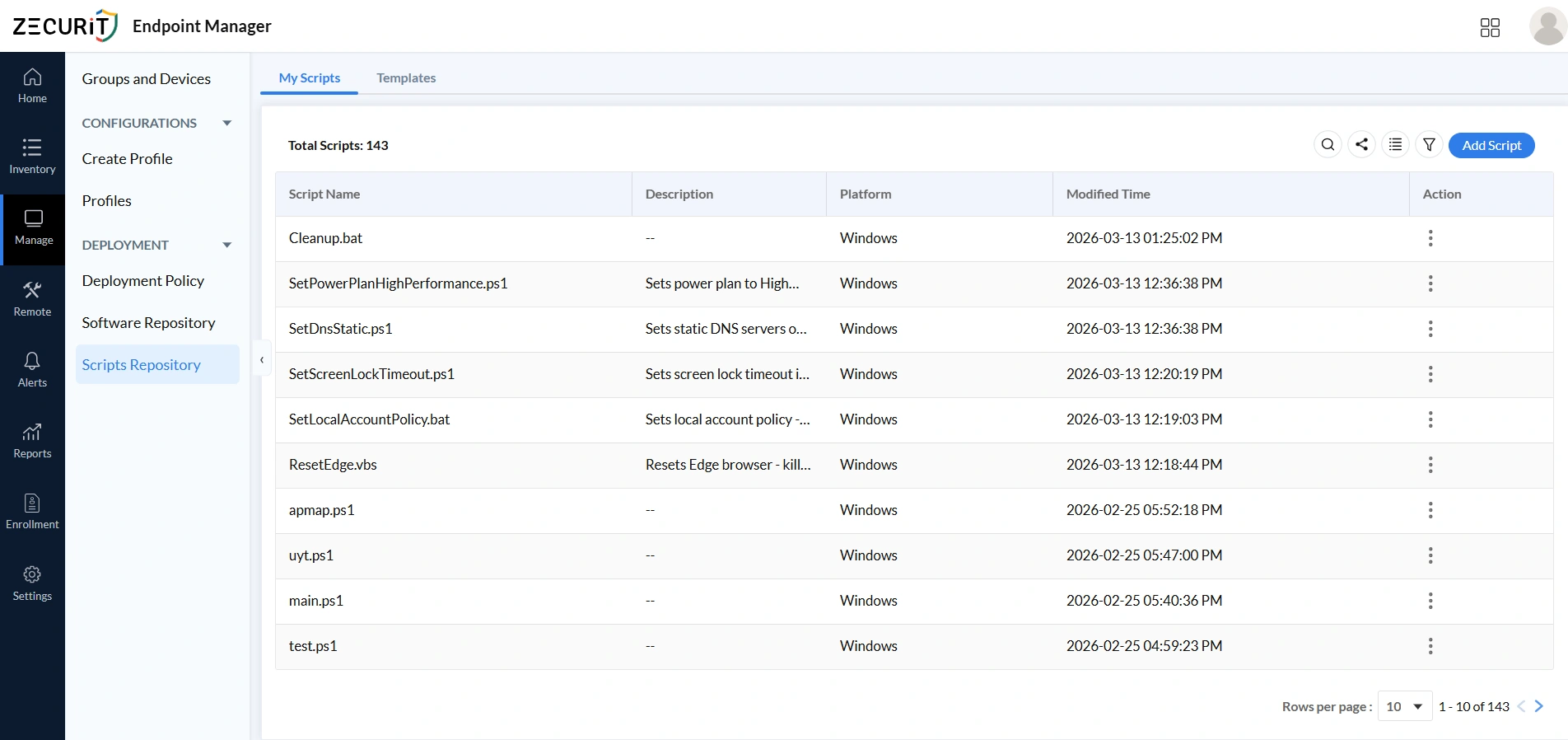
Script Repository : My Scripts
The My Scripts section is the central library for all automation scripts, displaying each script's name, platform, tags, and modification details in one place. A well-organized central library prevents duplication, improves search efficiency, and transforms scripts from individually owned resources into shared team assets. Teams that want a structured walkthrough can refer to the remote script deployment guide for step-by-step guidance.
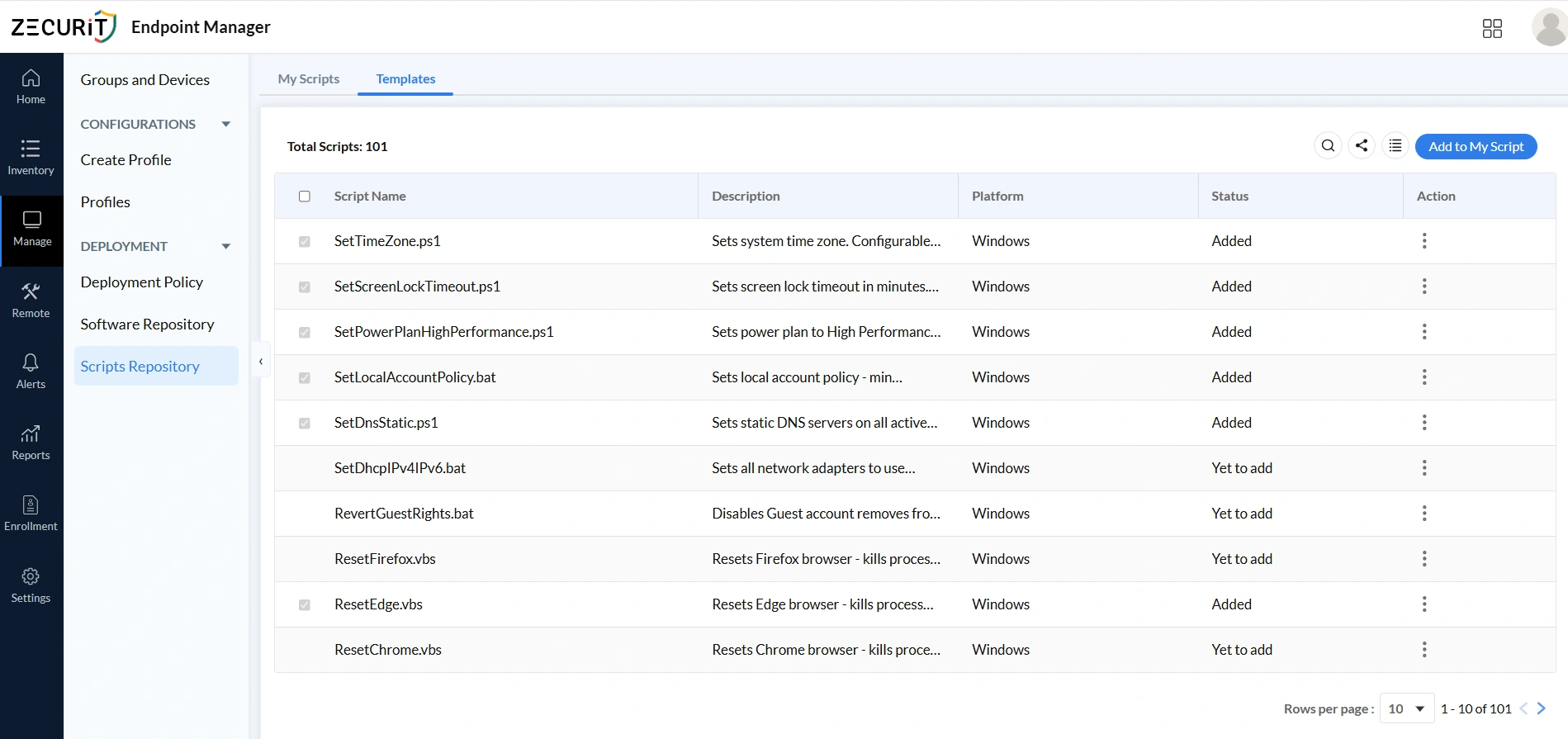
Script Repository: Templates
The Templates section contains prebuilt, ready-to-use scripts for common IT automation tasks including system configuration, network settings, and security management, saving teams the time of writing scripts from scratch. Templates enforce consistency across large device fleets by deploying identical configurations, such as screen lock timeouts or DNS settings, to hundreds of endpoints simultaneously. Organizations using Zecurit's software inventory and hardware inventory data can use that asset context to target templates precisely at the right device groups.
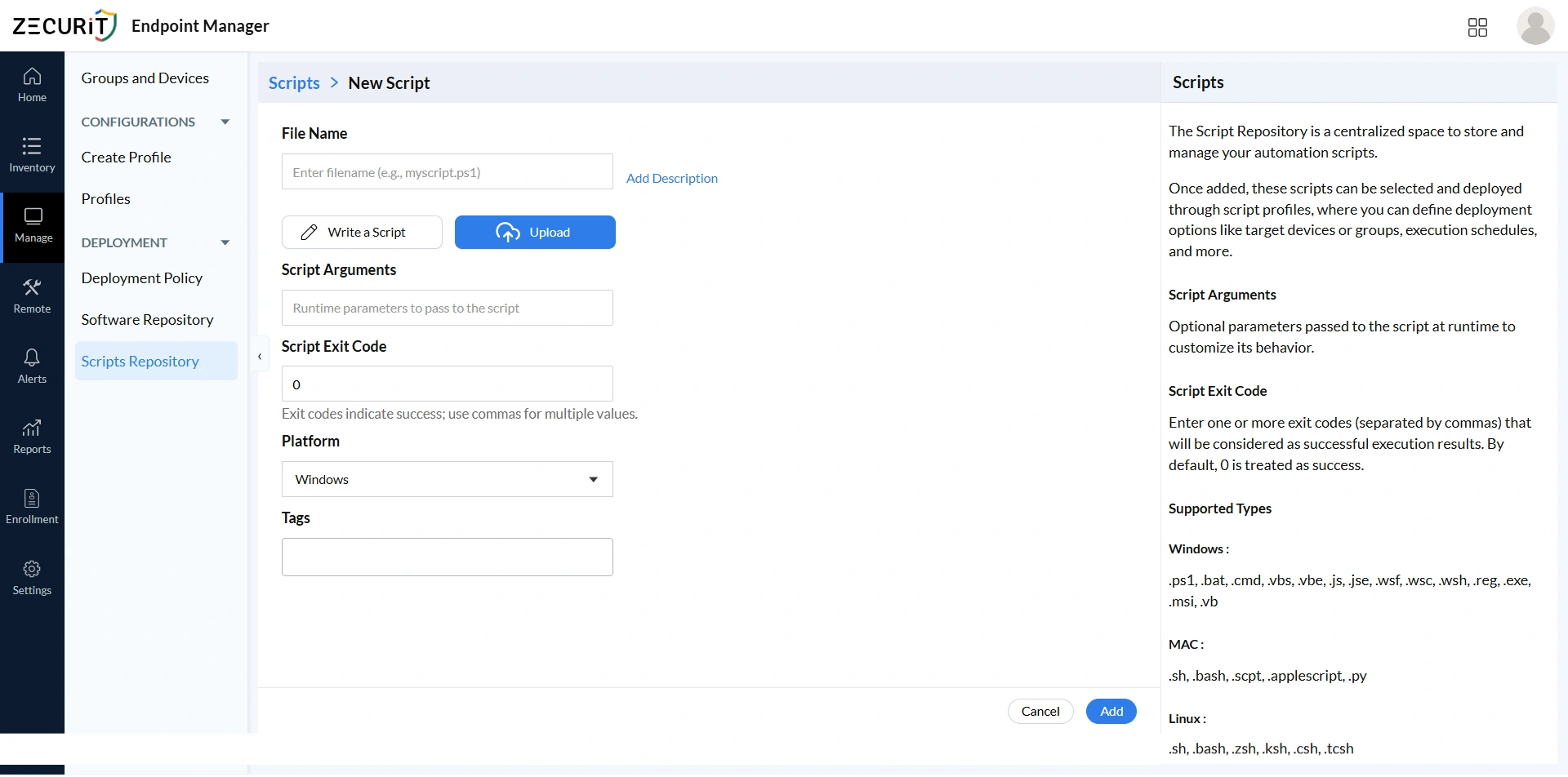
Script Repository - Add Script: Step by Step
The Add Script option allows administrators to create or upload automation scripts into a centralized repository, preventing duplication and encouraging collaboration across the IT team. A well-maintained repository is a key component of IT asset management best practices, where documentation, version control, and shared access all contribute to reliable and auditable IT operations.
File Name
Use clear, descriptive file names like HardenFirewall.ps1 or ConfigureProxy.sh, and always include the correct extension since the platform uses it to determine the execution engine. PowerShell (.ps1) is preferred for complex Windows automation, batch files (.bat, .cmd) suit simpler tasks, and shell or Python scripts (.sh, .bash, .py) serve macOS and Linux environments.
Write a Script
The built-in editor lets administrators write and modify scripts directly within the platform, improving version control and team collaboration without requiring external tools. Teams writing scheduled or recurring scripts can refer to the schedule PowerShell scripts with Task Scheduler reference for scheduling guidance.
Upload Script
The Upload feature imports existing scripts from external systems into the shared repository, preventing duplication and maintaining a unified automation library. Review all uploaded scripts carefully for security and compatibility before admission. The application deployment PowerShell script in the Script Hub serves as a useful formatting and documentation reference.
Script Arguments
Runtime arguments make scripts flexible and reusable across different environments without creating separate versions for each use case. For example, the same DNS configuration script can serve multiple office regions by accepting different server IPs as arguments. Never pass sensitive values such as credentials or API keys as plain-text arguments.
Script Exit Code
Exit code 0 indicates success by default, but scripts with multi-stage logic may return non-zero codes to signal specific completion states. Defining all valid success codes correctly ensures accurate deployment reporting, prevents false failure alerts, and stops genuine failures from being silently recorded as successful. See the PowerShell exit code guide and batch file return code reference for platform-specific detail.
Platform
Select Windows, macOS, or Linux based on the script's target environment. Incorrect platform assignment causes execution failures or unexpected system behavior on incompatible devices. Organizations managing mixed OS environments can refer to the top unified endpoint management tools comparison for broader strategic context.
Tags
Apply tags such as security, compliance, networking, or troubleshooting to keep large repositories navigable and auditable. Compliance-relevant labels like "cis-benchmark" or "security-hardening" help security teams identify scripts requiring periodic review. Tags also align script classification with IT inventory management categories, making it straightforward to identify which scripts target which asset classes.
Deployment Policy: Step by Step
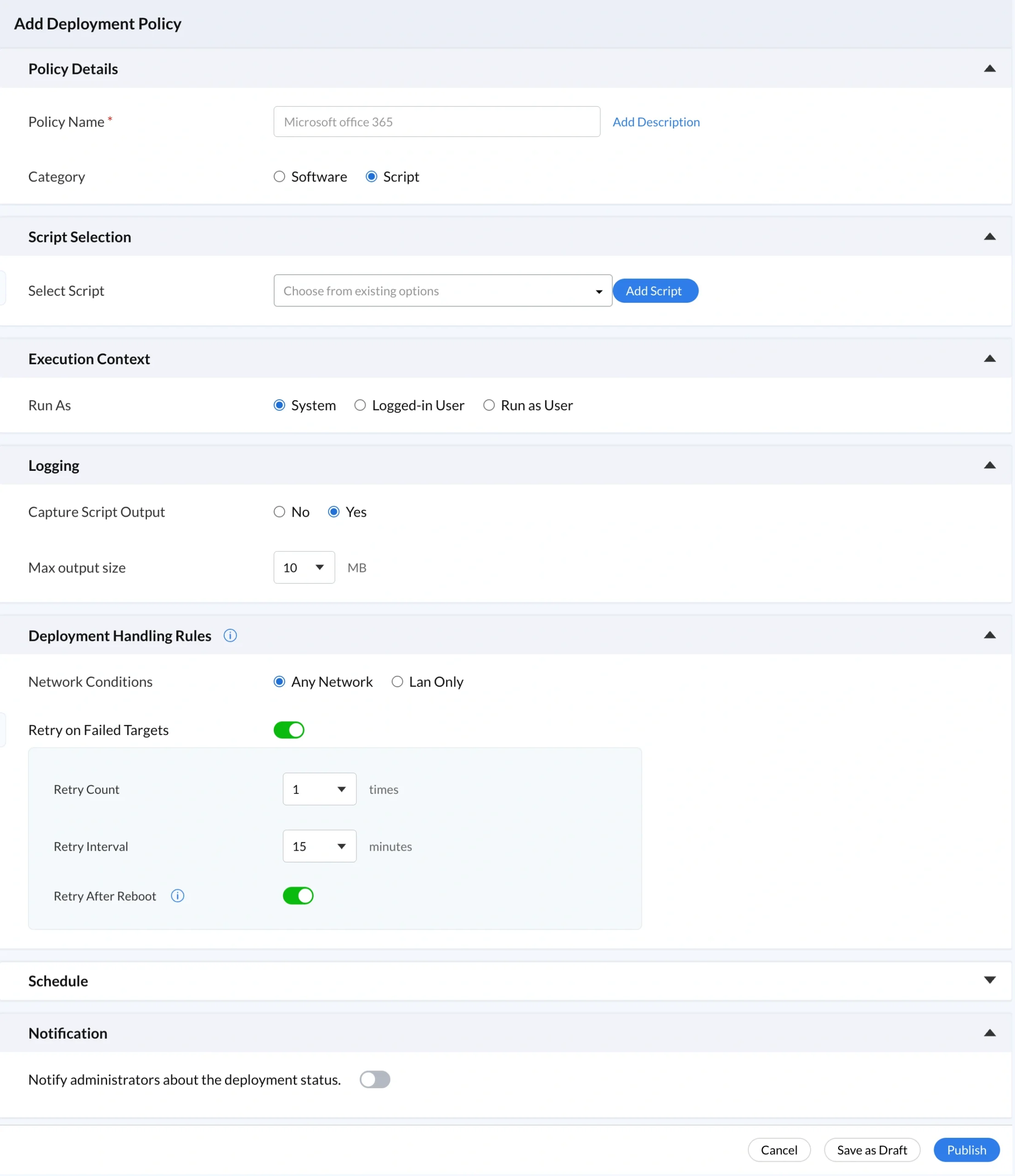
A deployment policy defines how scripts from the centralized repository are executed on managed devices, controlling execution context, scheduling, and retry behavior to ensure consistent, automated script execution without manual intervention. The deployment policy dashboard gives IT teams a complete view of all active, completed, and pending tasks, directly supporting endpoint monitoring and IT asset monitoring and alerts workflows.
Policy Details
The Policy Details section defines how scripts are deployed and managed across devices. Documenting the business justification and authorization basis in the policy description is mandatory for production environments. Undocumented deployment policies are governance gaps that compound over time and align with best cybersecurity practices only when treated as a required control.
Policy Name
Use descriptive policy names such as "DNS Hardening, Finance Workstations, Q2 2026" that communicate purpose, scope, and context immediately. Vague names like "Script2" or "Test" provide no useful information during incident investigations or compliance reviews. Teams managing Group Policy alongside Zecurit can refer to the best group policy settings guide for complementary naming practices.
Category
Set Category to Script rather than Software so script executions appear separately from software installations in the deployment history and audit trail. This separation supports reports and auditing workflows where compliance teams need to distinguish between configuration automation and software deployment events.
Script Selection
Script Selection restricts deployment to approved, reviewed, versioned scripts from the governed repository, preventing arbitrary command injection. Every automated action is traceable to a specific script with a known modification history. Organizations implementing zero trust security will recognize this as a core application of least privilege to automated operations. See what is privilege escalation for context on the risks this control mitigates.
Execution Context
Execution Context defines the privilege level under which scripts run, directly applying endpoint privilege management principles. System context provides full administrative privileges and is appropriate for firewall configuration, registry modifications, and software installation, as demonstrated by the Windows firewall configuration script and enable BitLocker encryption script. Logged-in User context suits browser resets and user-level configuration. Run as User executes under a named service account for domain resource access. Use the remote task manager and remote event viewer to investigate unexpected execution behavior during audits.
Logging
Enable output capture so stdout and stderr from every script execution are stored centrally and accessible per device without connecting directly to endpoints. For security-relevant scripts, output capture is mandatory as the primary data source for anomaly detection, forensic investigation, and compliance evidence. The endpoint monitoring and alerts module complements logging by triggering alerts on abnormal execution patterns.
Deployment Handling Rules
Deployment Handling Rules control network conditions, retry behavior, and execution timing to ensure reliable automation across dynamic environments. Use LAN Only network restrictions for scripts accessing domain resources or performing privileged operations, mitigating the remote code execution risks that unrestricted network execution creates. Set Retry on Failure with a count of three and a 15-minute interval to recover from transient failures while maintaining a detection window between attempts. Enable Retry After Reboot for scripts targeting locked resources, referencing the automated system reboot script for common configuration patterns. Correlate reboot events with script execution records using the monitor computer startups and shutdowns reference.
Schedule
Deploy Immediately suits urgent remediation and incident containment but requires the same documentation standards as scheduled deployments. Schedule Deployment aligns execution with approved maintenance windows, making out-of-schedule activations immediately detectable. This discipline mirrors patch management governance expectations and Patch Tuesday planning practices. Execute at Every Startup enforces persistent configuration states on every boot but requires quarterly review, complete documentation, and output logging enabled without exception. Correlate startup execution records with Active Directory event logs to detect unauthorized startup-scheduled policy additions.
Notification
Configure notifications selectively for security-critical and compliance-relevant deployments rather than enabling them for every script execution. Excessive notifications desensitize administrators to the alert channel. For routine automation, review execution status through the deployment policy dashboard during regular operational checks. This selective approach mirrors how IT asset monitoring and alerts is designed to operate: focused on signals that require action, not every state change across the fleet.
Conclusion
Building a centralized script repository simplifies IT operations by giving teams a single platform to store, organize, reuse, and govern automation scripts. Features like templates, tagging, execution context, logging, and deployment policies make script management more structured, secure, and scalable without manual intervention. Explore the endpoint management features overview to see how script deployment integrates with the complete platform, the IT asset management features to understand how device inventory and software tracking complement script automation, and the remote access capabilities that combine with a governed script repository to cover both immediate troubleshooting and structured fleet-wide automation.
