
See every process, CPU spike, memory leak, and network burst on any remote endpoint, live, from your browser. Diagnose in seconds. Terminate in one click. The user never knows you were there.
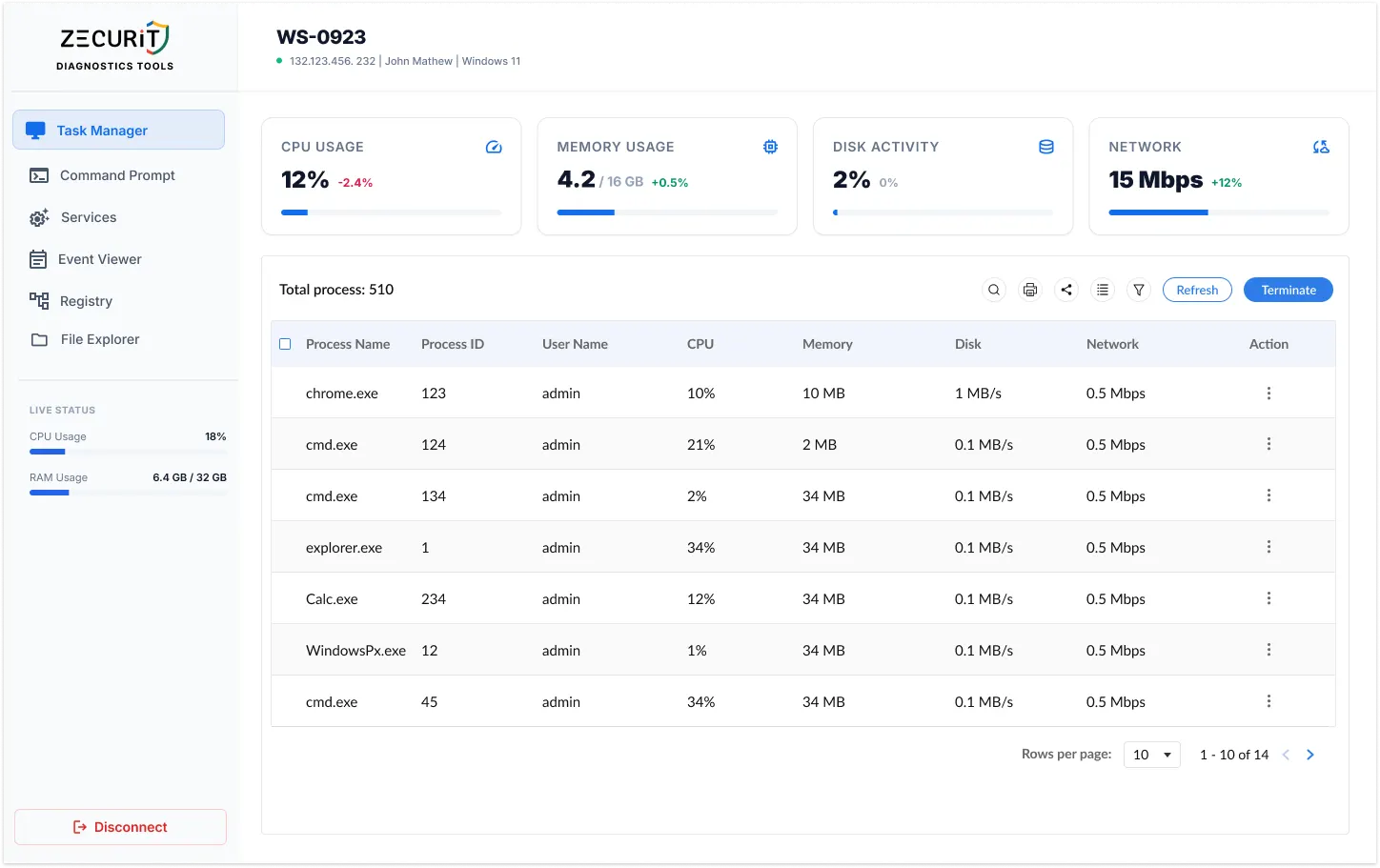
Every performance issue on a remote endpoint traces back to one of four resource signals. Zecurit surfaces all four, live, in one console.
See current processor utilization with a real-time delta showing whether load is trending up or down. Spot runaway processes and processor saturation the moment they occur, before the user calls the helpdesk.
Performance Bottleneck Indicator
Track RAM in use against the device's total installed memory. A rising delta is often the first indicator of a memory leak, an unresponsive application, or a workload that exceeds the hardware specification.
Memory Leak Detection Signal
Malware Injection Indicator
Monitor read/write throughput as a live percentage. Sustained high disk activity from a process with no legitimate reason is a recognized early warning pattern for ransomware encryption. Catch it here before it spreads.
Ransomware Early Warning Signal
Track outbound and inbound network traffic in Mbps with per-process attribution. Unexpected outbound traffic from processes that should not be communicating externally is a primary indicator of data exfiltration.
Data Exfiltration Detection Signal
Sort by CPU or memory to surface resource hogs instantly. Act on what you find without leaving the console.
The executable running on the system, chrome.exe, explorer.exe, custom apps, and any unknown processes that need investigation.
The unique system identifier for each process instance. Cross-reference with CMD or Event Viewer for deeper investigation.
Identify whether a suspicious process runs under standard user, admin, or SYSTEM context. Critical for threat triage.
Real-time processor consumption per process. Sort descending to find the top consumer in one click.
RAM consumed by each process in MB. Identify memory hogs and validate free memory after termination.
Network throughput attributed to each process. Spot unexpected communicators without writing a single packet capture.
From slow PC ticket to closed ticket, faster than a phone call.
CPU, RAM, Disk, and Network data refreshed continuously. No snapshots, no polling delays. You see what is happening right now.
End any process with one click. Nothing appears on the user's screen. No CMD window, no notification, zero disruption.
The entire session runs in the background. The user experiences a performance improvement without knowing a support action took place.
Every process shows PID, owning user account, and per-resource consumption. Know exactly what is running and who owns it.
All termination actions are logged with operator identity, timestamp, target endpoint, and process details. Every action is accountable.
Consistent Task Manager experience across Windows, macOS, and Linux. One console, every OS, no context switching
Same power. No desk visit required.
The Task Manager is not just a performance tool. Disk and Network data are two of the most reliable early warning signals in IT security.
Ransomware encryption creates a recognizable signature: sustained, high-throughput disk writes across a broad range of file types, from a process running under a user account with no legitimate reason for that activity. Monitoring disk activity remotely and in real time gives you the visibility to catch this pattern before encryption spreads across the endpoint.
Signal: Sustained high disk write % from unexpected process
Data exfiltration events produce anomalous outbound network traffic, typically from processes that do not normally communicate externally. The per-process network column in the Zecurit process list makes it straightforward to identify a process generating unexpected outbound throughput and terminate it or escalate immediately, without waiting for a SIEM alert.
Signal: High outbound Mbps from process with no external function
No. The Zecurit Remote Task Manager reads system data through the endpoint agent running in the background. Nothing appears on the user's screen when you open the console, refresh metrics, or view the process list. The experience is entirely invisible to the end user.
Yes. The process list displays all processes running on the system regardless of which user account owns them. The User Name column identifies the owning account for each process, so you can distinguish between processes running under a standard user, an admin account, and the SYSTEM context.
The Task Manager focuses on process visibility and termination. For full service management, including starting, stopping, and restarting Windows services, Zecurit's integrated Services tool is one click away in the same diagnostics panel. You do not need to leave the console or open a new session.
Yes. Every terminate action is recorded in the Zecurit audit trail with the operator's identity, the target endpoint, the process name and PID, and a timestamp. No administrative action through the Zecurit console is anonymous.
Stop asking users to read CPU numbers to you. Stop scheduling RDP sessions for single-process fixes. Get the live data and the direct action you need, silently and securely.
When the process list points you deeper, the full Zecurit diagnostics suite is one click away, same session, same audit trail.
Drop into CMD or PowerShell to run netstat, taskkill, sfc /scannow, or any other command against the same endpoint
View, start, stop, and restart Windows services directly from the console without opening a full remote desktop session
Pull system and application event logs to trace the root cause of the performance issue
Apply registry-level fixes when a configuration change is required
Browse, retrive or delete files on the remote endpoints directly from the web console.
Remotely wake up or power down devices with secure WoL and shutdown tool.