
The answer to your next incident is already in the Event Log. Zecurit puts Application, Security, Setup, and System logs from any managed endpoint in front of you in seconds. No VPN. No firewall changes. No RDP.
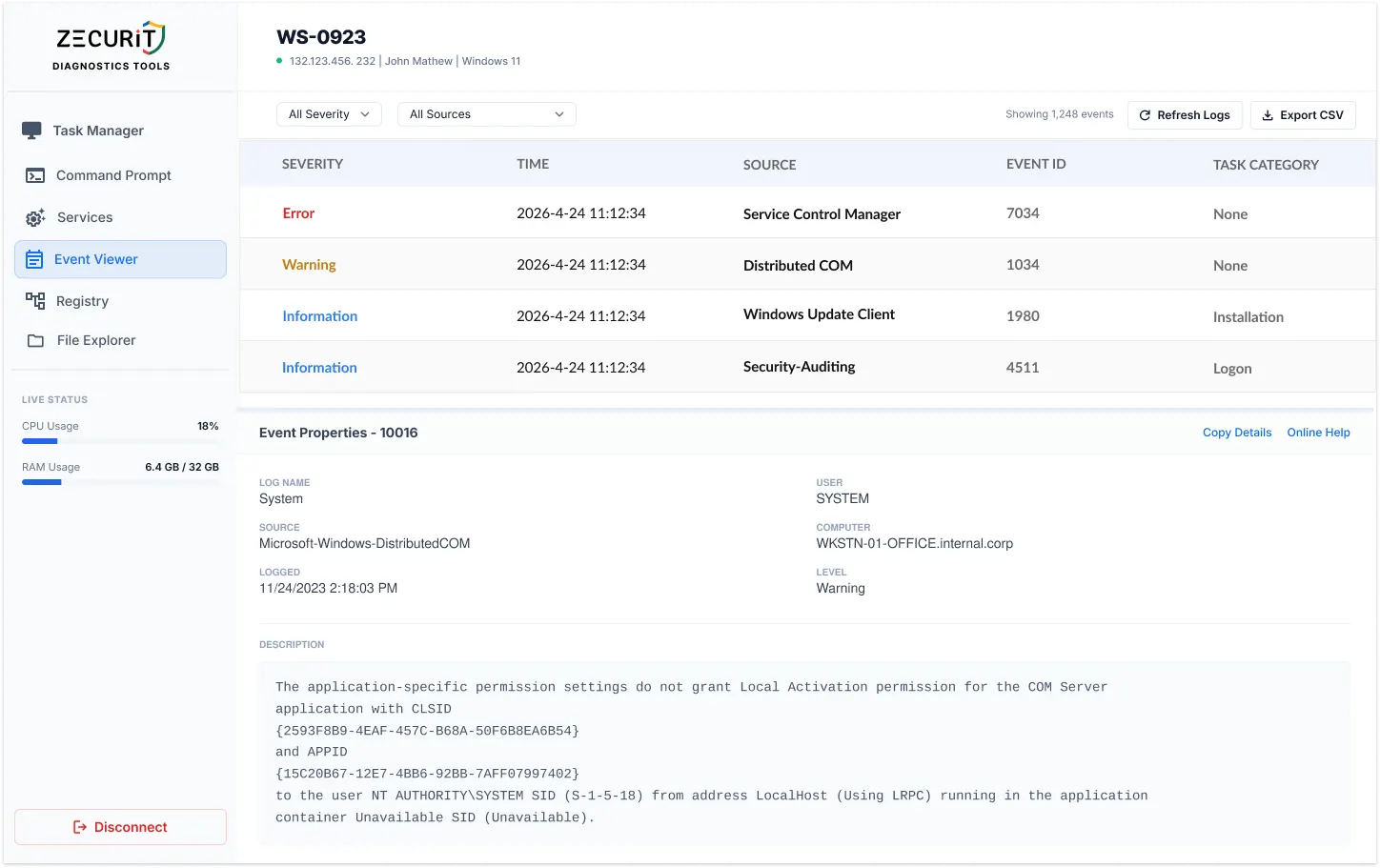
Every significant event on a Windows endpoint is recorded in one of four log channels. Zecurit surfaces all four from a single console.
Hardware failures, driver crashes, kernel power events, time-sync failures, and OS-level events. The first place to look after an unexpected shutdown, BSOD, or unexplained reboot. Critical for server and infrastructure health monitoring.
ID 41: Kernel PowerID 7000: Service FailID 6008: Bad Shutdown
Software crashes, .NET framework errors, SQL Server failures, Exchange errors, and any application using the Windows Event Log API. Contains the exception details and crash dump references that explain exactly what failed and why without needing the user to reproduce the issue.
ID 1000: App CrashID 1026: .NET Error
Every login attempt, privilege escalation, object access event, and policy change on the endpoint. The primary source for lateral movement detection, brute-force identification, and privileged account abuse investigation. Access is RBAC-controlled in Zecurit to protect sensitive authentication data.
ID 4625: Failed LoginID 4624: Successful LoginID 4720: Account Created
Windows Update failures, component installation errors, and cumulative update rollbacks. Frequently overlooked but essential for diagnosing endpoints running outdated builds despite being enrolled in update policy. Contains the error codes and component identifiers that explain silent failures.
ID 902: Update FailComponent Install Error
Native MMC remote access requires RPC ports, WMI configuration, and VPN. Zecurit requires none of these.
No VPN enrollment needed. If the endpoint has internet, Zecurit can read its logs.
Agent-based HTTPS outbound connection works through any NAT or proxy.
Works on AWS, Azure, and GCP instances where inbound RPC is blocked by security groups.
Unattended access means log investigation works even with no active desktop session.
The Event IDs every SysAdmin and SOC analyst should know by memory.
| Event ID | Log | Severity | What It Means |
|---|---|---|---|
| 41 | SYSTEM | Critical | Unexpected shutdown or power loss (kernel power) |
| 6008 | SYSTEM | Error | Previous shutdown was unexpected |
| 7000 | SYSTEM | Error | Service failed to start at boot |
| 7034 | SYSTEM | Error | Service terminated unexpectedly |
| 1001 | SYSTEM | Error | Windows Error Reporting: system crash details and dump reference |
| 4625 | SECURITY | Audit Fail | Failed login attempt (user, type, source IP) |
| 4624 | SECURITY | Audit OK | Successful login (track access by user and logon type) |
| 4648 | SECURITY | Audit | Login attempt using explicit credentials (pass-the-hash indicator) |
| 4720 | SECURITY | Audit | New user account created on this machine |
| 4732 | SECURITY | Audit | User added to a privileged local group |
| 1000 | APP | Error | Application crash (faulting module, exception code, and PID) |
| 1026 | APP | Error | .NET Runtime exception with stack trace reference |
| 902 | SETUP | Error | Windows Update component failure or installation rollback |
Every tool you need to find the signal, fast, across any endpoint in your fleet.
Agent-based HTTPS outbound. No RPC ports, no firewall rules, no VPN required on any endpoint.
Instantly narrow to Critical, Error, Warning, or Information. Eliminate noise, surface signal.
Filter any log by specific Event ID. Go directly from knowing there is a problem to knowing which event caused it.
Role-based controls restrict sensitive Security log access to authorized personnel only.
Export filtered log views for offline analysis, incident reports, and compliance documentation.
Investigate logs on locked, headless, or server machines with no active user session.
Jump from a log entry directly to CMD, Services, or Task Manager on the same endpoint.
Access logs from SQL Server, IIS, Exchange, Active Directory, and any custom event log channel.
One requires the network to cooperate. The other requires only a browser.
Shell access to remote machines is serious capability. Zecurit treats it that way.
All Windows Event Log data retrieved through Zecurit is encrypted via SSL/TLS between the endpoint agent and the Zecurit cloud infrastructure. Security log data including authentication records and user details never travels in plaintext, regardless of the network the endpoint is on.
Role-Based Access Control restricts Security log access to authorized personnel only. Every log access event is itself recorded in the Zecurit audit trail. Built for compliance with ISO 27001, SOC 2, HIPAA, and PCI-DSS requirements for authentication log access controls.
Log data is retrieved in real time through the Zecurit agent on the endpoint. The time between requesting a log category and seeing the entries in the console is typically a matter of seconds, dependent on the size of the log file and the network connection quality of the endpoint. For endpoints with very large log files, Zecurit loads the most recent entries first and pages through historical data on demand, ensuring the most relevant recent events are immediately accessible without waiting for the full log to load.
Zecurit provides export functionality for event log data. Filtered views can be exported to allow offline analysis, inclusion in incident reports, and evidence preservation for compliance or forensic purposes. This is particularly valuable for Security log exports during a post-incident investigation or when preparing documentation for a compliance audit.
Zecurit's remote event viewer works on all managed Windows endpoints including Windows 10 and 11 workstations, Windows Server 2016, 2019, 2022, and 2025. Server environments often produce the most operationally critical event log data, and the ability to access server logs without an RDP session or network-level access is one of the most common use cases for the tool among MSPs and enterprise IT teams.
The answer to your next incident is already in the Event Log. Get to it in seconds, from any browser, without VPN, without firewall changes, and without touching the user's machine.