
In today’s digital landscape, remote desktop software has become a vital tool for system administrator/Help desk team aiming to access remote systems to resolve issues, or collaborate across different locations. While AnyDesk is among the most popular remote desktop solutions, its free version comes with certain limitations, such as restricted features and usage time. If you’re in search of free alternatives to AnyDesk that provide similar or even enhanced functionality, you’re in the right place. This article will delve into some of the top free alternatives to AnyDesk that can cater to your needs.
If you are an IT Manager, System Administrator, or Managed Service Provider looking for a professional-grade AnyDesk alternative, Zecurit Remote Access deserves the top spot on your list.
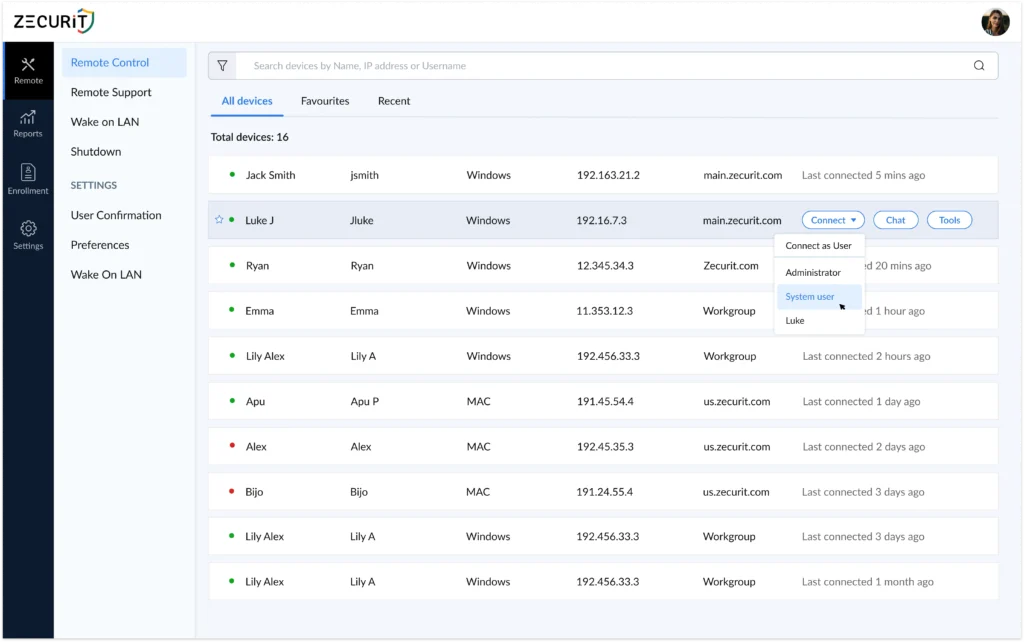
Unlike AnyDesk's free version, which is limited to personal use and comes with feature restrictions, Zecurit is purpose-built for IT environments. It combines unattended remote access, attended remote support, and endpoint management into a single platform, making it far more than just a remote desktop tool.
Key Features:
Unattended remote access with one-time agent installation
Full remote desktop control for Windows, Mac, and Linux
Enterprise-grade AES-256 encryption and Multi-Factor Authentication (MFA)
Session History and audit logs for compliance
Secure file transfer and clipboard sync
Remote reboot, Wake-on-LAN, and multi-monitor support
Bulk agent deployment via GPO, Intune, SCCM, or Azure AD
No open firewall ports required
What sets Zecurit apart from AnyDesk and most alternatives on this list is its unattended access capability. Once the lightweight agent is installed on a device, your team can connect instantly at any time, day or night, without requiring the end user to be present or approve the session. That is a critical advantage for IT teams managing distributed endpoints across time zones.
Zecurit also addresses a key pain point AnyDesk users often encounter at scale: cost and access control. With role-based permissions, every technician only accesses the devices they are authorized for, reducing security risk across your entire infrastructure.
Best For: IT Managers, SysAdmins, MSPs, and help desk teams who need a secure, scalable, and compliance-ready remote access solution.
Try Zecurit free at zecurit.com/remote-access
TeamViewer is one of the most well-known alternatives to AnyDesk. It’s widely used for remote support, file sharing, and collaboration. TeamViewer’s free version is available for personal use and offers a robust set of features, including:

For businesses or professionals who require advanced features, TeamViewer also offers paid plans. However, its free version is one of the best AnyDesk free alternatives available.
If you’re looking for a free, easy-to-use alternative to AnyDesk, Chrome Remote Desktop is a great choice. Offered by Google, it allows users to access their computer remotely via a Chrome browser or the Chrome Remote Desktop app.

Key Features:
While Chrome Remote Desktop may lack some advanced features, it’s a solid choice for users seeking a simple and straightforward solution. Please check this article for how to setup chrome remote destop.
RemotePC offers both free and paid plans with several advanced features, making it a competitive alternative to AnyDesk’s free version. The free version allows remote access to a single computer, with options for file sharing, text chat, and multi-monitor support.

Key Features:
RemotePC’s affordability and ease of use make it a great option for individuals and businesses looking for remote desktop software that doesn’t break the bank.
For users who need a free alternative to AnyDesk with high customization, UltraVNC is a fantastic option. As an open-source solution, it offers full control over its features, allowing advanced users to tailor the software to their specific needs.

Key Features:
UltraVNC may require some technical know-how to set up, but it is a powerful tool that can suit many advanced users and IT professionals.
TightVNC is another open-source remote desktop software that serves as a reliable AnyDesk free alternative. It’s known for its lightweight installation, minimal resource usage, and simplicity. While it lacks some of the advanced features of other tools, TightVNC provides a solid remote access solution for users who prioritize performance over frills.

Key Features:
For users with basic remote desktop needs, TightVNC is a simple and efficient choice.
Before exploring alternatives, it's worth mentioning that the free version of AnyDesk is still a great option for personal use. Although it has some limitations, like restricted features and occasional interruptions, it remains one of the fastest and most user-friendly remote desktop tools available.
Key Features of AnyDesk Free:
If you're okay with some limitations for non-commercial use, AnyDesk’s free version could still be a dependable choice.
While AnyDesk free works well for casual personal use, IT professionals, system administrators, and MSPs need more. They need unattended access, enterprise security, compliance logging, and the ability to scale across hundreds or thousands of endpoints.
That is precisely where Zecurit Remote Access stands apart from every other tool on this list. It was not built as a consumer app that IT teams try to repurpose. It was built specifically for the demands of professional IT environments, from day one.
For simple personal use, Chrome Remote Desktop or TightVNC will do the job. For open-source flexibility, UltraVNC is worth exploring. But if your organization depends on reliable, secure, and scalable remote access, Zecurit is the upgrade your team needs.
Start your free trial at zecurit.com/remote-access