
Browse, search, and edit HKLM, HKCU, HKU, and more on any remote Windows endpoint. No VPN. No RDP. No Remote Registry Service required.
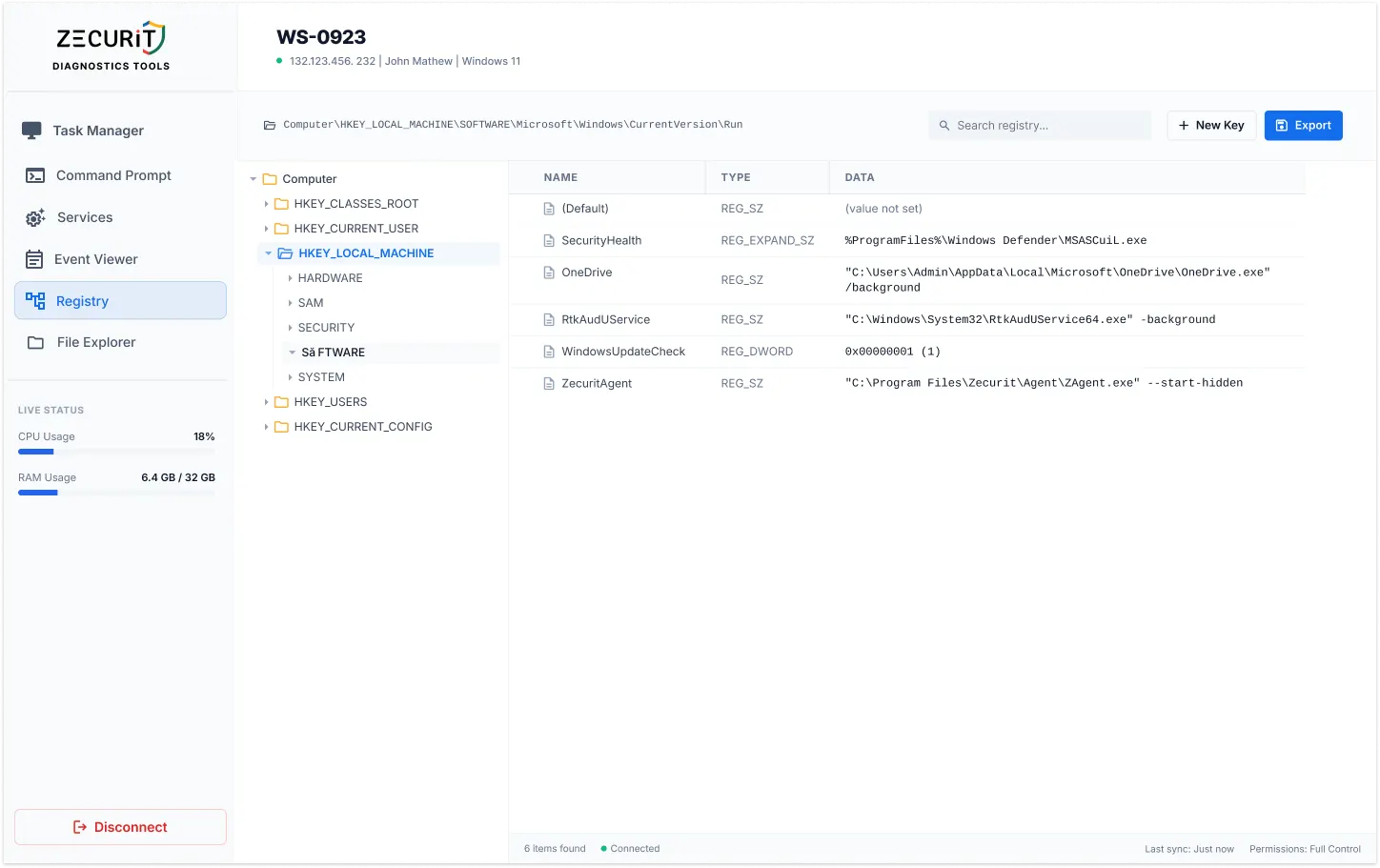
Full browse access to all five standard Windows registry hives, presented as an expandable tree identical to local Regedit.exe.
The most operationally critical hive. Hardware config, services, security settings, and boot configuration. Primary target for hardening, driver fixes, and software repair.
...\CurrentControlSet\Services
Profile settings for the currently logged-in user. Repair per-user application configurations, reset broken software settings stored per-profile, and investigate user-specific startup entries.
...\SOFTWARE\Classes
Individual hives for every loaded user profile. Repair corrupted profiles without the user logged in. Apply configuration changes to service accounts and the default user profile.
...\S-1-5-21-[SID]\SOFTWARE
Merged file association data and COM object registration. Repair broken file type associations, troubleshoot COM component failures, and investigate application registration issues.
...\CLSID\{GUID}
Hardware profile data for the current boot session. Useful for diagnosing hardware detection issues, display configuration problems, and profile-specific device settings.
...\System\CurrentControlSet
Full access to the 32-bit WoW64 registry view under HKLM\SOFTWARE\WOW6432Node. Essential for troubleshooting legacy 32-bit application configuration on 64-bit Windows systems.
HKLM\SOFTWARE\WOW6432Node\...
The registry has no undo button. Follow this checklist without exception before any live edit.
Confirm the complete registry path including hive, key hierarchy, and value name before opening the edit dialog. A path that differs by one character points to a completely different key. Copy from a trusted reference and verify character for character.
Record the current value data before making any change. For critical keys, use Zecurit's export function to save the key state to a .reg file. The audit trail records what changed, but having the original value documented separately enables the fastest recovery path.
Make the change, then re-read the value in the editor to confirm it took effect. For changes requiring a service restart, switch to the Services console on the same endpoint. Document reboot requirements in the ticket before scheduling.
Full browse access to all five standard Windows registry hives, presented as an expandable tree identical to local Regedit.exe.
Plain text data. The most common value type. Used for display names, file paths, and most configuration strings.
Numeric data. Used for flags, counters, and configuration switches. Accepts both decimal and hexadecimal input in the Zecurit editor.
An array of strings. Used for lists of values such as allowed protocols or dependent services. Each string in the array is editable independently.
String containing environment variable references such as %SystemRoot%. Used for paths that need to resolve at runtime.
A 64-bit numeric value. Less common than DWORD but used by some drivers and applications for large counter or size values.
Raw binary data displayed in hexadecimal. Used by hardware components and security subsystems for structured configuration data.
The fixes that only the registry can make, on any machine, from any browser.
Orphaned registry keys from failed uninstallers cause reinstallation failures and licensing conflicts. Navigate to the residue keys, verify their contents, and delete them remotely. No RDP, no asking the user to run regedit themselves.
HKLM\SOFTWARE\Microsoft\Windows\CurrentVersion\Uninstall\
Disable SSLv3, TLS 1.0, or NTLM immediately on any endpoint during a security incident or compliance audit. Set the correct DWORD values under the SCHANNEL and LSA hives without Group Policy delay.
HKLM\SYSTEM\CCS\Control\SecurityProviders\SCHANNEL
Login failures and resetting application configs often trace to a corrupt HKEY_USERS entry under the user's SID. Navigate to the specific hive, identify the problem key, and correct it without logging the user out or rebooting.
HKEY_USERS\S-1-5-21-[UserSID]\SOFTWARE
After terminating a malicious process in Task Manager, remove its autorun entry from the Run keys to prevent re-infection on next boot. Part of a structured incident response workflow alongside Event Viewer and Command Prompt.
HKLM\SOFTWARE\Microsoft\Windows\CurrentVersion\Run
Browse all five hives plus WoW64 64/32-bit views from the web console.
Locate key names, value names, or value data across any hive in real time.
Read and write REG_SZ, DWORD, MULTI_SZ, EXPAND_SZ, QWORD, and BINARY.
Multi-Factor Authentication required before any registry session opens.
Every read, write, create, and delete logged with admin identity, path, and before/after values.
Agent-based HTTPS outbound. No Remote Registry Service, no port 445, no VPN.
Export any key branch to .reg format for backup and recovery documentation.
No Regedit window or notification appears on the remote user's desktop.
One requires the network and a service running on the target. The other requires only a browser.
No administrator can open a registry session on any endpoint without completing Multi-Factor Authentication. The Windows Registry contains configuration data for security software, authentication protocols, and encryption settings. Unrestricted access to the registry is equivalent to unrestricted access to the security configuration of the entire endpoint.
MFA required for every session
Every operation is logged with administrator identity, operation type, full key path, value name, previous value data, new value data, target endpoint, and timestamp. A complete, non-repudiable record of who changed which key on which machine with the before and after values. A significant control for SOC 2 and ISO 27001 compliance.
SOC2 | ISO 27001 | PCI-DSS | HIPAA
No. Zecurit's remote registry editor does not use the Windows Remote Registry Service or any native Windows remote management protocol. It operates through the Zecurit endpoint agent, which reads and writes registry data through the standard Windows Registry API on the local machine. The Remote Registry Service, WinRM, and RPC connectivity are not required. This is the core architectural difference between Zecurit and native remote registry tools.
Yes. Zecurit supports exporting registry keys to .reg format for backup, documentation, and offline analysis. The export function allows you to save the current state of any key branch before making changes, providing a recovery point. For importing, .reg files can be applied to a remote endpoint using the integrated Remote Command Prompt with the reg import command, allowing bulk registry changes to be deployed without manual GUI navigation.
Yes. The Zecurit agent operates independently of user sessions. The registry editor works on machines that are locked, logged out, or have no active user session at all, including headless servers, kiosks, and workstations in off-hours maintenance windows.
Every key. Every hive. Every endpoint. A secure, audited, MFA-protected registry editor in your browser. From anywhere. Without VPN. Without RDP.