
Browse, upload, download, and manage files on any remote Windows, Mac, or Linux endpoint from your browser. No FTP server. No VPN. No user interruption.
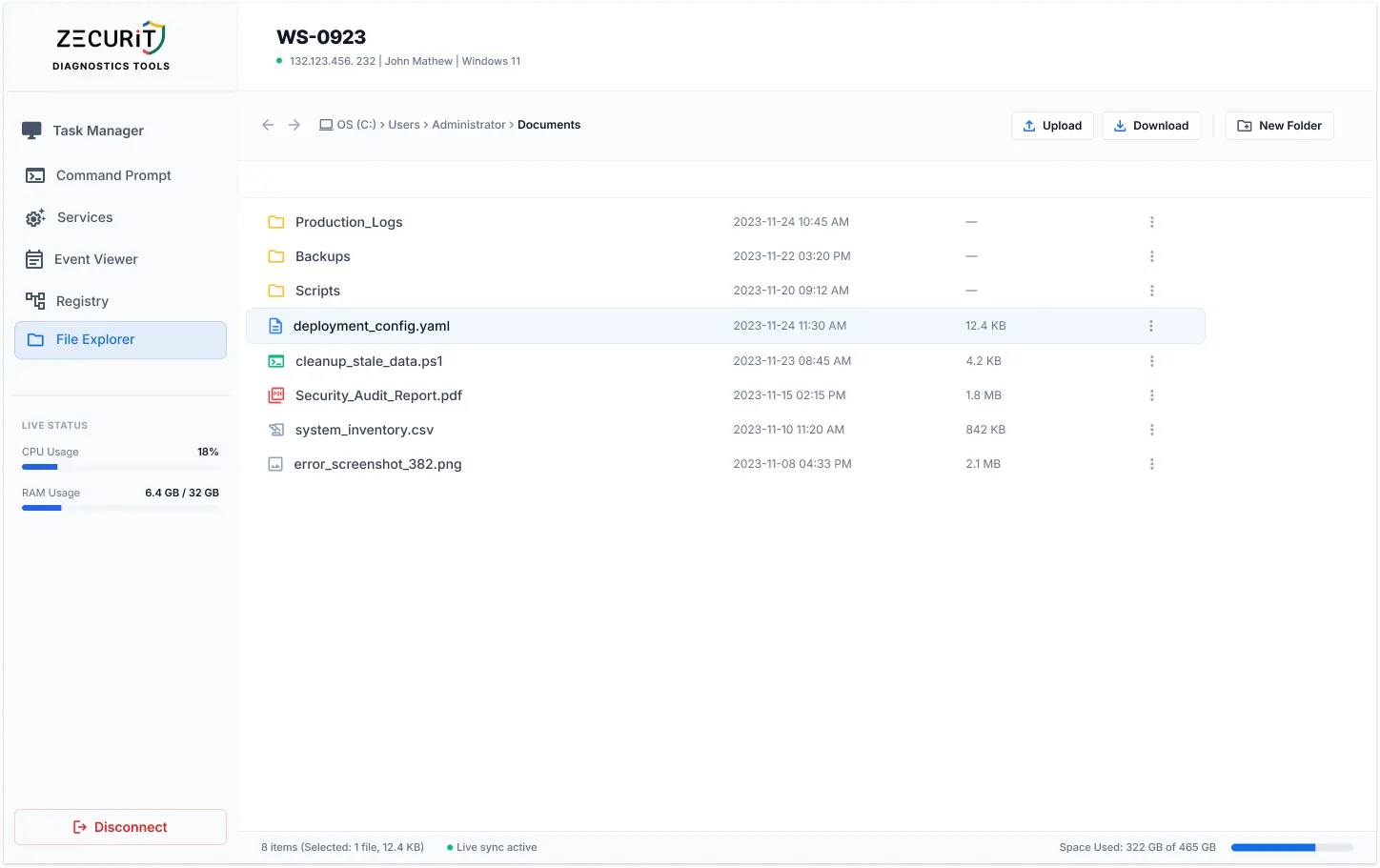
From log retrieval to software staging, every common IT file management task is covered without leaving the Zecurit console.
Push installers, scripts, config files, or patches from your local machine to any directory on the remote endpoint. No shared drive required.
Pull log files, crash dumps, config files, and audit reports directly to your local machine. Every download is logged with identity and timestamp.
Copy files between directories, move log archives to storage folders, and rename files as part of configuration update workflows, all on the remote machine.
Sort by file size to surface the largest consumers, navigate to temp directories, and delete in bulk to free up disk space. Live disk usage updates in real time.
The four file management scenarios that come up every week in IT operations, resolved without an RDP session or user coordination.
Navigate to the log directory, identify the file by date modified, and download it in under thirty seconds. No user involvement, no shared folder, no email attachment requested.
C:\ProgramData\AppName\Logs\ | /var/log/
Upload the installer to a staging directory, then switch to the Remote Command Prompt to run the silent installation. No shared network drive, no USB walk, no user coordination.
C:\Temp\Installers\ | /opt/staging/
Sort by file size to find the largest consumers, navigate to temp and cache directories, and delete in bulk. Live disk space indicator confirms the cleanup impact in real time.
C:\Windows\Temp\ | C:\Users\[User]\Downloads\
Download the current config file, edit it locally, and upload the corrected version back. Faster and safer than a Command Prompt editor, with a clear before-and-after audit trail.
/etc/nginx/nginx.conf | C:\App\config.yaml
Drag files from your local desktop directly into the browser to push them to the remote endpoint.
All file operations run in the background. No File Explorer window, no transfer bar, no disruption.
Complete file system access on Windows drives, macOS directories, and Linux root hierarchies.
All file data in transit is encrypted via SSL/TLS through the Zecurit cloud relay on every transfer.
Multi-Factor Authentication required before any file session can be opened on any endpoint.
Every upload, download, move, delete, and rename logged with admin identity and timestamp.
Real-time indicator confirms the file system view is current and in sync with the remote endpoint.
Live storage usage display confirms disk health and cleanup impact without running a command.
Every file operation runs silently in the background. Four scenarios where this matters most.
A user is working and experiencing an application issue in real time. You navigate to the log directory, download the file being actively written, and close the session. The user never knows you were there. With RDP, you interrupt their entire workflow to do the same thing.
Moving a multi-gigabyte database backup or log archive during business hours is disruptive over RDP because it blocks the screen. Through Zecurit, the move executes entirely in the background while the user continues their work uninterrupted.
Upload the installer to the remote endpoint during the day so it is ready for the scheduled maintenance window in the evening. No coordination with the user required. No repeat visit needed when the window opens.
During a security incident, collecting files from an affected endpoint via Zecurit does not alert the user or modify the visible system state, preserving investigation integrity and preventing potential evidence tampering.
One requires the network to cooperate and VPN to be running. The other requires only a browser.
No administrator can browse, upload, or download files on any endpoint without completing Multi-Factor Authentication. For a tool providing direct file system access to servers containing sensitive business data, MFA is a non-negotiable control.
Every file transferred through Zecurit, whether uploaded to a remote endpoint or downloaded to a local machine, is encrypted via SSL/TLS through the Zecurit cloud relay. File content never travels in plaintext regardless of the network either endpoint is on.
Every file operation is recorded with administrator identity, operation type, full file path, file name, file size, target endpoint, and timestamp. An immutable record for data governance, compliance reporting, and post-incident investigation.
Yes. Zecurit's remote file manager provides access to the full file system including hidden files and system files that are not visible in a standard Windows File Explorer view. This is essential for IT operations such as cleaning up hidden temporary files, accessing system configuration files, and investigating hidden malware artifacts. Access to system files is logged in the audit trail and is subject to the same RBAC controls as all other file operations.
Yes. The Zecurit agent operates independently of user sessions. The remote file manager works on servers, kiosks, and workstations that are locked, logged out, or have no active user session at all. This makes it essential for server file management, scheduled maintenance operations, and any scenario where physical or RDP access to the machine is not available. This is a core part of Zecurit's unattended remote access capability.
The Zecurit cloud relay acts as an encrypted transit path for file transfers between your browser and the remote endpoint. Files are encrypted in transit via SSL/TLS and are not stored by the Zecurit infrastructure. The relay does not retain file content after the transfer is complete. The audit trail records metadata about the transfer (file name, size, path, timestamp) but not the file content itself.
Yes. The Zecurit remote file manager supports selecting multiple files for bulk download, bulk delete, and bulk move operations. This is particularly useful for log retrieval scenarios where multiple log files from the same directory need to be collected, and for disk cleanup operations where a large number of temporary files need to be removed in a single action.
Stop scheduling RDP sessions to retrieve a log file. Stop asking users to email you config files they cannot find. Put every file on every managed endpoint in your browser, encrypted, audited, and accessible from anywhere.